VN Unity Data-Driven VN | Dating Sim Framework [Development Thread]

J0571N

New Member
Feb 13, 2020
9
3
177
Hello everyone!

Welcome to this development thread.

I’ve been experimenting with Unity to see how far I can push it for building a Visual Novel / Dating Sim framework that’s fully data-driven and doesn’t rely on hard-coded dialogue or flags.

I’ve used Ren’Py before and like how quick it is for writing stories, but I wanted to design something that scales better for complex logic — branching stats, time-based events, and reusable systems — while keeping everything editable through Unity’s Inspector.

Core Idea

A modular system that handles:
  • Event chains — defined through ScriptableObjects or JSON
  • Dialogue logic — fully separated from code
  • Stat and flag systems — used as conditions for events and routes
  • Service-based architecture — using a lightweight GameServiceLocator pattern instead of MonoBehaviours


Example Snippet
Code:
public bool AreConditionsMet(IEnumerable<EventCondition> conds, EventContext ctx)
{
    foreach (var cond in conds)
        if (!CheckCondition(cond, ctx)) return false;
    return true;
}
Everything runs through managers like EventManager, FlagManager, DialogueManager, etc., so writers and designers can focus on data instead of scripts.

Current Progress
  • Base systems: Stats, Flags, Events, Dialogue — Done
  • Service locator and bootstrap sequence — Done
  • Dialogue editor & runtime test UI — In Progress
  • Save/load layer and event debugger — Planned

Editor Tooling Preview

Here’s an early look at how EventData is created and configured inside the Unity Editor.

The system uses custom PropertyDrawers for both EventCondition and EventAction structures.
Each field dynamically changes based on context — for example, selecting ConditionType.Flag automatically switches to available flag keys, while ConditionType.Stat lists available stats from the database.
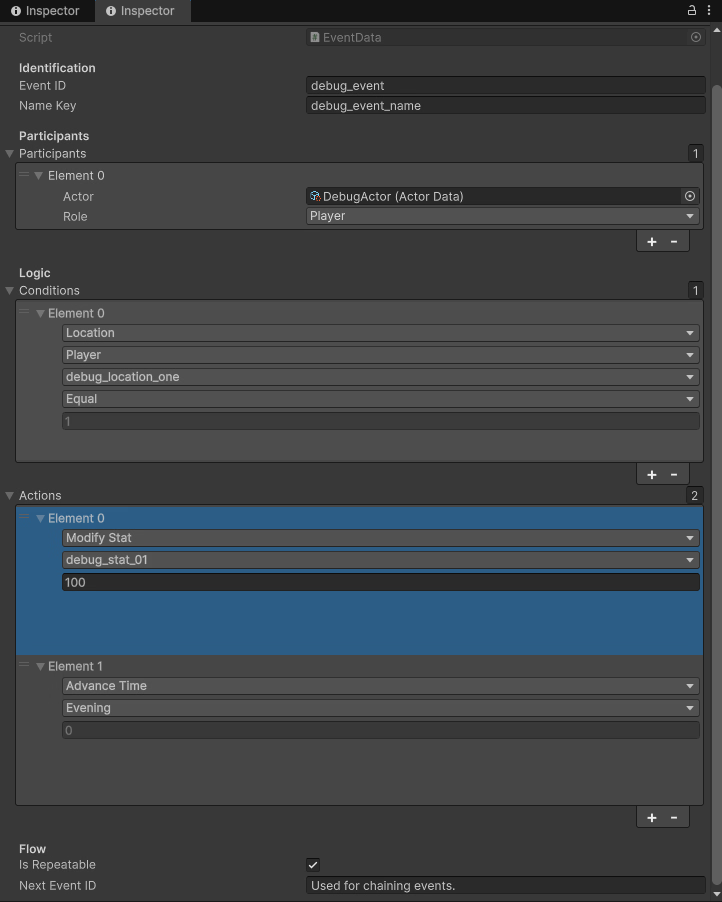
image_2025-11-17_122631140.png

This approach keeps authoring clean and intuitive while ensuring data stays consistent with the project’s databases.

Why Unity?

I wanted more flexibility for future projects — things like custom UI, 2.5D environments, or even mixing VN with simulation or management mechanics. Once the framework is stable, I could turn it into a reusable toolkit or asset for others.

Discussion

I’d love to hear how others here handle branching logic or event chaining in Unity (or Ren’Py).
If anyone’s interested in data-driven VN systems, I can share more structure diagrams or example prefabs later.

Links

"Every prototype is a fragment of a larger world I’m building — one system at a time."
 
  • Like
Reactions: Sentinel Sparrow

mibc9394

Member
Feb 10, 2025
160
231
62
I wrote a simple day/time system for my own game in renpy before. It allows me to set an arbitrary number of days and divide each day into an arbitary number of time slot. Then, for each time slot, I can insert different events to happen pre-time, during-time and post-time. Each event is set up with a custom event class that allows me to set their priorities, so that when more than one event happened at the same time they won't clash. The down side is that I have to write separate functions for setting the triggering conditions for the events.

I think for any dating sim system, dev tools that can quickly visualize dependencies in a logical way is crucial, such as being able to quickly list out all the events (or selected events) in chronological order (or other orders) with their dependencies shown, as it goes messy fairly quickly when designing this kind of game
 

J0571N

New Member
Feb 13, 2020
9
3
177
I wrote a simple day/time system for my own game in renpy before. It allows me to set an arbitrary number of days and divide each day into an arbitary number of time slot. Then, for each time slot, I can insert different events to happen pre-time, during-time and post-time. Each event is set up with a custom event class that allows me to set their priorities, so that when more than one event happened at the same time they won't clash. The down side is that I have to write separate functions for setting the triggering conditions for the events.

I think for any dating sim system, dev tools that can quickly visualize dependencies in a logical way is crucial, such as being able to quickly list out all the events (or selected events) in chronological order (or other orders) with their dependencies shown, as it goes messy fairly quickly when designing this kind of game
Yeah, that’s a great point — scheduling and event overlap can get chaotic once you start layering time, flags, and stats.

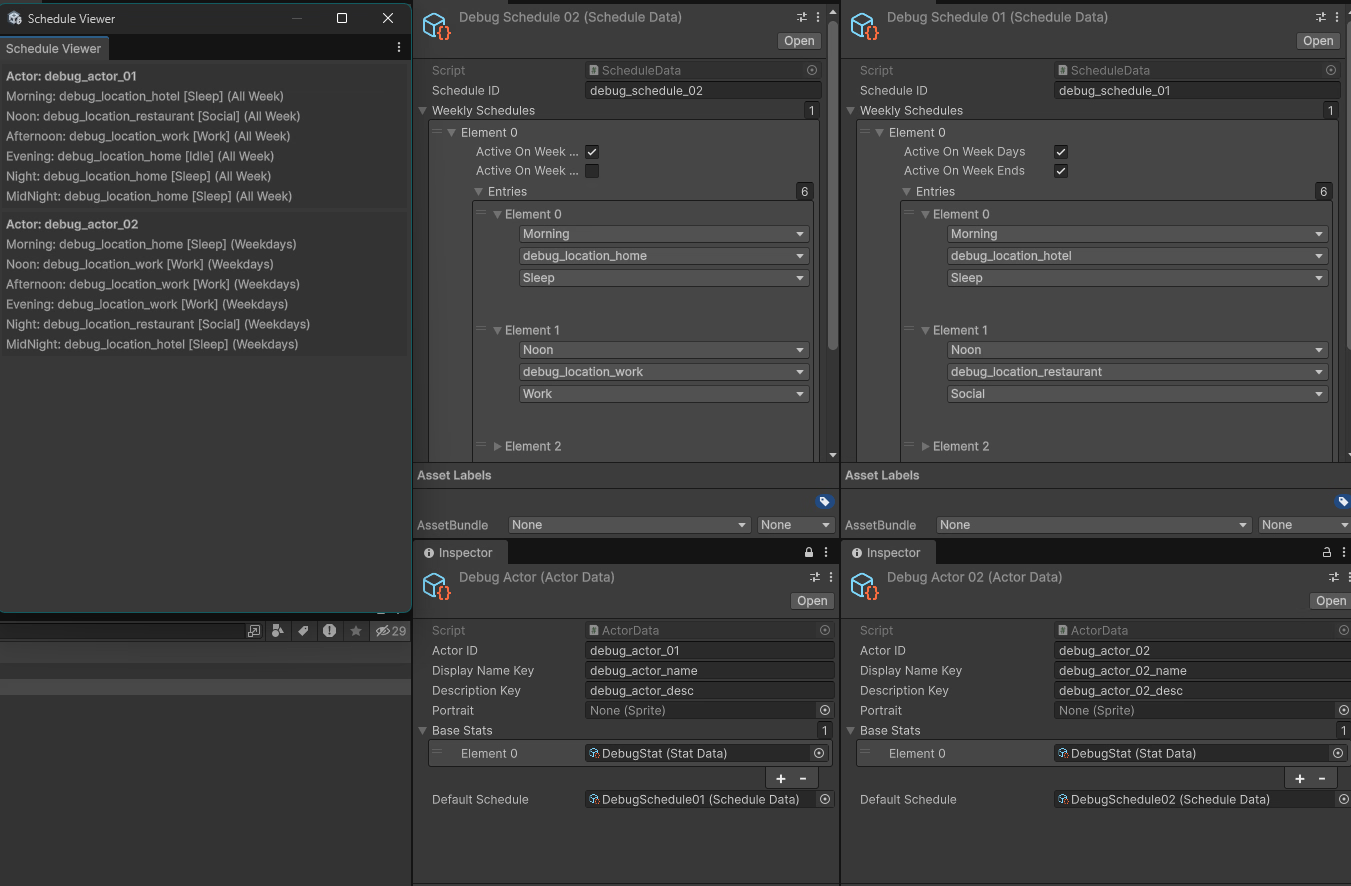
My approach handles that through a ScheduleManager + Validator toolset instead of hardcoding rules into event functions. Each actor has a ScheduleData asset defining their daily pattern (Morning → Noon → Afternoon, etc.), and the system validates conflicts or missing references at edit time using a ScheduleValidator.

On top of that, there’s a Schedule Viewer window that lets me visualize where each actor is at any given TimeStage. It can be extended to show events, flags, or other dependencies the same way — so it becomes a clean, visual debugging layer rather than manual scripting.

Events themselves also support a chaining system — each EventData can reference a nextEventID, allowing multiple events to link in sequence. This makes it possible to resolve or avoid conflicts dynamically: one event can trigger another, skip conditions, or redirect flow based on player actions or time.

I prefer this kind of centralized and validated structure because it keeps everything deterministic — it’s easy to trace when, why, and how things happen.
 

J0571N

New Member
Feb 13, 2020
9
3
177
Schedule Viewer Showcase

image_2025-11-17_160627079.png

This is a quick look at the current Schedule Viewer inside Unity.
Each actor has their own ScheduleData, which defines what location they occupy at each TimeStage (Morning, Noon, Afternoon, etc.).

The window pulls data directly from the databases and displays all active actors and their assigned locations in real time.
I’m using this both as a debugging tool and as an early visualization system to detect overlaps or missing entries in schedules.

Later, this same approach will extend to event dependencies and flags, so I can view everything (time, actor location, and event triggers) from a single unified window.
 

mibc9394

Member
Feb 10, 2025
160
231
62
Schedule Viewer Showcase

View attachment 5446665

This is a quick look at the current Schedule Viewer inside Unity.
Each actor has their own ScheduleData, which defines what location they occupy at each TimeStage (Morning, Noon, Afternoon, etc.).

The window pulls data directly from the databases and displays all active actors and their assigned locations in real time.
I’m using this both as a debugging tool and as an early visualization system to detect overlaps or missing entries in schedules.

Later, this same approach will extend to event dependencies and flags, so I can view everything (time, actor location, and event triggers) from a single unified window.
I think this is very good for a dating sim which involves progressing the game by meeting the right person at the right time.

How about dealing with irregular schedule? Probably will need another tool for designing character schedule. I think this is where things get complicated. It's some data that is kind of difficult to visualize concisely
 

J0571N

New Member
Feb 13, 2020
9
3
177
Update — Schedule Viewer Improvements

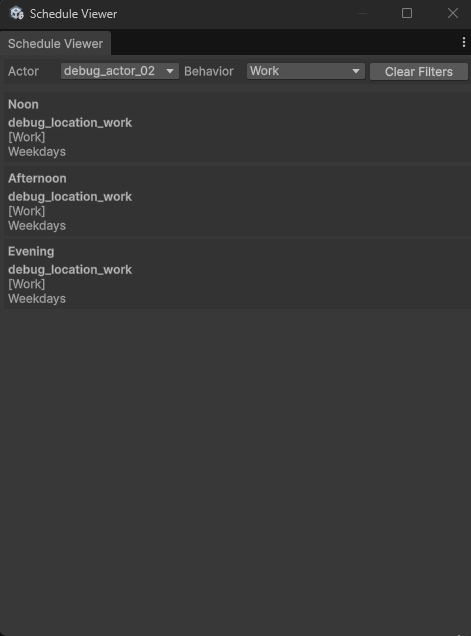
I just expanded the Schedule Viewer to include actor and behavior filters, making it much easier to inspect specific logic paths when debugging schedules or event chains in the future.

New Features:
• Dropdown filter to select a specific Actor.
• Dropdown filter to show schedules by BehaviorType (Work, Sleep, Social, etc.).
• Auto-refresh on database reload to keep data in sync.
• Displays context details (Weekdays / Weekends / All Week) for each entry.

Here’s a quick preview of the new functionality in action:

image_2025-11-17_164640942.png

Each entry now renders formatted information with rich text, showing the assigned locationID, behavior, and which days of the week the entry is active.

This filtering setup also lays the groundwork for expanding into event visualization later. For example, showing event chains or overlapping conditions per actor and time stage.
 

J0571N

New Member
Feb 13, 2020
9
3
177
I think this is very good for a dating sim which involves progressing the game by meeting the right person at the right time.

How about dealing with irregular schedule? Probably will need another tool for designing character schedule. I think this is where things get complicated. It's some data that is kind of difficult to visualize concisely
Yeah, irregular schedules are where things get interesting but complicated.

The current Schedule Viewer works well for visualizing static weekly patterns, but it doesn’t yet handle exceptions, one-off events, or dynamic overrides like holidays, story triggers, or conditional behaviors.

I'm planning to extend the system in a few ways:

Schedule Layers: Instead of a single weekly schedule, each actor will have multiple layers - a base routine, conditional overrides, and event-driven injections. The viewer will eventually show which layer is active and why.

Schedule Editor Tool: Designing irregular schedules really needs its own editor. I'm prototyping a timeline-based view where behaviors can be dragged across time blocks, weekday/weekend flags can be toggled, and actor availability can be previewed dynamically.

Contextual Preview: The long-term goal is to unify schedule, location, and event triggers into a single debug surface. For example, clicking a time slot could show something like:
"Sakura is at the park because her affection > 50 and it's Saturday afternoon."

It's definitely challenging to visualize all that clearly, but I think layering, filtering, and contextual previews will make it manageable.
Would love to hear how others have approached similar problems - especially in games with branching or reactive NPC behavior.
 
Feb 19, 2020
91
82
67
your system looks interesting, for visualization what if you had a history log actions taken and results then you can simply show the log, or recreate it in editor ui (y)

dev tools that can quickly visualize dependencies in a logical way is crucial, such as being able to quickly list out all the events (or selected events) in chronological order (or other orders) with their dependencies shown
yeah this is crucial to solve which made me think just store the chain of events and show them when you need them

you could build a system that automatically simulates all possible event paths, stores each event sequence (and the conditions that triggered them) in a database, and then visualizes the results as a node-graph in an editor window.
this would let you see where events branch, loop, or fail conditions and even allow real-time editing, where updating an event immediately refreshes the event path database and its graph.
 
Last edited: