i've seen there is a similar thread, and some guy answering that you can ignore "prefixes"
But it's not the same, i want to auto-ignore games that shares a specific tag, is there a way to do it?
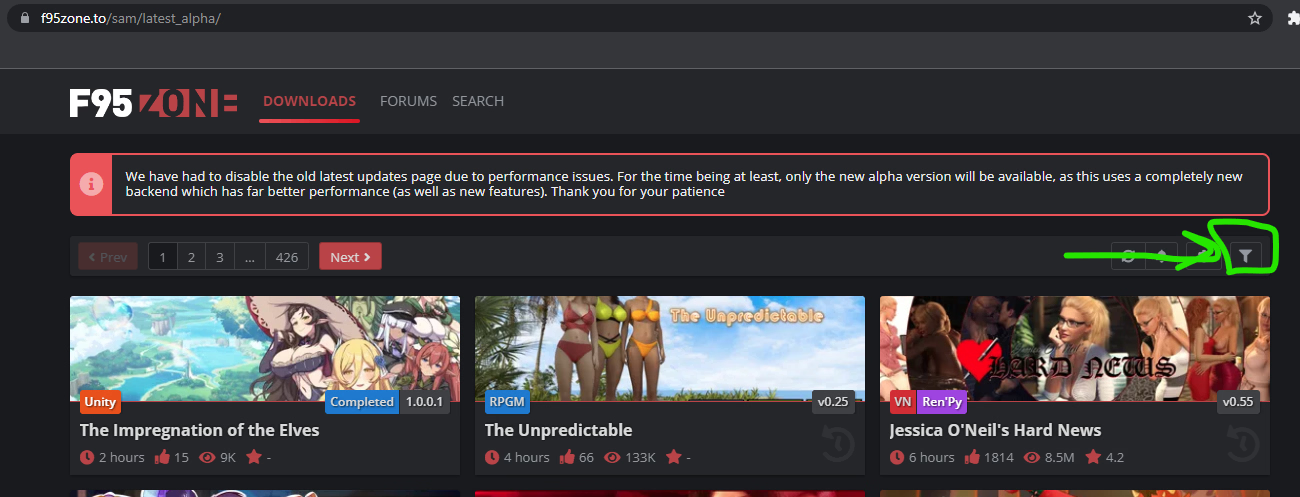
Latest updates - click filters tab in the top right hand corner of the page - go to exclude tags and add tags you want to not see and it'll remove all games from search that you excluded. Bookmark page as excluded tags are not saved.
Latest updates - click filters tab in the top right hand corner of the page - go to exclude tags and add tags you want to not see and it'll remove all games from search that you excluded. Bookmark page as excluded tags are not saved.
where is this "filters tab" in the top right hand corner? Top right hand corner for me is search and under that is my account, followed by conversations and alerts
where is this "filters tab" in the top right hand corner? Top right hand corner for me is search and under that is my account, followed by conversations and alerts
where is this "filters tab" in the top right hand corner? Top right hand corner for me is search and under that is my account, followed by conversations and alerts
Latest updates - click filters tab in the top right hand corner of the page - go to exclude tags and add tags you want to not see and it'll remove all games from search that you excluded. Bookmark page as excluded tags are not saved.
You can also use a browser extension that lets you define a redirect from the default latest updates page to your custom one with filters applied. The result is the same but it lets you browse the forum like normal without having to remember to click the bookmark every time.