My game isnt starting, no window pops up

AA_gunner

Newbie
Mar 8, 2024
35
18
70
Hey there,
lately i´ve been trying to play one of my favourite games on my laptop since i dont have access to my pc right now.
The game im trying to play runs on my PC with no issues, however, when i tried to start it on my laptop, at first a window popped up saying that i dont have certain .ddl files, which i managed to download since i already faced a similar issue in the past.

I thought the problem would be fixed, but to my surprise, now the game just refuses to start altogether. When i try to run it, a Pixel game maker logo shows up, then the window goes black, and the game crashes.

Any help would be appreciated.
Thanks in advance.
 

peterppp

Well-Known Member
Donor
Mar 5, 2020
1,263
2,406
386
why is it so hard for people who ask about problems with games to give the most basic info, like the name of the game?
 
  • Heart
Reactions: HELIO CESAR

HELIO CESAR

Well-Known Member
May 30, 2018
1,466
3,303
378
Hey bro give us more to work with, what is the game that is having issues? What is your system config, mostly hardware and OS version.
Which dlls were missing and where you got them, any crash report?

until then i will give an AI general answer.
For a GameMaker game, inserting missing DLLs can cause a crash because you may be using an incorrect version or the game has more complex dependency issues. The DLLs from random internet sources are also a common cause of malware and system instability.

Why simply adding a DLL can fail
  • Dependency chains: Many DLLs rely on other DLLs. Adding one missing file won't work if it, in turn, needs another file that is also missing. If you don't install the correct chain of dependencies, the program will crash on launch.
  • Version mismatch: A DLL file must be the correct version and architecture (32-bit or 64-bit) for the game and your operating system. An incompatible file will cause the game to fail immediately.
  • Malware risk: DLL download sites are notoriously unreliable and often distribute corrupted files or malicious software. The files you downloaded might be the reason for the crash.
  • Incorrect location: Dropping a DLL into the wrong folder will not solve the issue. The game's executable needs the file to be in a specific location, often the same directory as the executable itself or a system folder.
  • Corrupted file: The missing DLL could be a symptom of a larger problem, like a corrupted system file, and simply inserting a new one won't fix it.

How to correctly resolve missing DLLs
Do not try to find and insert individual DLLs. Instead, use these safer and more effective methods.
1. Run the official redistributable installers
The most common missing DLLs (like VCRUNTIME140.dll) are part of the Microsoft Visual C++ Redistributable package. A GameMaker game will typically require a specific version of this package.
  • Search and download the correct redistributable from the . For games, it is safest to install both the 32-bit (x86) and 64-bit (x64) versions.
  • Example: If the game mentions vcruntime140.dll, install the Microsoft Visual C++ Redistributable for Visual Studio 2015-2022.
2. Reinstall the game
If you have a legitimate copy from a service like Steam, GOG, or itch.io, simply reinstalling it will likely resolve the issue. The installer is programmed to place all necessary DLLs in the correct locations.
  • On Steam: Right-click the game, go to Properties > Local Files, and select Verify integrity of game files....
3. Run System File Checker (SFC)
If the issue is with a core Windows system file, you can run a scan to detect and replace it.
  • Open the Command Prompt as an administrator by right-clicking the Start menu and selecting Terminal (Admin) or Command Prompt (Admin).
  • Type sfc /scannow and press Enter. This will scan and repair corrupted system files.
4. Check for antivirus interference
Some antivirus software can mistakenly flag and quarantine legitimate DLL files, causing them to go "missing."
  • Temporarily disable your antivirus software and try running the game.
  • If the game launches, create an exclusion for the game's folder in your antivirus settings, then re-enable the software.
5. Check for further dependencies (Advanced)
If the problem persists, the game may require a non-standard DLL.
  • Look for a crash log file, which may reveal the specific file or process that caused the crash.
  • Use a tool like Dependency Walker to analyze the game's executable and see all the DLLs it requires. This can help you identify missing custom DLLs.

 

whowhawhy

Well-Known Member
Jan 19, 2023
1,055
1,837
222
*casts clairvoyance*
Hello people, i´ve been having some slight issues regarding getting this game to work on my laptop. At first the .ddl problem popped up, but it was the same on my PC so i knew how to fix it. But now the game launches, i see the Pixel Game Maker logo, and then it just crashes. Any help? Thanks.
P.S. If this question has been answered already i apologize for my laziness.
*casts precognition*
(re)install microsoft visual c++ redistributable for visual studio 2012
supposedly uninstalling all 2010-2015 (or 2012-2019 according to other sources) versions you have and then going through both x64 and x86 versions of each redistributable should reliably fix it (including other visual c++ dll errors that might pop up after this one).
 

Winterfire

Conversation Conqueror
Respected User
Game Developer
Sep 27, 2018
6,522
9,364
800
You already fucked up. You don't download dlls off the internet, when a dll is missing, it means you're missing a critical package... I hope by downloading dll you meant downloading the whole official package, and not just some "totally secure I promise" dlls on some shady websites :HideThePain:
 

AA_gunner

Newbie
Mar 8, 2024
35
18
70
Hey bro give us more to work with, what is the game that is having issues? What is your system config, mostly hardware and OS version.
Which dlls were missing and where you got them, any crash report?

until then i will give an AI general answer.
Apoogies for the incomplete question.The game im having problems with is Buzama 2. When it comes to my Laptop, its a Lenovo thinkbook 14, OS is Windows 11, version 10.0.26100,12th gen intel core i-5 (im not really sure what is important tho, im not good at this stuff). Regarding the missing .dll file, it was MSVCP120.dll and MSVCR100.dll.

The thing about the crash report is that there isnt one anymore. After i installed the c++ redistributable packages with the .dll files, it just crashes, no report window or anything.
 
  • Heart
Reactions: HELIO CESAR

AA_gunner

Newbie
Mar 8, 2024
35
18
70
You already fucked up. You don't download dlls off the internet, when a dll is missing, it means you're missing a critical package... I hope by downloading dll you meant downloading the whole official package, and not just some "totally secure I promise" dlls on some shady websites :HideThePain:
I installed the whole packages from the official windows website if that makes you less concerned.
 
  • Yay, update!
Reactions: Winterfire

Winterfire

Conversation Conqueror
Respected User
Game Developer
Sep 27, 2018
6,522
9,364
800
I installed the whole packages from the official windows website if that makes you less concerned.
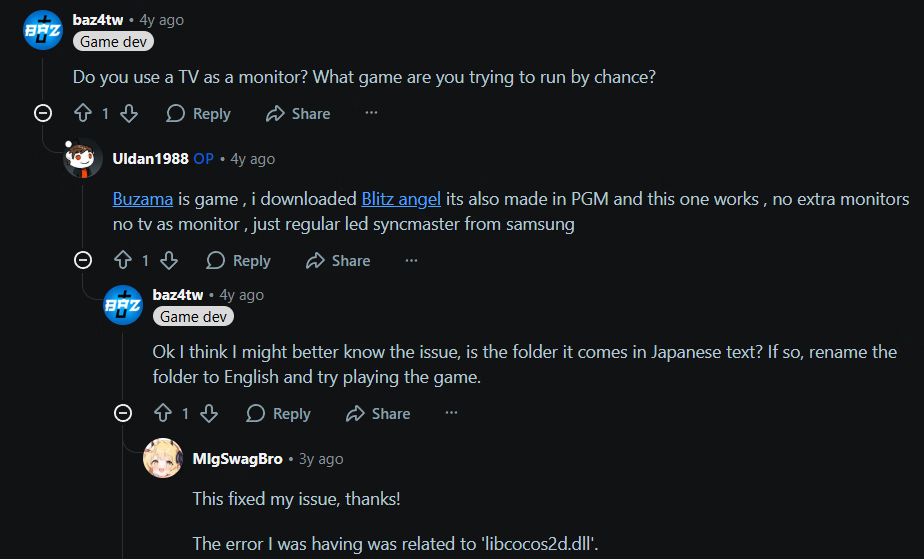
Now that you provided the name of the game, I googled and found this thread:


Which has your same issue, and OP solved with one of the replies.

Screenshot 2025-10-29 100849.png

-edit 2-
There are other solutions in that thread, but my guess is that you lack japanese locale and your japanese folder structure may be gibberish. So This might be something you might want to look into as well.
 
  • Like
Reactions: anne O'nymous

AA_gunner

Newbie
Mar 8, 2024
35
18
70
Now that you provided the name of the game, I googled and found this thread:


Which has your same issue, and OP solved with one of the replies.

View attachment 5386209

-edit 2-
There are other solutions in that thread, but my guess is that you lack japanese locale and your japanese folder structure may be gibberish. So This might be something you might want to look into as well.
Thanks man, i had to change my locale, but also extract the game directly to my C: disk, since changing the locale by itself did not work. I have a sneaking suspicion that the culprit is the f-cking one drive mf, since it needs to sync when i put anything anywhere else other that the base C: disk.

Anyways, it works now, thank you very much for Your assistance.
 
  • Like
Reactions: Winterfire

Winterfire

Conversation Conqueror
Respected User
Game Developer
Sep 27, 2018
6,522
9,364
800
Thanks man, i had to change my locale, but also extract the game directly to my C: disk, since changing the locale by itself did not work. I have a sneaking suspicion that the culprit is the f-cking one drive mf, since it needs to sync when i put anything anywhere else other that the base C: disk.

Anyways, it works now, thank you very much for Your assistance.
I believe the issue wasn't the drive, but using locale too late. If you extract a game without locale, the folder's name will be gibberish, making it unreadable even if you do it later on. Should be done before the extraction happens.
Glad you got it working!
 
  • Yay, update!
Reactions: AA_gunner