No longer getting alerts for new posts in watched threads.

Artix0

Well-Known Member
Modder
Jun 26, 2017
1,210
2,388
401
I've had a similar issue for a long while, but in a weird way - I receive notifications for maybe a quarter of my Watched threads, and the others seem to just... stop notifying me after a while. They're still there in the actual Watched list, but yeah it really sucks.

Manually entering the thread and unwatching/rewatching it tend to fix it for that thread, but then I worry what other thread may be pushed off the bottom of this 'invisible list'.
 

palianytsia

Newbie
Jul 19, 2025
48
18
17
I've had a similar issue for a long while, but in a weird way - I receive notifications for maybe a quarter of my Watched threads, and the others seem to just... stop notifying me after a while. They're still there in the actual Watched list, but yeah it really sucks.

Manually entering the thread and unwatching/rewatching it tend to fix it for that thread, but then I worry what other thread may be pushed off the bottom of this 'invisible list'.
Any idea how to turn off notifications for one specific thread? Thx
 

Goeffel

Active Member
Sep 10, 2022
981
690
193
Any idea how to turn off notifications for one specific thread? Thx
go to that topic, at top right click "unwatch".
normally, you'd still get notifications when someone quotes or pings you in that thread, but not from new posts or reviews.

consider changing what should cause notifications, in your account preferences.
https://f95zone.to/account/preferences
 
Last edited:
Dec 16, 2017
41
120
141
I've had a similar issue for a long while, but in a weird way - I receive notifications for maybe a quarter of my Watched threads, and the others seem to just... stop notifying me after a while. They're still there in the actual Watched list, but yeah it really sucks.

Manually entering the thread and unwatching/rewatching it tend to fix it for that thread, but then I worry what other thread may be pushed off the bottom of this 'invisible list'.
afaik this is normal with f95zone, maybe it's an intended feature but I'd like a way to have watches be permanent
 
  • Like
Reactions: Artix0

balboa2151

Active Member
Jun 10, 2023
556
618
226
Hello, I came into this thread to figure out how to delete all alerts permanently? I have thousands of alerts and I would like to delete/clear out all alerts? Is there a way to achieve this? Am I in the incorrect thread? Thank you
 

whowhawhy

Well-Known Member
Jan 19, 2023
1,055
1,833
222
Hello, I came into this thread to figure out how to delete all alerts permanently? I have thousands of alerts and I would like to delete/clear out all alerts? Is there a way to achieve this? Am I in the incorrect thread? Thank you
unread alerts: show all, then mark all as read

lots of alerts for the same thing: show all, then resummarize alerts

read alerts: they get passively removed over time (6 months?)

read alerts quicker than that because something broke: submit a ticket to the admins or post a thread in site problems and explain why you need help

read alerts you want gone now because of ocd: become an admin with the access to the database so you can delete them manually from there? :unsure:
 

Goeffel

Active Member
Sep 10, 2022
981
690
193
balboa2151

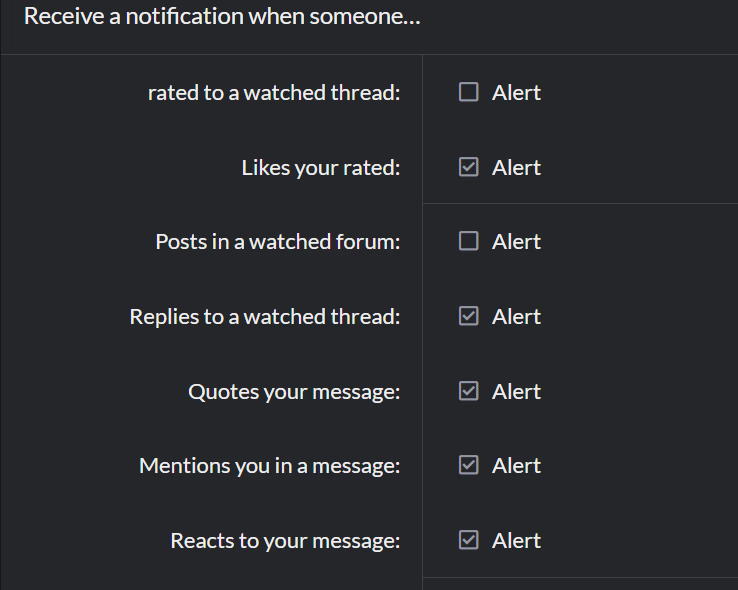
also: go to https://f95zone.to/account/preferences
and uncheck this or that option in the relevant section
1759525861783.png

All the options below screenshotted section are irrelevant to receiving too many alerts.
(I have them all at default = checked, and it hardly ever triggers an alert)

And then there is the manual labour, go to each popular topic among your watched ones and at top right: unwatch.
(I also had too many alerts in the beginning. Now I only watch topics with few replies - old games and then some - much better now.)

just in case: check if you have a whole forum section watched and alerts for that checked.
Until now I did not even notice one could do that, but it could easily lead to thousands of alerts each day.
 
Last edited:
  • Heart
Reactions: balboa2151

Bob69

Uploading the World
Uploader
Donor
Compressor
Mar 2, 2019
24,353
337,226
998
Alerts for watched thread and new comments are set up, so you ONLY get a new alert for the first new msg.
That means:
You watch a thread. The next day someone make a comment, you just ignore the alert (the alerts (1) will go away), but don't read the actual new comment, you now don't get a new alert if there is a new comment (next to the one you didn't read).

You can manipulate that by just going to the last page (that should be enough, don't actually need to see the latest comment. I am not 100% sure on that tho).
 

anne O'nymous

I'm not grumpy, I'm just coded that way.
Modder
Donor
Respected User
Jun 10, 2017
12,933
21,499
1,026
You can manipulate that by just going to the last page (that should be enough, don't actually need to see the latest comment. I am not 100% sure on that tho).
There's no way to know if you actually seen a post or not, just that it have been presented to you. So as long as the last page have been fully loaded, the forum will consider that you seen the last post. And the "new post" flag is reset the instant you loaded the last post.

So you can be 100% sure of that.
 
  • Like
Reactions: Artix0 and Bob69

whowhawhy

Well-Known Member
Jan 19, 2023
1,055
1,833
222
So as long as the last page have been fully loaded, the forum will consider that you seen the last post.
thread page # viewing (for the purpose of tracking unread threads and marking alerts as seen for stuff that's on those pages) is actually checked at the start, probs when you successfully communicate that you want to view the page.

you can test alerts clearing by marking them as unread, and thread tracking by closing the tab right after clicking on a thread/page link.

You watch a thread. The next day someone make a comment, you just ignore the alert (the alerts (1) will go away), but don't read the actual new comment, you now don't get a new alert if there is a new comment (next to the one you didn't read).
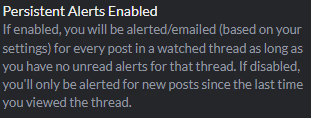
do you have persistent alerts disabled?
pa.png
with persistent alerts (if i'm not mistaken it's enabled by default?), just having the alert read is enough to get another notification. needing to access the page the alert is for is for when persistent alerts are off - though of course it's also one of the ways to mark alerts read.

rarely it does seem to glitch and some thread gets the vanilla behavior (persistent alerts is yet another plugin) of having to visit the thread to get further alerts despite having no unread alerts for it.

(and at times you get an alert for a posted-just-now post that you've already seen - both in case of you happening to open the page with it for another reason, and from you going to the post with the link in the alert as soon as you get it).
 

Bob69

Uploading the World
Uploader
Donor
Compressor
Mar 2, 2019
24,353
337,226
998
do you have persistent alerts disabled?
View attachment 5310582
with persistent alerts (if i'm not mistaken it's enabled by default?), just having the alert read is enough to get another notification. needing to access the page the alert is for is for when persistent alerts are off - though of course it's also one of the ways to mark alerts read.

rarely it does seem to glitch and some thread gets the vanilla behavior (persistent alerts is yet another plugin) of having to visit the thread to get further alerts despite having no unread alerts for it.

(and at times you get an alert for a posted-just-now post that you've already seen - both in case of you happening to open the page with it for another reason, and from you going to the post with the link in the alert as soon as you get it).
I have it disabled as I do not want new alerts when clicking away an alert. (I use watched forum to "kinda" keep track on threads where I make an update patch for). So far for me it works as intended.

I only know that I am getting kinda annoyed cause I forgot to not click the thread of the alert when just wanting to not get alerts anymore for threads I make a patch for lol.
I am only actively following a handful of threads. Cause the users here are unbearable.