

Unreal Engine Open Life [v0.0.3] [Secret Layer]
- Thread starter OpenLife
- Start date
3.40 star(s)
7 Votes

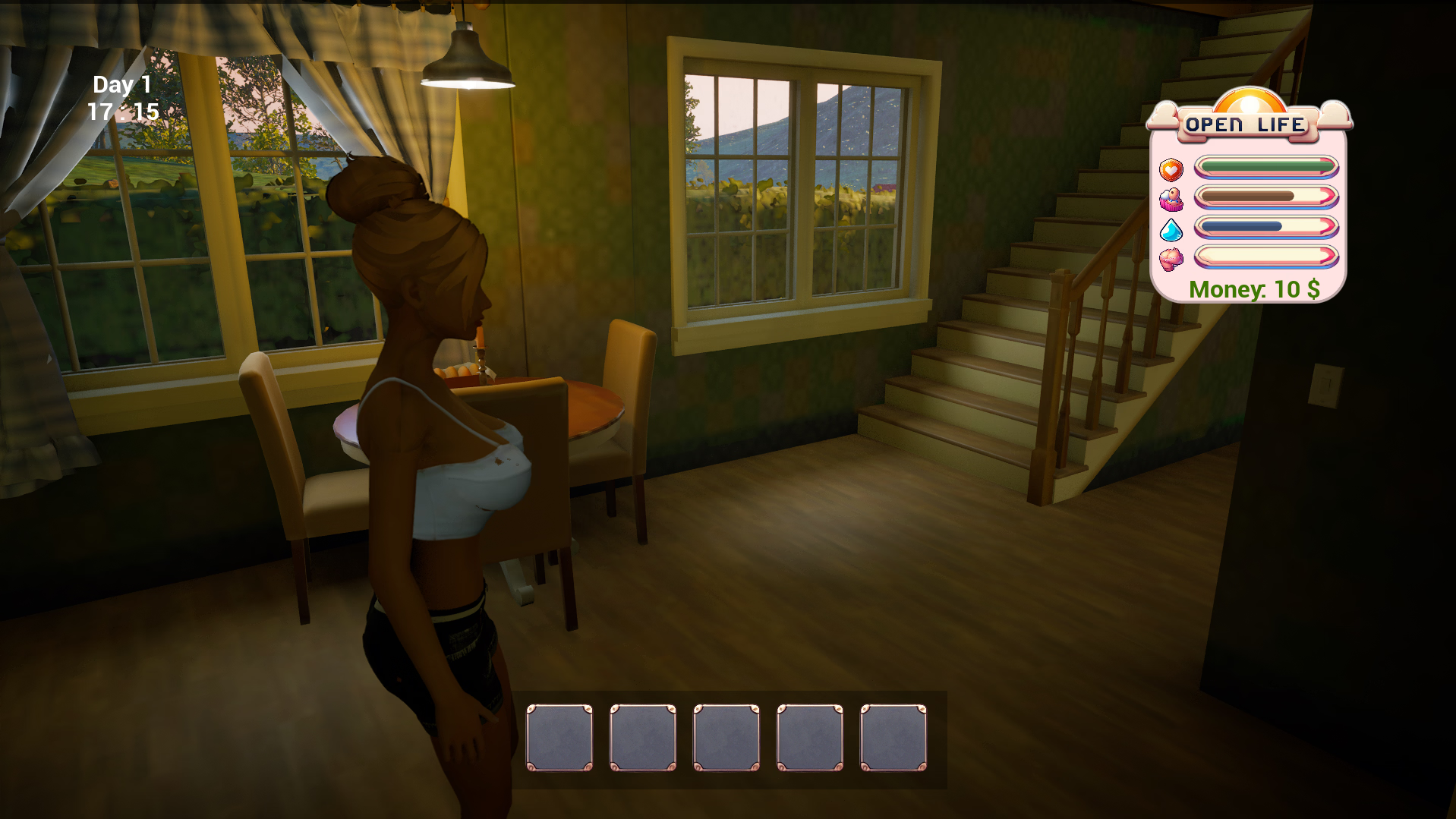
why the texture don't want to load for me , like a tought it's was normal (i'm dumb obviously)

it's may be my pc that can't load the texture , but i don't know why , because i can run at 60 even more without drops
only the main menu show every texture don't break the 3d model etc
it's may be my pc that can't load the texture , but i don't know why , because i can run at 60 even more without drops
only the main menu show every texture don't break the 3d model etc

slick97
Active Member
- Dec 2, 2021
- 839
- 2,251
- 377
I believe if you press "g" it should end the animation. If it's the mom scene then alt + f4 and reload the game, and if it persists you may need to start a fresh game.Stuck at the masturbation scene.
If you have a dedicated GPU then you can check if the windows is using it for the exe via the following steps:why the texture don't want to load for me , like a tought it's was normal (i'm dumb obviously) View attachment 5195540
it's may be my pc that can't load the texture , but i don't know why , because i can run at 60 even more without drops
only the main menu show every texture don't break the 3d model etc
- Open Windows Settings
- Navigate to System -> Display
- At the bottom of the display settings is an option for "Graphics Settings", click that
- Click "Browse" and search for "OpenLife.exe", click it then click "Add"
- Click on "Options" and it'll present you with three choices, click on "High Performance" (this will force the game to use whatever hardware is better at handling graphics)

- May 20, 2025
- 14
- 71
- 13
Thanks everyone for reporting bugs and encouragement
I'm constantly fixing bugs and adding new features and scenes to the game.
Version v0.0.3 will be available soon in the coming days. slick97 GARUDA_1902
I'm constantly fixing bugs and adding new features and scenes to the game.
Version v0.0.3 will be available soon in the coming days. slick97 GARUDA_1902
Gewehr4330
New Member
- Aug 8, 2021
- 8
- 5
- 71
Am I the only one who thinks this game is very similar to Deluded? I hope it won't be abandoned, and why do we need these erotic scenes when we can meditatively plant plants
I have a gaming laptop and I know that the laptop is not a great one , i have a 3050 ti laptop 8gbIf you have a dedicated GPU then you can check if the windows is using it for the exe via the following steps:
- Open Windows Settings
- Navigate to System -> Display
- At the bottom of the display settings is an option for "Graphics Settings", click that
- Click "Browse" and search for "OpenLife.exe", click it then click "Add"
- Click on "Options" and it'll present you with three choices, click on "High Performance" (this will force the game to use whatever hardware is better at handling graphics)
slick97
Active Member
- Dec 2, 2021
- 839
- 2,251
- 377
That's rough. If I recall correctly the 3050 series was heavily gimped in memory bandwidth, so I'm not surprised textures aren't loading fully.I have a gaming laptop and I know that the laptop is not a great one , i have a 3050 ti laptop 8gb
Unfortunately there isn't much of a solution to fix your issue unless the dev wants to take the time to implement a simpler method for hair textures (or a "laptop mode" in the settings).
Gewehr4330
New Member
- Aug 8, 2021
- 8
- 5
- 71
second floor, chest of drawers next to the curtainCan anyone point me towards the dildo? I can't find it.

randomname2243
Well-Known Member
- Oct 26, 2017
- 1,287
- 1,276
- 376
i don't know if anyone had this problem, some games on unreal engine here, freeze after a few seconds of starting the app. This happened in parasite inside but after updates, that game will never run to me. The same thing happens(freezing) in this game as well, any solutions?>That's rough. If I recall correctly the 3050 series was heavily gimped in memory bandwidth, so I'm not surprised textures aren't loading fully.
Unfortunately there isn't much of a solution to fix your issue unless the dev wants to take the time to implement a simpler method for hair textures (or a "laptop mode" in the settings).
slick97
Active Member
- Dec 2, 2021
- 839
- 2,251
- 377
It could be due to your GPU not having enough VRAM. It's hard to say since Unreal falls victim to the same curse as Unity in that any dev can buy assets on the marketplace and stitch a game together. However, not many know how to optimize their game with things such as occlusion culling, clearing unused memory, or compressing textures.i don't know if anyone had this problem, some games on unreal engine here, freeze after a few seconds of starting the app. This happened in parasite inside but after updates, that game will never run to me. The same thing happens(freezing) in this game as well, any solutions?>
The issue could also stem from the game not limiting your FPS. In most cases the GPU will get close to overheating before the game crashes to desktop, so options like VSync or an FPS limiter will help in that regard. Both Nvidia's and AMD's software give you that option as well which overrides any game's setting.
randomname2243
Well-Known Member
- Oct 26, 2017
- 1,287
- 1,276
- 376
how can I force the game before starting, to limit its fps? I want to test that scenario if it is true and I did ask the developer. he says it can run the game despite my low end PC. And I never had this issue with Unity games, only unreal engineIt could be due to your GPU not having enough VRAM. It's hard to say since Unreal falls victim to the same curse as Unity in that any dev can buy assets on the marketplace and stitch a game together. However, not many know how to optimize their game with things such as occlusion culling, clearing unused memory, or compressing textures.
The issue could also stem from the game not limiting your FPS. In most cases the GPU will get close to overheating before the game crashes to desktop, so options like VSync or an FPS limiter will help in that regard. Both Nvidia's and AMD's software give you that option as well which overrides any game's setting.
slick97
Active Member
- Dec 2, 2021
- 839
- 2,251
- 377
I'm not sure the exact process for Nvidia, but I believe their software (GeForce experience) let's you set a global limit on FPS. AMD is a similar process with their software (Adrenaline), but they have a few more settings that can potentially improve performance.how can I force the game before starting, to limit its fps? I want to test that scenario if it is true and I did ask the developer. he says it can run the game despite my low end PC. And I never had this issue with Unity games, only unreal engine
randomname2243
Well-Known Member
- Oct 26, 2017
- 1,287
- 1,276
- 376
I'm not sure the exact process for Nvidia, but I believe their software (GeForce experience) let's you set a global limit on FPS. AMD is a similar process with their software (Adrenaline), but they have a few more settings that can potentially improve performance.
- CPU ( AMD A10-5800B APU with Radeon HD Graphics
- GPU : AMD Radeon RX 580 2048SP
- RAM): 16GB DDR3 at 1666MHz
randomname2243
Well-Known Member
- Oct 26, 2017
- 1,287
- 1,276
- 376
Which and where I can find the good settings to improve performance? My profile is already set on performanceI'm not sure the exact process for Nvidia, but I believe their software (GeForce experience) let's you set a global limit on FPS. AMD is a similar process with their software (Adrenaline), but they have a few more settings that can potentially improve performance.
randomname2243
Well-Known Member
- Oct 26, 2017
- 1,287
- 1,276
- 376
Impressive! it runs now. i put max FPS on AMD app on 25 and also used GPU to scaling, not the display and pretty much disable every option in the app for perfomance. i mean i enabled "GPU scaling", vsync is off. i don't think it can be used for good reasons. Your tip helped, it was something about FPS or GPU scaling, because, the game would run for a few seconds but if maybe it spikes on high FPS(even if with vsync on)., it would freeze. Remember, it doesn't crash, it doesn't show a window, it just freezes and the task manager says "not responding" for 1+ hour
randomname2243
Well-Known Member
- Oct 26, 2017
- 1,287
- 1,276
- 376
Thank you the basic gardening lesson and analogies, good to know some devs care about teaching people something they don't know, over a game. This gets bonus 2 stars and 10 points to Gryffindor and 100 for penetrating and make loose pussy and maybe anus in the future; hopefully. Still, going to test some more since it can without problems, seems low is best as for medium, i don't like the spikes or hiccups when i am outside in the garden
randomname2243
Well-Known Member
- Oct 26, 2017
- 1,287
- 1,276
- 376
i see the game really lags when you put the seeds that stay after being harvested, even when you're inside the home, it still lags like you're outside and i don't think there is a shovel to remove plants is there? Well all in due time, perhaps i can make a personal list to Dms of creator?
Seems loading back "fixes" the lag but deletes every plant you planted
Seems loading back "fixes" the lag but deletes every plant you planted
Last edited:
slick97
Active Member
- Dec 2, 2021
- 839
- 2,251
- 377
So it seems all of the remaining major issues have been addressed with the most recent update, which I honestly wasn't expecting (most devs creating adult games in UE usually don't). As it stands there's only a couple minor issues I noted this time around:
Just a heads up for those who have saves from v0.0.2 and prior: the fixes for plants from this update won't apply to previously broken plants. You'll need to pick them up and replant them.
Also, I greatly appreciate adding buttons instead of relying solely on hotkeys
- Audio - especially during the "caught" masturbation scene with mom's dildo - is heavily delayed (~3-5 seconds)
- The camera during the "caught" masturbation scene stays zoomed in (fixed by triggering another animation)
- If you don't let go of "E" while picking up plants you can instantly pick them up
- The mom's AI can sometimes get stuck in the garage (fixed by talking to her)
Just a heads up for those who have saves from v0.0.2 and prior: the fixes for plants from this update won't apply to previously broken plants. You'll need to pick them up and replant them.
Also, I greatly appreciate adding buttons instead of relying solely on hotkeys
randomname2243
Well-Known Member
- Oct 26, 2017
- 1,287
- 1,276
- 376
i wish success on this
it will take time i understand.
So far on my PC, it can freeze even if i put it below 25 FPS, though it is still playable. i am surprised you can put the eggplant or her whole hand after that anus becomes so loose with the carrot or flashlight. All in due time
it will take time i understand.
So far on my PC, it can freeze even if i put it below 25 FPS, though it is still playable. i am surprised you can put the eggplant or her whole hand after that anus becomes so loose with the carrot or flashlight. All in due time

Darkbreed
Active Member
- Dec 17, 2020
- 544
- 590
- 216