Daz Smart content alternatives for daz?

KiaAzad

Member
Feb 27, 2019
341
236
197
So I've installed some of the packages in DIM, then gone to daz studio, ran re-import metadata offline, now all of them are removed from smart content. And I have a hard time working with content library, the search doesn't work, and I have to navigate tons of folders to see if something is in it.
Are there any alternatives to smart content that isn't finnicky like that? Or any workaround that re-constructs the metadata offline without having to install everything again?

Edit: Turns out I've installed some free assets that created their own categories, throwing me for a loop, missing the default one. They're still there, but feel free to share your answers, It wouldn't hurt to know if there are better options.
 
Last edited:

MissFortune

I Was Once, Possibly, Maybe, Perhaps… A Harem King
Respected User
Game Developer
Aug 17, 2019
6,910
10,689
872
A quick uninstall and reinstall of CMS never hurts, either. Helped me when setting up Daz on my new boot drive.

That being said, there's no real alternative to Smart Content outside of organizing your Content Library well.
 
  • Like
Reactions: KiaAzad

osanaiko

Engaged Member
Modder
Jul 4, 2017
3,437
6,604
707
Based on an old forum post I read, this product is supposed to be good for managing non-smart-content compliant packages:


The secret is to use it every time you install something to make sure it is categorized/tagged the way *you* want, to help you find it again.
 

Deleted member 3586865

Well-Known Member
Apr 13, 2021
1,838
1,574
241
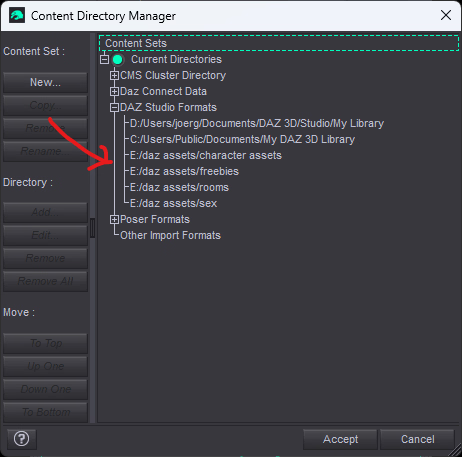
Your 3th party things are usually in the "Document" folder. You can make different folders within DAZ or import them once you created them with Explorer (or other tools).
You can freely organize them any way you feel like.

So in theory you could make a folder for Characters for example. Maybe another to tests of assets you unsure about.
There are many possibilities.

They also can be located on a different drive.

The only caveat is, DAZ needs to be certain that the files are, where you told them to. Because everything gets saved in the DUF file. So if you move things later on, they will be missing in your scene if you are not careful.
1747103640396.png

Mostly, clothing and pose crap will pollute you order. So it helps to clean up sometimes. Then again, i seen a video from IT Roy and he had thousands of things. Though it was in the Smart Content.

As for search, there are two option that i remember. One for database and one for file. You should chose the file option. It should find something then.
1747103538689.png

I have checked and yes, there are three. 2 for database and one for file search.