


Da Bi Dimm
Member
- Jan 28, 2025
- 406
- 205
- 113
I compress games on an old SATA2 HDD (the read/write speed is about three times slower than modern SATA3) (this is my rewritable disc), so every time I compress, that's exactly what I'm dealing with. Besides, with RPGM games that have that many images, for some reason, there haven't been similar issues when unpacking them on the HDD.Have ya ever tried unpacking a Renpy game with 50k files on a HDD?Thats what rpas are for.

- Apr 3, 2017
- 2,900
- 11,970
- 829
As u probably should know HDD and even SSD works several times faster for read and especially write when u deal with one big file than with thousands of small ones. Even in HDD test utilites speed tests are made with different types of file sizes and u got lowest speed always when it being tested with small files. For old mobile phones this problem probably even worse and thats one of the reasons why apk files is based on zip compression (coz of faster unpack even due bigger apk size than it would be with other archive format types) and probably would not be changed in near future.I compress games on an old SATA2 HDD (the read/write speed is about three times slower than modern SATA3) (this is my rewritable disc), so every time I compress, that's exactly what I'm dealing with. Besides, with RPGM games that have that many images, for some reason, there haven't been similar issues when unpacking them on the HDD.


- Mar 27, 2022
- 995
- 2,086
- 345
Sorry i have versione 3.1.2 v12
Can I have links for version 3.1.2 v25/26 if possible?
Changelog updated.I just realise the one on the main post is v3.1.3 v12, and the newest version is v27. Do u have the whole package that i can download at once so i can update it to v27 final version. If not thats okay i will download each one of it till v27
Edit : Nevermind i already found someone list the changelog and put all the link
Yea thats me.
Megalol´s secretary
https://f95zone.to/threads/ultrafast-adult-games-compressor-v3-1-3-27.80592/post-17829690
Last edited:
Da Bi Dimm
Member
- Jan 28, 2025
- 406
- 205
- 113
The point is clear (although personally I don't see a big problem in waiting a couple of minutes for a game with a large number of files to unpack, even on an old HDD, especially since in 99% of RPGM games there are no .rpa equivalents, and every image, sound, and video file is stored in folders, and no one complains about long unpacking times). It would also be good to convey this to the developers, who somehow manage to use .rpa archives even in games where the number of images does not exceed 100.As u probably should know HDD and even SSD works several times faster for read and especially write when u deal with one big file than with thousands of small ones. Even in HDD test utilites speed tests are made with different types of file sizes and u got lowest speed always when it being tested with small files. For old mobile phones this problem probably even worse and thats one of the reasons why apk files is based on zip compression (coz of faster unpack even due bigger apk size than it would be with other archive format types) and probably would not be changed in near future.
Last edited:

- Mar 2, 2019
- 24,863
- 346,812
- 1,049
Also to the initial question, the code for creating rpas is super simple and not really that much of an extra step, they just have to do it once.. The rpa compiling is done when building the game via SDK.The point is clear (although personally I don't see a big problem in waiting a couple of minutes for a game with a large number of files to unpack, even on an old HDD, especially since in 99% of RPGM games there are no .rpa equivalents, and every image, sound, and video file is stored in folders, and no one complains about long unpacking times). It would also be good to convey this to the developers, who somehow manage to use .rpa archives even in games where the number of images does not exceed 100.
Now what I don't understand, whats the problem with rpas in the first place? Those don't matter they are in 99.99% of cases just containers. If ya don't like them unpack and remove.
And you'd be wrong about nobody complaining about unpacking times. Saw it, but can't guess how frequent.
Da Bi Dimm
Member
- Jan 28, 2025
- 406
- 205
- 113
Overall, there have been no problems, and there still aren't, I just became curious why developers use .rpa (and yes, I think it’s useless, except in cases where the number of images is in the tens of thousands). In certain cases, it can break the entire game or a frame/sprite during translation or compression, in situations where the developer specified the path to one or several frames using the .rpa extension in the path (.../img.rpa/... instead of .../img/...).Also to the initial question, the code for creating rpas is super simple and not really that much of an extra step, they just have to do it once.. The rpa compiling is done when building the game via SDK.
Now what I don't understand, whats the problem with rpas in the first place? Those don't matter they are in 99.99% of cases just containers. If ya don't like them unpack and remove.
And you'd be wrong about nobody complaining about unpacking times. Saw it, but can't guess how frequent.
The second question remains: why do developers still encrypt images in RPGM games? Is there any point to it at all, other than causing confusion with files by creating encrypted/decrypted copies of the same files?
- Mar 2, 2019
- 24,863
- 346,812
- 1,049
Ehh like I said, its not really extra work, devs just do it once at the start and never have to worry about it, cause its done automatically.Overall, there have been no problems, and there still aren't, I just became curious why developers use .rpa (and yes, I think it’s useless, except in cases where the number of images is in the tens of thousands). In certain cases, it can break the entire game or a frame/sprite during translation or compression, in situations where the developer specified the path to one or several frames using the .rpa extension in the path (.../img.rpa/... instead of .../img/...).
The second question remains: why do developers still encrypt images in RPGM games? Is there any point to it at all, other than causing confusion with files by creating encrypted/decrypted copies of the same files?
There is some positives for modders. As renpy always prioritizes non rpa files there can be double files. A modder can mod the script files put them in loosely and it will just read that one, and to uninstall only needs to remove the mod script without having to have the orig one.
For RPGM games, I think the encrypted Audio/Image files are the default. But well what you expect from a 32 year old engine.
(Most up to date version is RPGM MV thats also already 10 years old).
Da Bi Dimm
Member
- Jan 28, 2025
- 406
- 205
- 113
And this is really interesting information, thank you.Ehh like I said, its not really extra work, devs just do it once at the start and never have to worry about it, cause its done automatically.
There is some positives for modders. As renpy always prioritizes non rpa files there can be double files. A modder can mod the script files put them in loosely and it will just read that one, and to uninstall only needs to remove the mod script without having to have the orig one.
For RPGM games, I think the encrypted Audio/Image files are the default. But well what you expect from a 32 year old engine.
(Most up to date version is RPGM MV thats also already 10 years old).
- Mar 2, 2019
- 24,863
- 346,812
- 1,049
Yea thats how all the inofficial Patches I do work.And this is really interesting information, thank you.
Da Bi Dimm
Member
- Jan 28, 2025
- 406
- 205
- 113
For example, in this game Completed - Everything Investigator Girl [Final] [HappyPink] : UAGC, RPGM VX Ace refuses to compress images and sounds with non-Latin names when the correction for non-Latin names is enabled.
As I understand it, in other VX Ace games it's the same, but in this particular one, with few exceptions, all files have non-Latin names, which made it noticeable (when comparing the compressed and uncompressed versions of the game, all files with Latin names have different sizes, while all files with non-Latin names have identical sizes down to the byte, even though UAGC sees these files and tries to compress them). The game is only about ~180MB and compresses in seconds, so it's perfect for troubleshooting and testing.
(Although I might have missed or forgotten something, and this problem might have already been mentioned somewhere) ...
As I understand it, in other VX Ace games it's the same, but in this particular one, with few exceptions, all files have non-Latin names, which made it noticeable (when comparing the compressed and uncompressed versions of the game, all files with Latin names have different sizes, while all files with non-Latin names have identical sizes down to the byte, even though UAGC sees these files and tries to compress them). The game is only about ~180MB and compresses in seconds, so it's perfect for troubleshooting and testing.
(Although I might have missed or forgotten something, and this problem might have already been mentioned somewhere) ...
Last edited:
- Apr 3, 2017
- 2,900
- 11,970
- 829
I doubt that this game is compressable according its png and mp3 file sizes even with extreme png and audio compression enabled so probably it has nothing to do with non-latin fix. Anyway while you provide good amount of info about problem I would prefer that you would use suggested from OP way/form and in current case brief result with feature you reported enable/disable for example compressed latin file/name 123.png with NLF off = 50Kb, compressed file 123.png with NLF on = 100Kb, in short what u do, what expecting and what u got in real. But as I've said before, even this is game small which makes it good for testing, I don't gonna waste my time until u explain me better on real examples what is issue here coz I pretty sure that it's already compressed almost to max and u wouldn't get it smaller at least without extreme compression.For example, in this game Completed - Everything Investigator Girl [Final] [HappyPink] : UAGC, RPGM VX Ace refuses to compress images and sounds with non-Latin names when the correction for non-Latin names is enabled.
As I understand it, in other VX Ace games it's the same, but in this particular one, with few exceptions, all files have non-Latin names, which made it noticeable (when comparing the compressed and uncompressed versions of the game, all files with Latin names have different sizes, while all files with non-Latin names have identical sizes down to the byte, even though UAGC sees these files and tries to compress them). The game is only about ~180MB and compresses in seconds, so it's perfect for troubleshooting and testing.
(Although I might have missed or forgotten something, and this problem might have already been mentioned somewhere) ...
Da Bi Dimm
Member
- Jan 28, 2025
- 406
- 205
- 113
I understand everything, but filing a bug report using the form you suggested from OP will take several dozen times more time, and I also don't want to spend my personal time on it. I reported the problem, and now I confirm that it exists; the rest is up to you (whether to ignore it or not).I doubt that this game is compressable according its png and mp3 file sizes even with extreme png and audio compression enabled so probably it has nothing to do with non-latin fix. Anyway while you provide good amount of info about problem I would prefer that you would use suggested from OP way/form and in current case brief result with feature you reported enable/disable for example compressed latin file/name 123.png with NLF off = 50Kb, compressed file 123.png with NLF on = 100Kb, in short what u do, what expecting and what u got in real. But as I've said before, even this is game small which makes it good for testing, I don't gonna waste my time until u explain me better on real examples what is issue here coz I pretty sure that it's already compressed almost to max and u wouldn't get it smaller at least without extreme compression.
The essence of the test: I deleted unnecessary files except for the ones being tested, manually renamed several files with non-Latin names and left a few with their original names, then performed compression without NLF and with NLF, here are the results:
You don't have permission to view the spoiler content.
Log in or register now.
You don't have permission to view the spoiler content.
Log in or register now.
Last edited:
- Apr 3, 2017
- 2,900
- 11,970
- 829
Ok, np. With screenshot is much better now but still bad since I don't gonna play in guessing game so you need to mark at screenshot where original files (this I can figure out at least by myself), where compressed with NLF and where without it.I understand everything, but filing a bug report using the form you suggested from OP will take several dozen times more time, and I also don't want to spend my personal time on it. I reported the problem, and now I confirm that it exists; the rest is up to you (whether to ignore it or not). The essence of the test: I deleted unnecessary files except for the ones being tested, manually renamed several files with non-Latin names and left a few with their original names, then performed compression without NLF and with NLF, here are the results:
You don't have permission to view the spoiler content. Log in or register now.
Da Bi Dimm
Member
- Jan 28, 2025
- 406
- 205
- 113
The screenshots are arranged in the order in which I described the test, and this is also indicated in the title of each screenshot, which appears when you try to save it. I also captioned each screenshot under the spoiler, check it out.Ok, np. With screenshot is much better now but still bad since I don't gonna play in guessing game so you need to mark at screenshot where original files (this I can figure out at least by myself), where compressed with NLF and where without it.
- Apr 3, 2017
- 2,900
- 11,970
- 829
Each case individual, I've said u many times that u need to report problem (first brief info what u do, what expected, what wrong and compressor settings and wall of text after it if u want) when u spot it and remember game name. In latest update I've fixed for RPGM MV/MZ auto non-latin detection so maybe it helped if ur problem was with it. I ask about extended info because u proven that missing important details (for example remember not working AV1 nvenc where u didn't reported that when u press at its button it shows error until I asked to record a video). In RPGM Ace game u could just go to game subfolders and while game compressed check that file names not being renamed despite NLF was activated and this would saved a lot of time since u know how NLF working because reported problem when RPGM MV/MZ game had duplicate image.This problem also persists with images and has even been noticed in RPGM MV/MZ games. But for me to talk about it, explain it, run tests, and show it in the format you are asking for, I would need to spend more than an hour, while for you (based on the information I provided) it would take at most 5 minutes. Quite an unfair difference in time spent (or, in your words, waste), don’t you think?
- Apr 3, 2017
- 2,900
- 11,970
- 829
You must be registered to see the links
update (install at UAGC v3.1.3 v27 final or newer):Fixed bugged non-latin fix tool (that became unstable in some cases since UAGC v3.1.3 v27 final)
P.S. When reporting bugs don't forget to write exact UAGC version since this helps to fix problems faster!
Gundamu0079
Well-Known Member
- Sep 19, 2018
- 1,791
- 2,579
- 502
anyone know how to use nvidia gpu for decrypt in uagc properly?? and how to make sure its working?
i am trying to decrypt a rpgm game, selecting nvenc makes the processor much faster but the gpu barely gets used and cpu is pegged to 100%
i am trying to decrypt a rpgm game, selecting nvenc makes the processor much faster but the gpu barely gets used and cpu is pegged to 100%
- Apr 3, 2017
- 2,900
- 11,970
- 829
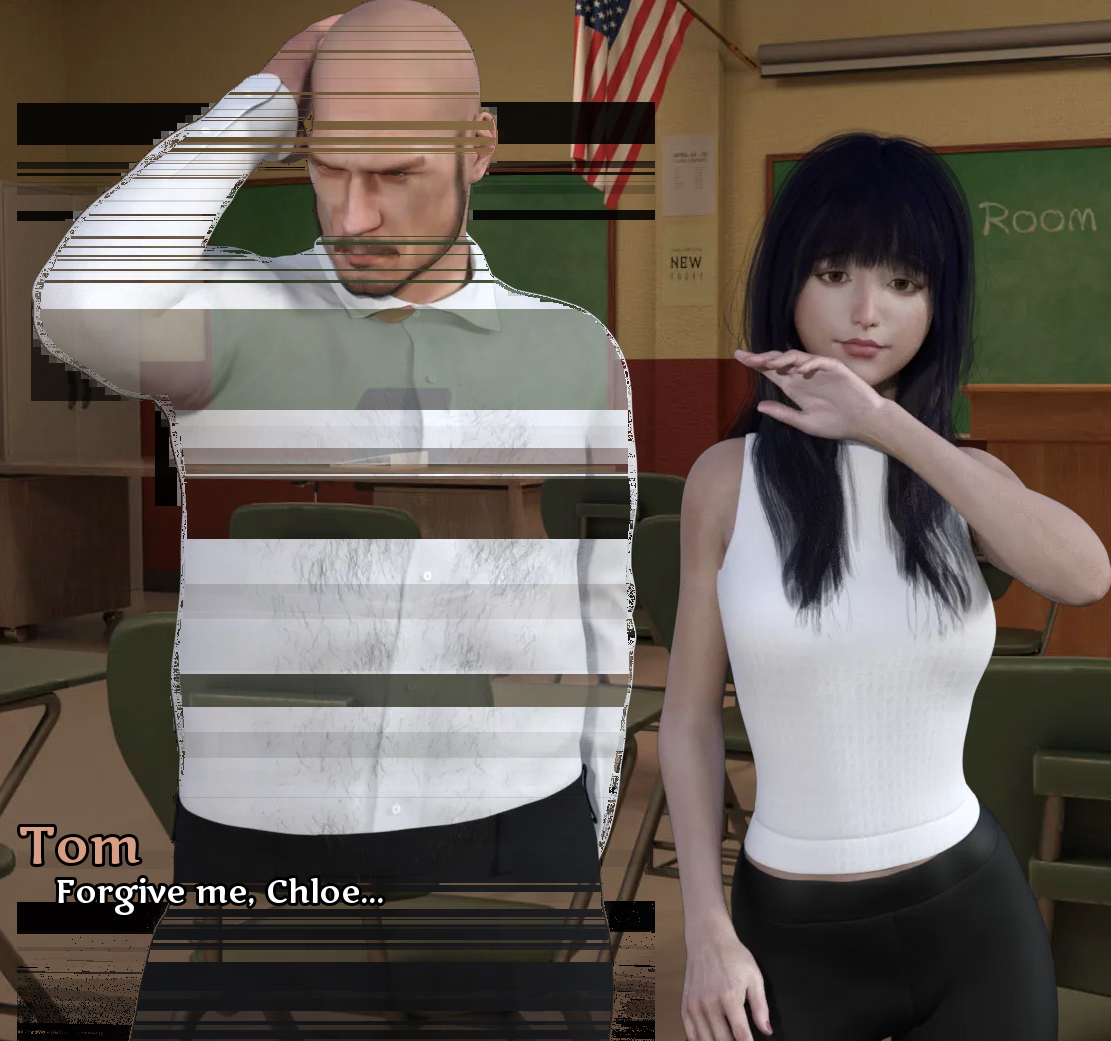
Found strange issue with dat game (but it doesn't worth to waste ur time to fix it since only solves using cwebp + lossless mode which make compression almost useless) that bald's dude transparent sprites looks broken (in image viewer all fine) which dev probably hates (happens in NTR scenes as far as I know and only with him while there are tons of same transparent images with other ppl that looks fine in game after compression like girl at the right of image).A Mother's Love [Part 1-16 Plus] [OrbOrigin]
COMPRESSED:
Win/Linux:
You must be registered to see the links- MEGA - PIXELDRAIN - WORKUPLOAD
Da Bi Dimm
Member
- Jan 28, 2025
- 406
- 205
- 113
When trying to compress this game Secret Care Cafe [v0.8.55.1 Patreon] [Rare Alex]
with a special compressor for it:
It gives the following error:
The folder for game compression is the same as before (Disc/Folder, I renamed the game folder to "a"). What am I doing wrong?
with a special compressor for it:
You don't have permission to view the spoiler content.
Log in or register now.
You don't have permission to view the spoiler content.
Log in or register now.