commondi32
Newbie
- Jul 16, 2020
- 84
- 62
- 29
Overview
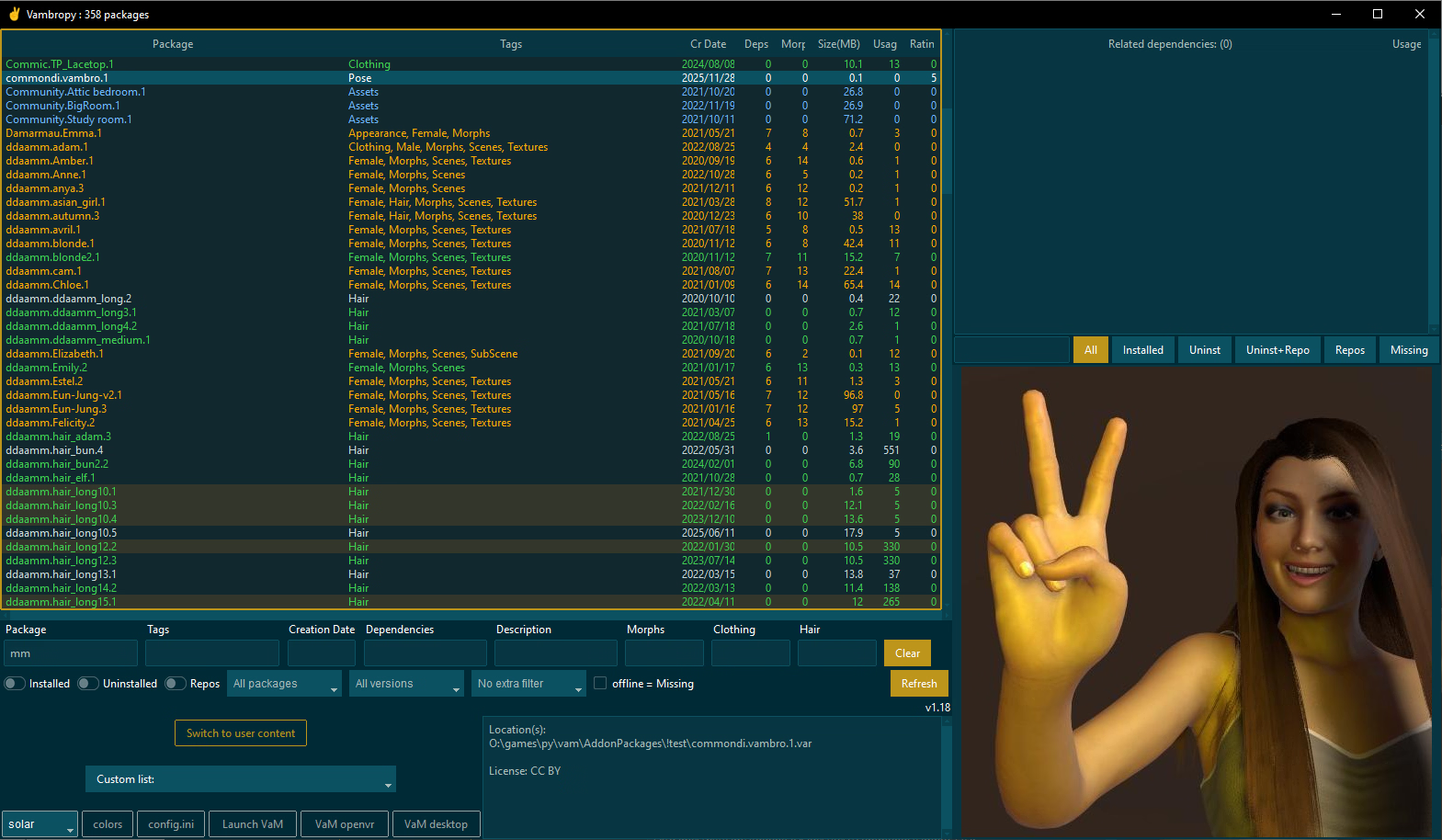
Vambropy is an open source tool for managing VaM package collections and user content. It is based on sfishere's VarBrowser ways to help VaM performance when the collection grows, by moving files within the same VaM directory, between AddonPackages and AllPackages directories (more efficient and robust than symlinking/renaming single files to enable/disable).
It uses a small database file to import relevant data from VaM packages and user content to allow easy search, filtering, rating, and to create/update custom lists which can dynamically activate/deactivate custom set of packages at once, enhancing VaM performance and responsiveness for different use cases. Thus, creators can configure more strategic profiles based on tools needed for their creations, and users can fast-switch and optimize environments like VamX, VamProduce 69, or any other desired configuration
Integration with VarBrowser (not needed but recommended) is provided by using same structure, with enhanced control over dependencies too, allowing to selectively install/ignore as well. Collections on external drives can be added to the database keep track of every .var file's info even when drives are offline. Synchronization with Varbrowser's AutoInstall tagging system provides a faster and more flexible way than the plugin itself (setting the tag on multiple packages at once). Sorting and filtering option makes it easy to find morph-heavy packages, very dependent ones, very depended ones, etc.
This update has numerous enhancements, changes and fixes. Some less noticeable, some bold ones.
Features :
- A high-performance sqlite database
- VarBrowser's concept of available/installed packages for better VaM performance.
- VarBrowser's Autoinstall tag system enhanced (toggle on/off selection of packages at once)
- Packages and related dependencies sections with context menu options and hotkeys.
- Easily see and install sub-dependencies VarBrowser left uninstalled.
- Easy package installation (copy) from external package repositories (other drives/dirs)
- Older/stale packages filtering and moving options.
- Ignore option for specific dependencies.
- Forced install of latest versions option.
- Simple but effective rating system, practical to remember good stuff.
 NEW
NEW - Deep filtering, find dependencies, morphs, description, clothing and hair single items NEW.
- NO DELETION/EDITION SO NO PACKAGE CAN BE ALTERED OR LOST.
- Packages are handled preserving their relative paths as they are, everywhere.
- User content browsing with images and basic info, dependencies, categories filtering.
- Prevents duplicates in VaM and warns about bad /corrupted/incomplete packages.
- Pointer-drag selection with file size sum info on title bar. (Shift+Ctrl modifiers support)
- UI Themes, each with configurable color-coded info for package and deps rows. NEW
- All package's thumbnails in a single image, and single images viewable in each package (image scroll). NEW
- Custom lists (profiles) allow to install/uninstall saved groups of packages at once. UPDATED
- Export selections to clipboard. (Easily copy/paste missing deps in Sharp VaM Tools)
- Find and download free dependencies directly from Hub. NEW
- Highlighted packages containing VarBrowser's favorite items.
- Highlighted older packages/dependencies.
- Image detaching option separates the image from main UI, resizable.
- Dependency usage for each package (related to the whole database collection).
- Sym-Linked package install from Repos (external NTFS partition/disks). (*1)
- Unpacking option for clothing and hair. (*2)
(*2) Unpacking might be useful mainly for clothing, it can be slightly faster than vars when loading person atoms (with some compromises, not recommended*).
Powerful multiple group and multi-word filters:
Browse specific content by package name, creator, tags, description (useful for plugins), morphs items, clothing and hair items, creation date, with an instant, as-you-filter related dependencies panel which is also filterable by name and availability status).
Example: just type 'camera' in description filter and all related packages will show; type 'scripts' or '*scripts' in tags to reduce even more, refining the search for that camera-related plugin.)
Special folders NEW:
A planned feature is file organizing, aiming to help at file level, letting you spend less time manually moving files with Explorer or any OS tools. Like feelfar's Var Manager did, but not automated and configurable, with more options. Currently, there are 4 new folders to move packages, configurable:
- _newvars is where hub downloads are saved. Default is AddonPackages\_newvars. Could be something like AllPackages\_newvars if you prefer new downloads to be available but not yet installed.
- _oldvars is a 'Move to...' menu option, where you can move old/stale vars. Default is _oldvars (root is VaM; it could be also set to AllPackages\_oldvars if you want to let the old versions still be available)
- _removed is a 'Move to...' menu option, where you can move unwanted packages. You can later review them and manually delete, backup, etc.
- _favorites is a recently requested 'Move to...' menu option, where you can send your favorite packages. Default is AddonPackages\_favorites. At the moment, when it is set to installed zone (AddonPackages), installed (including autoinstall), and not installed packages are moved, so uninstalled ones will be installed. As always, all the sub-paths are kept. (*)
(*) Any of these folders could be replaced with symlinked folders (do it at your own risk - there is no problem at all moving files to symlinked folders in another drive, but it was not tested enough). The _favorite folder idea was originally thought as a symlinked folder. Example: to help in a situation where a new faster SSD is bought and you want to start moving your favorite packages to it, so you can replace your _favorites folder with a symlink to that SSD, avoiding to browse your var files through OS app, unzipping vars to see what's on it. Just use Vambropy to browse, select and move. Feedback on it is very welcome.
IMPORTANT (FAQ):
Q: Does it modify my AddonPackages folders structure, vars , content?
A: Vambropy does NOT modify and currently is not aiming to modify* any files other than Custom/PluginData/sfishere/Autoinstall.txt (and Favorites,txt). It does NOT modify your sub-directories structures. When you command it to install/uninstall, it moves with their paths between AllPackages and AddonPackages dirs, so all paths are kept intact; same with installing by copying from another drive and directory. You can configure your external drives/ directory trees according to your own structures and the way it copies from external sources into VaM.
*There are plans, however, to link custom tools to it, giving you as much more power as you need, without being an all-around app which does everything (since it increases code complexity -> harder to maintain -> more time-consuming -> abandon)
Custom tools could be anything that can batch-process selections, for any tasks (i.e. modifying /debloat, etc.) but always externally, independently. This would be simple, like exporting the selection as a list of files with full path to be picked by the tool for processing/copying the selection to paste in the tool. So anyone could integrate any tool with Vambropy. Only requirement for the external tool is a command line option to accept a list of paths/a drop zone to throw the list/paste from clipboard, like Sharp Vam Tools does. So, just code the tool/ask for path list support to existing tools if they don't. Simple, isn't it?
)Q: It is a VaM plugin? Does it need VaM to be running along?
A: Vambropy is independent of VaM.exe, it does not need VaM/VarBrowser to be running, and changes made with it are not automatically reflected in VaM. if you are running VaM and Vambropy together, after making changes on one of them you will need to refresh the other. (A better way of refreshing packages in VaM -to avoid its low-performant package manager- is binding a hotkey through Keybindings plugin by AcidBubbles.)
Q: You said it does not delete any .var file but there is a dialog at start about removing duplicates.
A: When Vambropy starts, it checks for duplicates between AllPackages/AddonPackages, giving the user the option in a dialog box to keep just one. The rest is deleted ONLY IF they are digitally the same file, and it cannot accidentally delete all of them, always keeping the one you decide to keep. Plus, if they are not digitally equal, the duplicates are moved out and renamed (a 'DUPE_NOT_EXACT.' prefix is added) to allow you to review it later.
About the code:
Vambropy is python-coded, open source; code is fully commented on what it does and is easily moddable if you know some programming basics. qube21 is also working a lot to enhance functionality and interface, with numerous great features (see Vambropy.pyw changelogs). If you are are a python coder and want to mod it/fix things/enhance functionality just jump aboard! If you want to make it bigger or part of another project just mention me as original creator and the current collaborators as well.
Version 1.17 is kept downloadable, mainly for Qt version (not available at the moment in new version).
Qt version by qube21 features a high-performance UI with native high DPI support.
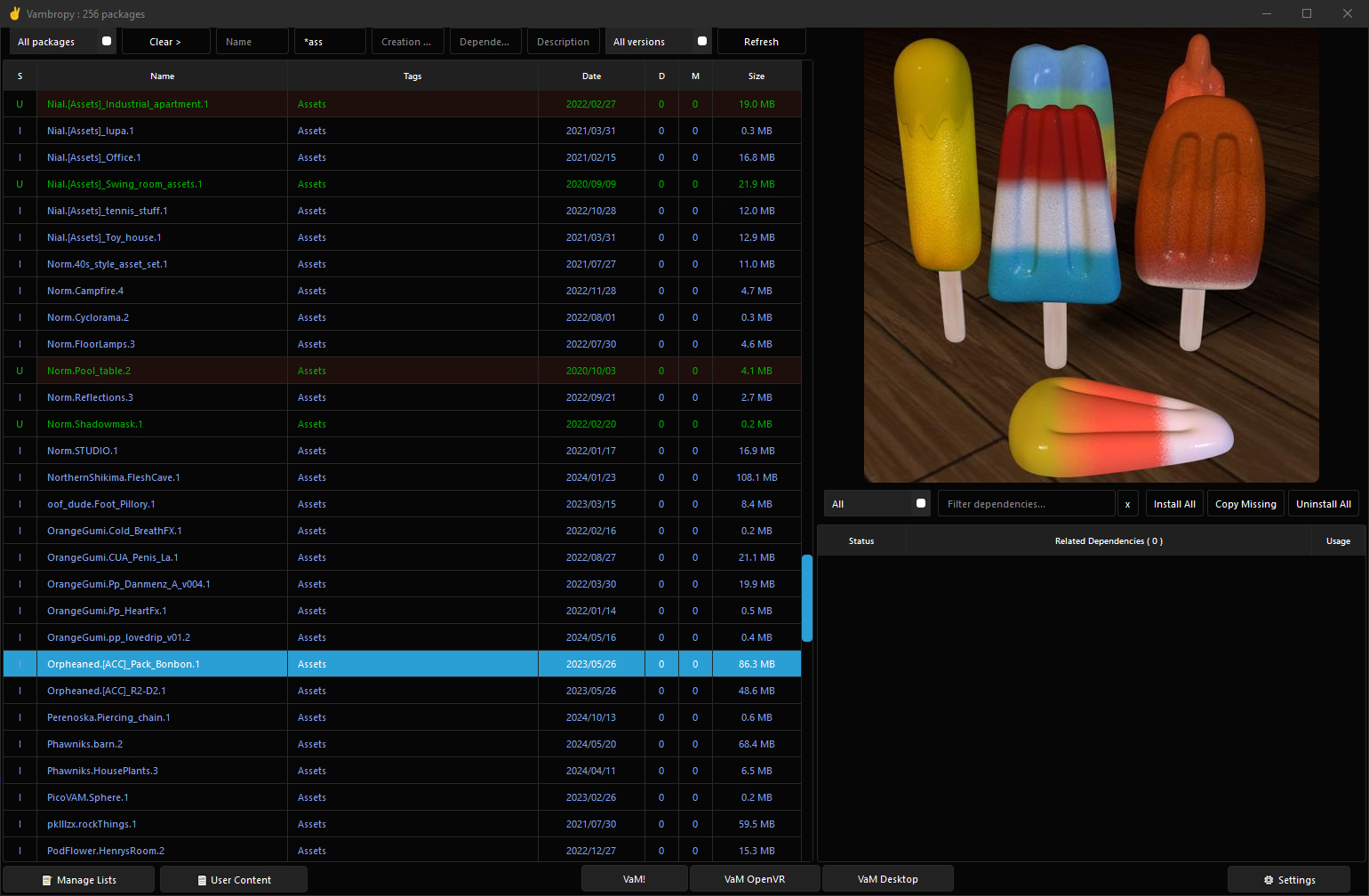
Some details on its workflow (still needs some updating):
You don't have permission to view the spoiler content.
Log in or register now.
You don't have permission to view the spoiler content.
Log in or register now.
You don't have permission to view the spoiler content.
Log in or register now.
You don't have permission to view the spoiler content.
Log in or register now.
You don't have permission to view the spoiler content.
Log in or register now.
IMPORTANT FOR v1.18: Before you start it, you can use the same thumbnails folder from 1.17, but vambropy.db can't be used, it has to be created again. If you have set some ignore tags on dependencies, you can export them and import after new database is created. Use VBDB tool for that. Copy the EXE or .py file in Vambropy folder. Type 'vbdb.exe' or 'python vbdb.py' export' in the command line and the the usage options. 'vbdb export' will export a list in a text file for those dependencies. Then make sure that text file is there along with the new vambropy.db, and call the tool again, this time 'vbdb import'.
The tool also exports/import the new user-set package ratings, in case of future db rebuild.
FOR v1.17 ONLY: In the binary download there are 2 executables: vambropy and vambropy_qt. If you use the User content section, use first the standard vambropy.exe to switch to the user content section, scan the content and update the database (the qt version has a bug at the moment, not finding the jsons). After that, you can close the standard version and open vambropy_qt. It will ask again for vam directory (different config files) but it uses the same database.
ABOUT VIRUS WARNINGS: The binary release has been modified by leaving resources out of the executable, to prevent false VIRUS positives. However, as a pyinstaller executable/uncertified windows app it may still raise alerts in antiviruses. Please be aware of this. If you are unsure about it, you can check the code and execute it from its sources with python 3.12, even build your own .exe( read the Readme.txt file on how to do it and/or check out the thread for help already offered on that).
The sources include 2 .exe files, GNU grep and sed (in resources dir), which might raise VIRUS alert here. You can also
You must be registered to see the links
them from original sites.Download
v1.18 binaries (Tk)
V1.18 Tk sources (see attachment)
Older versions:
v1.17.3 binaries Tk-only (fixes UI bugs)
V1.17 binaries (Qt version here)
v1.18 binaries (Tk)
You must be registered to see the links
You must be registered to see the links
You must be registered to see the links
V1.18 Tk sources (see attachment)
Older versions:
v1.17.3 binaries Tk-only (fixes UI bugs)
You must be registered to see the links
You must be registered to see the links
You must be registered to see the links
V1.17 binaries (Qt version here)
You must be registered to see the links
You must be registered to see the links
You must be registered to see the links
Last edited: