


- Jul 4, 2017
- 3,492
- 6,740
- 758
I was working on my project using VSCode and got annoyed at all the "spelling errors" highlighted in the editor.
I have the Renpy Language extension already installed and it works fine... but I realized that the dictionary of keywords was not part of the extension.
So I worked out how to add a custom dict to my project, and created the dict file. Here's how you can use it too:
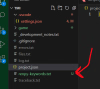
I have the Renpy Language extension already installed and it works fine... but I realized that the dictionary of keywords was not part of the extension.
So I worked out how to add a custom dict to my project, and created the dict file. Here's how you can use it too:
- In your project folder you should have a ".vscode" folder where there is a "settings.json" file (this is where VSCode stores any per-project customized settings). Open the "settings.json" file and add the following code block. Be careful not to break the JSON formatting of the existing file
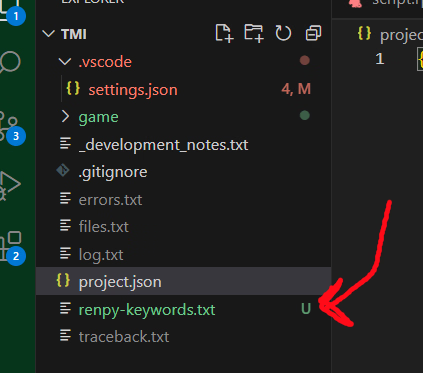
Code:"cSpell.customDictionaries": { "project-words": { "name": "renpy-keywords", "path": "./renpy-keywords.txt", "description": "Words used in Renpy DSL", "addWords": false }, "custom": true, // Enable the `custom` dictionary "internal-terms": false // Disable the `internal-terms` dictionary } - Next, Download the "renpy-keywords file" that is attached to this post. Save it in your project folder root, i.e. the same level as the "game" folder (not *in* the game folder)
The file goes here:
- And if you then restart VSC, you should no longer have the infuriating underscore squiggle lines on every "xpos" and "layeredimage" etc
Before  | After |
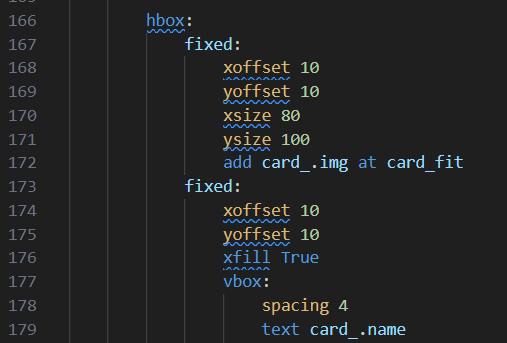
|
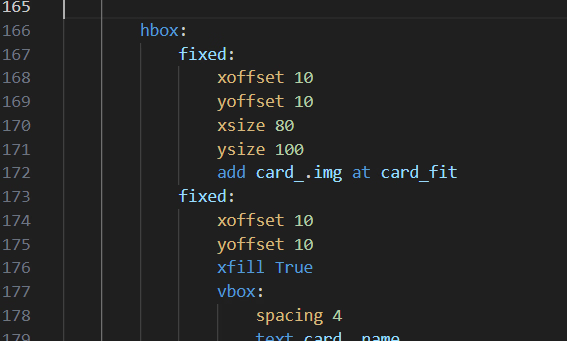
|
Last edited: