Mike Broner
New Member
- Aug 30, 2018
- 13
- 5
- 72

I used catbox, so it may be that. I remember I also lost my old banner because the image link was hosted there. I'll look into a new host soon.link doesnt seem to work

you have to complete Change attack event first, Go to the security room and then boom!. you can trywhen come the bugfix for this actual version. i cannot play because when i evolve something happen and the game stuck, i restart like 5 time, and i cannot enjoy...

It's an intended behavior, A=Z B=X and C=CIn my laptop somehow the key control is rigged, the A become Z, the B become X
And for the pause I forgot, I think it's P or T
It's so messed up, pls fix keyboard key configuration, it's not my laptop problem tho, I still could use the Z and X for other game and regular usage


So uhhhh you want to fix into what? I was as confused as the other guy reading your complaint.In my laptop somehow the key control is rigged, the A become Z, the B become X
And for the pause I forgot, I think it's P or T
It's so messed up, pls fix keyboard key configuration, it's not my laptop problem tho, I still could use the Z and X for other game and regular usage
ah i see now, thanks mateIt's an intended behavior, A=Z B=X and C=C
View attachment 5561177
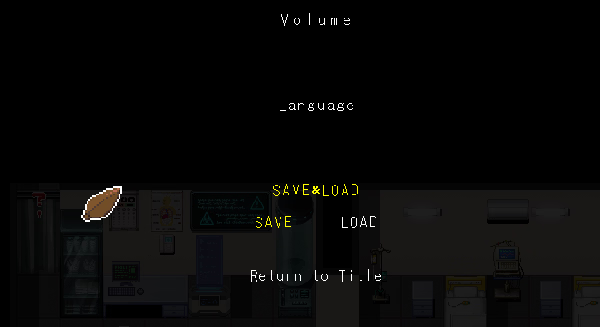
I also have problem with saves, idk I played so far but I can't save too, I pause and return to title, and I already press on A or Z on laptop to quit and save, but when I reopen the game I can't play my last saves cuz I have no idea how to load saves, there's no manu for it, I already try your method and it's still not working, maybe because it's still beta?.I've found a non conventional way to being able to load a save after closing the game
(I'm not sure how well it works, for example skill tree might not be detected as intended, but at least it's better than nothing, more after encountering some softlocking/hardlocking bugs that prevented me from finishing the demo)
Step 1: Press 1 to skip prologue / Play the prologue
Step 2: Pause the game by pressing P and save the game (you can choose any slot you want)
Step 3: Copy the "save" folder inside C:\[GAME_LOCATION]\Alien_Invasyndrome_Demo_Ver0.99.1\Resources\save and name it as you please, in this case I will be naming it "backup".
Obviously [GAME_LOCATION] corresponds to where you downloaded the game and "Alien_Invasyndrome_Demo_Ver0.99.1" may vary depending of how you named the folder.
Step 4: After you have a proper backup of this save folder then you can proceed and close the game anytime you want.
Step 5: After reopening the game and pressing 1, the demo will not be able to find any save, because it would be replaced by the autosave made after beating prologue. However, if you delete the current save folder and replace it with the "backup" folder (which now will be named save, of course) then you will be able to load any save you had before closing the game.
Take into account that this workaround has only been tested on version 0.99.1 and I cannot guarantee you that it'll work on later updates.
Yeah it's probably because it's still a demo so there's no permanent saving just yet. The game's pretty short as is, at least, so getting back on track on another sitting isn't that far behind. Hopefully the full version is a bit more expansive than what we have now.I also have problem with saves, idk I played so far but I can't save too, I pause and return to title, and I already press on A or Z on laptop to quit and save, but when I reopen the game I can't play my last saves cuz I have no idea how to load saves, there's no manu for it, I already try your method and it's still not working, maybe because it's still beta?.
I also have problem with saves, idk I played so far but I can't save too, I pause and return to title, and I already press on A or Z on laptop to quit and save, but when I reopen the game I can't play my last saves cuz I have no idea how to load saves, there's no menu for it, I already try your method and it's still not working, maybe because it's still beta?.


Almost a third part already? I thought it could be around the 20-25% because this was going to be bigger.
Ho ho this is interestingI've found a non conventional way to being able to load a save after closing the game
(I'm not sure how well it works, for example skill tree might not be detected as intended, but at least it's better than nothing, more after encountering some softlocking/hardlocking bugs that prevented me from finishing the demo)
Step 1: Press 1 to skip prologue / Play the prologue
Step 2: Pause the game by pressing P and save the game (you can choose any slot you want)
Step 3: Copy the "save" folder inside C:\[GAME_LOCATION]\Alien_Invasyndrome_Demo_Ver0.99.1\Resources\save and name it as you please, in this case I will be naming it "backup".
Obviously [GAME_LOCATION] corresponds to where you downloaded the game and "Alien_Invasyndrome_Demo_Ver0.99.1" may vary depending of how you named the folder.
Step 4: After you have a proper backup of this save folder then you can proceed and close the game anytime you want.
Step 5: After reopening the game and pressing 1, the demo will not be able to find any save, because it would be replaced by the autosave made after beating prologue. However, if you delete the current save folder and replace it with the "backup" folder (which now will be named save, of course) then you will be able to load any save you had before closing the game.
Take into account that this workaround has only been tested on version 0.99.1 and I cannot guarantee you that it'll work on later updates.
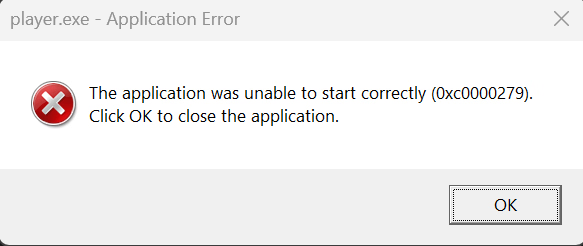
You might need to install this:View attachment 5578142
I get this error. Anyone know how to fix it?

Why did you quoted my message? Since it doesn't seem like you didn't respond to my message at all.Ho ho this is interesting
You might need to install this:
You must be registered to see the links