Anyone working on uncensoring doujin group [I'm moralist]'s latest game?[Solved]

shrimpcrabpower

New Member
Jun 2, 2025
8
9
3
It's called "淫穴調伏トエハ ~退魔巫女3Dおさわりシミュレーション~", just released today.
Tried using Bepinx with ManlyMarco's UniversalUnityDemosaic plugin, not working. Also tried opening asset files with AssetStudioMod, though I did find two mesh class "Toeha_MosaicAnus" and "Toeha_MosaicVagina" with model and wireframe, I have no idea how they work because I have zero knowledge in unity project.
Hope someone is interested in uncensoring this game.

Edit:Nevermind, I'm just dumb. I forgot to change entry point in cfg file to make BepInEx fully working. After doing that with the help of RuntimeUnityEditor I find the string "mazic" is what censor shader using as name, add that in the cfg file and it succeeded
 
Last edited:

shrimpcrabpower

New Member
Jun 2, 2025
8
9
3
Can you give me the instruction how to do it?
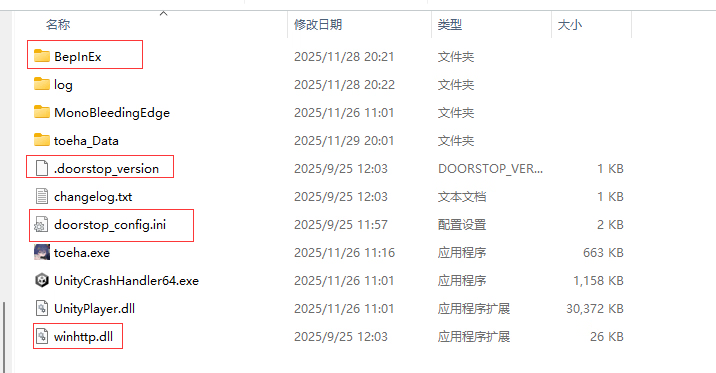
Download latest BepInEx(5.4.23.4) and install it at game root folder, run game once to generate plugin folder.
Find BepInEx.cfg in BepInex\config folder, edit it with notebook, find [Preloader.Entrypoint] section, change Type to MonoBehaviour(Type = MonoBehaviour)

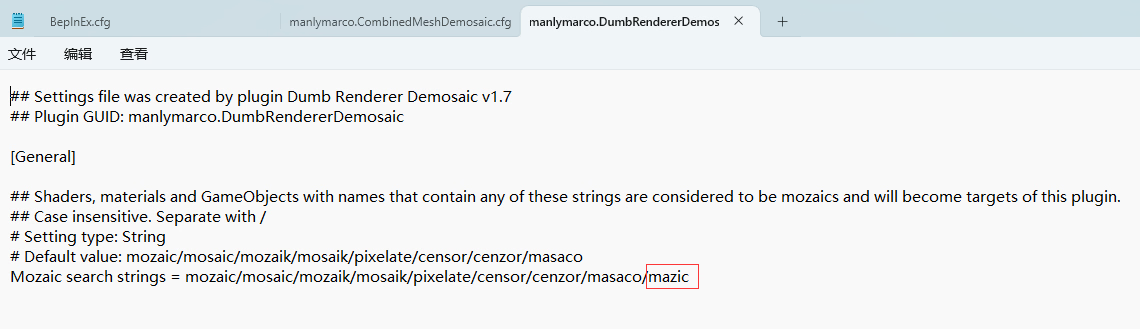
Download UniversalUnityDemosaics, put CombinedMeshDemosaic and DumbRendererDemosaic into the plugin folder, run game once to generate config file in BepInex\config folder, open both manlymarco.CombinedMeshDemosaic.cfg and manlymarco.DumbRendererDemosaic.cfg with notebook, add /mazic after the end of the line "Mozaic search strings", and it's done.
(Since I haven't encounter performance issue, I leave other search string in the cfg file in case there are other different shader names)
 

Noobleman

New Member
Sep 21, 2025
7
2
3
Download latest BepInEx(5.4.23.4) and install it at game root folder, run game once to generate plugin folder.
Find BepInEx.cfg in BepInex\config folder, edit it with notebook, find [Preloader.Entrypoint] section, change Type to MonoBehaviour(Type = MonoBehaviour)

Download UniversalUnityDemosaics, put CombinedMeshDemosaic and DumbRendererDemosaic into the plugin folder, run game once to generate config file in BepInex\config folder, open both manlymarco.CombinedMeshDemosaic.cfg and manlymarco.DumbRendererDemosaic.cfg with notebook, add /mazic after the end of the line "Mozaic search strings", and it's done.
(Since I haven't encounter performance issue, I leave other search string in the cfg file in case there are other different shader names)

Hello Ty for the tutorial , i am a bit confuse on add /mazic on.cfg files, can you help me send the screenshoot of the file where we add the /Mazic Thanks i really appreciate it :)
 

shrimpcrabpower

New Member
Jun 2, 2025
8
9
3
Okay Thanks you for the Screenshot :D. Okay sorry if i ask again, where is the file manlymarco cfg at? Because when i download the file universalUnityDosmatic theres no name of manlymarco.Dumbrendererdemos on both files (sorry i am a bit dumb) :")
Both cfg file are in the same folder(BepInEx\config) with BepInEx.cfg, they will generate once the plugins have successfully loaded for the first time, which means you have to put CombinedMeshDemosaic.dll and DumbRendererDemosaic.dll in the plugin folder and start the game first.
 

Noobleman

New Member
Sep 21, 2025
7
2
3
Both cfg file are in the same folder(BepInEx\config) with BepInEx.cfg, they will generate once the plugins have successfully loaded for the first time, which means you have to put CombinedMeshDemosaic.dll and DumbRendererDemosaic.dll in the plugin folder and start the game first.
Thank you it workeds :)
 

SoraDolla

New Member
Jul 23, 2021
7
1
87
Download latest BepInEx(5.4.23.4) and install it at game root folder, run game once to generate plugin folder.
Find BepInEx.cfg in BepInex\config folder, edit it with notebook, find [Preloader.Entrypoint] section, change Type to MonoBehaviour(Type = MonoBehaviour)

Download UniversalUnityDemosaics, put CombinedMeshDemosaic and DumbRendererDemosaic into the plugin folder, run game once to generate config file in BepInex\config folder, open both manlymarco.CombinedMeshDemosaic.cfg and manlymarco.DumbRendererDemosaic.cfg with notebook, add /mazic after the end of the line "Mozaic search strings", and it's done.
(Since I haven't encounter performance issue, I leave other search string in the cfg file in case there are other different shader names)
can you show me where the game root folder located at please
 

SoraDolla

New Member
Jul 23, 2021
7
1
87
Download latest BepInEx(5.4.23.4) and install it at game root folder, run game once to generate plugin folder.
Find BepInEx.cfg in BepInex\config folder, edit it with notebook, find [Preloader.Entrypoint] section, change Type to MonoBehaviour(Type = MonoBehaviour)

Download UniversalUnityDemosaics, put CombinedMeshDemosaic and DumbRendererDemosaic into the plugin folder, run game once to generate config file in BepInex\config folder, open both manlymarco.CombinedMeshDemosaic.cfg and manlymarco.DumbRendererDemosaic.cfg with notebook, add /mazic after the end of the line "Mozaic search strings", and it's done.
(Since I haven't encounter performance issue, I leave other search string in the cfg file in case there are other different shader names)
btw there's anyway to translate the game using auto translate?
 

ezwilly123

New Member
Mar 12, 2022
3
0
11
Hello, I downloaded CombinedMeshDemosaic.dll and DumbRendererDemosaic.dll, but after running them, the .cfg files for manlymarco.CombinedMeshDemosaic and manlymarco.DumbRendererDemosaic were not generated in the config file.
How can I solve this?
 

sy7028789

New Member
Sep 20, 2017
2
0
106
Download latest BepInEx(5.4.23.4) and install it at game root folder, run game once to generate plugin folder.
Find BepInEx.cfg in BepInex\config folder, edit it with notebook, find [Preloader.Entrypoint] section, change Type to MonoBehaviour(Type = MonoBehaviour)

Download UniversalUnityDemosaics, put CombinedMeshDemosaic and DumbRendererDemosaic into the plugin folder, run game once to generate config file in BepInex\config folder, open both manlymarco.CombinedMeshDemosaic.cfg and manlymarco.DumbRendererDemosaic.cfg with notebook, add /mazic after the end of the line "Mozaic search strings", and it's done.
(Since I haven't encounter performance issue, I leave other search string in the cfg file in case there are other different shader names)
Thanks, it is correct, checked and confirmed working, very detailed and clear tutorial
 

shrimpcrabpower

New Member
Jun 2, 2025
8
9
3
Hello, I downloaded CombinedMeshDemosaic.dll and DumbRendererDemosaic.dll, but after running them, the .cfg files for manlymarco.CombinedMeshDemosaic and manlymarco.DumbRendererDemosaic were not generated in the config file.
How can I solve this?
Have you change the Entrypoint in the BepInEx.cfg? If I remember it correctly, the plugin cfg file will only generate if the plugin have successfully loaded(which means the BepInEx have to be fully working).
 
May 12, 2020
26
7
129
hi, followed the instructions, but there's no config files generated after I put the two demosaic dlls into the plugin folder and run the game. BepInEx may not fully work. Only the auto translator plugin is working. Type edited. Btw I'm using crossover on Mac, while I‘ve done wine cfg to make BepInEx work. It once worked on Secretflashermanaka. I might have the same problem with the guy above.
 
Last edited:
May 12, 2020
26
7
129
Also I found another version of the game, whose files are like those. It's also claimed to be uncensored, but also only the autotranslator is working. Mosaic is still there.