


OzmaEuborn
Newbie
- Aug 15, 2021
- 47
- 67
- 128
Add screenshots of the problems, can be helpfulHi friend, im installing the game for the first time, im having trouble, it doesnt install
Add screenshots of the problems, can be helpfulHi friend, im installing the game for the first time, im having trouble, it doesnt install

First install directx, then try to install the game:Hi friend, im installing the game for the first time, im having trouble, it doesnt install
Try this:the d3d9 file fixes the lag but causes the game stretched out to fit my screen in full screen mode which makes everything look wide including the characters. any fix?
May your "disk name" its something like D:, F:, E:, etc..Im having issues, i dont know how to explain, so i will attach the error below:
---------------------------
Setup
---------------------------
WARNING: The patch was unable to detect your game at the location you specified:
"C:\ILLUSION\AG3"
Do you wish to correct the destination?
(ctrl+C to copy this message)
---------------------------
Yes No
---------------------------
Yes.I remember this game having a shitload of model characters to download, are those gone forever? I don't remember the last time I played this.
Hey sorry for bothering you againAdd screenshots of the problems, can be helpful
im a single user so theres no problem envolving admins and suchHey sorry for bothering you again
now theres an new problem , when i mount the disc and try to run the supposedly installation file for the game (injs3e.exe) appears this error right here when i execute it:
''Windows cannot access the specified device, path or file. Maybe you don't have the appropriate permissions to access the item.''
100% fixed, thank you brotherHello everynyan!
I am writing about how I managed to run this game on Windows 11 24H2.
1. Preparation:
a) Changed the locale to Japanese.
b) Downloaded and installed DirectX 2010 JuneYou must be registered to see the links
c) Downloaded and installed Microsoft Visual C++ 2005-2010.
2005 (x86 and x64)You must be registered to see the links
2008 (x86 and x64)You must be registered to see the links
2010 (x86 and x64)You must be registered to see the links
d) Enabled .NET Framework 3.5 in Windows Features.
2. Installation:
a) Downloaded, unpacked the archive with the game using 7-zip.
b) Mounted the game image (on Windows 11, right-click on the ISO and Mount) and installed it in a previously manually created folder C:\Illusion\AG3
c) Installed HF Patch in the folder with the installed game.
3. Solving performance issues:
a) In the game folder, in the properties of AG3 Make.exe/AG3 Play.exe, enable compatibility mode with Windows 7.
b) Downloaded, unpacked the DXVK archiveYou must be registered to see the links
In the x32 folder, found d3d9.dll and renamed it to d3d9_alt.dll
Copied and pasted this d3d9_alt.dll into the game folder (where AG3 Make.exe/AG3 Play.exe are located).
c) Now, when launching the game, always select the Subs button in the pop-up window and the game will have subtitles.
If they do not work, then when launching the game, select the Cfg button in the pop-up window.
In the Subtitles column, click add files and select subtitles.txt in our game folder.
Using the Up button, raise our subtitles.txt to the top and save.
That's it, I hope this will help some faded soul launch this game.
Hey there, i have been trying to use the regfixer but it didn't work for me so far. I tried relocate the file to a shorter path, edited the reg file with notepad but so far the game still doesn't recognize it and when i press "Artificial Girl 3 Play" it still shows that the game is looking for C disk path, how do i tackle this problem, i want to fix it first before trying to redowload the game again since i do have some mods within that file and... i kinda don't want to go through and dowload all of those mods again... Will be much appreciated if you can help me with this.First install directx, then try to install the game:
You must be registered to see the links
Try this:
You must be registered to see the links
May your "disk name" its something like D:, F:, E:, etc..
Try this reg file but first edit it with the disk name of yours
You must be registered to see the links
Yes.
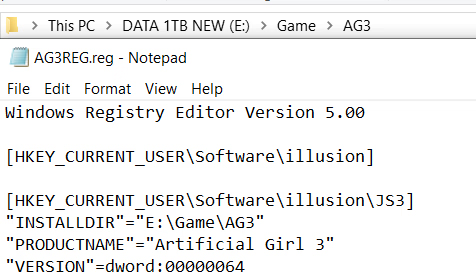
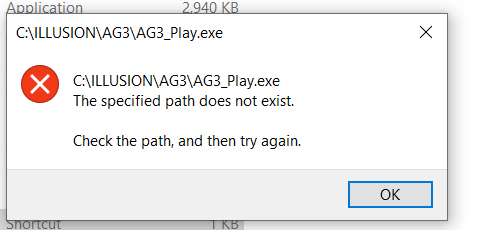
Try this (HD is "E"):Hey there, i have been trying to use the regfixer but it didn't work for me so far. I tried relocate the file to a shorter path, edited the reg file with notepad but so far the game still doesn't recognize it and when i press "Artificial Girl 3 Play" it still shows that the game is looking for C disk path, how do i tackle this problem, i want to fix it first before trying to redowload the game again since i do have some mods within that file and... i kinda don't want to go through and dowload all of those mods again... Will be much appreciated if you can help me with this.
View attachment 5568491 View attachment 5568493
Well I still have plenty of them.I remember this game having a shitload of model characters to download, are those gone forever? I don't remember the last time I played this.
Thanks man, i can play the game again now xd, it has been ages.Try this (HD is "E"):
Windows Registry Editor Version 5.00
[HKEY_CURRENT_USER\Software\illusion]
[HKEY_CURRENT_USER\Software\illusion\JS3]
"INSTALLDIR"="E:\\ILLUSION\\AG3"
"PRODUCTNAME"="Artificial Girl 3"
"VERSION"=dword:00000064
I would love to download the whole catalog and try it for myself if it's possible for you xdWell I still have plenty of them.
You don't have permission to view the spoiler content. Log in or register now.

Where do i put/use the reg file?May your "disk name" its something like D:, F:, E:, etc..
Try this reg file but first edit it with the disk name of yours
You must be registered to see the links
Unzip the file, double click, "install", DONEWhere do i put/use the reg file?
Will it work if i change it to disk D?, Im currently using emulators on mobile and im still new with pcs
