

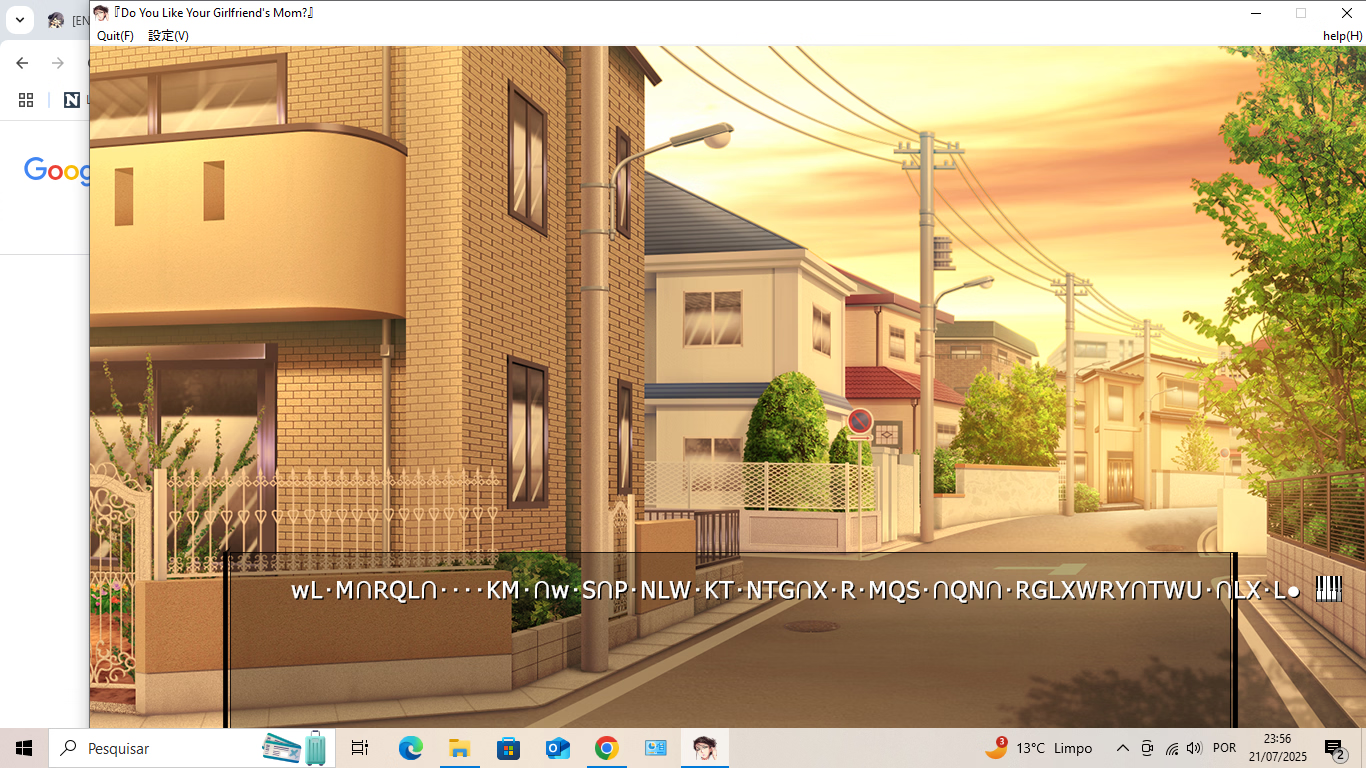
Is there a way to fix the resolution of the game? I used Alt + Enter and it's overlapping to the lower right hand corner of my screen. Should I just get another monitor so that I can view the game properly or should I just bear with reading the lore in the same resolution as a RPGM where getting it to fullscreen is not possible?

- Apr 12, 2020
- 441
- 2,208
- 439
I already answered this 2 posts earlier.Is there a way to fix the resolution of the game? I used Alt + Enter and it's overlapping to the lower right hand corner of my screen. Should I just get another monitor so that I can view the game properly or should I just bear with reading the lore in the same resolution as a RPGM where getting it to fullscreen is not possible?
These old games have broken windows settings in newer windows. I recommend usingYou must be registered to see the linksto fix and get proper full screen + scaling.
Forgive me for not knowing this, but is thisI already answered this 2 posts earlier.
You must be registered to see the links
download and install or are there extra steps that I need to follow in order to make this work?softsheep00
New Member
- Jun 14, 2022
- 2
- 1
- 105
Right click the exe, go to properties, compatibility, change high dpi settings, then click the box at the bottom. This will work for most visual novels with scaling issues in fullscreen, this on included of course. For whatever reason however you need to do it every time you open the game for this one in particular, for reasons i cant be sure of. Anyway i hope this helps have fun.Is there a way to fix the resolution of the game? I used Alt + Enter and it's overlapping to the lower right hand corner of my screen. Should I just get another monitor so that I can view the game properly or should I just bear with reading the lore in the same resolution as a RPGM where getting it to fullscreen is not possible?

nandabaihaq
New Member
- Jun 11, 2019
- 4
- 0
- 37
Do you know how to solve the problem of my post?I already answered this 2 posts earlier.
- Apr 12, 2020
- 441
- 2,208
- 439
That means Locale Emulator isn't being loaded properly. Make sure
You can try running
msacm32.dll, LocaleEmulator.dll and LoaderDll.dll are present and not being messed with. Do you use windows defender? Some more aggressive anti virus might prevent it from hooking to the game but it shouldn't be an issue tbh.You can try running
You must be registered to see the links
manually -> Run with Application profile, make sure the following option is selected: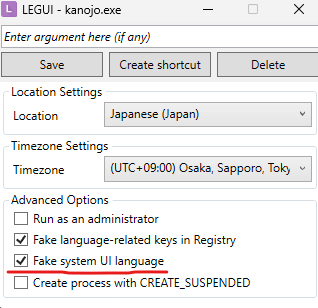
shiny-kuki
Member
- May 6, 2020
- 377
- 334
- 258
This engine is so bad. I know that much to know that what you did here was miraculous. The translation seems good too. Thank you
Still the same problemThat means Locale Emulator isn't being loaded properly. Make suremsacm32.dll,LocaleEmulator.dllandLoaderDll.dllare present and not being messed with. Do you use windows defender? Some more aggressive anti virus might prevent it from hooking to the game but it shouldn't be an issue tbh.
You can try runningYou must be registered to see the linksmanually -> Run with Application profile, make sure the following option is selected:
View attachment 5075252
redninja32
Newbie
- Oct 27, 2021
- 19
- 2
- 113
Do you have any idea what in the translation might cause it to not work on a virtual machine? The untranslated version runs fine.That means Locale Emulator isn't being loaded properly. Make suremsacm32.dll,LocaleEmulator.dllandLoaderDll.dllare present and not being messed with. Do you use windows defender? Some more aggressive anti virus might prevent it from hooking to the game but it shouldn't be an issue tbh.
You can try runningYou must be registered to see the linksmanually -> Run with Application profile, make sure the following option is selected:
View attachment 5075252
Edit: It seems it's the LocaleEmulator.dll, do you know of a possible fix?
Last edited:
- Apr 12, 2020
- 441
- 2,208
- 439
Not really since I use VMs myself to test the game. What host, guest and VM software do you use?Do you have any idea what in the translation might cause it to not work on a virtual machine? The untranslated version runs fine.
Be specific about the problem.Edit: It seems it's the LocaleEmulator.dll, do you know of a possible fix?
redninja32
Newbie
- Oct 27, 2021
- 19
- 2
- 113
I'm running Parallel Desktop Windows 11 on Mac Sequoia. When I click Kanojo.exe there is a blue circle that just starts infinitely spinning and the game doesn't open. When I remove LocaleEmulator.dll the game does open but displays no text.Not really since I use VMs myself to test the game. What host, guest and VM software do you use?
Be specific about the problem.
- Apr 12, 2020
- 441
- 2,208
- 439
My guess is some trickery done byI'm running Parallel Desktop Windows 11 on Mac Sequoia. When I click Kanojo.exe there is a blue circle that just starts infinitely spinning and the game doesn't open. When I remove LocaleEmulator.dll the game does open but displays no text.
You must be registered to see the links
is broken with Parallels, not the first time I've seen Rosetta based VMs break something tbh (I've experienced it myself with cheat engine). You will probably have to change the locale and language of your guest to Japanese and delete both LocaleEmulator.dll and LoaderDll.dll.Alternatively you can try the
You must be registered to see the links
fork but it might have the same issues.redninja32
Newbie
- Oct 27, 2021
- 19
- 2
- 113
I can't seem to change the language in the VM for some reason, what do I need to use from Locale Remulator?My guess is some trickery done byYou must be registered to see the linksis broken with Parallels, not the first time I've seen Rosetta based VMs break something tbh (I've experienced it myself with cheat engine). You will probably have to change the locale and language of your guest to Japanese and delete both LocaleEmulator.dll and LoaderDll.dll.
Alternatively you can try theYou must be registered to see the linksfork but it might have the same issues.
- Apr 12, 2020
- 441
- 2,208
- 439
Delete both dlls I mentioned above. Run LREditor and use the following settingsI can't seem to change the language in the VM for some reason, what do I need to use from Locale Remulator?
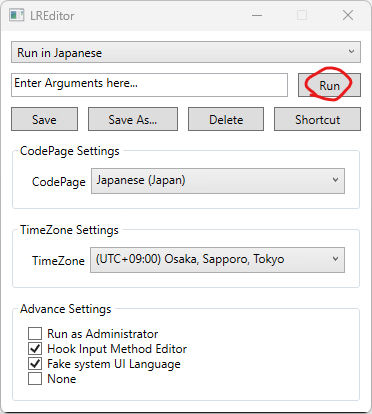
to run the game exe.
redninja32
Newbie
- Oct 27, 2021
- 19
- 2
- 113
The game does the same thing as before. Doesn't display any text and then crashes.Delete both dlls I mentioned above. Run LREditor and use the following settings
View attachment 5111788
to run the game exe.
- Apr 12, 2020
- 441
- 2,208
- 439
Sorry I can't really think of any other solutions that might work besides Japanese windows. And I'm not really interested in going into the rabbit hole that is supporting every single platform.The game does the same thing as before. Doesn't display any text and then crashes.