

- Thread starter monroe
- Start date
3.00 star(s)
5 Votes


TruuthBoi
Newbie
- Jun 1, 2022
- 63
- 80
- 28
Sorry for late reply, but if anyone needs:Does anyone has a Drain dungeon 2 link to download? I couldn't find one
You must be registered to see the links

a few people listed the english version as 1.04 when it came out.is there update in this game? i forget looked in where, but i recall it was version 1.04?
Hi, does someone interested in drain dungeon 3 ? translation request


ilovecheesedundun
Newbie
- Aug 12, 2022
- 46
- 28
- 28
Bobmcflay24
Newbie
- Aug 24, 2020
- 20
- 8
- 14

Crow Armbrust
Board Buff
- Apr 29, 2018
- 16,199
- 5,998
- 883

harem.king
Forum Fanatic
- Aug 16, 2023
- 4,419
- 7,780
- 671
thanks. saved me from playing the gameAll of the cg can be found atYou must be registered to see the links. They're all low-res and heavily censored, not worth it IMO.
OneUglySunuvabitch
Member
- Jul 21, 2021
- 160
- 93
- 154
Does anyone know how to fix the annoying crash that happens when pressing the F11 key? I think that it turned on the fullscreen function, but now it just crashes it for some annoying reason. DX

Goeffel
Well-Known Member
- Sep 10, 2022
- 1,033
- 731
- 238
only see this now, had the same problem.
To fix, download this (from first post, 2nd post is not an update but sth. different alltogether)
https://f95zone.to/threads/update-your-wolf-rpg-games-to-v2-24z-unlocks-display-resolution.59117/
Unpack into game folder (replace? yes!). Run Config.exe and set Display Mode to 3D.
Then F11 will become fullscreen toggler, not crash anymore, and moreover the game gets centered (I had it awkwardly on the left side). F4 will then no longer have a function, or at least none I could perceive.
--------------------------
--------------------------
also, if someone would like to reduce savescumming on entering dungeon because some BGM is not nice for long runs:
yes, it is borked.Does anyone know how to fix the annoying crash that happens when pressing the F11 key? I think that it turned on the fullscreen function, but now it just crashes it for some annoying reason. DX
To fix, download this (from first post, 2nd post is not an update but sth. different alltogether)
https://f95zone.to/threads/update-your-wolf-rpg-games-to-v2-24z-unlocks-display-resolution.59117/
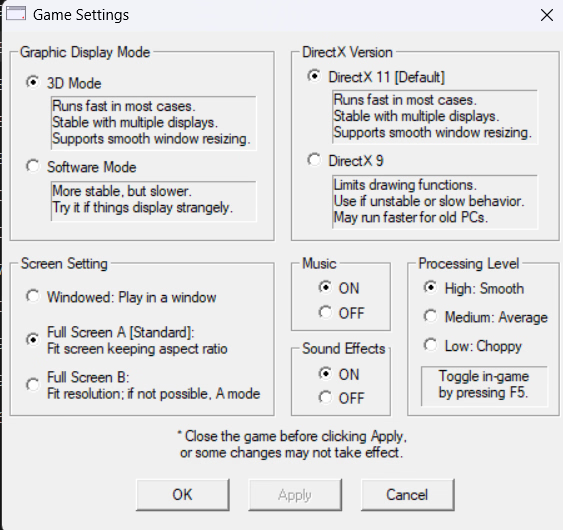
Unpack into game folder (replace? yes!). Run Config.exe and set Display Mode to 3D.
Then F11 will become fullscreen toggler, not crash anymore, and moreover the game gets centered (I had it awkwardly on the left side). F4 will then no longer have a function, or at least none I could perceive.
--------------------------
--------------------------
also, if someone would like to reduce savescumming on entering dungeon because some BGM is not nice for long runs:
You don't have permission to view the spoiler content.
Log in or register now.
Last edited:
OneUglySunuvabitch
Member
- Jul 21, 2021
- 160
- 93
- 154
Gotcha, fullscreen works as intended with the F11 key now, thanks a lot for the help. Might use the bgm replacer method you mentioned before, as I do the same for both MGQ and MGQP after all (though not all of its bgm is changed, as a good deal are actually just fine as-is, especially the "counterattack" theme (only see this now, had the same problem.
yes, it is borked.
To fix, download this (from first post, 2nd post is not an update but sth. different alltogether)
https://f95zone.to/threads/update-your-wolf-rpg-games-to-v2-24z-unlocks-display-resolution.59117/
Unpack into game folder (replace? yes!). Run Config.exe and set Display Mode to 3D.
Then F11 will become fullscreen toggler, not crash anymore, and moreover the game gets centered (I had it awkwardly on the left side). F4 will then no longer have a function, or at least none I could perceive.
View attachment 5491029
--------------------------
--------------------------
also, if someone would like to reduce savescumming on entering dungeon because some BGM is not nice for long runs:
You don't have permission to view the spoiler content. Log in or register now.
You must be registered to see the links
) that plays during a certain part in the Original MGQ Trilogy that I won't spoil~ X3