

Experiments with AI image to video generation
- Thread starter broho1234
- Start date
Hi,How are these ai videos done? I had the program but didn’t understand how to use it and took way too long to download the models…
Please watch the Youtube video linked in the first post:
You must be registered to see the links
Then go here:
You must be registered to see the links
to download the files needed. Also there are more instructions there on how to use the model.
You need to have an (NVidia ?) GPU with 6GB of memory or more.
Also the files needed take tens of GB of disk space so it's good to have a fast Internet connection.
Best of luck and please post them here if you get good videos.

Shadryl
Active Member
- Aug 20, 2025
- 626
- 1,986
- 194
Sadly, I had uninstalled comfyui and Git, it didn’t work out as it took entirely too long to download one of the models, and plus I don’t have an Nvidia GPU, I have AMD and it doesn’t work on that I heard? and only have 8GB of ram…I won’t be able to do this like you guys can.Hi,
Please watch the Youtube video linked in the first post:
You must be registered to see the links
Then go here:
You must be registered to see the links
to download the files needed. Also there are more instructions there on how to use the model.
You need to have an (NVidia ?) GPU with 6GB of memory or more.
Also the files needed take tens of GB of disk space so it's good to have a fast Internet connection.
Best of luck and please post them here if you get good videos.
beppecontatto
New Member
- Nov 5, 2019
- 11
- 2
- 130
Hi, I don't know anything about AI. I'd like to try the problem, but obviously I understand that without processing power you won't get anywhere.
I assume, as often happens, that nothing AI-related runs on a Mac.
I don't know, I'm writing this without any prior knowledge.
I have a Mac mini M2 with 8GB, so I assume it won't get you anywhere.
I'm not even clear how it works.
I read about Civitai, I think I even have an account. It's not clear what these various Lora, WAN, and FramePackStudio programs are.
Added to this is my poor knowledge of English.
At most, I can translate these posts if someone replies.
Thanks
I assume, as often happens, that nothing AI-related runs on a Mac.
I don't know, I'm writing this without any prior knowledge.
I have a Mac mini M2 with 8GB, so I assume it won't get you anywhere.
I'm not even clear how it works.
I read about Civitai, I think I even have an account. It's not clear what these various Lora, WAN, and FramePackStudio programs are.
Added to this is my poor knowledge of English.
At most, I can translate these posts if someone replies.
Thanks
beppecontatto
New Member
- Nov 5, 2019
- 11
- 2
- 130
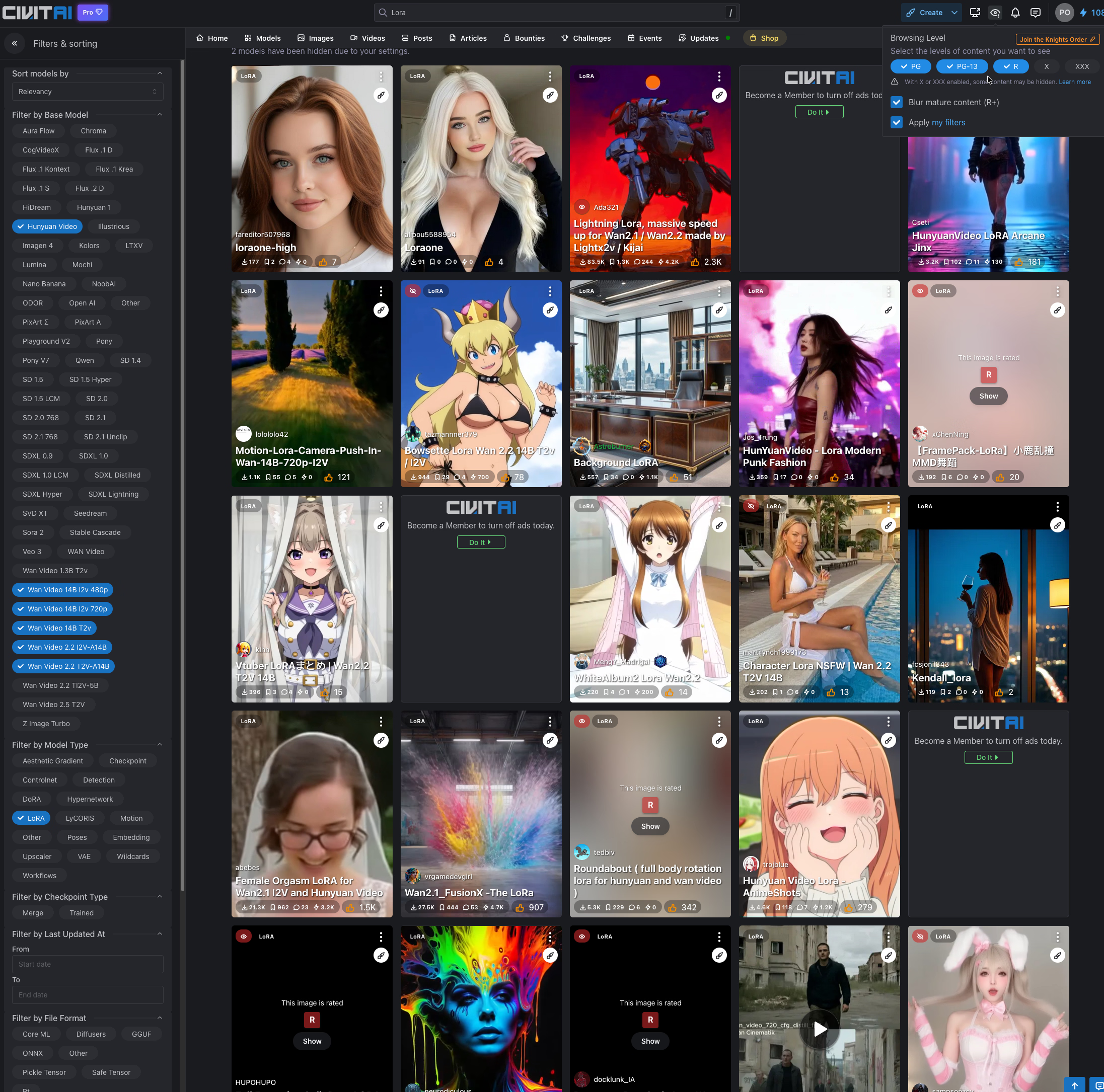
I signed up, but I didn't find anything like what you posted. I typed Lora and used the other search filter, but that type of content doesn't appear.The easiest way to get LORAs is from the Civitai site.
It is important to log in to the site. No registration is necessary, just google/discord or other accunt.
Feel free to do it with any , it is safe.
Then in the search box above, type LORA.
On the page that appears, in the left hand side bar, type in what you are looking for lora. In the example, I put Hunyuan Video in the box and found 100.
Clicking on any one of them will bring up its data page, and there you click on the download button.
In FramePack Studio, you find the ...model/lora directory and copy what you downloaded into it, then launch the program.
It is important to restart the program when it is running, otherwise you will not see what you have copied.
Afterwards you can choose which lora you want to use in the appropriate drop down menu.If I remember correctly, the default value is 1.
It's worth using only one LORA at first and experimenting with the 0.5 - 1 strength.
by the way, be sure to read the advice on the LORAs datasheet, there is a lot of help there, for example using the right keywords (bL0wj0b) or similar.
View attachment 4928589
(The example shown by JAI_INVESTIGATOR was done with ComfyUI, but I don't want to belch into it)
Maybe I'm not clear on how the filters work in the settings.
HI!Sadly, I had uninstalled comfyui and Git, it didn’t work out as it took entirely too long to download one of the models, and plus I don’t have an Nvidia GPU, I have AMD and it doesn’t work on that I heard? and only have 8GB of ram…I won’t be able to do this like you guys can.
There is a portable version of GomfyUI for AMD cards.
You must be registered to see the links
I don't know how useful it is, as I've been using nvivia gpu for a long time.
There is a manual installation guide further down.
8 GB of VRAM is indeed very little for AI, but there are quantized models (GGUF) that you can use with some compromises.
For 8 GB of VRAM, look for the Q3_K or Q4_K models.
e.g.
You must be registered to see the links
You must be registered to see the links
HI!Hi, I don't know anything about AI. I'd like to try the problem, but obviously I understand that without processing power you won't get anywhere.
I assume, as often happens, that nothing AI-related runs on a Mac.
I don't know, I'm writing this without any prior knowledge.
I have a Mac mini M2 with 8GB, so I assume it won't get you anywhere.
I'm not even clear how it works.
I read about Civitai, I think I even have an account. It's not clear what these various Lora, WAN, and FramePackStudio programs are.
Added to this is my poor knowledge of English.
At most, I can translate these posts if someone replies.
Thanks
The same applies to MAC as I wrote for AMD.
There is also MAC support at the link above.
But it's there.I signed up, but I didn't find anything like what you posted. I typed Lora and used the other search filter, but that type of content doesn't appear.
Maybe I'm not clear on how the filters work in the settings.

Once you've logged in, type LORA into the top search bar.
On the home page, click on the LORA article in the search bar on the left and enter what you're looking for in LORA. For example, if it's a video: Wan video 14b i2v 480p.
There is another solution that I think is more effective. After logging in, click on the VIDEO article, where you will see videos created by others. Click on one, and in the window that appears, you will see how it was made on the right-hand side. (model, LORA, prompt, etc.) Click on the desired LORA here, and it will take you to the creations made with it. It is very important to know that many creators do not publish all the information or lie about the prompt. You have to be selective.
Regarding Civitai, I think you need to set your profile to view NFSW content, because I remember it being disabled by default.
Best regards
beppecontatto
New Member
- Nov 5, 2019
- 11
- 2
- 130
HI!
There is a portable version of GomfyUI for AMD cards.
You must be registered to see the links
I don't know how useful it is, as I've been using nvivia gpu for a long time.
There is a manual installation guide further down.
8 GB of VRAM is indeed very little for AI, but there are quantized models (GGUF) that you can use with some compromises.
For 8 GB of VRAM, look for the Q3_K or Q4_K models.
e.g.You must be registered to see the linksYou must be registered to see the links
HI!
The same applies to MAC as I wrote for AMD.
There is also MAC support at the link above.
But it's there.
Once you've logged in, type LORA into the top search bar.
On the home page, click on the LORA article in the search bar on the left and enter what you're looking for in LORA. For example, if it's a video: Wan video 14b i2v 480p.
There is another solution that I think is more effective. After logging in, click on the VIDEO article, where you will see videos created by others. Click on one, and in the window that appears, you will see how it was made on the right-hand side. (model, LORA, prompt, etc.) Click on the desired LORA here, and it will take you to the creations made with it. It is very important to know that many creators do not publish all the information or lie about the prompt. You have to be selective.
Regarding Civitai, I think you need to set your profile to view NFSW content, because I remember it being disabled by default.
Best regards
Hi, thank you for your patience.
That said.
After watching it all, I understand that it's beyond my capabilities, due to my limited language skills and the minimal capabilities of my computer, I don't know how much sense it makes.
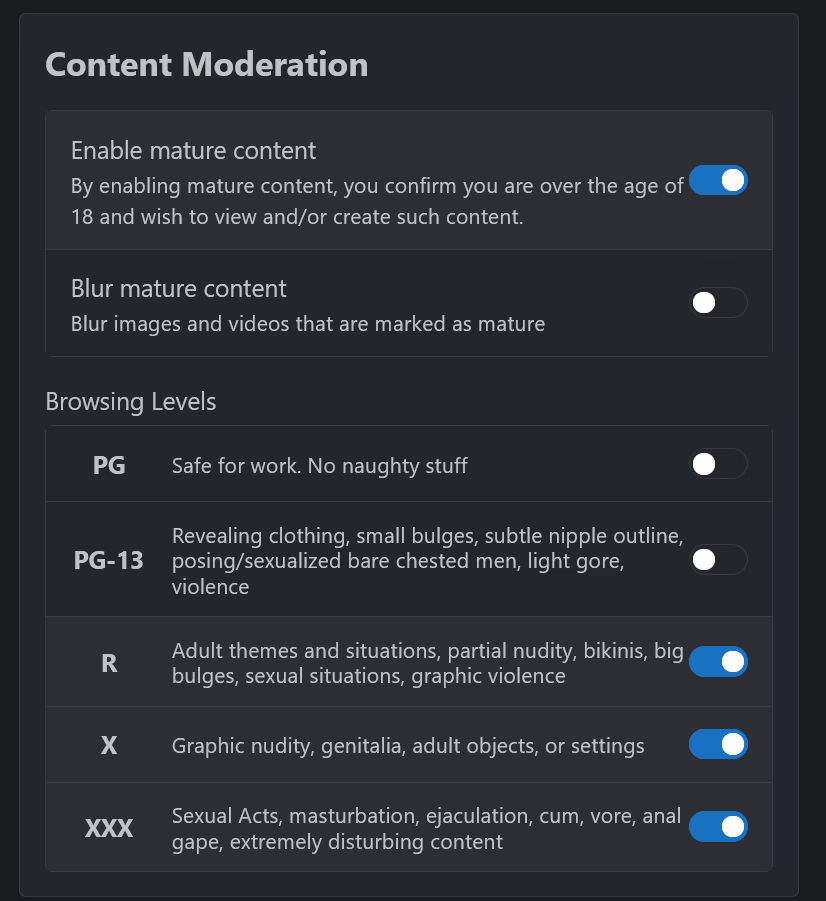
Regarding Civitai, I don't want to be pushy, but I did as you said and didn't check for explicit NSWF content.
I'll show you the screen with the visible filters
Yes, you can configure these settings in the account settings menu.Hi, thank you for your patience.
That said.
After watching it all, I understand that it's beyond my capabilities, due to my limited language skills and the minimal capabilities of my computer, I don't know how much sense it makes.
Regarding Civitai, I don't want to be pushy, but I did as you said and didn't check for explicit NSWF content.
I'll show you the screen with the visible filters View attachment 5566419
beppecontatto
New Member
- Nov 5, 2019
- 11
- 2
- 130
I think I had perceived the switches working the other way around.Yes, you can configure these settings in the account settings menu.
View attachment 5566627
I thought I wouldn't have to move them by enabling only the first one in the macro area.
thk

Laetits
Newbie
- Sep 17, 2021
- 28
- 46
- 189
I have a mini pc, so no comfyui available...
Just a test on Wan2.6, it's a 5 seconds 780p with no sound but you can do the same in 10 seconds and 1080p (reference image done with seedream 4.5) :
View attachment f33e52cd-aad8-41f2-9d37-03c317a741c6 (1).mp4
Just a test on Wan2.6, it's a 5 seconds 780p with no sound but you can do the same in 10 seconds and 1080p (reference image done with seedream 4.5) :
View attachment f33e52cd-aad8-41f2-9d37-03c317a741c6 (1).mp4
beppecontatto
New Member
- Nov 5, 2019
- 11
- 2
- 130
I use a Mac Mini M2, so I don't know what I could do. Besides the fact that I need a guide, something that starts from the beginning, I'm not clear about the steps.I have a mini pc, so no comfyui available...
Just a test on Wan2.6, it's a 5 seconds 780p with no sound but you can do the same in 10 seconds and 1080p (reference image done with seedream 4.5) :
View attachment 5595909
The concept of models isn't clear to me.
There are things I don't understand. I'm trying to read and understand, but there's too much information, and obviously my lack of knowledge of the language isn't helping.
I'm trying to understand what all those calls mean in this image.
The one shown has a lot of information about the setup; others have much less.
I understand that basically I download something to my machine and then I have to interact with the program that processes the request.
The only thing that's clear is the prompt, up until that point.
I'm lost as to the tools (there are 3) and techniques used.
Tools >
You must be registered to see the links
> ?
You must be registered to see the links
> ?
You must be registered to see the links
> ?Techniques
- txt2img > ?
- img2vid > ?
Resources used
-
You must be registered to see the links
Checkpoint
You must be registered to see the links -
You must be registered to see the links
LoRA
You must be registered to see the links -
You must be registered to see the links
LoRA
Laetits
Newbie
- Sep 17, 2021
- 28
- 46
- 189
No Nvidia graphic card on Mac Mini M2, so you can't generate anything locally. You will have to use an online plateform.I use a Mac Mini M2, so I don't know what I could do.