AI Porn is here, Create and Fap TRY FREE
x

Tool Ren'Py Extended Variable Viewer 3.01.02 - For walkthrough authors, game authors and modders

5.00 star(s) 6 Votes

FaceCrap

Ghost of torrents passed
Donor
Oct 1, 2020
1,614
1,128
327
But there's something wrong with the game. I don't know why, but it's really slow to save and, more important, fucking slow when it rollback, to the point that two rollback in a row totally freeze the game.
I had the same experience. Although the freeze also seemed to happen with saving. I don't know how long it took for you, but one time I've let it sit for about 10 minutes without it becoming responsive.
But, like I said, when I played it without the tool, this didn't happen, at least for me.

Hmmm... I also always force Angle/Angle2... got an old GFX card and some renpy versions seem to have a problem with it if I don't switch render engine. Those vertical panning images sometimes tend to get chunked, and some part show like it's wrapped, causing misalignments. Totally forgot about that, maybe this could also be a factor.
 
Last edited:

anne O'nymous

I'm not grumpy, I'm just coded that way.
Modder
Donor
Respected User
Jun 10, 2017
12,999
21,695
1,026
But, like I said, when I played it without the tool, this didn't happen, at least for me.
I don't doubt about this, if it was native to the game, everyone would be bashing it and its dev.

But I really don't understand why it happen. As I said, over a dozen of other Ren'Py 7.3.5.606 games (because I goes as far as to keep the same build in case a silent bug fix happened) it's the only one to react that way.
I checked the source for Ren'Py itself, all the files have the same MD5 hash than the files from 7.3.5 SDK.
I deleted all the pyo, rpyc and rpymc files for the core, in case the dev did a trick (a legit source file, and a modified compiled one).
I even put all the game files in place of another game, so with core files I witnessed working perfectly.
And still the same problem whatever I tried :/

Nothing in the configuration seem to justify this. The code is weird, but not to this point. And there's near to no variables (less than 200, against near to 1,000 for one of the test game).

I'll still continue to search what can be the cause, but for now I'll focus on the save security net since it need a quick update of the mod.
 

FangYuann

Member
Apr 20, 2019
110
160
186
Hey there brother/sister anne O'nymous, I've been having some problems with variables showing in this new version, 3.00.04 stopped working at all in a lot of games for some reason, so I got this new 3.01, it opens, but it simply seems not able to detect every variable that exists.

You don't have permission to view the spoiler content. Log in or register now.

After all that, let me just say I absolutely love this tool, been using it since the old version 2.x, quite a while now, and it's been one of the most useful thing's I've downloaded since I mess around a lot with ren'py games, would really appreciate a fix for this if possible.
 
  • Like
Reactions: anne O'nymous

anne O'nymous

I'm not grumpy, I'm just coded that way.
Modder
Donor
Respected User
Jun 10, 2017
12,999
21,695
1,026
[...] I got this new 3.01, it opens, but it simply seems not able to detect every variable that exists.
Yeah, it's a known issue and already fixed; some custom object were unnoticed.

I wanted to solve the slowdown issue mentioned by FaceCrap before releasing an update, but I'll give up. The game is totally weird and I absolutely don't understand what cause this. So, normally I should upload a 3.01.01 tomorrow. At most Sunday if I found a last minute issue while compiling all this to be Python 2.7, 3.9 and 3.12 compatible.


After all that, let me just say I absolutely love this tool, [...]
Thanks, and happy that you find it useful.


[...] would really appreciate a fix for this if possible.
I'll not say that everything is possible, especially not after having named one impossible thing in the same post, but all bug report are processed, and so far all have been fixed. The slowdown I talk about above being more an issue with the game than with my tool.
 
  • Heart
Reactions: FangYuann

anne O'nymous

I'm not grumpy, I'm just coded that way.
Modder
Donor
Respected User
Jun 10, 2017
12,999
21,695
1,026
And it's done, the update is now available.

Normally now you should never ever be facing a situation where you can't save your progression. Whatever the dev did, whatever the tools wrongly catch as being data, it should be possible to save. Better, the tool data should also be included in the save.
I say "normally", because it's hard to test since the tool already filter 99,99% of the bogus data. So, the few case where it was still happening are pure unknown exception. And, well, it happen that testing what you don't know as being a possibility is really hard ;)

I also fixed the most annoying issue, pointed by FangYuann, but that I also noticed a bit earlier. At some point in the 8.x branch, Ren'Py made a small change, that conflicted with a small change I did in the tool, resulting in some custom made objects not being caught by the viewer. The bug was only present in the 3.01.00 version.

Side note, this is the version 3.01.02. The 3.01.01 was the one ready to be released when I discovered the "not caught" bug, and I stupidly increased the version number...

As always, don't hesitate to report any bug or weird behavior that you'll notice. Especially is you notice slowdown.
Ren'py is growing significantly with its latest versions, adding data that are not significant for this tool, but that he can possibly have to process. I try to filter them early, in order for them to not impact the speed, but I'm just human, so I can sometimes miss something.


You don't have permission to view the spoiler content. Log in or register now.
 

phideaux

New Member
May 31, 2019
7
0
175
I now have a lot of games that use RenPy 8.x. 3.00.04. crashes on many but for some (not all) the AONstyles() trick works. I now discovered your new version 3.01.02. The problem is it never starts, that is to say when I do load at after starting the game I normally see the AONvve welcome screen. Now that never appears and Alt+U doesn't bring up the view. I tried replacing 3.00.04 in a 7.x game with 3.01.02 (3.00.04 works fine) but same problem - no welcome screen can't bring up viewer. Any thoughts on what I am should do fifferent.
 

anne O'nymous

I'm not grumpy, I'm just coded that way.
Modder
Donor
Respected User
Jun 10, 2017
12,999
21,695
1,026
The problem is it never starts, [...]
Hmm...

Do you have a file named "AONlogFile.txt", in the game base directory (where they NAME_OF_THE_GAME.exe or NAME_OF_THE_GAME.py files are)?
 

phideaux

New Member
May 31, 2019
7
0
175
No - I've checked 3 v8.x games and there's no log file. The AONPackages directory & AON.rpy file for 3.01.02 are present in the games older. It doesn't apprear to ba a visible crash, it just doesn't start. Is there away to force a log to be written during startup?
 

anne O'nymous

I'm not grumpy, I'm just coded that way.
Modder
Donor
Respected User
Jun 10, 2017
12,999
21,695
1,026
No - I've checked 3 v8.x games and there's no log file.
What mean that the tool isn't even loaded.
By default any error would be logged, so if the tool was loaded, you would either see the starting menu, or the AONlogfile.txt file, with inside the error that happened.

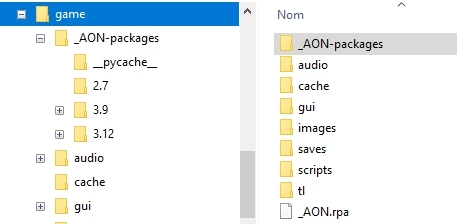
Does the game directory looks like this:
AONvve - game.jpg
The "__pycache__" is optional; it's automatically created by Python 3.x when it compile a .py file.
And the 3.9/3.12 directory don't have a sub directory (the screenshot is with a WIP version).
 

phideaux

New Member
May 31, 2019
7
0
175
Yes that is the layout. I noticed the subdirs under packages were new with 3.01.02. I un-zipped the download and did a merge at the game directory level and that results in excatly that file layout
 

anne O'nymous

I'm not grumpy, I'm just coded that way.
Modder
Donor
Respected User
Jun 10, 2017
12,999
21,695
1,026
Yes that is the layout. I noticed the subdirs under packages were new with 3.01.02. I un-zipped the download and did a merge at the game directory level and that results in excatly that file layout
Hmm... And there's files inside, right?

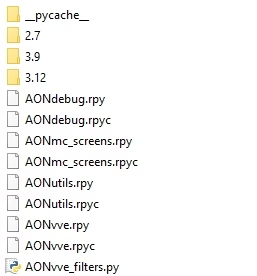
Those in the AON-packages or _AON-packages directory:
AONvve - main.jpg
Including the "rpyc" files and the "__pycache__" directory.

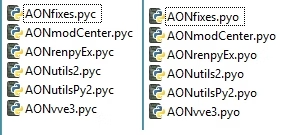
And either the list on the left (3.9 and 3.12), or the list on the right (2.7) on the sub directories:
AONvve - sub.jpg
 

anne O'nymous

I'm not grumpy, I'm just coded that way.
Modder
Donor
Respected User
Jun 10, 2017
12,999
21,695
1,026
see attached
Okay, there's no rpyc files. So I confirm that the mod isn't used at all, not even seen by Ren'Py.

You're sure that you put it in the directory named "game"?
The one were there's the "rpa" and/or rpy/rpyc files, and where the "saves" directory will be located?
 

phideaux

New Member
May 31, 2019
7
0
175
This is the game The Perfect Town (but others I have are the same) It was built with RenPy 8.0.3 by the developer.

I have attached the expanded directory structure after the game has been run with AONvve in place. Note this is on macos 15 which generally the RenPy engine doesn't care about. I often rebuild games that were distributed with only a PC build to make a mac version and they work fine.

Since you also have a bunch of .pyc files I wonder if the RenPy SDK is using a different version of Python 3 so that your code doens't execute. I'm not a python person so that is just speculation on my part. Again note that 3.00.04 works on 7.xx built games and will also startup (but crash) on 8.xx build games.

I would be happy to include any instrumentation files to see if we can get a startup trace.

Thanks for looking in to this.
 

anne O'nymous

I'm not grumpy, I'm just coded that way.
Modder
Donor
Respected User
Jun 10, 2017
12,999
21,695
1,026
This is the game The Perfect Town (but others I have are the same) It was built with RenPy 8.0.3 by the developer.
Hmm...

Just tried with the last update, and it works fine on PC:
hmmm.jpg


I have attached the expanded directory structure after the game has been run with AONvve in place.
Everything looks correct. All the files are there, and in the right place.


Since you also have a bunch of .pyc files I wonder if the RenPy SDK is using a different version of Python 3 so that your code doens't execute.
Even if it was the case, it wouldn't prevent Ren'Py to compile the "rpy" files. So you would have "AONmc_screens.rpyc", "AONutils.rpyc" and "AONvve.rpyc". It wouldn't also prevent Python to compile "AONvve_filters.py", so you would have a "__pycache__" folder in "AON-packages". And you would get an error telling you that Ren'Py can't find the module "AONutils", or "AONvve", I don't remember which one load first.

It's also not a question of path (since normally Ren'Py wouldn't search Python modules in the "AON-packages" directory), because here again you would have the "rpyc" files and the error telling you that it can't find the module.


What happen to you is that Ren'Py totally fail to see its own files, or if it see them, it refuse to process them.

You said that you encounter this with at least 3 8.x games, are they all 8.0.3?
Also, try to move the three "rpy" files directly in the "game" directory, with the "script.rpy"/"script.rpyc" files, to see if it change something. Since the game works, we know for sure that Ren'Py see the files there.
 

anne O'nymous

I'm not grumpy, I'm just coded that way.
Modder
Donor
Respected User
Jun 10, 2017
12,999
21,695
1,026
phideaux, have you checked the files/folders permissions?
See if they mach the permissions of the files that have "rpyc" file (for example gui.rpy).
Oh, yeah, could also be the problem here.

And also checking the "AON_packages" permission.
 

anne O'nymous

I'm not grumpy, I'm just coded that way.
Modder
Donor
Respected User
Jun 10, 2017
12,999
21,695
1,026
All the files in AON-packages have read+write for my userid which matches the .rpy files in the main game folder
And the directory itself?

Plus, does it works if you move the rpy files directly into the "game" directory?
 

kionaru

Newbie
Nov 14, 2018
33
8
211
Overview:
This tools extend the debug capabilities of Ren'py by providing a better supervising of the variables. This include list filtering, change notification, objects inspection, search and export capabilities.
Just press ALT + U (default) in game to open the extended variable viewer screen.
Note: for those using the old 2.05.01 version, you need to use ALT + E to open it.

Updated: 15 November 2025
Author: anne O'nymous
Tool Version: 2.05.01 / 3.01.02
Ren'py Version:
2.05.01 - Between 6.17.0 and 7.3.5​
3.x - from 6.99.11 to any 7.x and 8.x​
Language: English

Features :
You don't have permission to view the spoiler content. Log in or register now.


Installation :
You don't have permission to view the spoiler content. Log in or register now.


Uninstall :
You don't have permission to view the spoiler content. Log in or register now.


Change log :
You don't have permission to view the spoiler content. Log in or register now.


Limitations and known issue(s) :
You don't have permission to view the spoiler content. Log in or register now.


Final Notes :
You don't have permission to view the spoiler content. Log in or register now.

Thanks to :
  • @mirenzo for his idea of change tracking.
  • @paradj07 for the idea of the export capabilities.


Note that this thread is for discussions about the tool. If your question/comment address Ren'Py, the default variable viewer or the console, please wrote it directly in the right thread ; or create one.


All the screenshots are took with the game Pact with a witch, except for one that was took with the game Shattered.
View attachment 1701816 View attachment 1701817 View attachment 1701818 View attachment 1701819 View attachment 1701820 View attachment 1701821 View attachment 1701822 View attachment 1701823 View attachment 1701824 View attachment 1701825 View attachment 1701826 View attachment 1701827 View attachment 1701828 View attachment 1701829

If you found this useful, consider giving a like as thanks and/or encouragement to do more.
can you help me? this for windows. the game im using is my pleasure elite 0.39 elite version and use aon v3.01.02 place in the game folder, but when i try the AONvve_3.01.00 work
 
5.00 star(s) 6 Votes