


Europefan69
Member
- Aug 20, 2020
- 179
- 222
- 233
Sorry for the wait but as others have stated above, the devs are making it harder with each update to cheat but also I'm losing motivation to continue modding this game since 1) I barely play it and 2) I don't actively mod games anymore. While I want to release a finished product, I feel the mod is at least in a useable state so I will now be going over what is new (and missing) in the test build of Fap Nights Cheats Menu v3.
First regarding 0.3.0 story mode, I have decided at the moment that I will not release updates for any early Patreon builds until they are released on itch.io. This means the current test build will only be compatible with v0.2.8XXX♥ from itch.io (Yes if you have any build from Patreon even with the same exact name it will probably not work).
New UI:

I have decided to retire from using BepInEx, it has become too limiting and harder to maintain. I am now able to use ImGui to render the menu which should feel more similar to the old menu since a majority of people have voted for this in the poll. You can still use the number keys to toggle cheats on and off if you still prefer that method.
Like i said the menu isn't fully completed and I'll try to improve the UI. These are the cheats not fully implemented correctly:
-No Clip: currently only disables gravity and allows you to move up with left shift and down with left ctrl. Will not disable collisions
-Money: currently doesn't actually edit your save data and instead edits a "Fake Money" value which is added up with your save data for the game to use and display. you can buy things with this Fake Money however playing without the mod will cause your money to go negative since it will return to its real value
-Slut Token: does currently edit your save data however whatever value you put in will then be added to your tokens only when you spin the slots. for example if you set it to 1000 in the menu, when you spin you will gain 1000 - 10(cost of the spin)
Another thing I want to address is that a large majority of people have been mistakenly using the mod on versions that are not supported. I do not have the energy to reply to all of these so I'm exploring a way to have the mod notify you that the game version is incompatible when you launch it. This isn't implemented yet but hopefully that will stop any confusion in the future.
Here is the download for the test build:
First regarding 0.3.0 story mode, I have decided at the moment that I will not release updates for any early Patreon builds until they are released on itch.io. This means the current test build will only be compatible with v0.2.8XXX♥ from itch.io (Yes if you have any build from Patreon even with the same exact name it will probably not work).
New UI:
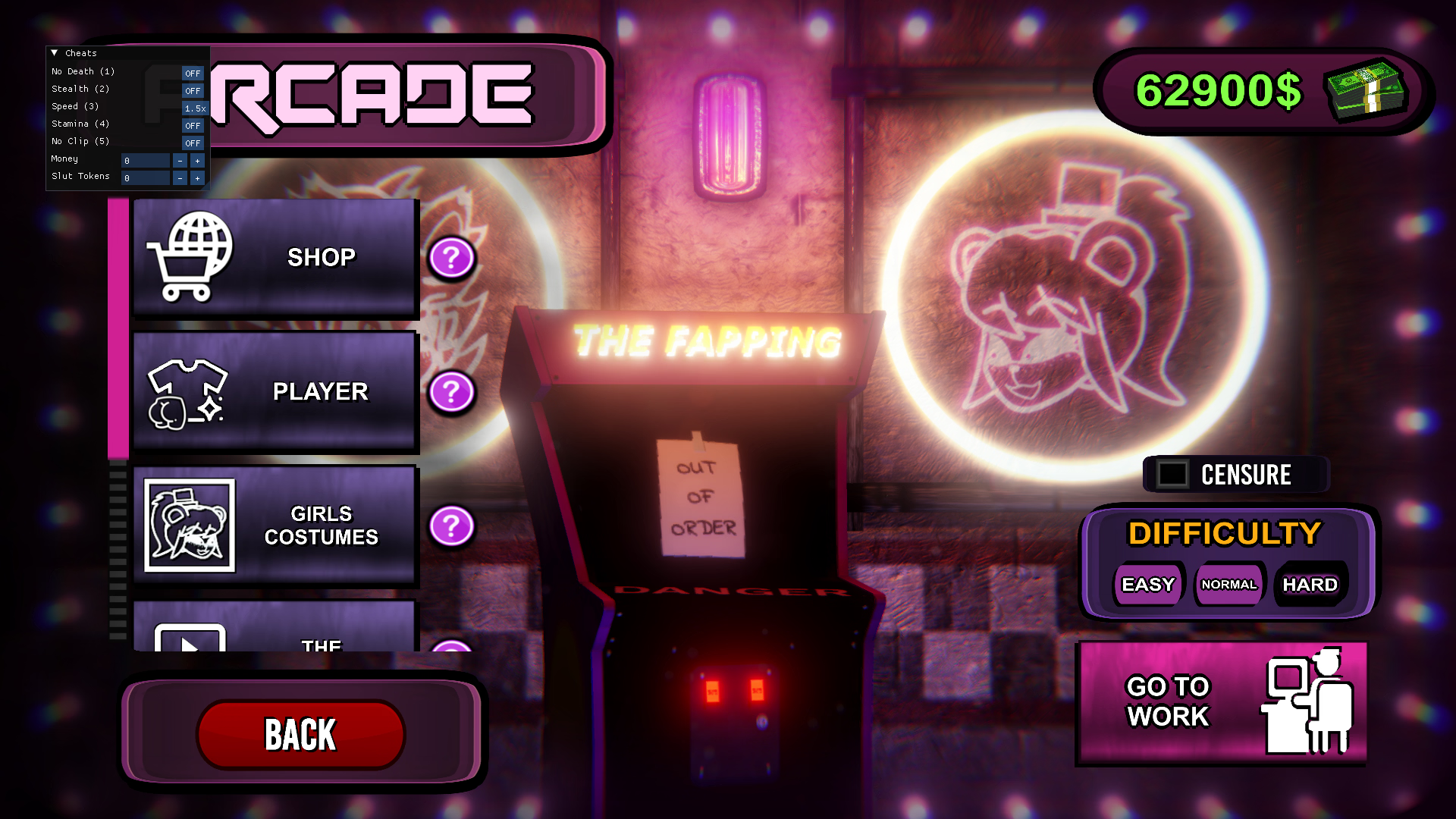
I have decided to retire from using BepInEx, it has become too limiting and harder to maintain. I am now able to use ImGui to render the menu which should feel more similar to the old menu since a majority of people have voted for this in the poll. You can still use the number keys to toggle cheats on and off if you still prefer that method.
Like i said the menu isn't fully completed and I'll try to improve the UI. These are the cheats not fully implemented correctly:
-No Clip: currently only disables gravity and allows you to move up with left shift and down with left ctrl. Will not disable collisions
-Money: currently doesn't actually edit your save data and instead edits a "Fake Money" value which is added up with your save data for the game to use and display. you can buy things with this Fake Money however playing without the mod will cause your money to go negative since it will return to its real value
-Slut Token: does currently edit your save data however whatever value you put in will then be added to your tokens only when you spin the slots. for example if you set it to 1000 in the menu, when you spin you will gain 1000 - 10(cost of the spin)
Another thing I want to address is that a large majority of people have been mistakenly using the mod on versions that are not supported. I do not have the energy to reply to all of these so I'm exploring a way to have the mod notify you that the game version is incompatible when you launch it. This isn't implemented yet but hopefully that will stop any confusion in the future.
Here is the download for the test build:
You must be registered to see the links
(v0.2.8XXX♥ ONLY). installation is the same however there will only be 3 files you will need to put directly into the game folder. if any issues come up let me know and to anyone else still on holiday vacation enjoy your time off
Last edited:
