
RPGM Fix RPGM Game-Code

May 16, 2019
92
19
115
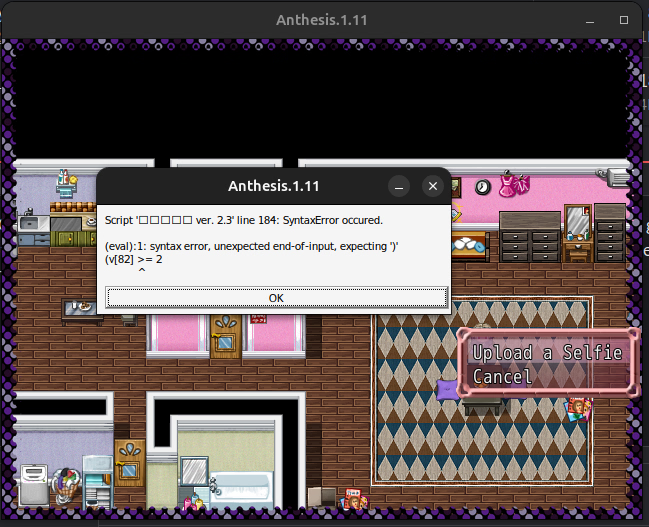
I often encounter issues on RPGM Games like "Script X in line Y Syntax Error, expected )" or similiar. I know changing the game code can be dangerous for me, to break the game and for others if I implement viruses, but is there a way for me to edit the code or fix those issues, I encountered them on Win10 but even more now on Ubuntu.

Example if from Anthesis, but I get this error in every other game to the point its probably a Linux error, but the message clearly states, there is an issue in the script file, which wine might not read correctly, so I think I have to change it.

Do anyone of you have experience with this issue or is there a good guide to change script files? Bildschirmfoto vom 2025-08-06 16-09-04.png
 

Winterfire

Conversation Conqueror
Respected User
Game Developer
Sep 27, 2018
6,523
9,365
800
why japanese isn't showing correctly? I feel like the errors you encounter is due to that. Japanese Locale is required, even for translated games (as they don't translate everything, only what you're going to see, that is dialogue).
 

RickSensei

Member
Jun 4, 2024
135
1,020
229
I often encounter issues on RPGM Games like "Script X in line Y Syntax Error, expected )" or similiar. I know changing the game code can be dangerous for me, to break the game and for others if I implement viruses, but is there a way for me to edit the code or fix those issues, I encountered them on Win10 but even more now on Ubuntu.

Example if from Anthesis, but I get this error in every other game to the point its probably a Linux error, but the message clearly states, there is an issue in the script file, which wine might not read correctly, so I think I have to change it.

Do anyone of you have experience with this issue or is there a good guide to change script files? View attachment 5117696
I haven't played Anthesis or any RPGM games on linux, but the error ur seeing, unexpected end-of-input, expecting ')' means that the code should usually be some thing like '(\v[82] >= 2)', there's an opening bracket, so it needs a closing bracket, so either it's missing a closing bracket, or it misinterpreted some other syntaxes somehow the compiler mistook '\' for an '('. It's hard to know without seeing the code
 
Last edited:
May 16, 2019
92
19
115
why japanese isn't showing correctly? I feel like the errors you encounter is due to that. Japanese Locale is required, even for translated games (as they don't translate everything, only what you're going to see, that is dialogue).
Thats the first thing I changed but it showed the exact same error, changed my entire pc to japanese (locale and language) after that I downloaded vss and failed and now I'm here
 
  • Like
Reactions: Winterfire

Winterfire

Conversation Conqueror
Respected User
Game Developer
Sep 27, 2018
6,523
9,365
800
Thats the first thing I changed but it showed the exact same error, changed my entire pc to japanese (locale and language) after that I downloaded vss and failed and now I'm here
Keep in mind that once you extract a game, and set the system to japanese, that won't fix the issue.
The game must be extracted with japanese locale, otherwise it'll be all messed up. At the very least the error doesn't show japanese as expected.
 
May 16, 2019
92
19
115
Keep in mind that once you extract a game, and set the system to japanese, that won't fix the issue.
The game must be extracted with japanese locale, otherwise it'll be all messed up. At the very least the error doesn't show japanese as expected.
I played around a bit and somethin weird happend now, so I changed the locale around and I have a package installed, which uses wine, so I just need to doubleclick on the exe and it works, but I got the error even with japanese local, now I used just the usual wine terminal command and no error anymore, for funsies I can redownload it with japanese locale and look what happens but apparently with wine it works even if its already unpacked