Game asks for Microsoft store app?

FelixBlume

New Member
Apr 14, 2025
3
0
10
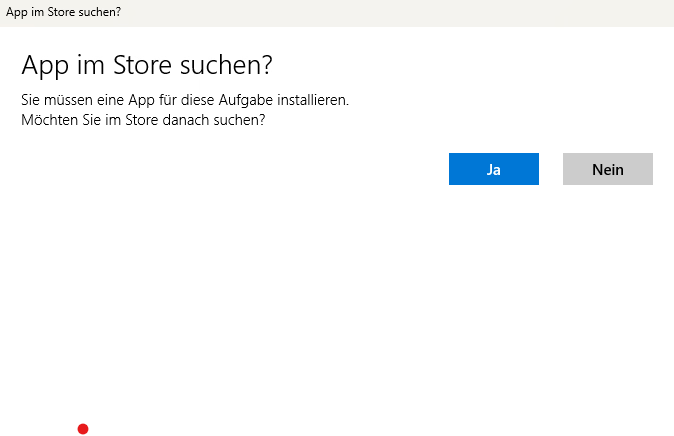
Hello i donwloaded several Games and with some of them i get a Pop up where it asks for a Microsoft store app and if i want to look the store for it, but nothing shows up. It's only with some Games idk why.
 

FelixBlume

New Member
Apr 14, 2025
3
0
10
...

and which of the 1000s of games linked on f95zone are the ones affected must remain a secret? same for the exact pop-up message? why?

yeah sry my bad.

For Example HerFavoriteSon i downloaded it to test it but it won't start. When i execute the .exe file this message pops up. 1752859454879.png
when i press Yes it open microsoft store with an empty page, when i press No nothing happens.
 

anne O'nymous

I'm not grumpy, I'm just coded that way.
Modder
Donor
Respected User
Jun 10, 2017
12,932
21,495
1,026
For Example HerFavoriteSon i downloaded it to test it but it won't start. When i execute the .exe file this message pops up.
Hmm?

It's a basic Ren'Py game, not even the last version. It have absolutely no reason to trigger this and it didn't when I tried it one minute ago.
I haven't looked at Ren'Py code itself, but the exe/dll are strictly the same than for the SDK, as well as the Python libraries.

Normally for the App store search dialbox to appear, it need that Windows think that something is missing. But everything is present in the archive. So, either you haven't extracted everything (more surely the Python interpreter) or the path to the game is weird and Windows think that the interpreter is missing because of this.
 

tekunikaru

Corporal Lurker
Donor
Aug 26, 2019
50
151
206
Have you solved it? If not:

Ensure the game is fully extracted before starting it: This include files and folders within the archive.

If you don't have any extraction software, Windows might try to open the archive with Explorer. This should work most of the time, but if it doesn't, Try using or other similar archiving software to extract the game.

I was unable to reproduce the issue on Windows Sandbox (Windows 11).
 
Last edited:

FelixBlume

New Member
Apr 14, 2025
3
0
10
Have you solved it? If not:

Ensure the game is fully extracted before starting it: This include files and folders within the archive.

If you don't have any extraction software, Windows might try to open the archive with Explorer. This should work most of the time, but if it doesn't, Try using or other similar archiving software to extract the game.

I was unable to reproduce the issue on Windows Sandbox (Windows 11).

I didn't solve it yet, and i fully Extracted them its not even with all games just some games