Others Unity [Help] HS2 BetterRepack R16 – RTX 2060 12GB + i5-14400F only 20–30 FPS, huge drops with multiple characters

Huynhnguyen

New Member
Dec 10, 2021
9
1
13
Hi everyone,


I’m having performance issues with Honey Select 2 BetterRepack R16.


My specs:


  • CPU: Intel i5-14400F
  • GPU: RTX 2060 12GB (latest NVIDIA drivers)
  • RAM: 32GB
  • SSD NVMe Gen4
  • Windows 10

The issue:


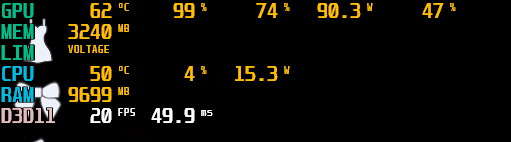
  • Even on Low settings, the game only runs at ~20–30 FPS.
  • Switching between Low and High changes FPS by only 2–3.
  • Loading multiple characters in Studio drops FPS to 2–3.
  • GPU usage is 99%, while CPU usage stays around 15–20%.

For comparison:


  • GTA V runs smooth 60 FPS (V-Sync).
  • RDR2 on Balanced runs 40–50 FPS.

So the PC is fine. Is this just how HS2/Illusion engine works (poor multithreading)? Are there any mods or fixes to improve FPS in Studio with multiple characters?


Thanks in advance!


1756629799307.png
 

Winterfire

Conversation Conqueror
Respected User
Game Developer
Sep 27, 2018
6,523
9,366
800
How many characters are we talking about, and at what screen resolution?
 
  • Heart
Reactions: Huynhnguyen

Huynhnguyen

New Member
Dec 10, 2021
9
1
13
How many characters are we talking about, and at what screen resolution?
In my case it already drops badly with just 1–2 characters in Studio.
At 1080p resolution I only get ~20–30 FPS, and if I load more characters it can go down to single digits (2–3 FPS).
That’s why I was confused, since my PC should be strong enough.
 

Winterfire

Conversation Conqueror
Respected User
Game Developer
Sep 27, 2018
6,523
9,366
800
How complex is the scene you're putting them on? Have you tested with a completely blank scene, characters only? Including a test with no lights and just 1 single light.
 
  • Like
Reactions: Huynhnguyen

Huynhnguyen

New Member
Dec 10, 2021
9
1
13
How complex is the scene you're putting them on? Have you tested with a completely blank scene, characters only? Including a test with no lights and just 1 single light.
I tested with a completely blank scene.
With V-Sync on it locks at 60 FPS, with V-Sync off the FPS goes very high.
But as soon as I add just one character, it immediately drops down to around 30 FPS.
Adding or removing lights doesn’t seem to make any difference for me.
 

Winterfire

Conversation Conqueror
Respected User
Game Developer
Sep 27, 2018
6,523
9,366
800
V-Sync locks the FPS to your refresh rate, I'd keep it disabled if you're not playing with it.

Can you try naked characters to see if it makes any difference? Even if they were high poly with high res textures due to a mod, if that's just it, it shouldn't have a big effect. Try with completely naked characters, also, are you using a laptop or desktop? And are you running other things that may be affecting your GPU? With the game off, is your GPU being used?
 
  • Heart
Reactions: Huynhnguyen

Huynhnguyen

New Member
Dec 10, 2021
9
1
13
V-Sync locks the FPS to your refresh rate, I'd keep it disabled if you're not playing with it.

Can you try naked characters to see if it makes any difference? Even if they were high poly with high res textures due to a mod, if that's just it, it shouldn't have a big effect. Try with completely naked characters, also, are you using a laptop or desktop? And are you running other things that may be affecting your GPU? With the game off, is your GPU being used?
I tested both with and without clothes, and the FPS drop is the same – just adding one character makes it go down to ~30 FPS.
I also closed Discord, Steam, and other background apps, but it doesn’t change anything.
So it looks like the characters themselves (body/skin/hair rendering) are what’s causing the bottleneck.
 

Winterfire

Conversation Conqueror
Respected User
Game Developer
Sep 27, 2018
6,523
9,366
800
I tested both with and without clothes, and the FPS drop is the same – just adding one character makes it go down to ~30 FPS.
I also closed Discord, Steam, and other background apps, but it doesn’t change anything.
So it looks like the characters themselves (body/skin/hair rendering) are what’s causing the bottleneck.
Task Manager should tell you if your GPU is being used, are you using a laptop or desktop?
 
  • Like
Reactions: Huynhnguyen

Winterfire

Conversation Conqueror
Respected User
Game Developer
Sep 27, 2018
6,523
9,366
800
All right, based on what you've said, I looked up and found the following threads that have a similar issue as yours:


Based on the responses you can read yourself, it's probably due to graphics mod (or similar) which affects everything in the game. For comparison, it would be like using post processing mods on games, which can be quite heavy on your system.
So, depending on what you're using, try to turn it off and see if anything changes.

-Edit-
I am not talking about in-game post processing you could access from the game settings, but the post processing mods that have their own menu.
 
  • Heart
Reactions: Huynhnguyen