HTML HTML Twine + SugarCube game

MGDS

Member
Jan 31, 2024
217
122
121
Hello !

I've been wanting to start creating a video game for a long time. I don't have a lot of time (work and family life), but I think I'm quite adaptable. I don't program, but 20 years ago (already), I created websites, and today I use computer tools that produce XML files that I can modify manually.

I've also done a bit of game design (first in XML, then with an integrated 3D tool), which is why I initially focused on Ren'py and Daz3D.

But ultimately, I think it will be easier for me to do HTML + SugarCube.

I started a few days ago with Twine and am constantly struggling with either ChatGPT or Gemini! I've stolen a lot of ideas from similar games (Destroyer, Fresh Start, Family Ties, New Life Project) but I'm stuck on one specific point :
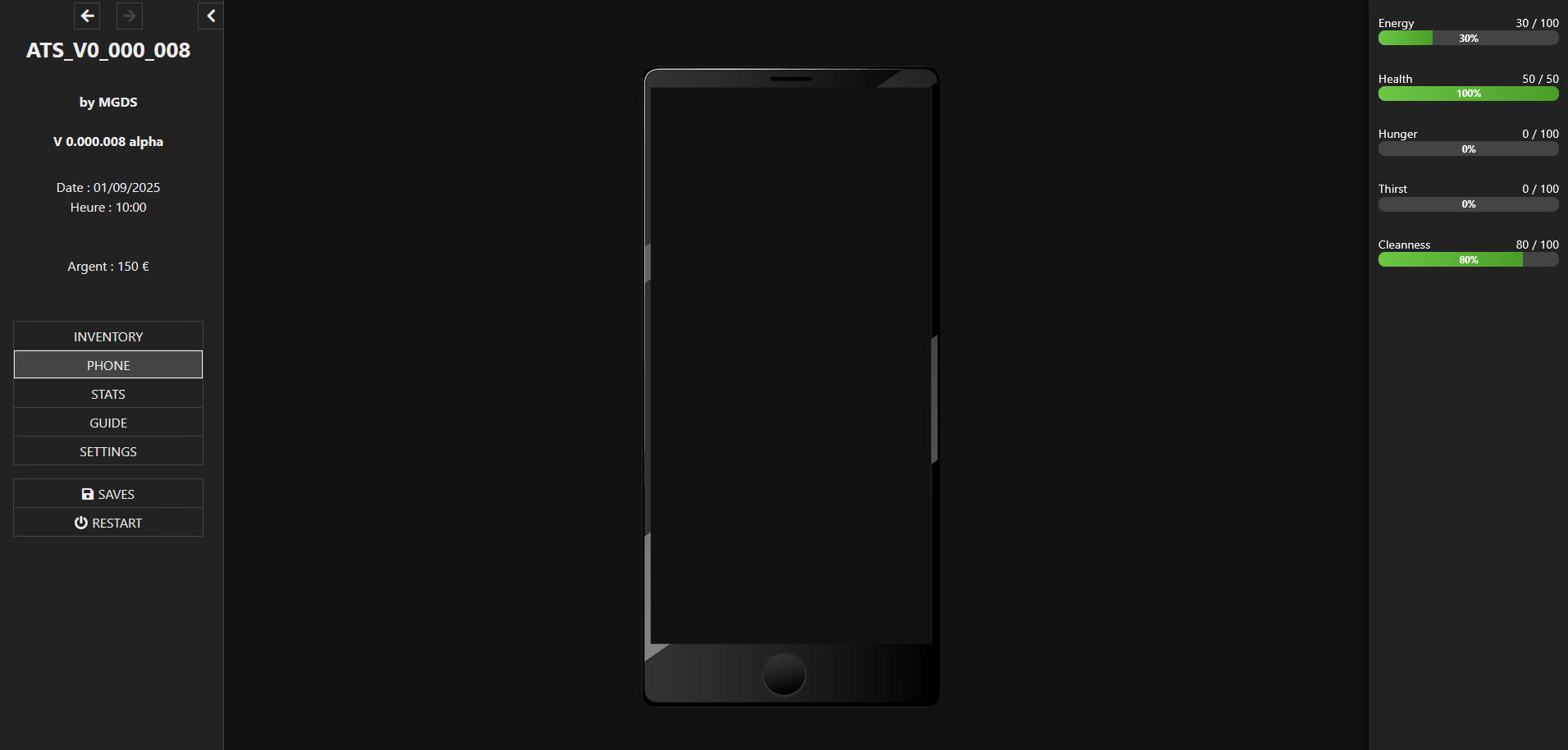
I have menus on the left and right. I have a "PHONE" passage in which I want a smartphone "frame". So far so good. I can't, despite the assistance of the 2 AI (And instructions that I think are clear like resizing images according to the screen size), I can't position a "content" correctly (for the moment it would be a wallpaper - even if ideally and eventually on this editable background, I would like to integrate app images).

That's what I asked to both AIs (but the background never fits perfectly) :

- In the PHONE section, a photo of a phone frame that can be resized to fit the window size but is still fully visible (original image size: 600 x 1288 px).
- In this frame, a transparent background is positioned 26 px from the left and 60 px from the top of the frame. The default background size is 548 x 1085 (it must also be resized to fit the window size and in the same proportions, of course).
- The whole image must be centered, taking into account the left and right menus.

1757165322553.png

Can someone help me ?
 

papel

Active Member
Game Developer
Sep 2, 2018
601
826
152
I don't program
(...)
I started a few days ago with Twine and am constantly struggling with either ChatGPT or Gemini!
Please don't tell me you're just asking AI to write code you don't understand until it magically "works". A couple of weeks ago someone was doing that and to sum it up: leaving AI to code for you when you don't understand a fucking thing will NOT work, not in the short term, less in mid term and never in the long term. Learn the language.

- In this frame, a transparent background is positioned 26 px from the left and 60 px from the top of the frame. The default background size is 548 x 1085 (it must also be resized to fit the window size and in the same proportions, of course).
For someone who did some web design, even if it was 20 years ago, I expected you to remember that you can change background color of HTML elements without using images. Try it yourself: right click anywhere on the page, select the "Inspect" option, then edit the element by adding style="background-color: #0555AA;". s

Anyway, you can center stuff by using either "margin: auto" (will center horizontally and vertically), "margin: 0 auto" (will only center horizontally) or percentages + translation on the style.
 

MGDS

Member
Jan 31, 2024
217
122
121
Well, thank you for the answer I guess ?

I don't let AI doing all the job. Yes it helps me to control my coding and find solutions when necessary. I did some HTML / CSS / PHP coding for a few months 20 years ago (Because I needed it and learned it - don't laugh - with "Creating your website for dummies" and and other enormous book -yes books- which I still own.) But the only courses I took were a few hours for my boss to make some minor updates and corrections then building my own professionnal (small business with a small showcase website). I finished high school in 1995 and never touched (other than Word) after that in my studies.

But I learned by myself XML structures for both professional and amateur game design later (and some 3D modeling for the same reason) It's not my main activity but I'm also the interface between developers and IT specialists and users in my last 3 jobs.

So yes, I admit I never really learned any languages (and when you already have a job + a family + you like playing games and if you add some other hobbies, you don't really have time to). But I do, slowly (even if I don't ever publish anything), I try, test, retry...


For someone who did some web design, even if it was 20 years ago, I expected you to remember that you can change background color of HTML elements without using images. Try it yourself: right click anywhere on the page, select the "Inspect" option, then edit the element by adding style="background-color: #0555AA;". s

Anyway, you can center stuff by using either "margin: auto" (will center horizontally and vertically), "margin: 0 auto" (will only center horizontally) or percentages + translation on the style.
I'm sorry if I didn't explained it well, I'm french and my english (I don't use any translator, only for some hard words) is not perfect.
First, in a passage I tried to use an PNG img with an empty phone frame and wanted to put inside the frame a changeable wallpaper img (and later apps buttons independently if possible). But when resizing the webbrowser, the two layers (the phone frame and the backgroud img) didn't match anymore. I understood that one of the problem came from the fact that I used a StoryRightSideBar which I have decided to delete for now.
To avoid the problem, I created a pop-up for the phone but I'm only at the beginning. So I won't have to worry about left or right margins.

Yes, I said backgroud but meant wallpaper for inside the phone frame.

Ah, by the way, I have two colleagues in the IT department of my current company, one more of a web designer, the other more oriented towards infrastructure and a bit of software development. Both of them very often use AI to help them. I understand that you must be fed up with amateur creators who jump completely into the void, but I assure you that, even if it takes time, I move forward step by step and will never claim to have the level of a professional or even an expert amateur.
 
Last edited:

osanaiko

Engaged Member
Modder
Jul 4, 2017
3,439
6,607
707
I think you already understand this, but what you are trying to do with the phone frame and adjustable background image is nothing to do with Twine/Sugarcube. It is a pure HTML/CSS layout question.

So, any questions you ask to the AI, setup your question prompt by describing the problem solely as a HTML/CSS question - AI will know nothing about twine and will not be helpful.

Side note: I don't condemn the use of AI, but as was mentioned above, in general I think it is not very useful unless you already understand the problem space. That is, it can save time for someone with experience already but it does not really help if you don't know the right questions to ask.


Regards how to solve the problem itself here is an approach (also, I am not a html expert but I do work in the industry so I have some understanding...)

There are two parts to the issue:

1. getting the images displayed in the correct relative positions

2. making it work even if the browser window is resized / different to the original size you envisioned.


Let's consider what you can do to simplify the problem, given that you are not an expert:

1. stop trying to support "responsive" design - decide on a target width for the phone component and stick to that. if the user has a computer screen which does not fit, then they will have to scroll vertically.

2. use the HTML and CSS the way they were intended, don't fight the browser.

3. HTML pages are made of nested blocks. I would try to solve this just in a standalone HTML page first, before trying to integrate it into your Twine project. You can make a solution that works, then transfer it to the same "space" (container div) as will be available in the twine project.

Lets first imageing a page like your Twine project: three columns, left and right are some existing UI, the centre is the main content. The phone will be in the main content section. We have a phone background image, then on the screen is a wallpaper image that will be adjustable, and then the phone UI on top of that.

Creating html is annoying, so now we understand better, we can come up with a way to get useful AI help. Try this prompt.

"Help me make a project which has a phone simulation in the middle column of a three column page. I need the HTML and CSS.
The page should take up the full browser window width. The columns are 20%, 60% and 20% of the available width. the two outer columns should have grey background color and the centre should be black.
In the center column, add a simulated phone. It will have a phone body image that is XXXX pix wide and YYYY tall. if the height is too much for the browser window, the user will scroll the window. Inside the phone body is the screen. I want the screen to have a wallpaper image that I can adjust dynamically in a later code change, so put it as an inline style attribute on the element. On top of the wallpaper will be the phone UI. Put two columns of three icons.
"

You will need to adjust the image paths, the size parameters of the phone body image and the wallpaper and the icons.
 

MGDS

Member
Jan 31, 2024
217
122
121
There are two parts to the issue:

1. getting the images displayed in the correct relative positions

2. making it work even if the browser window is resized / different to the original size you envisioned.

Well, that's the major issue I got and now I understand why almost every HTML/Twine game I played so far only have texts on their phone passage. Thanks for your answer !

I have "sizes issues" :ROFLMAO: because my screen resolution is 1920*1080 and wanted the game to be playable on smartphone / tablet (I never played any adult games on smartphone). But to think, with the menu bar(s) I don't know if it's really enjoyable ?
 

osanaiko

Engaged Member
Modder
Jul 4, 2017
3,439
6,607
707
Making a html page originally designed for "normal" screen size and layout (16:9 landscape) work nicely on mobile size is a real pain in the ass.

Tablet is relatively easier because the screen ratio is much closed to desktop, the real difference is the need for a bigger font and perhaps larger click targets. But the again, tablets are less common than either phone or desktop user.

There's two common ways to handle converting a full page layout to mobile:
- to take the "side bars" and stack them above and below the main content
- put the sidebars content into drop downs/modals that can be opened by icons on a floating top or bottom bar

Being totally honest: if this is your first game I'd not worry about that spending your limited time on making it work on mobile etc. for two reasons... first, it's hard enough to keep making continual progress even without taking on complex technical sidequests, and secondly, the financial support from mobile users is reported to be far far worse than desktop users.

However if you really are going for it, I would say that there's got to be some examples of HTML/CSS for twine games that have been reworked for mobile - I suggest you look for them, maybe it can be a big help.
 

Sewyoba

Member
Jul 22, 2018
451
385
216
Haven't read other answers, but Twine's left and right bars are wacky, and middle space between them is squished. You don't use absolute coordinates, or whatever those are called. When screen is output to the player, it works like this: normal passage stuff is placed as is, all sizes accurate, thne it is squished by the opened bars, and sizes stop being pixel-perfect.

Easiest solution would be stretching wallpaper image to phone image's sizes, then it will be always centered correctly.

Also, check out Dialog functionality . Create Dialog like this:

<<script>>
Dialog.create("Title" "Phones-class-from-Stylesheet-passage");
Dialog.wiki('<<include "Phone-passage">>');
Dialog.open();
<</script>>

Basically, phone can be a pop-up instead of a full-fledged passage. If you use background image of a wallpaper, it would naturally be centered inside the dialog's phone frame. Changing wallpapers could be done through changing background image for the dialog
 

MGDS

Member
Jan 31, 2024
217
122
121
Being totally honest: if this is your first game I'd not worry about that spending your limited time on making it work on mobile etc. for two reasons... first, it's hard enough to keep making continual progress even without taking on complex technical sidequests, and secondly, the financial support from mobile users is reported to be far far worse than desktop users.
By the time I get money from whatever game I'm making, it'll snow in hell :ROFLMAO: :ROFLMAO: :ROFLMAO: But thanks for the answer.

Haven't read other answers, but Twine's left and right bars are wacky
And I saw a game (don't remember the name) with Left, Right and ... Below !!!

Also, check out Dialog functionality . Create Dialog like this:

<<script>>
Dialog.create("Title" "Phones-class-from-Stylesheet-passage");
Dialog.wiki('<<include "Phone-passage">>');
Dialog.open();
<</script>>

Basically, phone can be a pop-up instead of a full-fledged passage. If you use background image of a wallpaper, it would naturally be centered inside the dialog's phone frame. Changing wallpapers could be done through changing background image for the dialog
Thanks ;) . Will look at it later.