I made a script to reformat URLs for more convenient bookmark

Orichan

Member
Sep 6, 2017
298
650
263
If you bookmark games that interest you, you probably noticed that as the game updates, the URL changes, and you no longer know if you already bookmarked the page or no without having to scroll through your bookmarked pages.

So I made a script that reformat the URL when you arrive on the page, by only having the game name, without version number.

https://f95zone.to/threads/the-headmaster-v0-12-3-1-public-altos-and-herdone.23470/
becomes
https://f95zone.to/threads/the-headmaster.23470/

Here is script link :

It's rather simple, I think even if you have no programming experience you can read the code and check it's not malicious.

I only tested it on latest chrome version. If you have any issue with it on another browser/version, just let me know :)
 
  • Like
Reactions: Meaning Less

Hagatagar

Well-Known Member
Oct 11, 2019
1,440
4,116
378
It should also be noted that you need a browser add-on to use user-scripts.
is a how-to from the same site as above.

And it goes without saying to only use this kind of scripts from trusted sources, as it mess up your device.
 

dudemcguy

New Member
Aug 20, 2018
1
0
57
edit 2025-10-29: Still had some edge cases with certain symbols that kept breaking the URLS. Since the forums work using just the thread numbers, I have decided to simplify it to simply have the url be .../threads/<number>/.

This will break compatibility with old book marks (the books marks work to direct to a thread, but the thread won't be marked bookmarked when viewing it), but I've described a fix at the bottom of this comment. The following has been basically not really been tested, use at your own risk. I accept no responsibility for potential damage and offer no technical support.

Code:
function find_game_name(str){
    let regexpattern = /(README - |Collection - |SiteRip - |VN - |Others - |QSP - |RPGM - |Unity - |HTML - |RAGS - |Java - |Ren'Py - |Flash - |ADRIFT - |Tads - |Wolf RPG - |Unreal Engine - |WebGL - |Completed - |Onhold - |Abandoned - |REQ - |UPDATE - |Mod - |Cheat Mod - ){1,10}(?<name>[^\[\]]+)(\s*\[.+)/i
    let regexmatch = str.match(regexpattern)
    //console.log(regexmatch)
    return regexmatch[2]
}

(function() {
    'use strict';

    let url = window.location.href;
    let regexp = /(https:\/\/f95zone\.to)(\/threads\/)([^.]+)(\.)([0-9]+)(.*)/
    let match = url.match(regexp)
    let game_name = find_game_name(document.title)
    document.title = game_name
    let new_url = match[2] + match[5] + match[6]

    //console.log(match)
    //console.log(new_url)
    history.pushState({}, null, new_url);
})();
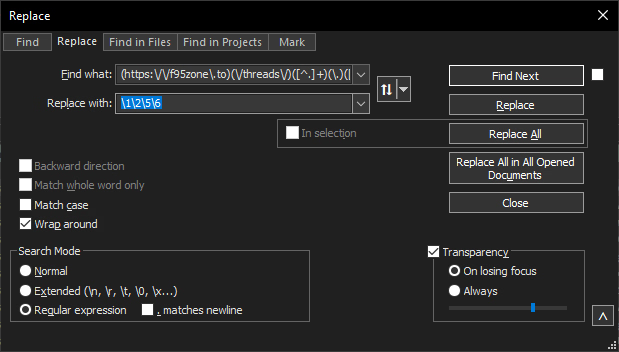
You can update the old bookmarks to match the above code by exporting them to a .html file and editing them in Notepad++ before reuploading. Using find an replace in Notepad++, check "Regular expression" under "Search Mode", and enter the following in the find/replace fields.

Find what: (https:\/\/f95zone\.to)(\/threads\/)([^.]+)(\.)([0-9]+)(.*)
Replace with: \1\2\5\6

notepad++_2025-10-29_02-30-12.png


Below is the old code saved for posterity.
You don't have permission to view the spoiler content. Log in or register now.
 
Last edited: