

- Thread starter BlueFireNick
- Start date
5.00 star(s)
9 Votes
Corrupteddante1502
New Member
- Sep 20, 2024
- 8
- 2
- 23
I reinstalled the game in order:You'll need to add the Kagura Compatibility folder's contents to the game as well. Copy the Data folder inside it and paste it into the base game's folder.
1. Base game steam
2. DLC steam
3. R18 Patch for steam from kagura
4. Copy "Data" after extract fffmod 1.6.3 to base game folder
5. Copy "Data" in "Kagura compatible ver folder" to base game folder
After that in Night time this happen

After this error message, I clicked several times but the only thing happen is different error messages with some change in png file name like this


TieFoon
Member
- May 30, 2020
- 132
- 126
- 137
Sadly the events with the seed is RNG based random event, basically make sure you have at least 30+ energy left after a day at the guild. Meaning... for example say you go do community work and once that is over you need to have 30+ energy left over (I think 25 is the minimum but better safe than sorry) for random events to trigger. At this point however you just got to be lucky to get the event with the seed/plant. It sucks a bit i know but that's just how it is.I want to know how to obtain this strange seed and cultivate it to grow
Easiest way i found to have enough energy left for those random events is to make sure i have at least 30 energy left when going to bed to sleep. You could always save right before going to bed as well and then save scum (Loading the save over and over) til you get the event you desire.
Getting the seed itself is also a random event which can happen during the evening in you and your sister home, for example maybe you decide to kiss you sister and then when that's done a tiny event may trigger where the mailman/woman comes by to deliver you a letter, it can basically happen aftermost things you do in your home, like hugging, talking, drinking, giving sister a present etc.
mykesquick1
New Member
- Dec 21, 2024
- 3
- 0
- 1
I have the same problem and also in the text instead of some characters are rectangles and instead of arrows when selecting an activity in the tavernI reinstalled the game in order:
1. Base game steam
2. DLC steam
3. R18 Patch for steam from kagura
4. Copy "Data" after extract fffmod 1.6.3 to base game folder
5. Copy "Data" in "Kagura compatible ver folder" to base game folder
After that in Night time this happen
View attachment 4366890
After this error message, I clicked several times but the only thing happen is different error messages with some change in png file name like this
View attachment 4366892
mykesquick1
New Member
- Dec 21, 2024
- 3
- 0
- 1
Found a replacement file in the author's previous answers, but that didn't helpI have the same problem and also in the text instead of some characters are rectangles and instead of arrows when selecting an activity in the tavern

- Apr 14, 2019
- 1,187
- 3,390
- 499
I have confirmed that these files are inside the Kagura Compatibility folder. Go and copy the 'Data' folder inside a fresh download of the Kagura Compatibility folder, and paste it into the game's base folder. You should get a single overwrite request if you are doing this on a fresh copy of the game. If you go inside the Data folder of the base game after following all the steps, you should see something like this:I reinstalled the game in order:
1. Base game steam
2. DLC steam
3. R18 Patch for steam from kagura
4. Copy "Data" after extract fffmod 1.6.3 to base game folder
5. Copy "Data" in "Kagura compatible ver folder" to base game folder
After that in Night time this happen
View attachment 4366890
After this error message, I clicked several times but the only thing happen is different error messages with some change in png file name like this
View attachment 4366892
You don't have permission to view the spoiler content.
Log in or register now.
This mod actually has JP support fully added without any extra downloads. Simply open the game and click on the 'language icon' in the bottom left corner to switch to JP.Hello. I'm a Japanese user.
I'm very interested in this mod, but does the mod support Japanese?
Yes, this is an issue with Kagura's chosen font that I never noticed until a few days ago since I don't use their poor font when testing. However, I have found a workaround to get these symbols to load in both 07 and Pixelify, so that will be fixed in the next update.I have the same problem and also in the text instead of some characters are rectangles and instead of arrows when selecting an activity in the tavern

thanks !This mod actually has JP support fully added without any extra downloads. Simply open the game and click on the 'language icon' in the bottom left corner to switch to JP.
mykesquick1
New Member
- Dec 21, 2024
- 3
- 0
- 1
I'll wait for an update then). Thank you for your workI have confirmed that these files are inside the Kagura Compatibility folder. Go and copy the 'Data' folder inside a fresh download of the Kagura Compatibility folder, and paste it into the game's base folder. You should get a single overwrite request if you are doing this on a fresh copy of the game. If you go inside the Data folder of the base game after following all the steps, you should see something like this:
You don't have permission to view the spoiler content. Log in or register now.
This mod actually has JP support fully added without any extra downloads. Simply open the game and click on the 'language icon' in the bottom left corner to switch to JP.
Yes, this is an issue with Kagura's chosen font that I never noticed until a few days ago since I don't use their poor font when testing. However, I have found a workaround to get these symbols to load in both 07 and Pixelify, so that will be fixed in the next update.

Dervah
New Member
- May 23, 2024
- 4
- 2
- 3
Hello!
I tried to install the mod using the steam version of the game.
- I downloaded both the base game and the DLC from steam
- I downloaded 1.6.3 FFFox Mod and extracted the Data folder into the Steam Data folder
- I put the "Kagura Compatible Ver" into the Steam Data folder
I launched and started the game but only got these errors

Any help would be greatly appreciated!
I tried to install the mod using the steam version of the game.
- I downloaded both the base game and the DLC from steam
- I downloaded 1.6.3 FFFox Mod and extracted the Data folder into the Steam Data folder
- I put the "Kagura Compatible Ver" into the Steam Data folder
I launched and started the game but only got these errors
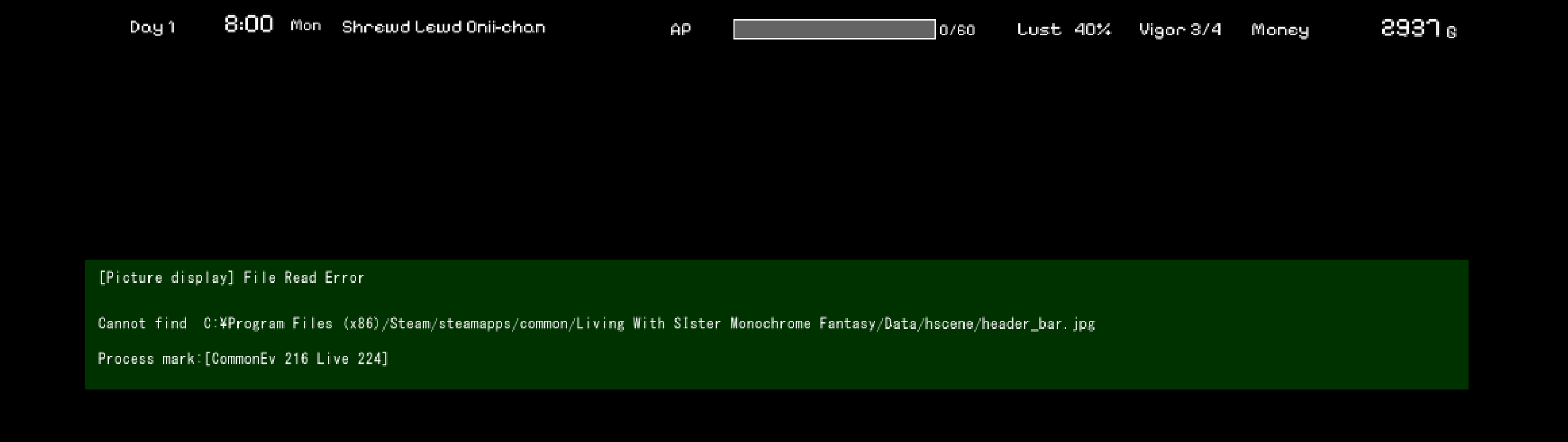
Any help would be greatly appreciated!
Corrupteddante1502
New Member
- Sep 20, 2024
- 8
- 2
- 23
Thanks bro for the reference folder picture, I realised the fffmod 1.6.3 zip file i downloaded somehow missing some components in the Kagura compatible folder, trying new download nowI have confirmed that these files are inside the Kagura Compatibility folder. Go and copy the 'Data' folder inside a fresh download of the Kagura Compatibility folder, and paste it into the game's base folder. You should get a single overwrite request if you are doing this on a fresh copy of the game. If you go inside the Data folder of the base game after following all the steps, you should see something like this:
- Apr 14, 2019
- 1,187
- 3,390
- 499
This is a basic image that comes with the base game after you use the 18+ patch. The steam version requires a patch from Kagura to unlock 18+ content. After you patch the game through Kagura, then copy over the Data folder, and go inside the Kagura folder to copy over that Data folder as well.Hello!
I tried to install the mod using the steam version of the game.
- I downloaded both the base game and the DLC from steam
- I downloaded 1.6.3 FFFox Mod and extracted the Data folder into the Steam Data folder
- I put the "Kagura Compatible Ver" into the Steam Data folder
I launched and started the game but only got these errors
View attachment 4369092
Any help would be greatly appreciated!
Dervah
New Member
- May 23, 2024
- 4
- 2
- 3
You're the best! It worked. Sorry if that was a silly questionThis is a basic image that comes with the base game after you use the 18+ patch. The steam version requires a patch from Kagura to unlock 18+ content. After you patch the game through Kagura, then copy over the Data folder, and go inside the Kagura folder to copy over that Data folder as well.
- Apr 14, 2019
- 1,187
- 3,390
- 499
Alright, I've updated the mod to 1.6.4. This update is rather small without anything really new. Just mainly a bug fix update for several of the bugs flying around in 1.6.3. I've also finished adding the last of the text in-game to the multi-lingual support, so everything in the game is now translatible using that. I didn't have too much time to test the fixes before heading out, so I can't guarantee all the bugs are gone, but I believe I squashed a decent amount of them...knock on wood and all that jazz.
Merry Christmas, ya filthy animals.
Merry Christmas, ya filthy animals.
Last edited:

NotMyProudestCC
Newbie
- May 23, 2024
- 78
- 22
- 18
Thank you for your hard work! BTW, is there a way to exit the game aside of clicking on the X button of the game window? there is an exit from the main menu when you open the game but I couldn't find one after starting/loading a save.
- Apr 14, 2019
- 1,187
- 3,390
- 499
Nope. I don't believe so. Just from the main menu. You can return to the main menu using f12, though.Thank you for your hard work! BTW, is there a way to exit the game aside of clicking on the X button of the game window? there is an exit from the main menu when you open the game but I couldn't find one after starting/loading a save.
Dervah
New Member
- May 23, 2024
- 4
- 2
- 3
Hope you have a nice Xmas as well. Thank you Santa!Alright, I've updated the mod to 1.6.4. This update is rather small without anything really new. Just mainly a bug fix update for several of the bugs flying around in 1.6.3. I've also finished adding the last of the text in-game to the multi-lingual support, so everything in the game is now translatible using that. I didn't have too much time to test the fixes before heading out, so I can't guarantee all the bugs are gone, but I believe I squashed a decent amount of them...knock on wood and all that jazz.
Merry Christmas, ya filthy animals.

Corrupteddante1502
New Member
- Sep 20, 2024
- 8
- 2
- 23
THANKS BROAlright, I've updated the mod to 1.6.4. This update is rather small without anything really new. Just mainly a bug fix update for several of the bugs flying around in 1.6.3. I've also finished adding the last of the text in-game to the multi-lingual support, so everything in the game is now translatible using that. I didn't have too much time to test the fixes before heading out, so I can't guarantee all the bugs are gone, but I believe I squashed a decent amount of them...knock on wood and all that jazz.
Merry Christmas, ya filthy animals.
- Apr 14, 2019
- 1,187
- 3,390
- 499
The option is on the left side while she's in the sideways pose. You'll need ver 1.6.3 or newer.I'm unable to find the raised leg stance during the sideways pose