Giant Games Studio

Newbie
Game Developer
Oct 31, 2025
32
58
79
Its been all 3 updates now that ive downloaded this game, when i launch it it shows on my taskbar and task manager and i can hear the menu but when i click on the window to pull the game up on my screen it doesnt display on my monitor. Is there a fix for this? Please q.q
I’m really sorry about the hassle.
For upcoming versions, I’ll set the game to start in a small windowed mode by default. There have been reports that this startup setting helps fix issues where the game runs but doesn’t properly display on the monitor.
In the meantime, thank you for reporting it.


i'm getting trojen warnings from avast on every file
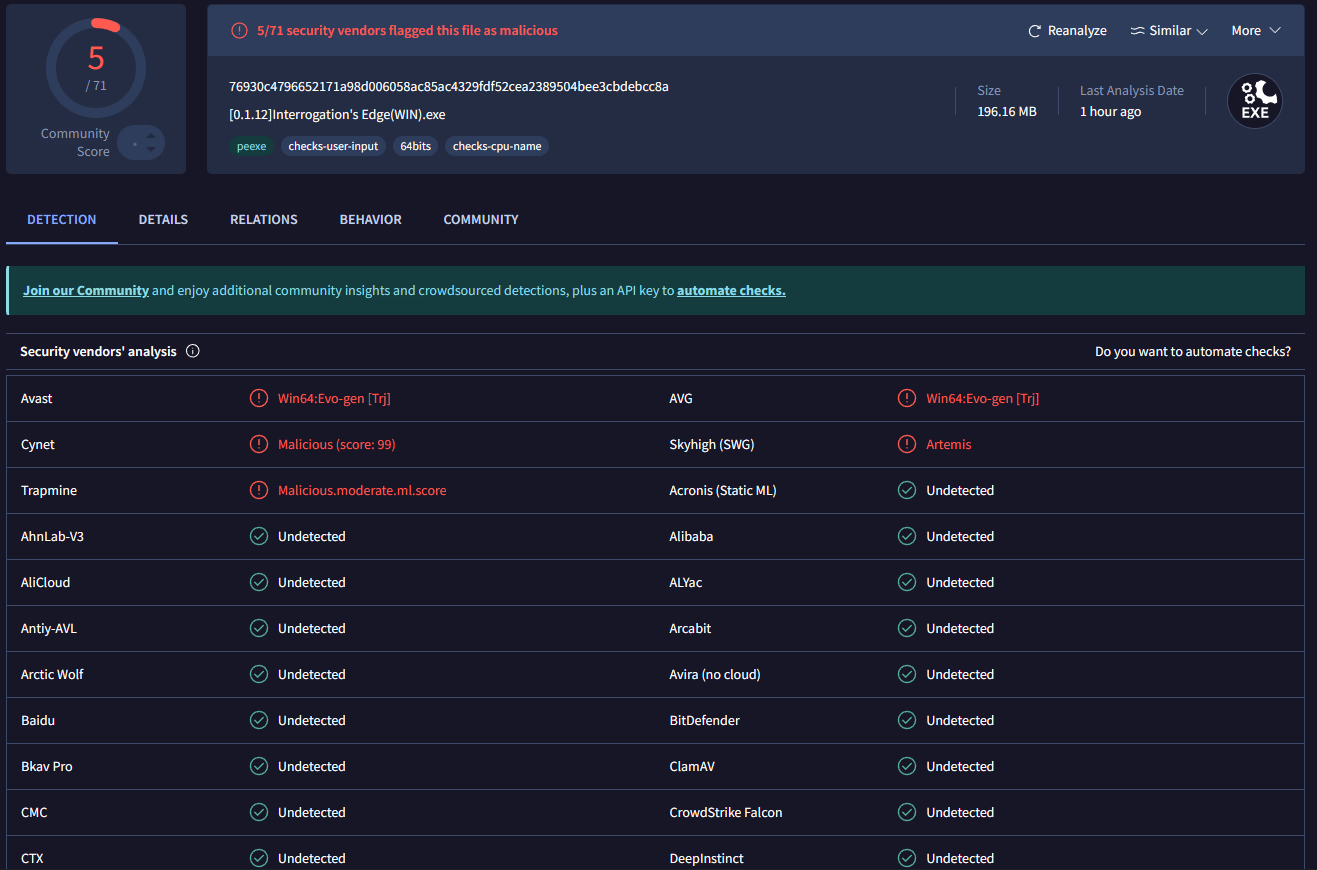
This is a false positive. Avast is flagging the files because the executable isn’t digitally signed yet, which can sometimes trigger heuristic warnings. I’ve scanned the build with other well-known and reliable antivirus software(image below), and they report the files as clean. I’m looking into code signing in future releases to reduce these warnings. Sorry for the inconvenience.

VirusTotalScan.png

How do you input the cheat codes?
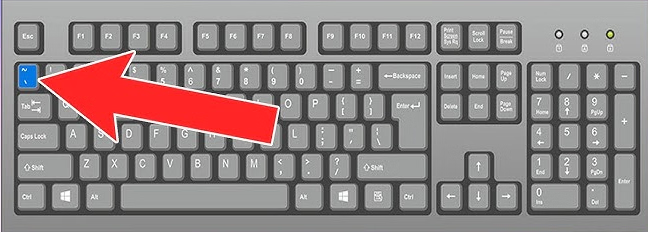
You can open the console by pressing the tilde (~) key on your keyboard (shown in the image below).
Once the console is open, just type the cheat code there and press Enter.

Tilde Key.png
 

Flugelbozz

Member
Nov 12, 2018
437
408
309
POV keys not changing camera for whatever reason, X-ray doesnt work either, which is really odd, cause pan tilt zoom and reset works

EDIT: nvm, just realized that we have to buy it in the store
EDIT2: climaxing during Daisy POV seems to remove her face
 
Last edited:

Giant Games Studio

Newbie
Game Developer
Oct 31, 2025
32
58
79
POV keys not changing camera for whatever reason, X-ray doesnt work either, which is really odd, cause pan tilt zoom and reset works
Did you purchase those features in the shop? There’s currently a known bug where the keybindings appear even if the player doesn’t actually own the item yet, which can make it seem like the controls aren’t working.
 
  • Like
Reactions: Flugelbozz

brast11

Newbie
Oct 6, 2020
59
72
161
everytime i open the shop after any interrogation, the screen goes back and nothing can be selected, idk if the animation of logging into the pc is bugged. At first I thought it was being cause my clicking to cut the animation short, because it also happened with the interrogation, having the shop pop up over the interrogation menu, waiting for the animation to finish fixed this, but not the shop essentially soft locking the game
 

Giant Games Studio

Newbie
Game Developer
Oct 31, 2025
32
58
79
everytime i open the shop after any interrogation, the screen goes back and nothing can be selected, idk if the animation of logging into the pc is bugged. At first I thought it was being cause my clicking to cut the animation short, because it also happened with the interrogation, having the shop pop up over the interrogation menu, waiting for the animation to finish fixed this, but not the shop essentially soft locking the game

This was happening because the main menu became clickable before the initial camera animation had finished, which could cause the game to soft-lock.


This issue has already been fixed in version 0.1.16. Thanks a lot for the detailed report.
 
  • Like
Reactions: brast11

Axis3123

Well-Known Member
Apr 1, 2020
1,006
843
338
Ooooo, I'm eyeing the w.i.p in the shop and I see those Hypno Goggles. Possible mind-control/hypnosis? I know for a fact they alluded to it during the intro :D
 

Giant Games Studio

Newbie
Game Developer
Oct 31, 2025
32
58
79
Ooooo, I'm eyeing the w.i.p in the shop and I see those Hypno Goggles. Possible mind-control/hypnosis? I know for a fact they alluded to it during the intro :D

I actually planned to have this implemented already. The idea was that switching to First Person View would overlay Hypno Porn videos on top of the character’s POV. The video could be uploaded from the Player.


Unfortunately, Godot currently only supports Ogg Theora as video CODEC, which isn’t a modern or efficient format. That makes loading videos, and especially switching between them, very laggy, so I decided to postpone the feature for now.


That said, seeing the interest around them definitely motivates me to revisit this. I’ll look into alternative approaches to make it work properly.
 
  • Thinking Face
Reactions: Axis3123

Axis3123

Well-Known Member
Apr 1, 2020
1,006
843
338
I actually planned to have this implemented already. The idea was that switching to First Person View would overlay Hypno Porn videos on top of the character’s POV. The video could be uploaded from the Player.


Unfortunately, Godot currently only supports Ogg Theora as video CODEC, which isn’t a modern or efficient format. That makes loading videos, and especially switching between them, very laggy, so I decided to postpone the feature for now.


That said, seeing the interest around them definitely motivates me to revisit this. I’ll look into alternative approaches to make it work properly.
Could it possibly be an alternative? As in, either A): flashy lights/triggers/spirals/the works since it may only be cycling through simple textures, or B): small-sized videos that loop but give the illusion of longevity due to obfuscated/delicate editing? Possibly through snippets of gooning material.

...course, hypnosis as its own thing is a turn on for me, so a simple visor with a spiral on it is enough for me. Definitely spices up any scenario in my book >///_///>
 

Giant Games Studio

Newbie
Game Developer
Oct 31, 2025
32
58
79
Could it possibly be an alternative? As in, either A): flashy lights/triggers/spirals/the works since it may only be cycling through simple textures, or B): small-sized videos that loop but give the illusion of longevity due to obfuscated/delicate editing? Possibly through snippets of gooning material.

...course, hypnosis as its own thing is a turn on for me, so a simple visor with a spiral on it is enough for me. Definitely spices up any scenario in my book >///_///>

I think option A is the most feasible approach, so I’ll be looking into that for the next patch.
Thanks for the feedback, it helps a lot when it comes to steering the game.
 
  • Like
Reactions: Axis3123

PeterHatNixMehr

Newbie
Donor
Apr 5, 2024
62
71
99
I think that most likely the problem lies in the amd drivers. Screen - 2560x1440p
its not amd drivers. i have nvidia and the game is also on the right side on my screen. i can click on it then i have full screen but when i click where the game wasnt its on the right side again. its like the game isnt fullscreen so when you click on it its actually not there so it shows only on the right.
like on window mode and you click outside of it.

the problem is mor elike that we cant use alt+enter for fullscreen to force it.
Patch is needed. sad i was happy to try a new game :C
 
  • Thinking Face
Reactions: Giant Games Studio

Giant Games Studio

Newbie
Game Developer
Oct 31, 2025
32
58
79
its not amd drivers. i have nvidia and the game is also on the right side on my screen. i can click on it then i have full screen but when i click where the game wasnt its on the right side again. its like the game isnt fullscreen so when you click on it its actually not there so it shows only on the right.
like on window mode and you click outside of it.

the problem is mor elike that we cant use alt+enter for fullscreen to force it.
Patch is needed. sad i was happy to try a new game :C


The game is supposed to start maximized on the monitor where your mouse cursor is. In v0.1.16 (the next update), I’ve changed the startup behavior so the game launches in 1280×720 windowed mode instead, which should prevent this issue.


Sorry about the inconvenience. I’m trying my best for a proper fix. If you bookmark the thread, you won’t miss the update when it drops.
 
  • Heart
Reactions: PeterHatNixMehr

PeterHatNixMehr

Newbie
Donor
Apr 5, 2024
62
71
99
The game is supposed to start maximized on the monitor where your mouse cursor is. In v0.1.16 (the next update), I’ve changed the startup behavior so the game launches in 1280×720 windowed mode instead, which should prevent this issue.


Sorry about the inconvenience. I’m trying my best for a proper fix. If you bookmark the thread, you won’t miss the update when it drops.
Already bookmarked it when i wrote that comment xD
Thank you for reading and even awnsering the comments! Idk if thats interesting for the fix but i have a 2560x1440p screen too.
 
  • Heart
Reactions: Giant Games Studio