

- Thread starter Stone Eyes
- Start date
-
- Tags
- 2d game 2dcg anal sex big ass big tits bukkake combat corruption creampie fantasy female protagonist footjob groping group sex handjob interracial japanese game masturbation multiple endings multiple penetration oral sex rpg sex toys spanking teasing titfuck turn based combat vaginal sex virgin voiced
4.60 star(s)
499 Votes


900bs
Well-Known Member
- Jul 2, 2023
- 1,194
- 1,292
- 343
Hi. From what you’ve described, it sounds like you might have installed the mods folder in the wrong place.Hi, I downloaded the game from the first page. Then I downloaded your "mods" folder and overwrote the one I had, and finally deleted the existing "img" file and used the one you shared. The game works without any problems, but I don't have any mods added. There is no mod section in the settings, I guess I couldn't activate it, where am I making a mistake? Can you help?
However, if you put it in the same directory as the img folder, everything should be fine.
Please send me a screenshot of your mods folder and a screenshot from the game.
No one has mentioned this before, so I’m not sure what the issue is.
Thanks for your reply. I reinstalled the game from scratch to avoid making a mistake, then I overwrote the mods folder you shared with the mods folder in the game, and changed it. Finally, I deleted my own IMG file and used the IMG you shared. It is difficult for me to upload it to the wrong place because I checked it over and over again and the game opens without any problems, but I still do not see a mod menu in the game. I finally uninstalled the game, thank you anyway.Hi. From what you’ve described, it sounds like you might have installed the mods folder in the wrong place.
However, if you put it in the same directory as the img folder, everything should be fine.
Please send me a screenshot of your mods folder and a screenshot from the game.
No one has mentioned this before, so I’m not sure what the issue is.
900bs
Well-Known Member
- Jul 2, 2023
- 1,194
- 1,292
- 343
Did you have the image of her insides in the game menu like in my screenshot?Thanks for your reply. I reinstalled the game from scratch to avoid making a mistake, then I overwrote the mods folder you shared with the mods folder in the game, and changed it. Finally, I deleted my own IMG file and used the IMG you shared. It is difficult for me to upload it to the wrong place because I checked it over and over again and the game opens without any problems, but I still do not see a mod menu in the game. I finally uninstalled the game, thank you anyway.
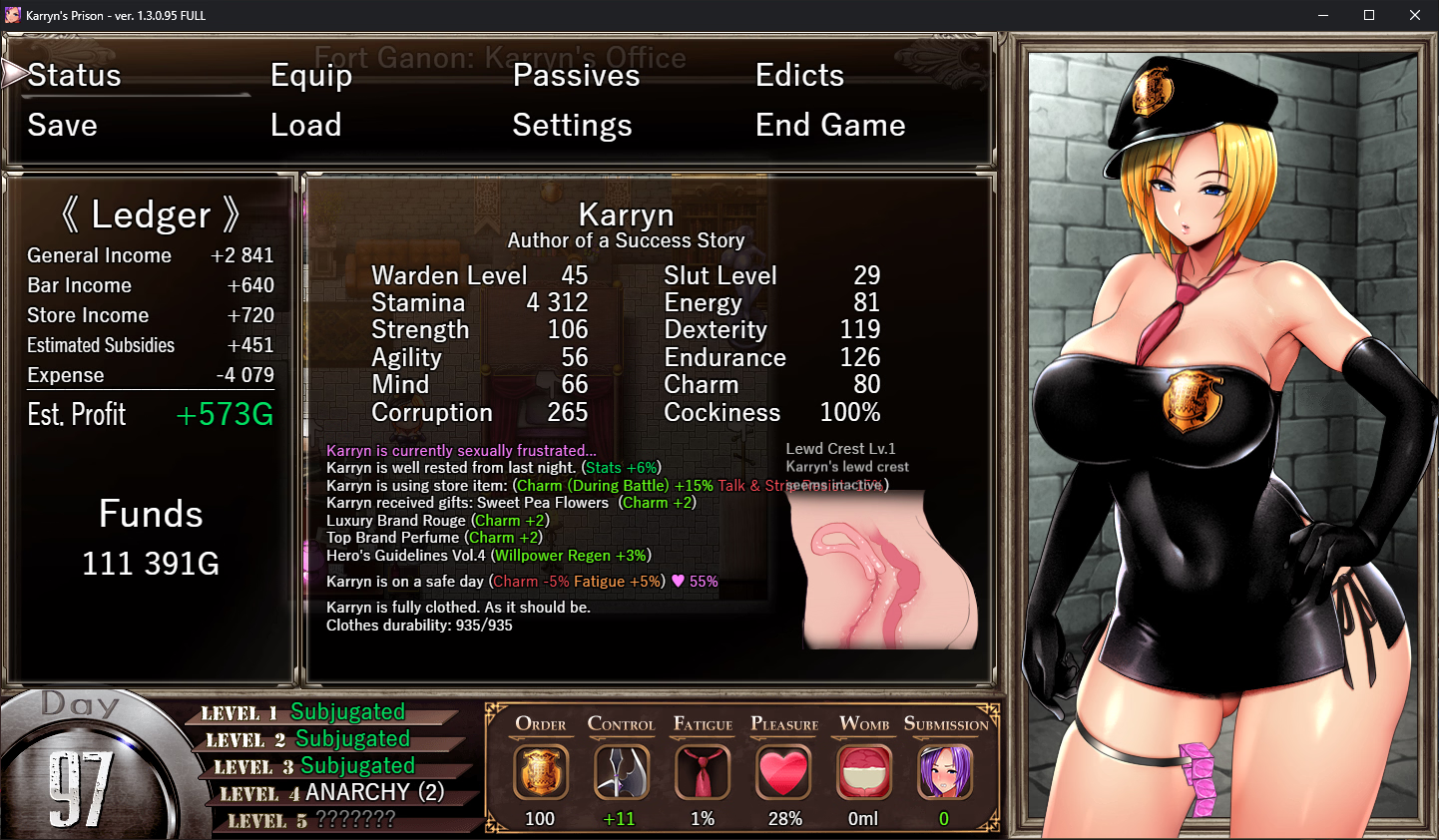
unfortunately, it doesn't look like this for me. I get the default images as if there are no mods. I might be missing some common software on my system, I don't know. I'll send you all the screenshots when I have time.Did you have the image of her insides in the game menu like in my screenshot?
View attachment 4854120

whatmi
Member
- Jul 4, 2019
- 434
- 953
- 188
why did you took 3x charm thing and 1x will power regen?Did you have the image of her insides in the game menu like in my screenshot?
View attachment 4854120
i wasn't trying to go for lewd build yet, but this seems awfully inefficient
900bs
Well-Known Member
- Jul 2, 2023
- 1,194
- 1,292
- 343
Don’t worry about the Will Power regen number, that’s just a bug that appeared when the SluttyBabe mod got a major update. I haven’t even cleared the 4th floor yet.why did you took 3x charm thing and 1x will power regen?
i wasn't trying to go for lewd build yet, but this seems awfully inefficient
As for Charm, I raised it mainly to unlock all the accessory slots and get their buffs. I also noticed that the higher Karryn’s Charm, the less enemies attack and the more they try to do things to her. If you seduce them on top of that, they basically stop attacking and become easy to defeat, assuming Karryn’s Corruption is low. On higher difficulty levels, this works really well.
Regarding a Lewd build, it’s actually very powerful, and you can push Charm even higher. You can clear enemy waves just by seducing and with “Kiss” and “Pet Cock”.
MayorDukalis
Member
- Nov 18, 2023
- 405
- 133
- 130
ok I won't helpI'm not sure you understand what I'm talking about. I followed the instructions above correctly and I'm still having an issue. Frankly, if you're not going to help, don't write, your opinion doesn't matter.
 you downloaded the game from the first page yourself , so figure it out
Hentaison99
Member
- May 8, 2022
- 162
- 25
- 160
Can I ask how you made her costume that colour or rather which area of the mod please?Did you have the image of her insides in the game menu like in my screenshot?
View attachment 4854120
900bs
Well-Known Member
- Jul 2, 2023
- 1,194
- 1,292
- 343
This can be done in the settings of the "Slutty Babe" mod.Can I ask how you made her costume that colour or rather which area of the mod please?


Beats9821
Member
- Nov 19, 2018
- 329
- 432
- 263
Some mods do not play nicely together. The discord channels for the mods can be a really helpful resource for something like this.So, is the vortex useless and I have to do everything manually or is it something on mod's end?
EDIT: Nevermind, for some reason reinstalling the mod fixed it... At least the game seems to be loading...
My friend, first of all, do not occupy this place with irrelevant answers to the questions asked. Maybe you are joking, but you are not funny. I am blocking you because I do not have enough valuable time for you. Goodbye.ok I won't help
I have reinstalled the game from scratch and am using your 'img' and 'mods' folders. However, the mods are not active. Am I missing something very simple?Did you have the image of her insides in the game menu like in my screenshot?
View attachment 4854120
Looks like you have Guard Play installed twice, though that shouldn't affect anything as that second copy isn't installed correctly anyway.I have reinstalled the game from scratch and am using your 'img' and 'mods' folders. However, the mods are not active. Am I missing something very simple?
If you list out your install steps in detail we might be able to pinpoint exactly what is going wrong.
900bs
Well-Known Member
- Jul 2, 2023
- 1,194
- 1,292
- 343
You're using my save file try deleting the save folder, maybe that's causing the issue, although it shouldn't prevent the mods from loading.I have reinstalled the game from scratch and am using your 'img' and 'mods' folders. However, the mods are not active. Am I missing something very simple?
It’s really strange that the game isn’t detecting the mods. Try deleting the GuardPlay folder as well.
Also, in your game path, there's a folder named "IndirDagit" that might be the reason the game isn’t recognizing the mods.
Try renaming that folder to something using only Latin letters, like "game", "rpg", etc., without any special characters.
Yes, that too but in any case, it might cause errors, yet the game not detecting the mods at all is another issue.Looks like you have Guard Play installed twice, though that shouldn't affect anything as that second copy isn't installed correctly anyway.
If you list out your install steps in detail we might be able to pinpoint exactly what is going wrong.
900bs
Well-Known Member
- Jul 2, 2023
- 1,194
- 1,292
- 343
Full version v1.3.0.97 +All DLC
You must be registered to see the links

Pretty sure the second copy of guard play wouldn't even be getting loaded anyway, so there shouldn't be any errors caused by it.You're using my save file try deleting the save folder, maybe that's causing the issue, although it shouldn't prevent the mods from loading.
It’s really strange that the game isn’t detecting the mods. Try deleting the GuardPlay folder as well.
Also, in your game path, there's a folder named "IndirDagit" that might be the reason the game isn’t recognizing the mods.
Try renaming that folder to something using only Latin letters, like "game", "rpg", etc., without any special characters.
Yes, that too but in any case, it might cause errors, yet the game not detecting the mods at all is another issue.
I just tried that "ÍndirDağit" folder name on my own system without issue, but that could just be due to the locale settings I have in place. The special characters are likely the biggest culprit though [despite it working for me]