

Oh, well, you can try to get free and do what i discribed before, or you may just relax and enjoy your captivity.What do I do when I'm captured by those slave girls and then dragged around by the bandit?
- Thread starter evron
- Start date
3.80 star(s)
17 Votes
I couldn't kill the guard even though I shot him a dozen times, nor could I find the slaver merchant anywhere.Oh, well, you can try to get free and do what i discribed before, or you may just relax and enjoy your captivity.

Maximignon
Newbie
- Feb 3, 2024
- 33
- 38
- 53
I strongly recommend waiting until the next version finally drops. The game was quite stable before the versions that introduced the 6th stage. Not perfect, but fun!I couldn't kill the guard even though I shot him a dozen times, nor could I find the slaver merchant anywhere.
I haven't managed a playthrough on the curent build, despite several attempts. Some random thing kept soft-locking me. Such a pity, because the new features look downright fantastic.

upayipwn
Newbie
- Feb 8, 2020
- 31
- 41
- 62
I have the same issue at 5120x1440. I think this pattern works for any Unity game. It's working great for this game!Curious if anyone else uses an ultra-wide monitor (3440x1440). The game over scenes specifically have enlarged text that spills off the bottom of the screen. None of the settings seem to fix it.
Also, does anyone know what Zoom Ratio does in the settings? It doesn't appear to affect anything.
First, next to the .exe, create a bat file. I called mine launch.bat. Modern Windows doesn't let you just right click and make a new bat file so you might have to make a txt file and then rename it (including the extension).
Second, open the bat file in notepad. In the bat file, add this line: (change the numbers to your preferred resolution)
"Nurtale Nesche 1.0.4.12.exe" -screen-width 1920 -screen-height 1080 -screen-fullscreen 0
This tells Unity to launch the game with a specific resolution. Note you might have to change the exe name in the first part to match the version you have.
You now will launch the game using the bat file. If you had full screen enabled, this will look like it didn't work as it will pop open in your native resolution. Disabling full screen will have it go back to the above specified resolution.
This is what your folder should look like:
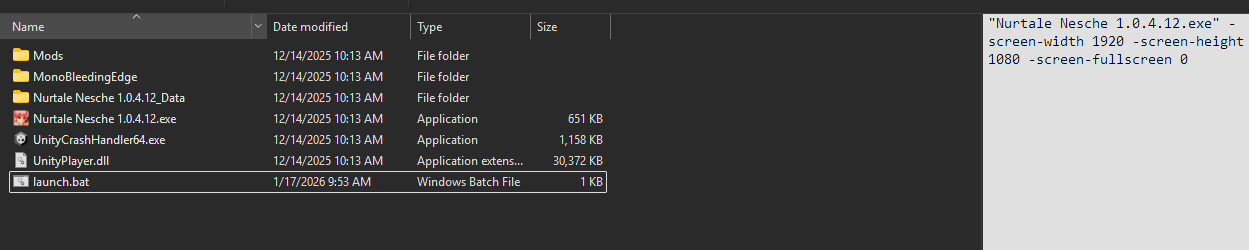
Hope this helps!


staniotsui
New Member
- Aug 24, 2021
- 11
- 14
- 87
Katagurumi
Newbie
- Jul 26, 2017
- 18
- 9
- 87

Dan_5858
Newbie
- Sep 10, 2017
- 35
- 10
- 105
Thanks very much for these details! I didn't know you could create batch files to change application resolution. And it recognises the .exe just being in the same folder!I have the same issue at 5120x1440. I think this pattern works for any Unity game. It's working great for this game!
First, next to the .exe, create a bat file. I called mine launch.bat. Modern Windows doesn't let you just right click and make a new bat file so you might have to make a txt file and then rename it (including the extension).
Second, open the bat file in notepad. In the bat file, add this line: (change the numbers to your preferred resolution)
"Nurtale Nesche 1.0.4.12.exe" -screen-width 1920 -screen-height 1080 -screen-fullscreen 0
This tells Unity to launch the game with a specific resolution. Note you might have to change the exe name in the first part to match the version you have.
You now will launch the game using the bat file. If you had full screen enabled, this will look like it didn't work as it will pop open in your native resolution. Disabling full screen will have it go back to the above specified resolution.
This is what your folder should look like: View attachment 5634753
Hope this helps!
EDIT: Unfortunately, while the batch file works, it appears the issue lies with the UI within the game, which is still oversized. Specifically, it's only oversized during game-over scenes, and reverts back to its correct size if accessed during gameplay...very odd.
Last edited:
upayipwn
Newbie
- Feb 8, 2020
- 31
- 41
- 62
Hmm, interesting. I'm glad the batch file worked!Thanks very much for these details! I didn't know you could create batch files to change application resolution. And it recognises the .exe just being in the same folder!
EDIT: Unfortunately, while the batch file works, it appears the issue lies with the UI within the game, which is still oversized. Specifically, it's only oversized during game-over scenes, and reverts back to its correct size if accessed during gameplay...very odd.
For the UI, is your windows scale over 100%? That could also be affecting it. The batch file trick fixed the cutscenes for me but my scale is at 100%.

Dan_5858
Newbie
- Sep 10, 2017
- 35
- 10
- 105
Yep, windows scale is 100%. The fact that the UI in game changes during the game-over scenes indicates to me that it's a different issue. I've tried playing around with the 'Zoom Ratio' option, but it doesn't appear to do anything:Hmm, interesting. I'm glad the batch file worked!
For the UI, is your windows scale over 100%? That could also be affecting it. The batch file trick fixed the cutscenes for me but my scale is at 100%.
View attachment 5643581

Hexco12373
Newbie
- Aug 31, 2021
- 47
- 12
- 183
Need help with stage 5, i literly open All the number door, and kill All the goblin, but still cant find the key to go next stage. Did i do something wrong?