Ren'Py Please help: Problem with a Renpy Game - It won't start, no trace file.

Capt OA

Member
Apr 29, 2018
189
143
237
Hello all,

I wanted to ask for some guidance. I have a game that I've been playing without issues. I even played it for a while, but then it stopped working. I can see it in the Program Manager for a bit but then it dissapears. There is only the log.txt containing this:

Code:
Thu Jul  4 12:47:45 2024
Windows-10-10.0.19041
Ren'Py 7.5.2.22081402
 

Bootstrap to the start of init.init took 0.63s
Early init took 0.01s
Loader init took 0.36s
Loading error handling took 0.66s
Loading script took 6.83s
I tried with both the full and the compiled version. I even transferred it to a USB drive to run it in another laptop, same result.
I can run any other Renpy games, except this one.
I was wondering if there is a way to enable more logging options, to be written to the log file to sort this problem out.
I find it very odd that this problem is only with this game (CultureShock-Chapter3v0.1), and it started happening out of nowhere.
If anyone has any ideas, please share them.

Thanks in advance.
 

peterppp

Well-Known Member
Donor
Mar 5, 2020
1,262
2,400
386
could be your antivirus has been updated and now prevents this game from running
 

Penfold Mole

Engaged Member
Respected User
May 22, 2017
3,471
9,182
748
Have you tried to extract the game zip into a new folder (i.e. make a new copy of the game) and run it from there?

You could also try to start the game while holding the SHIFT key and switch the renderer manually to try either of the alternatives. In case the settings window opens at all, that is.
 

Capt OA

Member
Apr 29, 2018
189
143
237
Have you tried to extract the game zip into a new folder (i.e. make a new copy of the game) and run it from there?

You could also try to start the game while holding the SHIFT key and switch the renderer manually to try either of the alternatives. In case the settings window opens at all, that is.
That's why I downloaded the full (uncompressed) game and extractet both to my HDD and then to the USB drive.
What do you mean with "start the game while holding the SHIFT key" ?
I pressed Shift key then double click on the game, but same result, the "wait" windows cursor, then nothing. No windows. Just the log.txt file updated.
Any other suggestions?

Thanks!
 

Penfold Mole

Engaged Member
Respected User
May 22, 2017
3,471
9,182
748
That's why I downloaded the full (uncompressed) game and extractet both to my HDD and then to the USB drive.
What do you mean with "start the game while holding the SHIFT key" ?
I pressed Shift key then double click on the game, but same result, the "wait" windows cursor, then nothing. No windows. Just the log.txt file updated.
Any other suggestions?

Thanks!
Holding SHIFT while starting the game is for resolving graphics card/driver issues, to switch renderers without actually starting the game itself.
In case it still doesn't work, then it could be what peterppp guessed about it. Likely your AV prevents the game from running.
In case you're using Windows Defender (you have no other AV's installed), it won't give you any info about it, either. You could maybe find something in your Event Viewer after you've tried to start the game unsuccessfully again. Start the Event Viewer and look at the
-Windows Logs/Application
-Windows Logs/System
-Applications and Services/Microsoft/Windows/Windows Defender/Operational

Although generally not recommended, you could try to add the game folder to your AV exceptions.
 
  • Like
Reactions: TheresiaW

Capt OA

Member
Apr 29, 2018
189
143
237
This guy had the same problem and shared his solution, you can find it in this post.
I still don't know the actual cause but removing the "persistent" file from all locations (inside the games/saves and the TheBigOne folder under AppData/Roaming) corrected the problem, now it runs.
 

Vicky 200r

New Member
Oct 22, 2024
1
0
70
This guy had the same problem and shared his solution, you can find it in this post.
I still don't know the actual cause but removing the "persistent" file from all locations (inside the games/saves and the TheBigOne folder under AppData/Roaming) corrected the problem, now it runs.
Did the game start running after deleting the persistent file
 

peterppp

Well-Known Member
Donor
Mar 5, 2020
1,262
2,400
386
Did the game start running after deleting the persistent file
that's what he said
This guy had the same problem and shared his solution, you can find it in this post.
I still don't know the actual cause but removing the "persistent" file from all locations (inside the games/saves and the TheBigOne folder under AppData/Roaming) corrected the problem, now it runs.
 

TheresiaW

Member
Jan 1, 2020
252
564
164
Holding SHIFT while starting the game is for resolving graphics card/driver issues, to switch renderers without actually starting the game itself.
In case it still doesn't work, then it could be what peterppp guessed about it. Likely your AV prevents the game from running.
In case you're using Windows Defender (you have no other AV's installed), it won't give you any info about it, either. You could maybe find something in your Event Viewer after you've tried to start the game unsuccessfully again. Start the Event Viewer and look at the
-Windows Logs/Application
-Windows Logs/System
-Applications and Services/Microsoft/Windows/Windows Defender/Operational

Although generally not recommended, you could try to add the game folder to your AV exceptions.
Thanks for the instructions. I've had this problem with two games now and have spent hours trying to get the game to run again without success.
Updating all hardware and software drivers did nothing. Adding the games as exceptions in my anti-virus program and firewall was also unsuccessful.

The solution was:
I had to delete all the data under “AppData\Roaming\RenPy”.
Then I had to restart the game with the “Shift” key pressed and change the graphics settings, save and restart.
I had to test several settings after pressing Shift until it finally worked. Now the game works again.
 
  • Like
Reactions: Penfold Mole

xabes

New Member
May 25, 2018
11
2
102
also been having problem with all renpy game.the second the game window open, it close. deleting the persistent file no longer work. firewall is not blocking since one game is allowed and still close when the window appear.
 

Eucanuba

Newbie
May 22, 2017
75
59
194
^Same Issue. I think got this problem after the recent updates to the GeForce Game Ready Driver but I cant be sure.
 

Lounatick

Cheerleaders' dev
Donor
Game Developer
Jan 30, 2019
507
1,880
279
I also run into this problem from time to time. What worked for me was using the Intel® Extreme Tuning Utility to downclock the Performance Core Ratio — it was set to 59x by default, and I lowered it to 54x.
I saw this fix somewhere — probably on a Ren'Py forum, though I can't remember exactly where — but ever since I applied it, every game has been running without issues for me.
 

xabes

New Member
May 25, 2018
11
2
102
^Same Issue. I think got this problem after the recent updates to the GeForce Game Ready Driver but I cant be sure.
do you have a razer tartarus keypad like me? the keypad was the problem somehow. to resolve it, i had to unplug it, and someone said to try different usb port and it worked.
 

We1wet

New Member
Sep 8, 2023
2
0
79
Most likely the problem is in the video driver. I managed to solve it by switching the discrete video card to the integrated one. Otherwise I would have had to install the previous version of the video driver.
 

Eucanuba

Newbie
May 22, 2017
75
59
194
do you have a razer tartarus keypad like me? the keypad was the problem somehow. to resolve it, i had to unplug it, and someone said to try different usb port and it worked.
In order to fix it I reverted my GeForce driver to the April 30th Version.
 

lifemare

Member
Apr 16, 2020
217
315
117
Same issue here. I suspect this was caused by some windows update. They've been causing issues every time lately (like resetting file associations - annoying af).

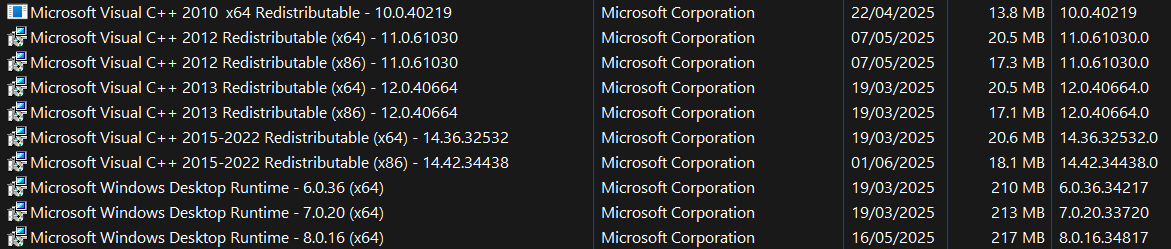
I haven't installed anything new in the last months except updates to FileMenuTools, ExplorerPatcher, Windhawk (neither of which should conflict with renpy). All i did install was in an effort to provide eventual missing python dependencies, namely the x86 version of the C++ 2015-2022 distro.

Full list: Screenshot 2025-06-02 151201.png

I noticed the 2012 distro had updated recently so i tried uninstalling it and running a game, but no dice.

Oh, and i updated my GPU drivers (3070Ti Laptop) which were surprisingly old (windows and driverhub were both lying to me). Again in an attempt to solve the issue, to be clear.

I can't run a single renpy game i've downloaded in the last 2-3 months from f95. The windows cursor throbber just appears for a couple of seconds and disappears... no leftover process in task manager, no error messages, nothing gets logged, holding shift while attempting to launch has no effect, deleting persistent files is useless, no thread that i can google is helpful... I'm baffled

and horny o_O


PS: Do any of you guys have Python installed? I've been running it for Stable Diffusion with a metric ton of libraries so i really don't want to remove it just to test. And games were running fine alongside it for a long time. Low chance it has any effect.
 
Last edited:

GhostSljer

New Member
Jul 15, 2018
1
0
12
Hello. I was having some games not launching, and it helped me to manually switch from a discrete GeForce graphics card to an integrated Intel one via the Nvidia Control Panel.