Tool RPGM RPG Maker MV MZ Cheat UI Plugin

kukuru97

Member
May 31, 2019
134
186
167
RPG-Maker-MV-MZ-Cheat-UI-Plugin

  • GUI based RPG Maker MV/MZ game cheat tool
UI Sample
You don't have permission to view the spoiler content. Log in or register now.

Features

  • Good usability based on GUI.
  • Supports both RPG MV/MZ games.
  • Editing stats, gold, speed, items, variables, switches ...
  • Accelerate game speed (x0.1 ~ x10)
  • Supports no clip mode, god mode.
  • Disable random encounter.
  • Force battle victory/defeat/escape/abort.
  • Supports useful customizable shortcuts.
    • Toggle save/load window, quick save/load, goto title, toggle no clip, editing party/enemy HP ...
  • Easy to find items, switched, variables, etc by searching text.
  • Save location and recall, teleport cheats.
  • Supports developers tool.
  • Translate variables, switches, maps. (Needs : Only supports for Korean.)
  • Maybe more features..?

File and Tutorial check the Github page
Link Github :
 
Last edited:

kukuru97

Member
May 31, 2019
134
186
167
So how do you install and use this?
Copy unziped directories to {game directory}/www (for MZ, just copy to {game_directory}).
  • It will overwrite www/js/main.js file, so it is strongly recommended to make a backup file.
 

Overdunker

Newbie
Feb 27, 2022
83
21
43
Copy unziped directories to {game directory}/www (for MZ, just copy to {game_directory}).
  • It will overwrite www/js/main.js file, so it is strongly recommended to make a backup file.
I've tried this, but it does not actually bring the window up in the MZ version at least.
 

RuiMist

Member
May 6, 2017
190
49
149
Its not letting me see everything because I can't seem to scroll up or down with arrow keys
 

13325

Member
Jun 21, 2017
132
109
235
How do you change file structure/ main.js for MZ games to get this cheat menu to work for it? Simply overwriting the MZ main.js with the altered for MV main.js does not seem to work. I've tried adding the loadscript here
Code:
    onScriptLoad() {
        if (++this.loadCount === this.numScripts) {
            PluginManager.setup($plugins);
            //PluginManager.loadScript('cheat/init/import.js');
        }
    }
But I get 404s about the files not being found for axios.min.js, setup.js, as well as the main.css. I'm specifically trying to add it to the game "Star Knightess Aura".
 

rymac100

Newbie
Jan 9, 2023
15
2
21
How do you change file structure/ main.js for MZ games to get this cheat menu to work for it? Simply overwriting the MZ main.js with the altered for MV main.js does not seem to work. I've tried adding the loadscript here
Code:
    onScriptLoad() {
        if (++this.loadCount === this.numScripts) {
            PluginManager.setup($plugins);
            //PluginManager.loadScript('cheat/init/import.js');
        }
    }
But I get 404s about the files not being found for axios.min.js, setup.js, as well as the main.css. I'm specifically trying to add it to the game "Star Knightess Aura".
send me your www folder setup and your exe folder setup
 

13325

Member
Jun 21, 2017
132
109
235
send me your www folder setup and your exe folder setup
No longer needed, srry I found out how to do it like a day after, thanks to someone giving me a MZ game with it installed. Thanks for looking ou tho
 

zero48

New Member
May 5, 2020
10
3
139
how to edit UI position. sometimes when press CTRL + C. position not in middle or center.
anyone know?
 
Jan 8, 2024
43
83
61
Can you take pictures to guide me?
I am trying to cheat saint enishia but it didn't work
Hope you rep me soon
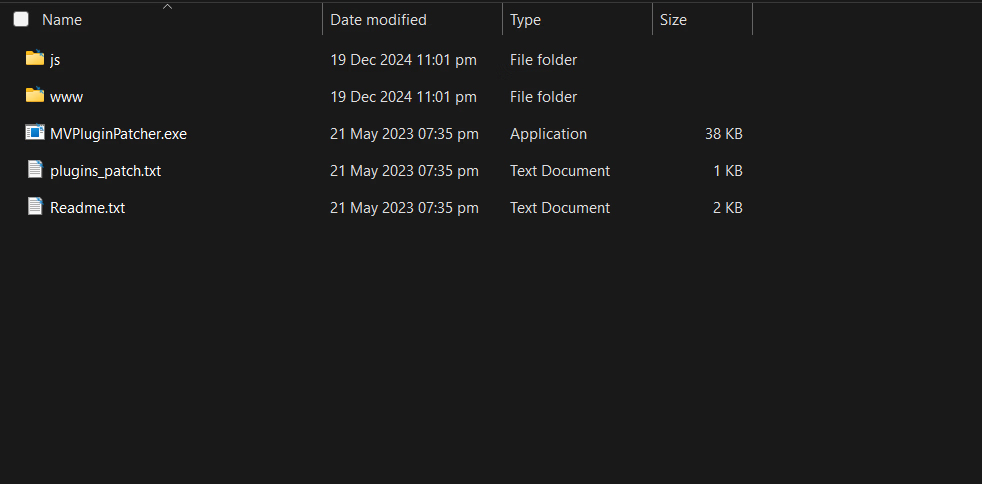
Not 100% sure, I think the file you're looking for is Emerladcoder's Mv cheat plugin. I use a modified version of it. Just search "NamelessMagician - RPG-Maker-MV-MZ-Cheat-Menu-Plugin" and it should bring it up. Alternatively, use the file I've attached below.
1747866160574.png
The way it works is simple. If you're applying the cheat to RMMV, copy everything other than the "js" folder to the root folder of your game. For RMMZ, copy everything other than the "www" folder. Once done with that, run the "MVPluginPatcher.exe" once and you should be good to go. Pressing 1 in game should bring up the cheat menu.
PS - These files are usually flagged as viruses. If you feel you can't trust me, look for the source on github.
 

jakenever

Newbie
Jul 9, 2019
67
63
141
Not 100% sure, I think the file you're looking for is Emerladcoder's Mv cheat plugin. I use a modified version of it. Just search "NamelessMagician - RPG-Maker-MV-MZ-Cheat-Menu-Plugin" and it should bring it up. Alternatively, use the file I've attached below.
View attachment 4862312
The way it works is simple. If you're applying the cheat to RMMV, copy everything other than the "js" folder to the root folder of your game. For RMMZ, copy everything other than the "www" folder. Once done with that, run the "MVPluginPatcher.exe" once and you should be good to go. Pressing 1 in game should bring up the cheat menu.
PS - These files are usually flagged as viruses. If you feel you can't trust me, look for the source on github.
This worked for me thanks a lot man
 

Icyclub

Member
Aug 21, 2023
127
44
73
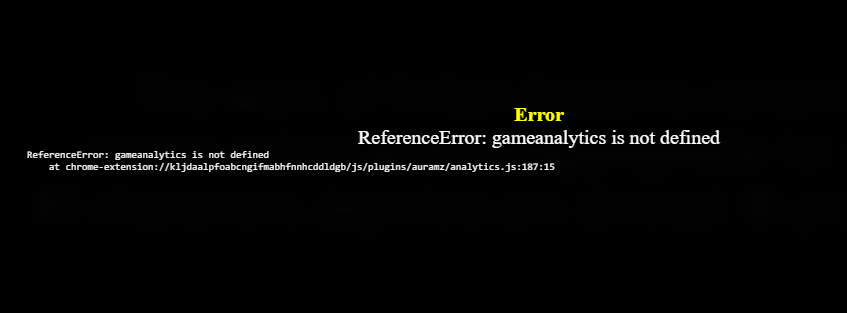
what i DO have a problem with is star knightess aura, for whatever reason it wont load up and shows this error message Screenshot 2025-09-20 131632.png
also it did load last night when the wifi went out but the reason i closed it down was some of the icons werent working properly, and then thats another question y the hell does this thing seem to require wifi?