Mod RPGM Sana Revamped [v0.1 Test, v0.1 Light Version] [WIP] [DevLog Thread]

5.00 star(s) 4 Votes

magic_man132

Member
May 6, 2021
112
29
152
this might be the mod/game of the year... i been watching your progress for a long time i just want to say goodluck and keep up the good work..
 
  • Like
Reactions: tygct

tygct

Member
Jun 6, 2017
174
1,017
396
Since "netorare" is a content toggle, does that mean you intent to also include more exotic fetishes as optional (futa/futa NTR; incest; bestiality)?
It heavily depends on the CGs we have available and the characters I have planned.

As for now, it is highly likely that there will be futa contents since there's a character who is futa in the base game and she have sex with the player, for NTR with the futa girl it depends on whether Ryuna wants to draw her in some scenes with Sana or not.*1

I don't have anything planned involving incest, pretty much because there are not blood-related characters (except Sana and her mom), so only lesbian incest is possible, I'm not against it but not a priority for me.

For bestiality, it depends on whether you consider orcs/goblins as beasts or not, if so, then yes, there will be bestiality in the game, I have already a backstory and a few quests written for orcs and goblins.

Theoretically, I can create a toggle for any fetish (netorare, femdom, consensual non-consent, etc...), I said in theory because I still need to implement the new quest/event system, the content of the game (and the contents done by modders) will be represented through these systems (quests or events have a list of conditions they need to meet before activation, so a NTR event can check if the NTR content is enabled or not before firing), this makes the game flexible if someone wants to enable NTR and disable it later on in the game, any NTR quest/event done before disabling NTR will remain as done for the rest of the systems though (like the Sana's sex diary if she has participated in a sex scene with another man), so as long as everything goes according to my plan and design it should be doable.

------------------------------

*1: Actually, thanks to the sex framework Ryuna may not need to draw her, since she is futa, she could re-use generic CGs in which only the penis is drawn, in that way I can create quests/events involving her and Sana, re-using these generics CGs, there will be more info about these "generic" CGs once I come back to the sex framework!
 

tygct

Member
Jun 6, 2017
174
1,017
396
As a little update for y'all I'm still working on the input mapping/binding.

1. As for now, I have already created a module which allows to rebind keys to the user's desires, this module is available for both the game and mods, each mod needs to create their own input actions and map them to keys/buttons.
2. Keybindings (known as input mappings) are saved in the configuration module without problems
3. The controller is fully compatible!
4. All issues with the old input system has been resolved, the new input system is smooth as fuck! and everything works correctly, whether it is a single key/button or a combination.
5. Added a new method to check whether a key or an input mapping is being released, being released means that the user has pressed down a key/button and just released it.

I encountered a problem with the movement that I just solved today:

I had to implement a new method that "mirrors" the native methods RPG Maker uses to determine the movement (up/down, left/right and whatnot) it was a little pain in the ass to do this since there is not much documentation so I had to spend more time than I wanted in this, the problem was that RPG Maker determines the movement direction using the default keys (directional arrows) and the left stick in controllers (left stick up, down, etc...), so if you mapped the movement to WASD the player won't move.

I managed to replicate this behavior so everything is working as it should but checking the input mappings for movement, so if you map the movement keys to WASD or to the right stick in the controller it works without problems and you are able to move the character.

There are some problems I am currently dealing with:

1. Every window in the game should be adapted to the new input system, this involves modifying all windows that comes with RPG Maker and make them interact with the new module (I'm currently working on this)
2. There are some issues in the configuration scene when setting keybindings, I need to create a window to listen to key/button-strokes and register them (I'm currently working on this)
3. The window (keyboard) input I have created is not compatible with controllers, since it only listen to the keyboard
-> This one is not a huge problem, I will need to do something about this before v1.0, but it is not a priority
4. The scene the game uses to change an actor's name is not compatible with the keyboard, and also, more importantly, it only uses latin characters, so it is impossible to rename a character with japanese/chinese characters.
-> Like I said above for point 3, not a priority for me as for now since it is only a test release, but I gotta do something about this later on, so anyone can rename characters with special characters.

Hopefully I can come up with a devlog sooner than later about the new input system.
 

tygct

Member
Jun 6, 2017
174
1,017
396
Input System Devlog

Hello there!

It's been some time since the last devlog, Like I said in previous posts, I have been working on revamping the input system, fixing old code and trying to to bring it into modern standards, hopefully the work I have done is good enough to achieve this.

As a summary of what I have done this past few weeks:
  • I have removed all dependencies of the Windows API​
  • I implemented a new module that replaces the original RPG Maker key codes and button codes (for gamepad), it covers the whole keyboard and the most common gamepad buttons, this module is called Input Map
    • I have added backwards compatiblity translating the original key codes to the new ones.​
    • This input map module allows me to create actions (like interact, cancel, move left, move right, etc...) and map a list of key and buttons to this action​
    • Each input map has three possible keybinds:
      • Main: Main keys/buttons for this action, cannot be removed/cleared, only changed
      • Alt 1: First set of alternate keys/buttons for this action​
      • Alt 2: Second set of alternate keys/buttons for this action​
    • You can map key (and buttons too!) combinations to an input action, for example:
      • You can create an input action: "Open Sex Scene Menu" and map it to use: "Left Shift + G"
        • This input action will trigger only when both of these key codes are pressed, you can also perform a "exclusive" check in case you don't want this input action to trigger if other keys are pressed.
          • For example: "Left Shift + G + H": Won't trigger since H was pressed​
  • I have created a default input map bindings for the base-game input actions
    • These bindings allows the game to be played in several ways, by this I mean you can play the game single-handedly lol
      • "Left hand only": WASD, Space, Tab, Left Shift, etc...
      • "Right hand only": Arrow keys, Return, Backspace, Right Shift
      • "Both hands" (Main): Default RPG Maker mapping
    • Both left hand and right hand mappings are mapped using the alt 1 and alt 2 keybinds, the "both hands" mapping is the default option
    • If you have played RPG Maker games before, this feature makes the RPG Maker F1 menu useless, keybindings are now changed in-game, and are not limited to what RPG Maker offered originally of course.​
    • I have plans to modify mkxp-z source code to free F1 and F2 keys (later on development) so they are usable in-game​
  • Modders are able to register new keybindings and create hotkeys to map their custom actions​
  • I updated all windows (and the rest of the original RPG Maker code) to use the new input system​
  • I have created a new window to use inside the configuration scene to register the key bindings (compatible with both the keyboard and the gamepad)​
  • (A bit technical to understand) I have been modified the selectable window to extract the handler (callbacks) functionality into the base window, in the process, I have changed it to use input mappings and the code is now cleaner
    • You can run a callback (handler) inside any window easily when an input map is pressed and the window is active, all you have to do is just register them when creating the window.
      • Before this, you had to overwrite several methods from the selectable window, which could result in bugs if the base window method is changed in the future.​

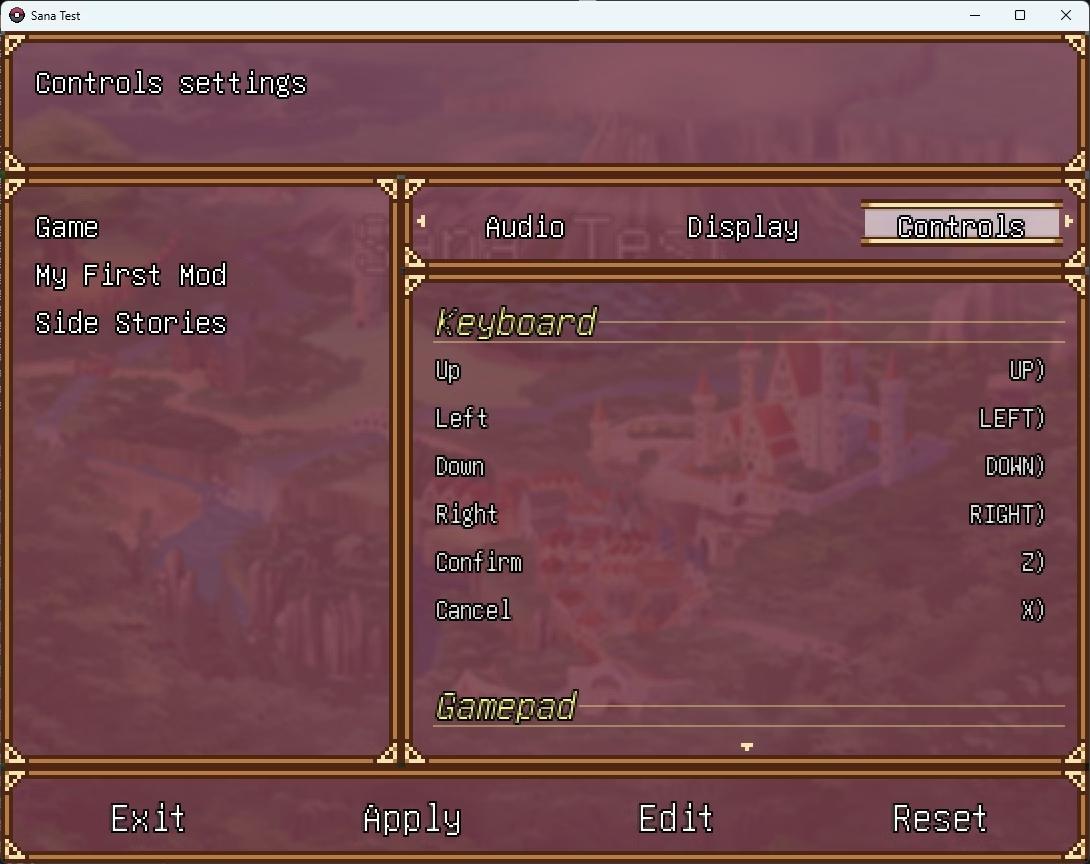
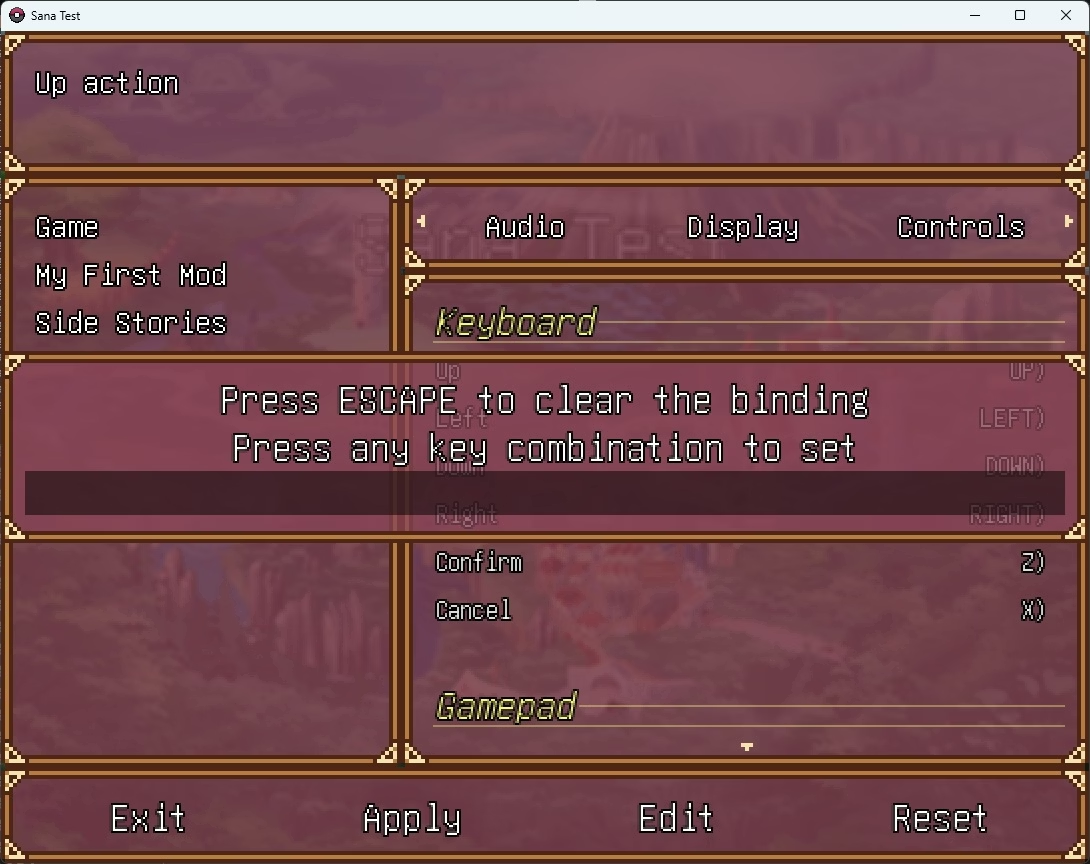
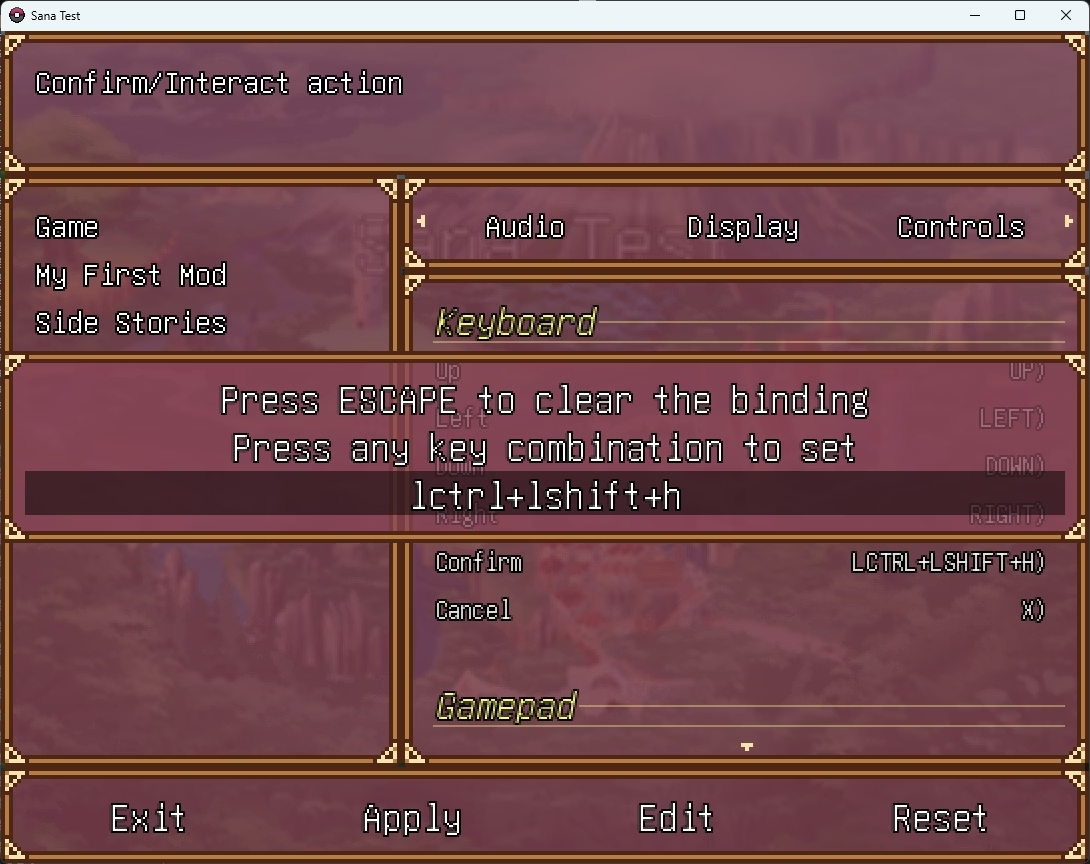
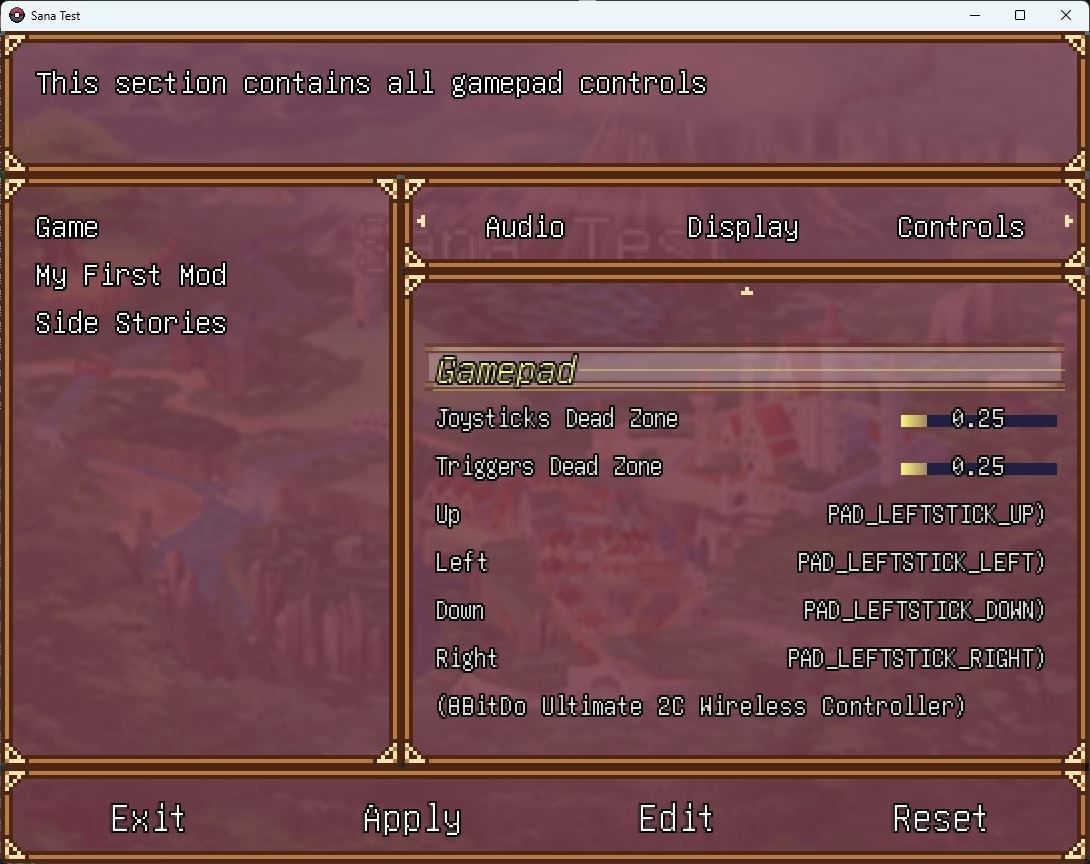
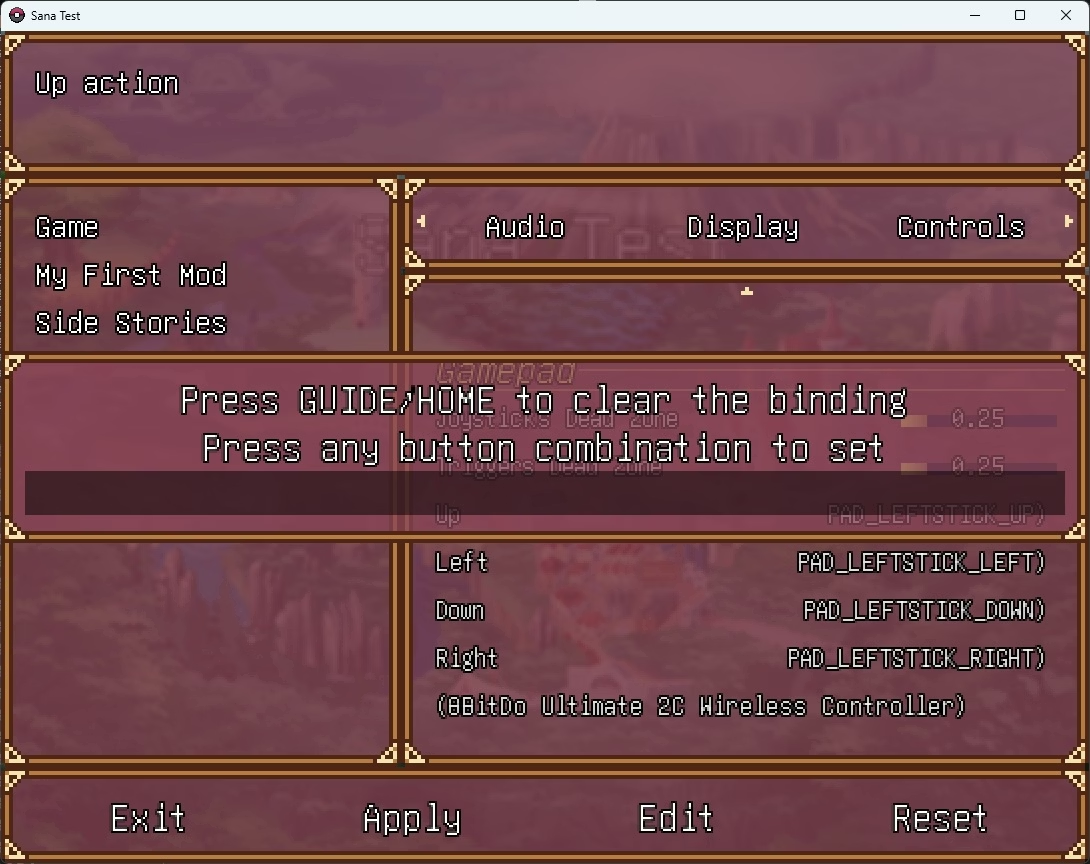
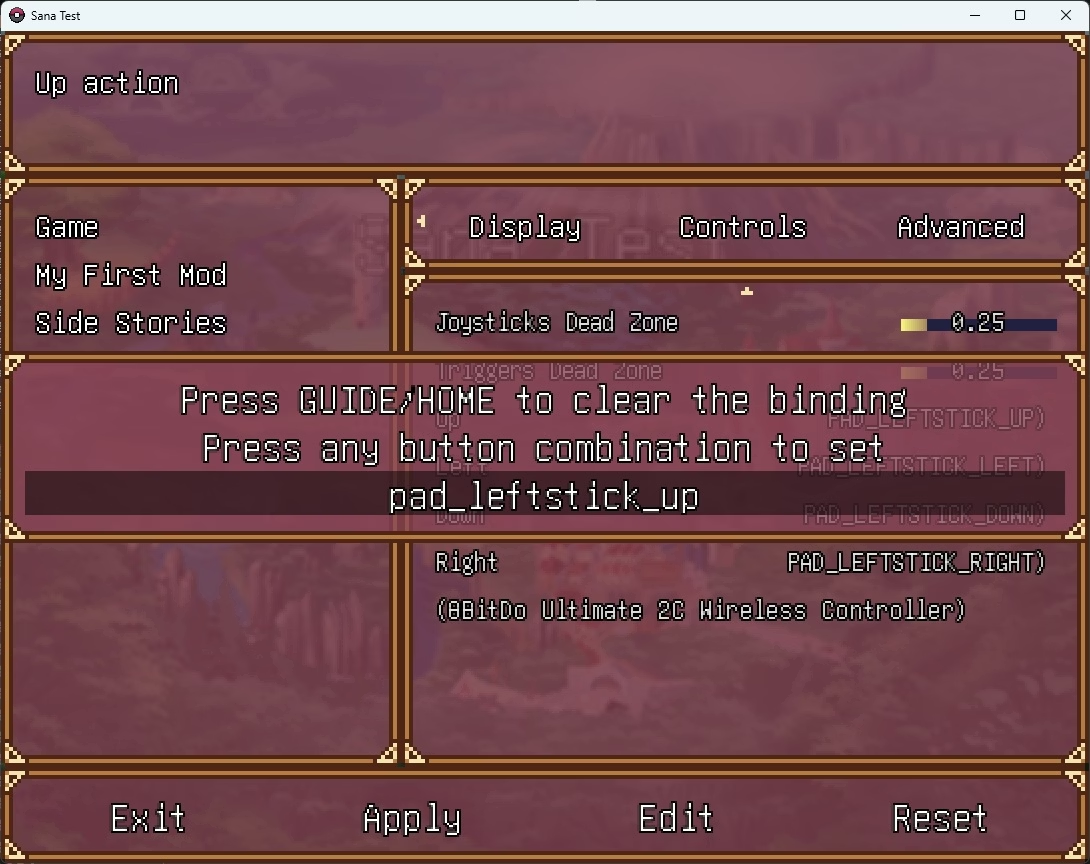
How does it looks?
Take a look! (excuse the spam of pictures, I was lazy to record a video lol)

1.jpg
2.jpg
3.jpg
4.jpg
5.jpg
6.jpg

As you can see, the same window works perfectly for both gamepad and the keyboard, it's important to note that, if you want to change a binding for the gamepad, you must have a gamepad connected, otherwise the window won't open because you will be stuck since the window will be waiting for gamepad input.

The window allows two behaviors, setting a combination or keys or a single key, for testing purposes, all pictures has the "combination" flag ON.

There is also two new options: Joystick and triggers dead zone, which allows you to set the deadzone for both the gamepad triggers and joysticks.

The menu also renders which controller you have connected right now, in case you have more than one and don't know which one is active in the game.

These configuration menu entries are created like the other ones I explained before, example:
JSON:
{
    "entry_type": "keybind",
    "entry_display_name": "$cfg_menu_controls_up",
    "entry_description": "$cfg_menu_controls_up_desc",
    "entry_config_name": "key_up",
    "entry_options": {
        "keybind_combinations": false,
        "keybind_mode": "keyboard"
    },
    "entry_config_context": "sana"
}
  • New entry type: keybind
  • New entry options:
    • keybind_combinations: Flag to allow keybind combinations or not
    • keybind_mode: Sets the keybind input mode (keyboard, gamepad)

Any downsides?
The main downside is because of the way the configuration module is designed, as you may know if you checked my last devlog, the configuration system is made in a way in which you create each option individually, this means that, if I want to allow users to map the alt. 1 and alt. 2 for an action, I have to create a setting for each ones of these like: "key_up1" and "key_up2", but that's not it, if I want to allow mapping the gamepad controller too, I will need to create yet another two settings: "pad_up1" and "pad_up2", this makes the process of creating settings for the input mappings very verbose, for example if you have 8 input mapping settings and you want to allow the user to map alt. 1 and alt. 2 for each one (both the keyboard and controller) you have: 8 x 2 x 2 = 32 settings just for that.

Honestly I don't think I will work on fixing this downside, since the system does not force you to map alt 1 and alt 2, as long as main is mapped, you are good to go, this is probably a problem for me since modders won't need to allow mapping many keys or buttons with their mods, but I will probably need to spend some time to properly create all settings for each mapping if I want to allow different layouts so you don't have to do it manually (you know? the left hand only and right hand only thing), anyways it's easier than redesigning the whole configuration module, which I'm not going to do because, apart from this downside, it works great.

Is there anything left?
Yep, the work is not finished with the new input system, I still need to solve this problem:
  • Different input actions can have the same combinations of keys/buttons (keybindings conflicts)
This one is important to fix, take this example to understand:
1. You have two input actions: Confirm and Cancel
2. Confirm is mapped to Z and Cancel to X
3. You map Confirm to X
4. The game won't complain because there is no code that performs this check
5. Now, you have Confirm mapped to X and Cancel to X
6. You cannot interact with anything in the game anymore because as soon as you want to Confirm you will also Cancel the action

I will probably fix this by allowing to set a list of incompatible "actions" for each action, so for example, for the action "Confirm" I can add the action "Cancel" as incompatible, being incompatible means that none of the keybindinds must match between these actions, if anyone matches when binding a new key the game will complain about it, likewise, the Up action is incompatible with the Down action, same happens with Left action and Right action.

Besides of this, I consider the new input system to be good enough to continue development.

What's next?
Once I take care of the keybindings conflicts I explained above, the sex framework is up next and this last one will be the last piece of work I have to do for v0.2
 

ElDonBigotes

Member
Nov 22, 2020
367
97
152
Input System Devlog

Hello there!

It's been some time since the last devlog, Like I said in previous posts, I have been working on revamping the input system, fixing old code and trying to to bring it into modern standards, hopefully the work I have done is good enough to achieve this.

As a summary of what I have done this past few weeks:
  • I have removed all dependencies of the Windows API​
  • I implemented a new module that replaces the original RPG Maker key codes and button codes (for gamepad), it covers the whole keyboard and the most common gamepad buttons, this module is called Input Map
    • I have added backwards compatiblity translating the original key codes to the new ones.​
    • This input map module allows me to create actions (like interact, cancel, move left, move right, etc...) and map a list of key and buttons to this action​
    • Each input map has three possible keybinds:​
      • Main: Main keys/buttons for this action, cannot be removed/cleared, only changed
      • Alt 1: First set of alternate keys/buttons for this action​
      • Alt 2: Second set of alternate keys/buttons for this action​

    • You can map key (and buttons too!) combinations to an input action, for example:​
      • You can create an input action: "Open Sex Scene Menu" and map it to use: "Left Shift + G"​
        • This input action will trigger only when both of these key codes are pressed, you can also perform a "exclusive" check in case you don't want this input action to trigger if other keys are pressed.​
          • For example: "Left Shift + G + H": Won't trigger since H was pressed​

  • I have created a default input map bindings for the base-game input actions​
    • These bindings allows the game to be played in several ways, by this I mean you can play the game single-handedly lol
      • "Left hand only": WASD, Space, Tab, Left Shift, etc...
      • "Right hand only": Arrow keys, Return, Backspace, Right Shift
      • "Both hands" (Main): Default RPG Maker mapping
    • Both left hand and right hand mappings are mapped using the alt 1 and alt 2 keybinds, the "both hands" mapping is the default option
    • If you have played RPG Maker games before, this feature makes the RPG Maker F1 menu useless, keybindings are now changed in-game, and are not limited to what RPG Maker offered originally of course.​
    • I have plans to modify mkxp-z source code to free F1 and F2 keys (later on development) so they are usable in-game​

  • Modders are able to register new keybindings and create hotkeys to map their custom actions​
  • I updated all windows (and the rest of the original RPG Maker code) to use the new input system​
  • I have created a new window to use inside the configuration scene to register the key bindings (compatible with both the keyboard and the gamepad)​
  • (A bit technical to understand) I have been modified the selectable window to extract the handler (callbacks) functionality into the base window, in the process, I have changed it to use input mappings and the code is now cleaner​
    • You can run a callback (handler) inside any window easily when an input map is pressed and the window is active, all you have to do is just register them when creating the window.​
      • Before this, you had to overwrite several methods from the selectable window, which could result in bugs if the base window method is changed in the future.​

How does it looks?
Take a look! (excuse the spam of pictures, I was lazy to record a video lol)

View attachment 5064194
View attachment 5064195
View attachment 5064196
View attachment 5064197
View attachment 5064198
View attachment 5064199

As you can see, the same window works perfectly for both gamepad and the keyboard, it's important to note that, if you want to change a binding for the gamepad, you must have a gamepad connected, otherwise the window won't open because you will be stuck since the window will be waiting for gamepad input.

The window allows two behaviors, setting a combination or keys or a single key, for testing purposes, all pictures has the "combination" flag ON.

There is also two new options: Joystick and triggers dead zone, which allows you to set the deadzone for both the gamepad triggers and joysticks.

The menu also renders which controller you have connected right now, in case you have more than one and don't know which one is active in the game.

These configuration menu entries are created like the other ones I explained before, example:
JSON:
{
    "entry_type": "keybind",
    "entry_display_name": "$cfg_menu_controls_up",
    "entry_description": "$cfg_menu_controls_up_desc",
    "entry_config_name": "key_up",
    "entry_options": {
        "keybind_combinations": false,
        "keybind_mode": "keyboard"
    },
    "entry_config_context": "sana"
}
  • New entry type: keybind
  • New entry options:
    • keybind_combinations: Flag to allow keybind combinations or not
    • keybind_mode: Sets the keybind input mode (keyboard, gamepad)

Any downsides?
The main downside is because of the way the configuration module is designed, as you may know if you checked my last devlog, the configuration system is made in a way in which you create each option individually, this means that, if I want to allow users to map the alt. 1 and alt. 2 for an action, I have to create a setting for each ones of these like: "key_up1" and "key_up2", but that's not it, if I want to allow mapping the gamepad controller too, I will need to create yet another two settings: "pad_up1" and "pad_up2", this makes the process of creating settings for the input mappings very verbose, for example if you have 8 input mapping settings and you want to allow the user to map alt. 1 and alt. 2 for each one (both the keyboard and controller) you have: 8 x 2 x 2 = 32 settings just for that.

Honestly I don't think I will work on fixing this downside, since the system does not force you to map alt 1 and alt 2, as long as main is mapped, you are good to go, this is probably a problem for me since modders won't need to allow mapping many keys or buttons with their mods, but I will probably need to spend some time to properly create all settings for each mapping if I want to allow different layouts so you don't have to do it manually (you know? the left hand only and right hand only thing), anyways it's easier than redesigning the whole configuration module, which I'm not going to do because, apart from this downside, it works great.

Is there anything left?
Yep, the work is not finished with the new input system, I still need to solve this problem:
  • Different input actions can have the same combinations of keys/buttons (keybindings conflicts)
This one is important to fix, take this example to understand:
1. You have two input actions: Confirm and Cancel
2. Confirm is mapped to Z and Cancel to X
3. You map Confirm to X
4. The game won't complain because there is no code that performs this check
5. Now, you have Confirm mapped to X and Cancel to X
6. You cannot interact with anything in the game anymore because as soon as you want to Confirm you will also Cancel the action

I will probably fix this by allowing to set a list of incompatible "actions" for each action, so for example, for the action "Confirm" I can add the action "Cancel" as incompatible, being incompatible means that none of the keybindinds must match between these actions, if anyone matches when binding a new key the game will complain about it, likewise, the Up action is incompatible with the Down action, same happens with Left action and Right action.

Besides of this, I consider the new input system to be good enough to continue development.

What's next?
Once I take care of the keybindings conflicts I explained above, the sex framework is up next and this last one will be the last piece of work I have to do for v0.2
Thank you very much for your work, and I'm looking forward to playing it. One question later: Can I use the mouse instead of the keyboard? English isn't my language, sorry.
 

tygct

Member
Jun 6, 2017
174
1,017
396
Thank you very much for your work, and I'm looking forward to playing it. One question later: Can I use the mouse instead of the keyboard? English isn't my language, sorry.
No problem!

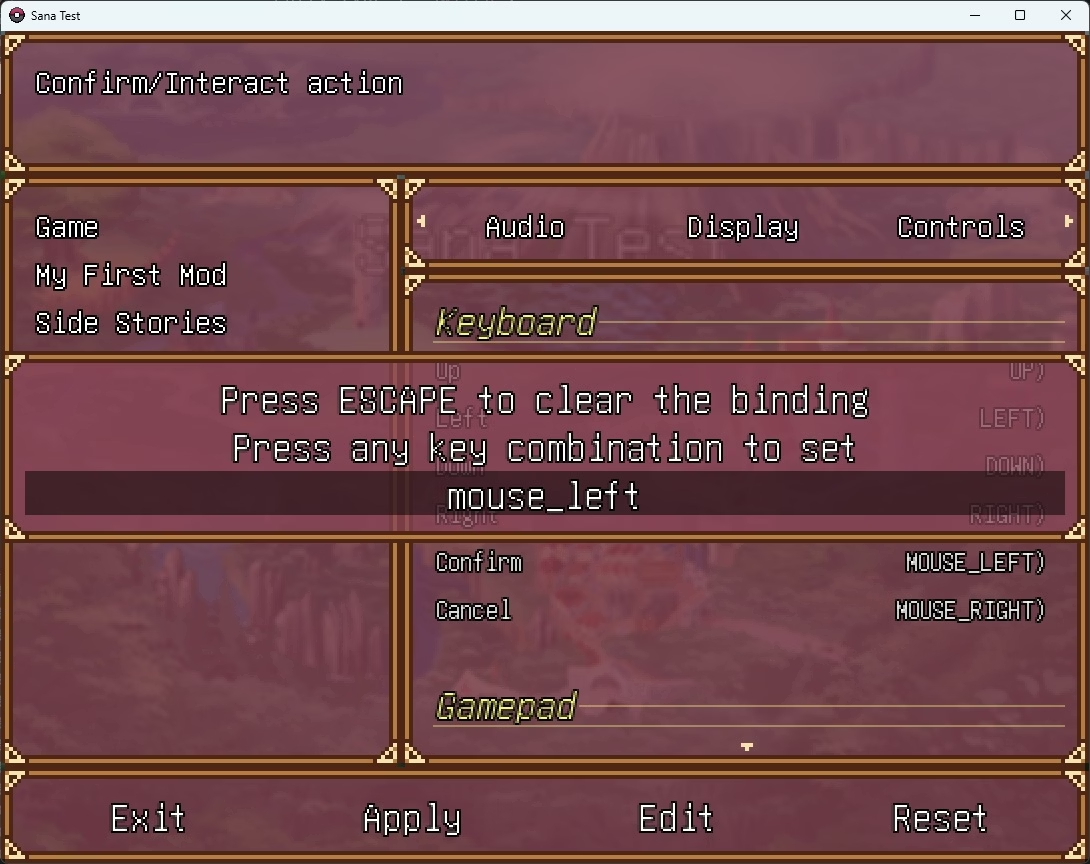
As for now, it is not possible to play with the mouse because it is "not supported".

I have put it in quotes because the mouse is actually recognized by the new input system, as you can see in this screenshot (mouse_left for Confirm and mouse_right for Cancel), the mouse wheel is also supported (scroll up and scroll down) BUT you cannot use it like you would use it in new RPG Maker MV games since that would require lots of work to make the windows and the player's movement work with the mouse.

Maybe in the future I'll consider doing this but it is not a priority right now.

mouse.jpg
 
Jul 30, 2018
339
417
278
consistant update and work-life balance is the key.
this man did this mod for free out of love for the game or just hobby.
we do not want fast cash grab update (even if it's free) causing fatigue and burnt out, we just want genuine update within devs time and pace.
we do not entitled to anything but ofc we'd want some update once in a while because this mod is literally the only light in this dark sky.
nowhere for this game out there getting reworked art with engine custom made/update.
even the og dev moved on to another project.
this mod at this point is a remake of SANA game.
as always thanks for the update and stay safe!
 

tygct

Member
Jun 6, 2017
174
1,017
396
consistant update and work-life balance is the key.
this man did this mod for free out of love for the game or just hobby.
we do not want fast cash grab update (even if it's free) causing fatigue and burnt out, we just want genuine update within devs time and pace.
we do not entitled to anything but ofc we'd want some update once in a while because this mod is literally the only light in this dark sky.
nowhere for this game out there getting reworked art with engine custom made/update.
even the og dev moved on to another project.
this mod at this point is a remake of SANA game.
as always thanks for the update and stay safe!
Thanks! I appreciate your words, gotta thank Ryuna_the_2nd too for stepping in to redraw the game CGs and refusing to stop or drop it out of tiredness for this long, specially since this does not bring any revenue
 

tygct

Member
Jun 6, 2017
174
1,017
396
Input System Devlog (Pt. 2)

the work is not finished with the new input system, I still need to solve this problem:
  • Different input actions can have the same combinations of keys/buttons (keybindings conflicts)
This one is important to fix, take this example to understand:
1. You have two input actions: Confirm and Cancel
2. Confirm is mapped to Z and Cancel to X
3. You map Confirm to X
4. The game won't complain because there is no code that performs this check
5. Now, you have Confirm mapped to X and Cancel to X
6. You cannot interact with anything in the game anymore because as soon as you want to Confirm you will also Cancel the action
Hey, one the major issues I had in mind before creating the Input Map module was related to this, it was that by allowing to remap keybindings the player would make the game unplayable by mistake, that is not a problem anymore since the keybinding conflict problem is solved (hooray!), I still need to finish some details here and there but the most important part of the code is finished.

How does rebinding work?
Like you may know already from the previous devlog, input map actions represents the mapping of an action to a list of keyboard keys or gamepad buttons and each of them has three slots (main, alt. 1 and alt. 2), now each input action has new flag attributes:
  • Unclearable: Determines whether an input map action can be cleared or not​
    • Defaults to false (by default all actions are clearable)​
  • Unique: Determines whether an input map action is unique in the game or not​
    • Defaults to false (by default all actions are not unique)​
The unclearable flag makes the input system never allow an input map action to be cleared, meaning that the main slot (both keyboard keys and gamepad buttons) must have a valid combinations of keys/buttons, they won't ever be assignable to UNKNOWN, which is the code used to represent an cleared/unassigned key/button code.

Of course, the alternative slots (both alt. 1 and alt. 2) are clearable since they are optional, it only checks the main slot, for both keys and buttons.

I have made it false by default mainly because the vast majority of mods should not use this, since they should allow players to clear their keybindings/hotkeys.

About the unique flag, this flag makes an input action unique in the game, including the input actions provided by mods, the combination of keys/buttons that an unique input action is using cannot be ever used by any other input action.

I have only made unique the essential actions of the game, because if these actions ever conflict with something else, it has the potential to make the game unplayable, for example:
  1. Movement keys​
    1. Main: UP, LEFT, DOWN, RIGHT (ARROWS)​
    2. Alt 1: W, A, S, D​
  2. Confirm keys​
    1. Main: Z​
    2. Alt 1: RETURN​
    3. Alt 2: SPACE​
  3. Cancel keys​
    1. Main: X​
    2. Alt. 1: TAB​
    3. Alt. 2: BACKSPACE​
  4. Menu keys​
    1. Main: ESCAPE​
As long as these actions are unique, you can still control the game even though you fuck up the input mappings somehow, to make sure this never happens, I will also add a new console command (resetbindings) that will reset all keybindings to their default value, just in case you break the mappings, even though it is highly unlikely.


Yeah I know, the messages shown when the keybindings conflict may not be easy to understand (like what the hell is "slot: 0"), believe it or not, as many games I have played in my life, sometimes I find hella difficult to write error/info messages like this which are easy to understand and clear enough lol, I'll change the wording to make it clearer.

In case you have not noticed, I've also changed the way clearing a binding works, previously the ESCAPE key was not usable as a normal key because it was reserved by the game to clear bindings, I kinda did not like this so I've changed the behavior of the keybinding window to un-assign when the ESCAPE key is hold during some time, if the ESCAPE key is released before this time, it will be treated as a valid key code.

Funny thing is that, as simple as it sounds, doing this took me a headache due to synchronization issues, I used Ruby fibers for the binding process and doing so bugged out the code of the scene and freezed the windows, took me a week or so to realize what the hell was going wrong.

Other minor changes
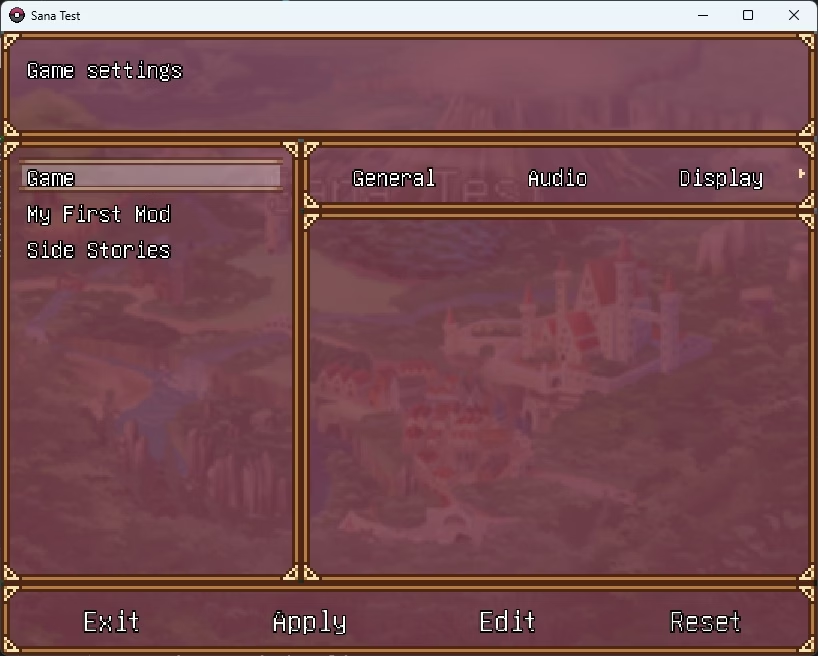
I have changed how configuration menus are shown in the settings scene, previously they were inserted without any particular order, meaning that they appeared in the menu in the same order they were created, I thought that sorting them alphabetically would make it easier for players to find a specific menu, specially if they install many mods that provides new config menus, so I modified the code to sort them like that.

Though, I wanted the game config menu to always appear at the top of the list (for ease-of-use), so the only menus that are sorted are the ones added by mods, the game uses the display name to sort the menu in the list, in case the name is localized, it will translate it first before sorting them, so ordering localized menus is doable.

I have also enabled quick scrolling for the config menu windows, if holding down the prev. page or next page actions, the cursor will move up/down as many positions as needed to go to the next menu that is not shown.

As you can see here, Side Stories is shown last due to starting with S:
cfg_menu.jpg

If you change the display name, it will be shown above others:
cfg_menu_2.jpg

No matter how many menus you have installed, the game config menu will always appear on top.

Besides of this, I've also fixed some logic bugs in the Configuration module, which btw are the worst types of bugs because it seems everything is working as it should and suddenly it breaks the game with almost no trace/logs report, though this is kinda technical so I'll skip this part lol.

Due to what I said above and looking ahead to the future, I improved the logging module to create copies of existing log files, in case you find a bug and decide to play the game again instead of reporting it, the log file won't get overwritten, the game now will keep up to 3 copies of previous log files (game_log1.log, game_log2.log and game_log3.log), and one working log file (game_log0.log)

See y'all in the next devlog!
 
Last edited:

ElDonBigotes

Member
Nov 22, 2020
367
97
152
Input System Devlog (Pt. 2)


Hey, one the major issues I had in mind before creating the Input Map module was related to this, it was that by allowing to remap keybindings the player would make the game unplayable by mistake, that is not a problem anymore since the keybinding conflict problem is solved (hooray!), I still need to finish some details here and there but the most important part of the code is finished.

How does rebinding work?
Like you may know already from the previous devlog, input map actions represents the mapping of an action to a list of keyboard keys or gamepad buttons and each of them has three slots (main, alt. 1 and alt. 2), now each input action has new flag attributes:
  • Unclearable: Determines whether an input map action can be cleared or not​
    • Defaults to false (by default all actions are clearable)​
  • Unique: Determines whether an input map action is unique in the game or not​
    • Defaults to false (by default all actions are not unique)​
The unclearable flag makes the input system never allow an input map action to be cleared, meaning that the main slot (both keyboard keys and gamepad buttons) must have a valid combinations of keys/buttons, they won't ever be assignable to UNKNOWN, which is the code used to represent an cleared/unassigned key/button code.

Of course, the alternative slots (both alt. 1 and alt. 2) are clearable since they are optional, it only checks the main slot, for both keys and buttons.

I have made it false by default mainly because the vast majority of mods should not use this, since they should allow players to clear their keybindings/hotkeys.

About the unique flag, this flag makes an input action unique in the game, including the input actions provided by mods, the combination of keys/buttons that an unique input action is using cannot be ever used by any other input action.

I have only made unique the essential actions of the game, because if these actions ever conflict with something else, it has the potential to make the game unplayable, for example:
  1. Movement keys​
    1. Main: UP, LEFT, DOWN, RIGHT (ARROWS)​
    2. Alt 1: W, A, S, D​
  2. Confirm keys​
    1. Main: Z​
    2. Alt 1: RETURN​
    3. Alt 2: SPACE​
  3. Cancel keys​
    1. Main: X​
    2. Alt. 1: TAB​
    3. Alt. 2: BACKSPACE​
  4. Menu keys​
    1. Main: ESCAPE​
As long as these actions are unique, you can still control the game even though you fuck up the input mappings somehow, to make sure this never happens, I will also add a new console command (resetbindings) that will reset all keybindings to their default value, just in case you break the mappings, even though it is highly unlikely.


Yeah I know, the messages shown when the keybindings conflict may not be easy to understand (like what the hell is "slot: 0"), believe it or not, as many games I have played in my life, sometimes I find hella difficult to write error/info messages like this which are easy to understand and clear enough lol, I'll change the wording to make it clearer.

In case you have not noticed, I've also changed the way clearing a binding works, previously the ESCAPE key was not usable as a normal key because it was reserved by the game to clear bindings, I kinda did not like this so I've changed the behavior of the keybinding window to un-assign when the ESCAPE key is hold during some time, if the ESCAPE key is released before this time, it will be treated as a valid key code.

Funny thing is that, as simple as it sounds, doing this took me a headache due to synchronization issues, I used Ruby fibers for the binding process and doing so bugged out the code of the scene and freezed the windows, took me a week or so to realize what the hell was going wrong.

Other minor changes
I have changed how configuration menus are shown in the settings scene, previously they were inserted without any particular order, meaning that they appeared in the menu in the same order they were created, I thought that sorting them alphabetically would make it easier for players to find a specific menu, specially if they install many mods that provides new config menus, so I modified the code to sort them like that.

Though, I wanted the game config menu to always appear at the top of the list (for ease-of-use), so the only menus that are sorted are the ones added by mods, the game uses the display name to sort the menu in the list, in case the name is localized, it will translate it first before sorting them, so ordering localized menus is doable.

I have also enabled quick scrolling for the config menu windows, if holding down the prev. page or next page actions, the cursor will move up/down as many positions as needed to go to the next menu that is not shown.

As you can see here, Side Stories is shown last due to starting with S:
View attachment 5115758

If you change the display name, it will be shown above others:
View attachment 5115759

No matter how many menus you have installed, the game config menu will always appear on top.

Besides of this, I've also fixed some logic bugs in the Configuration module, which btw are the worst types of bugs because it seems everything is working as it should and suddenly it breaks the game with almost no trace/logs report, though this is kinda technical so I'll skip this part lol.

Due to what I said above and looking ahead to the future, I improved the logging module to create copies of existing log files, in case you find a bug and decide to play the game again instead of reporting it, the log file won't get overwritten, the game now will keep up to 3 copies of previous log files (game_log1.log, game_log2.log and game_log3.log), and one working log file (game_log0.log)

See y'all in the next devlog!
Thank you very much for your work and good luck!
 
  • Like
Reactions: tygct

tygct

Member
Jun 6, 2017
174
1,017
396
It's been over a month since the last update on the project's progress, how are things going?
I have nothing substantial to show yet, I had my vacations around mid August and I've been relaxing.

I'm back to my IRL job from my vacay and as usual, I have a big pile of work I need to do before resuming the project, I will have more things to share eventually as I get back to my routine.

Also I think that before resuming the project and since Windows 10 EOL is next month I will probably move my work PC setup to Linux, it will make it easier to test the game for Linux and also develop the fork I'm using of MKXP-Z for Sana, it is a pain in the ass in Windows to compile and modify the source code.
 

tygct

Member
Jun 6, 2017
174
1,017
396
Status Update
Not really much of an important update, just wanted to say that I am alive and finally moved my setup to Linux and even though it took me longer that I thought everything is working properly for now (God bless Steam's Proton for making everything easier), also since I started anew I decided to use VSCodium instead of VSCode, so it took me so extra work to move everything into VSCodium and find extensions that replaced some that I used in VSCode that are not available there.

I created a VSCodium workspace while I was testing extensions and I think I could use it to share a common ground for mod makers in the future, the extensions I use are automatically recommended to be installed and everything is configured properly within the workspace settings for both Windows and Linux, so I can turn this into a (kindof) plug-and-play environment to create mods.

I don't think I shared the last thing I did before migrating OS, I guess I can let you guys know until I got something better to share about the sex scene framework.

I had to revisit the drawing board so to speak, because there were some problems when it comes to sex animation overlays and sounds, the way I designed did not allow me and modders to create overlays and sounds separately from the animation, so if someone wanted to create an animation overlay/sound pack they would always have to overwrite the animation base files, I managed to re-design this part to actually allow this (at least I think for now).

The downside is that this will introduce incompatibilities if a overlay pack is used with animations base files that were changed by other mod, for example:
If you, as the user, install these three mods:
- Animation Pack A (contains the base animation files)
- Animation Pack A - Overlays (contains overlays for "Animation Pack A" made by another modder)
- Animation Pack A Continued (A redrawn/better version of "Animation Pack A" changing the base shape made by another different modder)
In this situation you will end up with the overlays that comes from "Animation Pack A - Overlays" appearing over the new "Animation Pack A Continued" and they will probably appear as if they are out of place and/or floating since the base shape may have changed, still I'd rather have this than not allowing to create sounds and overlays packs for animations.

My main goal with this is to separate, as much as possible, the art part of the game into smaller pieces of work, so allowing different people to work on the same animations base files is better than working on the whole package.

This screenshot shows the contents of the game's database, now as I said, sex scene sounds and overlays are independent instances of the base animation file (which is the blowjob.sxa one), before this change, they were all inside the element_sex_animation thing as "addons", this instances are later "glued together" when the sex framework detects a change in the database and rebuilds a registry of animations, this registry contains sex animations with all components together and ready to be loaded to avoid lag and frame drops as much as possible when the sex framework requests new animations for a new scene.

1760791397123.png

Depending of the amount of RAM used in future test versions and the amount of animations, I may change the current behavior to preload all bitmaps into memory, making the animation registry as fast as possible since they will be loaded in the RAM already, which is the most expensive part of the process.

See ya'll in another devlog/update, hopefully sooner than later.
 

tygct

Member
Jun 6, 2017
174
1,017
396
Status Update 2

Been dead silent since the last post but, as you guys already know, I've been working on the sex framework, which is the last puzzle piece left for the next test version, I have finished working on what I call the "skeleton" of the sex scene framework, I had to plan how to implement it into the game to be as seamless as possible and at the same time easy-to-use, since not only me but modders will use the module as an "API" to create and control sex scenes during events in the game, still as you can tell, there is nothing substantial to show yet since there's a key part which it is not finished yet (sex scene actors script), hence this "Status Update" instead of a "content" devlog post.

I really wanted this "skeleton" for sex scenes to fulfill two main requirements:
  1. Be as fluid as possible: Avoid game freezes/fps drops as much as possible​
  2. Be as flexible as possible: Allow customizable and extensible logic for each sex scene through addons​
In theory, I think that I've fulfilled these two points considering the way I've designed it, still not everything is bullet-proof, that's why I said "in theory", because it is like a balance between these two points: the more addons running at the same time the more risk for fps drops, heavily depending on your machine.
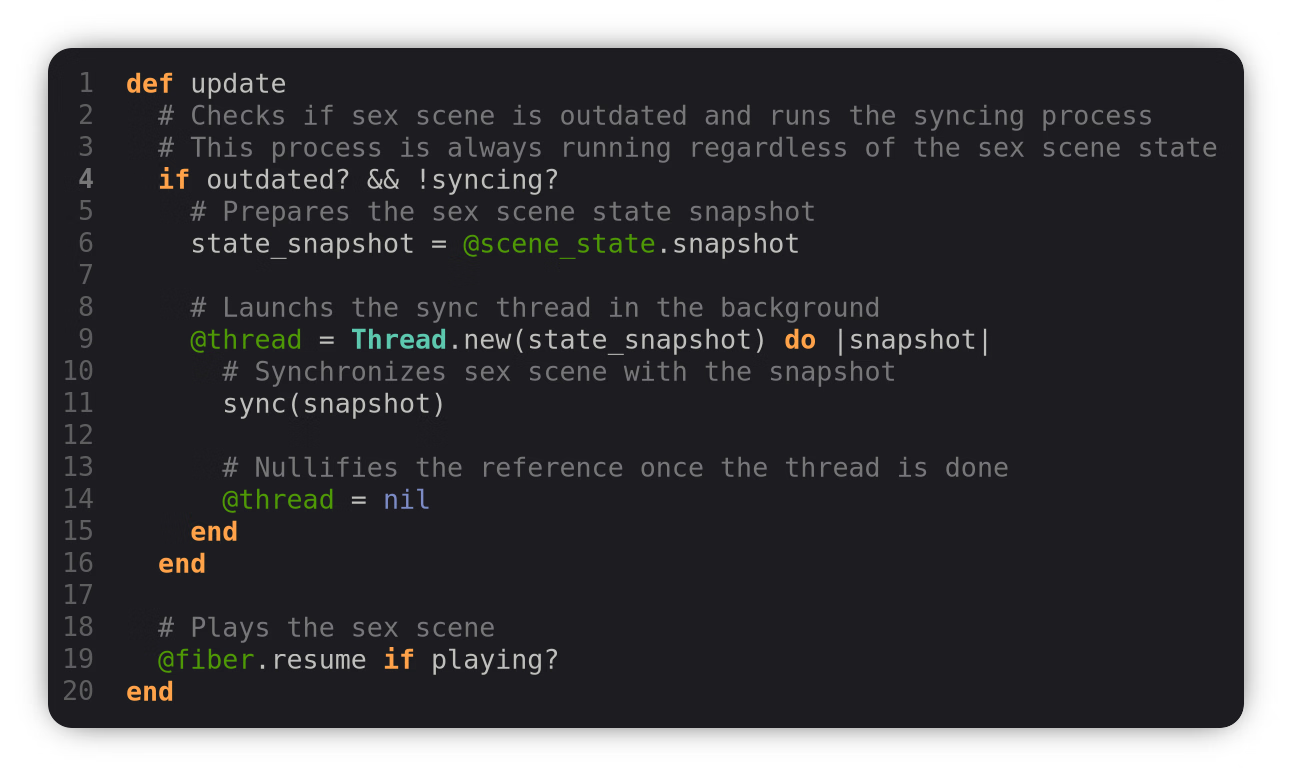
frame-update.png
Sex scene frame update code snippet

The sex framework allows to create and run any number of sex scenes at the same time (we are only limited to the size of the screen, which is way too small since it is RPG Maker VX Ace game after-all :p), every sex scene (which are created with an unique ID: like "waitress_sex_interaction"), as soon as it is created it will run the frame update method, which will run a thread to synchronize itself with its own state.

Small note I forgot to say: I also had to remove all the functionality of the sex framework that made it scene-independent to make it future-proof, now the sex scenes are not updated within the engine frame update, instead, I have modified the scene super class (the base scene which is the parent of all scenes in the game) to make it scene-dependent, so now the sex scenes will run depending on whether the current game scene allows sex scene to run, basically all scenes are prohibited to run sex scenes except the battle scene and the map scene (which is the gameplay scene), in the future, other scenes like minigames like the waitress one or other ones I have planned will implement their own scene and allow sex scenes to occur in them.

To understand what I said here, I should explain what a "sex scene state" is, every sex scene creates its own state, which is something like a representation of the dynamic information that changes during the sex scene playback, this state is what I have designed to separate the internal logic that is very sensitive from the actual information that can change, either by the user (you), by myself/modders or by addons automatically.

What is this "dynamic information"? you may ask, this information is, for example, the active actors participating in the sex scene, the position/slot each actor is using, the sex scene context, the list of animations available, the current animation, the sex tags, even the sex scene opacity, the sex scene playback speed, etc... Separating the state from the sex scene allows you to use the same sex scene instance for several actors, several contexts and other dialogue choices or events.

Like I said, everytime a sex scene state is changed, a sync routine is spawned by the sex scene, this routine is prepared to generate a snapshot of the current sex scene state and synchronize the sex scene to that snapshot, this snapshot design is really useful because, as the sex scene is synchronizing a snapshot, the sex scene state could be changing, which will result in another synchronization routine with another snapshot later on.

If you are tech-savvy, you may notice that the thread is created and ran regardless whether the sex scene is playing or not, this little thread here allows sex scenes to synchronize automatically whenever a change in the sex scene state is detected, so the synchronization process could be ran at the same time the sex scene is playing! This part right here achieves what I call the fluidity/smoothness I talked about above, the sex scene is designed to always play a sex animation, if a state change is detected, it will keep playing the same animation meanwhile the game in the background (using threads) will synchronize the state, once the thread is done, in the next iteration the sex scene will change its active animation and show the new one.

Within the sync process, there are two types of synchronization: major and minor
  • Major Sync: Triggers when a major change is detected in the sex scene, for example: the list of actors has changed, the context has changed, the list of tags has changed like going from vaginal sex to anal sex, etc...
  • Minor Sync: Represents a minor change that does not need to run the most complex logic, for example: the current animation has changed, the opacity has changed, the sex animation speed has increased/decreased, etc...
Inside this "major sync" occurs probably the most time-consuming logic that a sex scene executes, which is preloading animations into the RAM. To ensure smoothness I need to preload sex animation into the RAM so the pictures files aka the bitmaps are accessible, BUT I cannot simply load all of them at the beginning of the game, like some modern RPG Maker games do nowadays, this is because the game allows modders to add new animations, this could potentially make the game consume LOTS of memory if there are a lot of animations installed and everything is preloaded at the beginning of the game, so instead of preloading them all, I just made the sex scene preload the list of possible animations (like preloading chunks of animations), which is way smaller in comparison to the whole sex animation registry.

The "minor sync" is used to synchronize any other data that is not time-consuming, like changing the animation, changing the sex scene opacity (transparency), changing the animation frame rate (increase/decrease speed), etc...
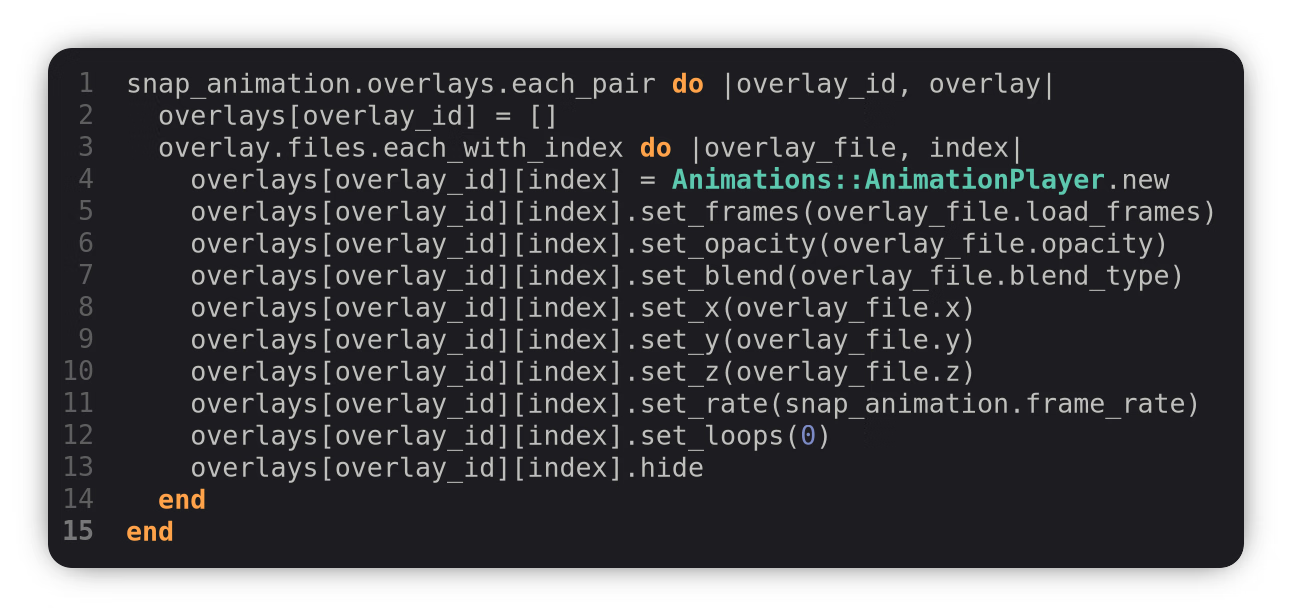
Here's a small code snippet of the thread sync method, this loop here updates the sex scene animation to allocate enough animation players for all overlays available for the selected animation:
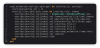
sync-snippet.png
Sex scene sync method overlay syncing code snippet
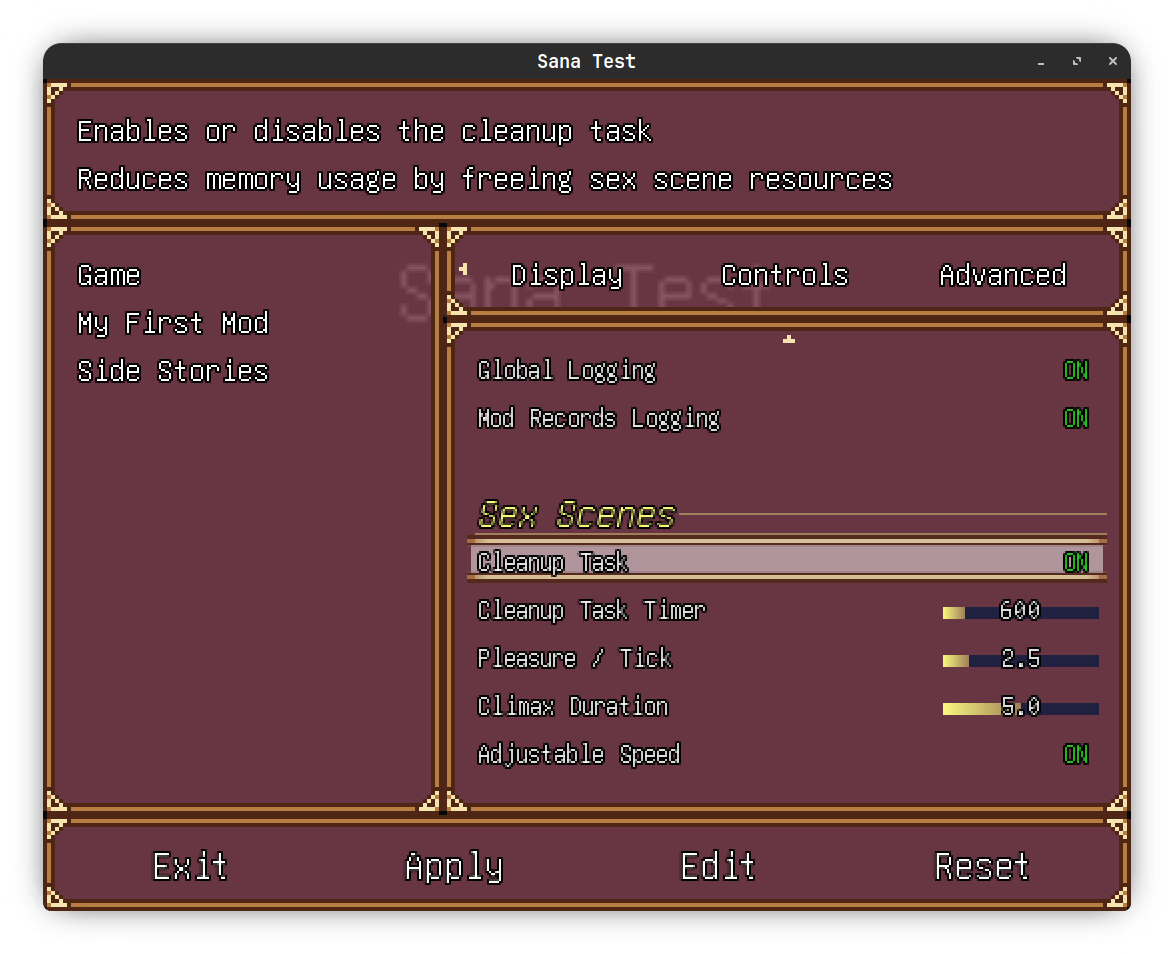
To ensure that the game does not abuse your RAM sticks (which are more valuable than ever right now :p) I have created a new functionality in the sex framework, the cleanup task, this task (which is configurable in the settings menu btw) will keep track of all used sex animations and free their resources once a timer (in real-life seconds) has passed and there are not sex scenes currently running.
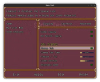
settings.png
Game sex scene settings page
There are others settings in the screenshot which may change in the future but I could give a short explanation of what they are:
  • Climax Duration: Sets the time (in seconds) that an actor's orgasm will last in the sex scene
    • Setting it up to 5.0 makes a climax event last for 5 real-life seconds
    • This is really useful for addons (like the dirty talk system) and other things like some visual effects (a white flash on the screen)
    • During this period a flag will be activated (climaxing) for each actor that is climaxing allowing to tweak the dialogue
  • Adjustable Speed: Allows the user (you) and sex scene addons to adjust the sex scene speed and actors speed (frame rate).
I said they may change in the future because that is actually the part I'm currently working on! Which is basically how to represent an actor inside a sex scene, so yeah, I don't much to say here, just a few things that I 100% wanted to include, which are:
  • Ability to allow/disallow climaxing for an actor
    • This flag allows to disable orgasming for a specific actor, when this flag is enabled, this actor won't be able to ever reach climax in this sex scene
    • Definitely useful for some edging sex scenes
  • Sex act history per actor
    • Each actor will remember what action they have performed during a sex scene, even when changing animations or tags
    • An actor history will look like this:
      • Actor A performed {VAGINAL_SEX} to Actor B
      • Actor A performed {KISSING} to Actor B
      • Actor A performed {WHATEVER_SEX_TAG} to Actor B
    • Possible but not implemented: Add the ability to track the play time per sex act, for example: 24 seconds in VAGINAL_SEX, 10 seconds in KISSING, etc...
  • Sex actor play time
    • Tracks how much time an actor has been participating in the sex scene (expressed in game frames and in real-life seconds), useful for other addons like the pregnancy system addon to determine how much sperm is generated, or the arousal system addon to determine how much arousal to substract if a climax was reached.
  • Sex actor pleasure modifiers
    • Actors participating in the sex scene will gain pleasure points per sex scene tick
    • You can tweak the base pleasure gain amount of points in the game settings (check screenshot above)
    • This modifiers feature allows to extend the pleasure per tick formula using modifiers
    • These modifiers can be registered by addons
      • Addons like the arousal addon and the traits will influence the pleasure that an actor gains per sex scene tick
      • For example:
        • You could get a buff of pleasure if you are aroused enough
        • You could get a debuff of pleasure if you are not aroused
        • You could get a debuff of pleasure if the sex scene is aggressive and the actor does not have the "Consensual non-consent" trait
        • You could get a debuff of pleasure if the actor is a sizequeen and the other actor has the trait "small penis"
        • You get the idea...
      • These modifiers could make you even lose pleasure instead of gaining it!
        • If an actor is not getting aroused enough in a sex scene they won't ever reach climax as their pleasure will go down.
    • Easily add/remove modifiers using an unique ID
      • Each pleasure modifier is saved with an unique ID so they are easily added/removed

There are a few more things to talk about, but I don't want to do it now because they are either more complex to understand than the ones I've mentioned here, or they may change A LOT during development, such as the sex scene add-ons, one thing that I could confirm is that I want to allow the user (and modders) enabling or disabling specific sex scene add-ons for a sex scene, for example, you could want to disable the dirty talk add-on module because you want a sex scene to be silent or you don't want too much talking, you could do that in two ways:
  • Enable/disable locally: Enables/disables a sex scene add-on temporally for a sex scene (using an in-game menu I will create later on).
  • Enable/disable globally: Enables/disables a sex scene add-on globally, this sex scene add-on won't ever be used again until enabled again in the settings menu.
Since I started developing the framework, I was aiming to release v0.2 this Christmas, but honestly, I don't think it's going to be possible, I could still get it to work but I don't want to work against the clock on it to be honest, if everything I have planned goes smoothly I could get it, no promises though.

Like I said, there's more things to talk about because the sex framework is far from done, there are lots of other things that I want to add, like a sex scene controller menu where you can tweak sex scene during gameplay, adding new features like sex actions during sex (won't talk much about this yet) etc, none of this planned for v0.2 though, only for versions in the future.

Hopefully the next devlog is about how the sex framework is finished and I could talk about the next release, see ya'll soon.

 
Last edited:
Mar 6, 2022
27
55
137
These modifiers are pretty interesting too.
I wonder if there will be those that are relevant to tittyfucks (as I'll be, without a doubt, making Sana into a paizuri and nipplefuck only obsessed woman).
And sex stats, i.e how many times her tits've got inseminated is also an addition I'm very happy to hear about. All in all, nicely going, kind sir!
 

tygct

Member
Jun 6, 2017
174
1,017
396
Good heavens, the level of care my guy tygct puts into this is amazing considering it's a non-profit project. You're doing great, my friend. I have faith you'll achieve something amazing with this. I just hope I can still play it with joiplay when the final version comes out :'v
Thanks! As long as Joiplay handles mkxp-z games I don't see why it wouldn't work since I removed every usage of the Windows API from the game, there may be problems with the mod system since Android is a bit different when it comes to file system permissions.
 
  • Like
Reactions: Ř@ĐįäÞïőñ
5.00 star(s) 4 Votes