Create and Fuck your AI Cum Slut –70% OFF
x

Mod Unity [Secret Flasher Manaka] Custom Missions 1.1.9 & Version 2 Beta

5.00 star(s) 1 Vote

nephisto2040

New Member
Aug 27, 2025
13
0
1
Did you try what Mcnv said a couple post before yours? You need the file hierarchy to be: installfolder/BepInEx/plugins/ModImages. To have downloaded the right plugins and put them in the plugins folder. To have the correctly named tanline image in the ModImages folder. The correct name for the .png is "Satanism (selestia)_1b28dda75a915c4ca1b6abb91ae65946" if you have the old plugins or "Satanism (selestia)" if you have the updated version.
yes i have the png in the mod image folder and have both dll file in plugins
which is why im confused
 

M9mij

New Member
Nov 2, 2025
1
0
0
I really enjoyed playing the V2 custom missions like 'The Price of Losing Control', 'PrefectManaka', 'Kenji'. Are there any additional V2 custom missions besides these?
Well-made custom missions are far more thrilling than most adult games.
Hi, where could i find the mods you mentioned? I am so freshman in this forums. Anyway, have a nice day ;-)
 

mcnv

Newbie
Jul 15, 2018
60
82
202
I took most of the code off the example from the mod. Wanted to use the CreateCondition function since its easier to read.
I'm trying to get the conditions for photos at night directly under the street lamps while a specific body part was exposed. in this case, None, but apparently just wearing the coat still risks your butt showing if you crouch.
Code:
    step6:
        chat.SetButtons("Show Gallery")
        condition = CreateCondition("[InLight,Exposed_HipCrouch,!Crouching,!Exposed_Front,!Exposed_Upper,!Exposed_Hip,!Exposed_All,!DayTime]")
        area = CreateArea(type="sphere", stage="Residence", x=0, y=0, z=0, r=1000, outline=false, compass=false)
        gallery = CreateGallery("gallery_callback",condition, area) #can also use coditions and areas/zones
           
        listener = CreateListener("waitforbutton2")
        listener2 = CreateListener("waitforconfirm2")

        waitforbutton2:
            if chat.Clicked() != null
                gallery.Show()                   
       
        waitforconfirm2:
            if gallery.Confirmed()
                selection = gallery.GetSelection()
                if selection.Count()>0
                    chat.SetButtons()
                    thread.Goto("step7", image=selection["0"])
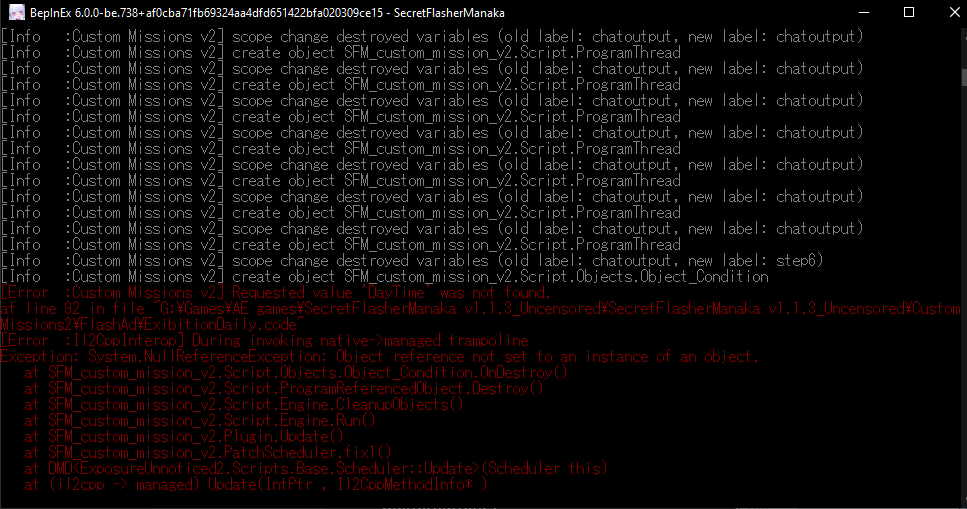
This is the error I got.
View attachment 5493186
Okay, so after a bit of testing I can use the callery_callback while also the CreateConditions list. to do like a second pass though. Doesn't seem efficient considering this goes though every picture according to the example.

Code:
        gallery_callback: #will be called repeatedly for each image
            if !data.DayTime
                _result = true
 

mcnv

Newbie
Jul 15, 2018
60
82
202
Camera Flash
Chat Mission for V2.0
Extensive use of camera and chat feature to create a reason to snap pictures of yourself.

Manaka is contacted by an advertisement company who noticed her streaking in the streets and offers her a job. Of course it involves exhibitionism, try not to get distracted with your phone. People are walking around after all.

Michel: Your contact. works with Fresh Ad and the person who hired you. shows you the ropes.

Samantha: Exhibitionist Daily Editor. Likes Ass. Will ask for every stage of you stripping before the nudes.

Limitations
Needs the final player rank.
You can take the pictures in advance and submit them.
You can submit similar photos.
You can submit angularly shit photos and they will accept them.
The threads will reset if you reset the game, they are short enough that you don't have to worry.
This will fill your gallery with a lot of photos.
Not an actual Mission. You don't actually get paid.
No Staging, Just pick which thread you want to do.
Really short for now.


Any criticism is welcomed.
 
Last edited:

feifei138138

New Member
Dec 2, 2025
1
0
1
I have created my first mission for Manaka. I hope you like it!

The story takes place in the apartment. You start in front of the apartment and have to complete tasks on each floor/level, with a little twist at the end where your belongings are located. ;)

(You need all handcuffs and a blindfold in your inventory and the vibrator in place as well. Didn't implemented a "Pre-Requirements-Check")
I still haven't found a task point, can I take a screenshot?
 

Alucard80

New Member
Jul 13, 2025
4
3
12
Okay, so after a bit of testing I can use the callery_callback while also the CreateConditions list. to do like a second pass though. Doesn't seem efficient considering this goes though every picture according to the example.

Code:
        gallery_callback: #will be called repeatedly for each image
            if !data.DayTime
                _result = true
You had the name of the condition wrong, is named “IsDayTime”, not “DayTime”.

By the way, I have similar question. I’m having problems with the conditions related to the coat position: “FrontClosed”, “FrontOpen1”, “FrontOpen2”, “BackClosed” and “BackOpen”.

They’re listed on the CustomMissions v1 documentation but when I used them in v2 I get a code error. Are they discontinued? Is there any way to detect the position of the coat when Manaka is wearing casual clothes?
 
Last edited:

raptorr64

Newbie
Jul 9, 2017
28
50
157
By the way, I have similar question. I’m having problems with the conditions related to the coat position: “FrontClosed”, “FrontOpen1”, “FrontOpen2”, “BackClosed” and “BackOpen”.
Yeah, now FrontOpen1 is Exposed_Front, FrontOpen2 is... I don't remember, Exposed_Top or something... I think naked is Exposed_Full. Use F9 and check in the console, a lot of states have 2 keywords now
 

Alucard80

New Member
Jul 13, 2025
4
3
12
Yeah, now FrontOpen1 is Exposed_Front, FrontOpen2 is... I don't remember, Exposed_Top or something... I think naked is Exposed_Full. Use F9 and check in the console, a lot of states have 2 keywords now
Thank you for the reply. The problem is that I’m looking for a way to detect the position of the coat even if you are using casual clothes. The exposed conditions always returns false if you aren’t considered naked, no matter if you wear coat or not.

I wasn't aware that active conditions also appeared on the console, but I've just checked them and I don't see anything related with the coat.
 

useruser9527

New Member
Dec 2, 2025
2
0
1
I made a new mission today that starts right outside your door.

Lost Bet: You lost a bet against your best friend and have to get him a drink from the vending machine while butt naked, but things don't really go as planned ...

The Seduction skill needs to be on for this.
I am not an English user, so I used a translator for assistance. Even though I believe I have understood the task requirements, I still don't know how to proceed with the task. For example, in shop 3, I don't know how to continue after an “punishment enough,time to head home” message appears. As well as the cute panty mission, I stood beside the vending machine at a loss. I hope to receive clearer task prompts.
I fully experienced the first mission and thought it was quite good, but in the subsequent stages, I often couldn’t understand what I was going to do next.
 

HoshiMiku

New Member
Dec 2, 2025
2
0
1
I made another v2.0 mission. This one is a blackmail mission where you have to complete three tasks in different parts of the city. After the outfit changes you can change the cosplay to whatever you want but don't touch the skirt, jacket, or shirt. If you fail at any point, progress should be saved so you can continue where you left off. If the difficulty feels off, let me know and I can adjust some of the conditions.

The mission starts directly outside her house to the right.

here. As crisp said, you need a second installation of the game without version 1 of the mod installed. I just downloaded the pre-patched version again and named it something else. Your save will be shared between both versions. As for installing, unzip the blackmail folder itself to the CustomMissions2 folder like so.
View attachment 5268669
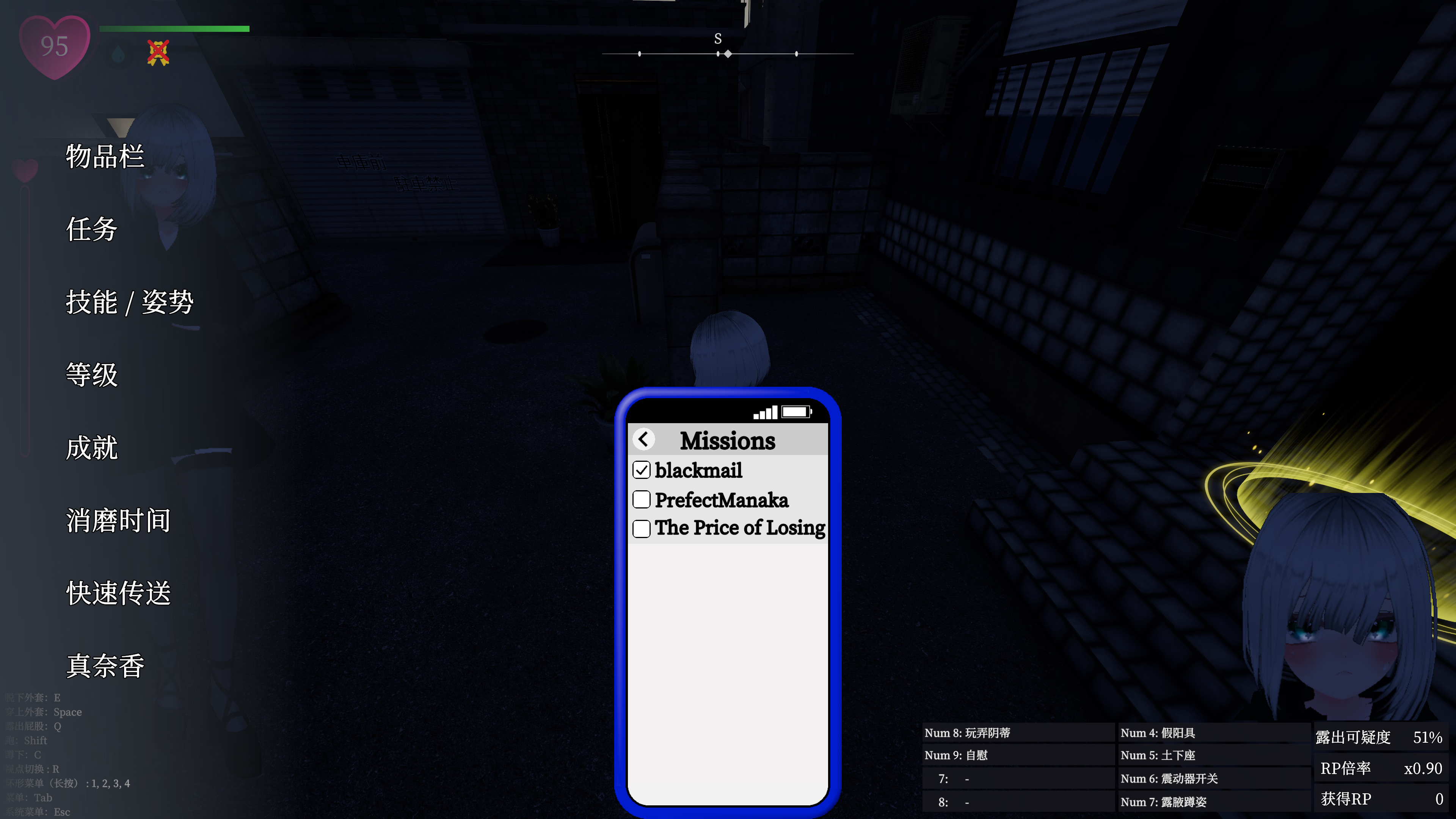
Hi, I have loaded your custom quests from version 2, but I cannot find the starting location for the quest. As shown in the screenshot, the mod seems to have loaded the quest successfully, but I am unable to locate where to begin. Another quest, "The Price of Losing Control" (#469 and #476), also cannot be started.

However, "PrefectManaka" (#440) works normally, possibly because it does not rely on a location trigger and instead starts automatically by sending a message after entering the game.

Could you help me resolve this issue? I have tried loading an earlier version of the mod, but the quest still doesn’t seem to start. Could it be that I am going to the wrong location, or is there another reason? I'm not entirely sure.

My game version: 1.1.3
Mod version: 0.4.2
1c029fdc701ff2bbeb14d324ea1022f4.png
 

cactuar

Member
Modder
Mar 31, 2018
194
2,966
467
Hi, I have loaded your custom quests from version 2, but I cannot find the starting location for the quest. As shown in the screenshot, the mod seems to have loaded the quest successfully, but I am unable to locate where to begin. Another quest, "The Price of Losing Control" (#469 and #476), also cannot be started.

However, "PrefectManaka" (#440) works normally, possibly because it does not rely on a location trigger and instead starts automatically by sending a message after entering the game.

Could you help me resolve this issue? I have tried loading an earlier version of the mod, but the quest still doesn’t seem to start. Could it be that I am going to the wrong location, or is there another reason? I'm not entirely sure.

My game version: 1.1.3
Mod version: 0.4.2
View attachment 5495159
Does this work now?
 

yuio5577

New Member
May 3, 2018
12
4
69
Hi, I have loaded your custom quests from version 2, but I cannot find the starting location for the quest. As shown in the screenshot, the mod seems to have loaded the quest successfully, but I am unable to locate where to begin. Another quest, "The Price of Losing Control" (#469 and #476), also cannot be started.

However, "PrefectManaka" (#440) works normally, possibly because it does not rely on a location trigger and instead starts automatically by sending a message after entering the game.

Could you help me resolve this issue? I have tried loading an earlier version of the mod, but the quest still doesn’t seem to start. Could it be that I am going to the wrong location, or is there another reason? I'm not entirely sure.

My game version: 1.1.3
Mod version: 0.4.2
View attachment 5495159
I have the same problem, I don't see the start point and I tried the new one and it still doesn't show up.

Does this work now?
 

Yyexu

New Member
Sep 20, 2025
4
5
3
Ok, I did it, except for the "disallow Manaka getting home without having all equipments collected" part.

And it is indeed scary, being literally fucked up and constrained and sent to random places. -- So I changed the mod's name to Aftermath. (But names can be changed as anybody want, it only affect saving states specifically to the mod.

Maybe lossing some of the RP but not the whole would be better. Or may be "disallow getting home" would be a choice for motivation.

Update: v1.3.2

- Configs can only be changed at home now.
- The penalty mode for those who still want RP penalty but don't want to lose all RP. Penalty is cumulative, it will be severe after about 3 to 4 times. Only returning home can reset it.
- Toys can be configured to equipped one at a time or all at once.
- Removed starting point of Convenience Store and Fashion Shop
- Fully configurable target stages for teleportation.
- Added 3 mode to the clothes striping, now can be configured to strip one clothe at a time and what to strip (ALL clothes or just those Casual clothes).

Update: v1.3.3

- Fixed a conner case that teleports items to stage origin. Now in such stages items simply drop at same position as Manaka.

Ps, Line 201 describes where the key should be dropped:
Code:
                    randomPos = CreateList(stage=_state.Position.stage, x=_state.Position.x, y=_state.Position.y, z=_state.Position.z)
Can be edited to move slighty:
Code:
                    randomPos = CreateList(stage=_state.Position.stage, x=_state.Position.x+0.05, y=_state.Position.y, z=_state.Position.z)
to prevent complete overlap of item interaction areas.

But I haven't tested what amount should be reasonable, so I will leave it here.

If anyone find out or have some new idea, posting new version of this script is welcome. This script is always in Public Domain.

All items are dropped in same stage before teleportation if any, but the compass will be incorrect in stages like stores.

I'm sorry to bother you. I really like this mod, but I've noticed that in-game I can't seem to set it to equip just one vibrator—it only lets me choose to equip all of them. I can't figure out why.
 

HoshiMiku

New Member
Dec 2, 2025
2
0
1
现在可以了吗?
Thank reply. I can now see the quest starting location, but it seems a new issue has appeared. The quest progress bar does not load, and I am unable to start the quest.
No new messages are popping up on the phone either.
Is there a specific condition to start the quest? I tried disabling all my skills, but I still cannot begin the quest.
84dbbffe-63b6-4552-9890-b089a0306dbc.png
 

Dungeon_Crawler

New Member
Oct 15, 2025
12
23
3
Does this work now?
The original didn't work for me at all. Now I do see the starting point and get the dialog about starting the quest, but when I remove a piece of clothing while standing at one of the designated spots (which do show up) nothing happens, the mission doesn't advance.
 

mistersodacan

Newbie
Jul 29, 2017
24
36
23
Thank reply. I can now see the quest starting location, but it seems a new issue has appeared. The quest progress bar does not load, and I am unable to start the quest.
No new messages are popping up on the phone either.
Is there a specific condition to start the quest? I tried disabling all my skills, but I still cannot begin the quest.
View attachment 5497074
The original didn't work for me at all. Now I do see the starting point and get the dialog about starting the quest, but when I remove a piece of clothing while standing at one of the designated spots (which do show up) nothing happens, the mission doesn't advance.

More than likely, there are specific conditions for the mission to start that aren't included in the mod itself. You have to dig through the thread to find the original post and/or responses where the creator actually says what the conditions are. There are several like this and I just ended up removing them. Very poor design, to be frank.


On a completely unrelated note:

Screenshot_3784.png

This makes me wish there were equippable halos in the game.

Also, I had to screenshot this because every time I tried downloading it, it was corrupted.
 

mistersodacan

Newbie
Jul 29, 2017
24
36
23
Handcuffed Poses !!

With the help of Doppio1234 above, I made a series of short scripts that allow Manaka to perform poses while handcuffed, which are normally impossible to do.

I am new at scripting so I could not figure out a way to make these more compact, hence you'll find that there are 104 JSON files (I made an individual script for 13 poses of my choice, each with a variation for the 8 available stages).

If you want to make a script for an additional pose not included in the zip, simply replace the Action (pose) and Stage (area/zone) values. The script is simple to understand, so it's easy to figure out what needs to be replaced and where.

To install, put the JSON files inside your CustomMissions folder. You can make these poses at any time and any place, I set the action radius for every stage at 1,000 meters.

How to use:

- Make sure the Fixed First Person Camera and Fixed Third Person Camera skills are both Disabled.
- Perform a pose (e.g. Spread-Leg Walk)
- Press the First Person Camera hotkey (R by default)
- Manaka is now on Spread-Leg Walk mode while handcuffed. Neat!
- Press the First Person Camera hotkey again to switch back to Third Person Camera. You will remain handcuffed with your pose.

View attachment 5392267 View attachment 5392269

In other words, Manaka will NOT be able to perform a pose AFTER being handcuffed (this is by the game's design), but she can perform the pose BEFORE being handcuffed with the help of this script.

To use another pose, either a normal one or a handcuffed pose, or perform another action, you'll need to uncuff yourself first with the Interact button. For your benefit, the script gives her a Keyed handcuff so that you can release her on the first try. For some poses (like Spread-Leg Walk) you'll need to press the Dash button once first to get in a position where you can uncuff yourself.

Why is the trigger the First Person Camera button?

The resulting pose requires a condition to be met, for which there are many options that the script allows but the most convenient I could find was the FPC state, as it's an action that you can normally perform in-game even if you're handcuffed, so you could press its hotkey at any time. TLDR just make a pose and press First Person Camera twice to switch to the handcuffed variation of that pose.

If you like this script, feel free to incorporate it in your future missions (e.g. "Spread-Leg Walk to the Park Toilet while handcuffed", "do an I-Balance Leg pose on the Downtown bridge while handcuffed", or some other kinky shit). Enjoy!
>"For your benefit, the script gives her a Keyed handcuff so that you can release her on the first try."

Does this mean that handcuff objectives will stop completing once you make a pose this way? Those require you to use normal handcuffs. I just want to be able to do something while I'm completing objectives.
 
5.00 star(s) 1 Vote