

- Thread starter Shawnchapp
- Start date

- Jun 14, 2018
- 1,666
- 2,359
- 462
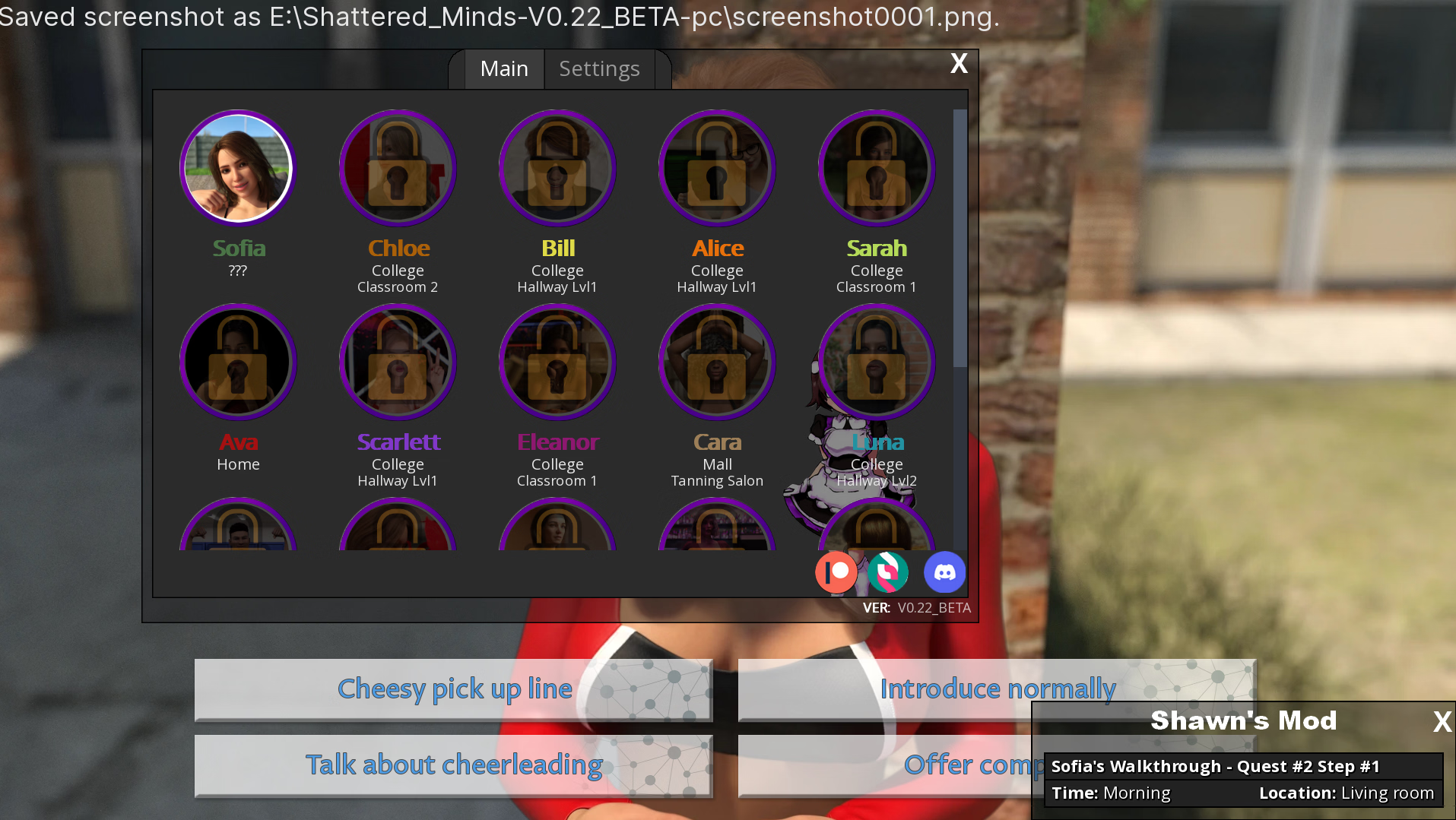
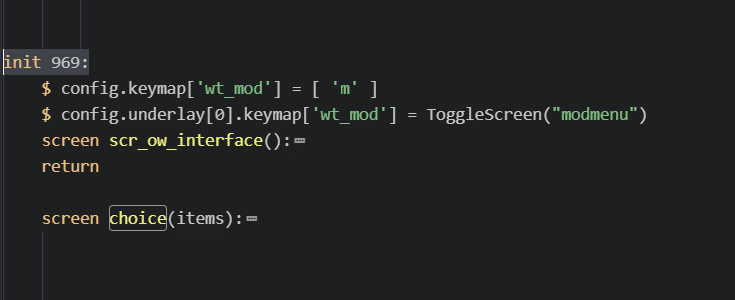
I found that you added a 'return' statement before the 'screen choice' override. So, the choice WT is no longer displayed in v0.22. Was this change intentional or just a mistake?
I think it's less about the
return and more the lack of init 969 as part of the screen definition.If you change that line to
init 969 screen choice(items): the walkthrough icons will appear.
MLGKwikSkop
Member
- Dec 21, 2020
- 156
- 274
- 207
How about fellow retards like me that don't know how to work with compiled files?I think it's less about thereturnand more the lack ofinit 969as part of the screen definition.
If you change that line toinit 969 screen choice(items):the walkthrough icons will appear.
- Jun 14, 2018
- 1,666
- 2,359
- 462
How about fellow retards like me that don't know how to work with compiled files?
I guess you're stuck waiting for the developer of the mod to publish an update.
Honestly, normally I'd point people at UnRen and explain that it really isn't that hard. But this game (and to a lessor extent, the mod) are a pain to unpack to get to a point someone can edit it themselves.
Let's see if I can provide a temporary workaround...
Just download this file and put it in your
/game/mod/ folder.
- Feb 13, 2018
- 2,417
- 8,868
- 635
odd was there change in renpy 8.4? cause it should fall under the inti block wight above it... do not all follw under the inti block anymore?I think it's less about thereturnand more the lack ofinit 969as part of the screen definition.
If you change that line toinit 969 screen choice(items):the walkthrough icons will appear.
- Jun 14, 2018
- 1,666
- 2,359
- 462
odd was there change in renpy 8.4? cause it should fall under the inti block right above it... do not all follow under the inti block anymore?
View attachment 5469632
Honestly, I don't know.
I just know that changing that line fixed it for me.
It could well be the
return above it. I didn't think so, so just changed the screen line.Once it started working, I stopped thinking about it.
Normally, I dig into it - trying to figure it out. But I just went back to playing.
- Feb 13, 2018
- 2,417
- 8,868
- 635
oh ya it could be the return didn't even noticed that LOLHonestly, I don't know.
I just know that changing that line fixed it for me.
It could well be thereturnabove it. I didn't think so, so just changed the screen line.
Once it started working, I stopped thinking about it.
Normally, I dig into it - trying to figure it out. But I just went back to playing.

ClassicGamer221
Newbie
- Jun 27, 2023
- 33
- 26
- 167
Hi. I've got version .23 and was wondering if I could play the new version using saved files from.22 without starting the game from the beginning. I understand that it will take a moment to update your mod, so I'm not bugging you to update it, only asking if you foresee any issues an old save with your mod might predictably cause if I play without your mod. Hmm. However can I play without your helpful mod though? Going to edit this rather than delete it so other folks will learn that I was able to resume from an earlier point in the game with no problems. Take your time in examining the features the developer has updated so that you mod runs smoothly for us all when you are ready.
Last edited:
pashabyrussia
Member
- Feb 1, 2023
- 129
- 147
- 217
Shattered Minds [v0.23 Beta] [eXtasy Games] update your mod pls
dewayne4478
Active Member
- Dec 10, 2022
- 869
- 383
- 238
most likely going bout 4 days or more days. considering photo hunt mod public yet and didnt see on his patreon, i am going to be longer then 4 daysShattered Minds [v0.23 Beta] [eXtasy Games] update your mod pls
Last edited:
game got updated!
Release Date: 20-07-2025
Game/Creator:Shattered Minds /You must be registered to see the links
Modder:You must be registered to see the links/You must be registered to see the links/You must be registered to see the links
Mod/Game Version: 0.22 Beta
Language: English
Features:
This mod adds an in-game walkthrough for every character and story event in the game The walkthrough menu contains dynamic guides that let you track your progress for each character and see the requirements needed to trigger their scenes and advance their story. The mod guides also show all requirements for getting all possible extra dialogue options and seeing all possible extra content during events and scenes.
Clicking "MOD" or tapping the "m" key opens mod menu
Improvements:
- Improving the dialogue UI by changing textbox and font
- Transparency slider
- Font size slider
Installation:
You don't have permission to view the spoiler content. Log in or register now.
Save Fixer:
You don't have permission to view the spoiler content. Log in or register now.
Change-Log:
You don't have permission to view the spoiler content. Log in or register now.
DOWNLOAD:You must be registered to see the links/You must be registered to see the links/You must be registered to see the links
View attachment 4469020 View attachment 4469019

- Sep 3, 2022
- 30,900
- 286,989
- 957
He is recovering from getting out of the hospital.game got updated!

HungLow247
Member
- Apr 23, 2025
- 388
- 288
- 133
update plz. can't load old save for new 23 update .
Release Date: 20-07-2025
Game/Creator:Shattered Minds /You must be registered to see the links
Modder:You must be registered to see the links/You must be registered to see the links/You must be registered to see the links
Mod/Game Version: 0.22 Beta
Language: English
Features:
This mod adds an in-game walkthrough for every character and story event in the game The walkthrough menu contains dynamic guides that let you track your progress for each character and see the requirements needed to trigger their scenes and advance their story. The mod guides also show all requirements for getting all possible extra dialogue options and seeing all possible extra content during events and scenes.
Clicking "MOD" or tapping the "m" key opens mod menu
Improvements:
- Improving the dialogue UI by changing textbox and font
- Transparency slider
- Font size slider
Installation:
You don't have permission to view the spoiler content. Log in or register now.
Save Fixer:
You don't have permission to view the spoiler content. Log in or register now.
Change-Log:
You don't have permission to view the spoiler content. Log in or register now.
DOWNLOAD:You must be registered to see the links/You must be registered to see the links/You must be registered to see the links
View attachment 4469020 View attachment 4469019
Last edited:
grimreaper7
New Member
- Mar 10, 2020
- 5
- 13
- 64
Hey all!!! Before anyone else posts again. Shawn is recovering from the hospital. It will be updated as soon as possible.
- Feb 13, 2018
- 2,417
- 8,868
- 635
you mean can't?update plz. can load old save for new 23 update .
and have you tried the save fixer?

circuitarity
Active Member
- Jul 3, 2019
- 820
- 718
- 329
I have a brain injury... if there's not explicit instructions on how to install a mod I can't usually install it and even with explicit instructions I am unable to navigate most unren operations.you mean can't?
and have you tried the save fixer?
Merry Christmas!He is recovering from getting out of the hospital.
That's good that he's recovering....
All the best for you all!

HomicidalHulk
Newbie
- May 31, 2023
- 88
- 66
- 167
Well, I can't get the save fix to work. I can't get the mod to work. So, i guess i get to install and restart every time there is an update now. I even bought it on steam to try to support, but seems i get to REALLY know this game. 
- Feb 13, 2018
- 2,417
- 8,868
- 635
Well, I can't get the save fix to work. I can't get the mod to work. So, i guess i get to install and restart every time there is an update now. I even bought it on steam to try to support, but seems i get to REALLY know this game.
whats the error you get?
HomicidalHulk
Newbie
- May 31, 2023
- 88
- 66
- 167
Code:
I'm sorry, but an uncaught exception occurred.

While running game code:
AttributeError: Can't get attribute 'mod_stats_info' on <renpy.python.StoreModule object at 0x000000000576fd10>

-- Full Traceback ------------------------------------------------------------

Traceback (most recent call last):
  File "renpy/common/_layout/screen_main_menu.rpym", line 28, in script
    python hide:
  File "renpy/ast.py", line 1187, in execute
    renpy.python.py_exec_bytecode(self.code.bytecode, self.hide, store=self.store)
    ~~~~~~~~~~~~~~~~~~~~~~~~~~~~~^^^^^^^^^^^^^^^^^^^^^^^^^^^^^^^^^^^^^^^^^^^^^^^^^
  File "renpy/python.py", line 1273, in py_exec_bytecode
    exec(bytecode, globals, locals)
    ~~~~^^^^^^^^^^^^^^^^^^^^^^^^^^^
  File "renpy/common/_layout/screen_main_menu.rpym", line 28, in <module>
    python hide:
  File "renpy/common/_layout/screen_main_menu.rpym", line 35, in _execute_python_hide
    ui.interact()
    ~~~~~~~~~~~^^
  File "renpy/ui.py", line 304, in interact
    rv = renpy.game.interface.interact(roll_forward=roll_forward, **kwargs)
         ~~~~~~~~~~~~~~~~~~~~~~~~~~~~~^^^^^^^^^^^^^^^^^^^^^^^^^^^^^^^^^^^^^
  File "renpy/display/core.py", line 2117, in interact
    repeat, rv = self.interact_core(
                 ~~~~~~~~~~~~~~~~~~^
        preloads=preloads,
        ^^^^^^^^^^^^^^^^^^
    ...<4 lines>...
        **kwargs,
        ^^^^^^^^^
    )
    ^
  File "renpy/display/core.py", line 3203, in interact_core
    rv = root_widget.event(ev, x, y, 0)
         ~~~~~~~~~~~~~~~~~^^^^^^^^^^^^^
  File "renpy/display/layout.py", line 1281, in event
    rv = i.event(ev, x - xo, y - yo, cst)
         ~~~~~~~^^^^^^^^^^^^^^^^^^^^^^^^^
  File "renpy/display/layout.py", line 1281, in event
    rv = i.event(ev, x - xo, y - yo, cst)
         ~~~~~~~^^^^^^^^^^^^^^^^^^^^^^^^^
  File "renpy/display/layout.py", line 1281, in event
    rv = i.event(ev, x - xo, y - yo, cst)
         ~~~~~~~^^^^^^^^^^^^^^^^^^^^^^^^^
  File "renpy/display/screen.py", line 805, in event
    rv = self.child.event(ev, x, y, st)
         ~~~~~~~~~~~~~~~~^^^^^^^^^^^^^^
  File "renpy/display/layout.py", line 1281, in event
    rv = i.event(ev, x - xo, y - yo, cst)
         ~~~~~~~^^^^^^^^^^^^^^^^^^^^^^^^^
  File "renpy/display/layout.py", line 1510, in event
    rv = super(Window, self).event(ev, x, y, st)
         ~~~~~~~~~~~~~~~~~~~~~~~~~^^^^^^^^^^^^^^
  File "renpy/display/layout.py", line 273, in event
    rv = d.event(ev, x - xo, y - yo, st)
         ~~~~~~~^^^^^^^^^^^^^^^^^^^^^^^^
  File "renpy/display/layout.py", line 1281, in event
    rv = i.event(ev, x - xo, y - yo, cst)
         ~~~~~~~^^^^^^^^^^^^^^^^^^^^^^^^^
  File "renpy/display/layout.py", line 1510, in event
    rv = super(Window, self).event(ev, x, y, st)
         ~~~~~~~~~~~~~~~~~~~~~~~~~^^^^^^^^^^^^^^
  File "renpy/display/layout.py", line 273, in event
    rv = d.event(ev, x - xo, y - yo, st)
         ~~~~~~~^^^^^^^^^^^^^^^^^^^^^^^^
  File "renpy/display/layout.py", line 1281, in event
    rv = i.event(ev, x - xo, y - yo, cst)
         ~~~~~~~^^^^^^^^^^^^^^^^^^^^^^^^^
  File "renpy/display/layout.py", line 273, in event
    rv = d.event(ev, x - xo, y - yo, st)
         ~~~~~~~^^^^^^^^^^^^^^^^^^^^^^^^
  File "renpy/display/behavior.py", line 1185, in event
    return handle_click(self.clicked)
           ~~~~~~~~~~~~^^^^^^^^^^^^^^
  File "renpy/display/behavior.py", line 1107, in handle_click
    rv = run(action)
         ~~~^^^^^^^^
  File "renpy/display/behavior.py", line 404, in run
    new_rv = run(i, *args, **kwargs)
             ~~~^^^^^^^^^^^^^^^^^^^^
  File "renpy/display/behavior.py", line 411, in run
    return action(*args, **kwargs)
           ~~~~~~^^^^^^^^^^^^^^^^^
  File "renpy/common/00action_file.rpy", line 499, in __call__
    renpy.load(fn)
    ~~~~~~~~~~^^^^
  File "renpy/loadsave.py", line 636, in load
    roots, log = loads(log_data)
                 ~~~~~^^^^^^^^^^
  File "renpy/compat/pickle.py", line 296, in loads
    return load(io.BytesIO(s))
           ~~~~^^^^^^^^^^^^^^^
  File "renpy/compat/pickle.py", line 288, in load
    return Unpickler(f, fix_imports=True, encoding="utf-8", errors="surrogateescape").load()
           ~~~~~~~~~~~~~~~~~~~~~~~~~~~~~~~~~~~~~~~~~~~~~~~~~~~~~~~~~~~~~~~~~~~~~~~~~~~~~~~^^
  File "renpy/compat/pickle.py", line 280, in find_class
    return super().find_class(module, name)
           ~~~~~~~~~~~~~~~~~~^^^^^^^^^^^^^^
AttributeError: Can't get attribute 'mod_stats_info' on <renpy.python.StoreModule object at 0x000000000576fd10>

Windows-10-10.0.19045-SP0 AMD64
Ren'Py 8.5.0.25111603
Shattered Minds V0.23_BETA
Wed Dec 31 14:30:35 2025