



- Dec 29, 2017
- 3,552
- 6,268
- 727
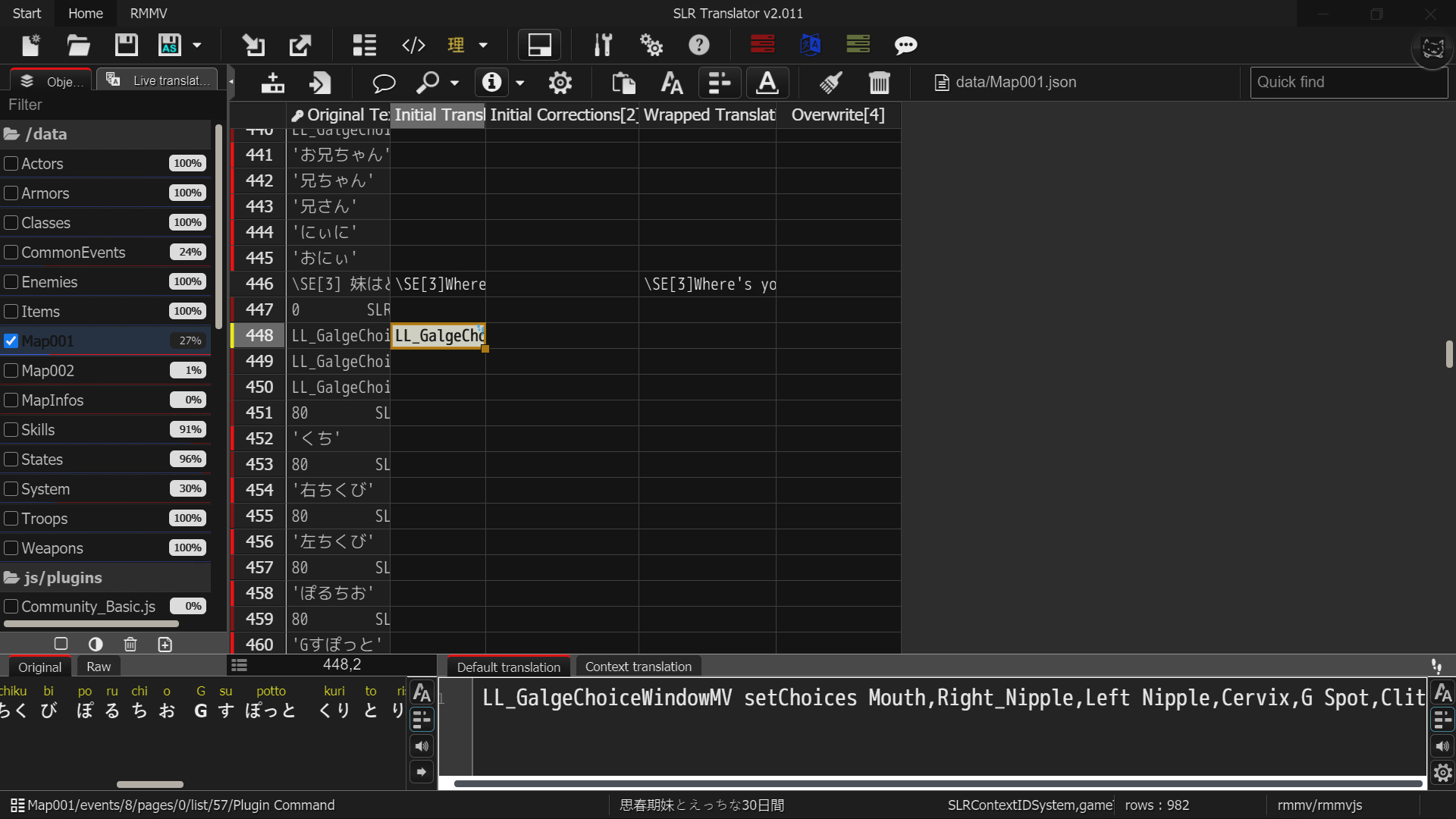
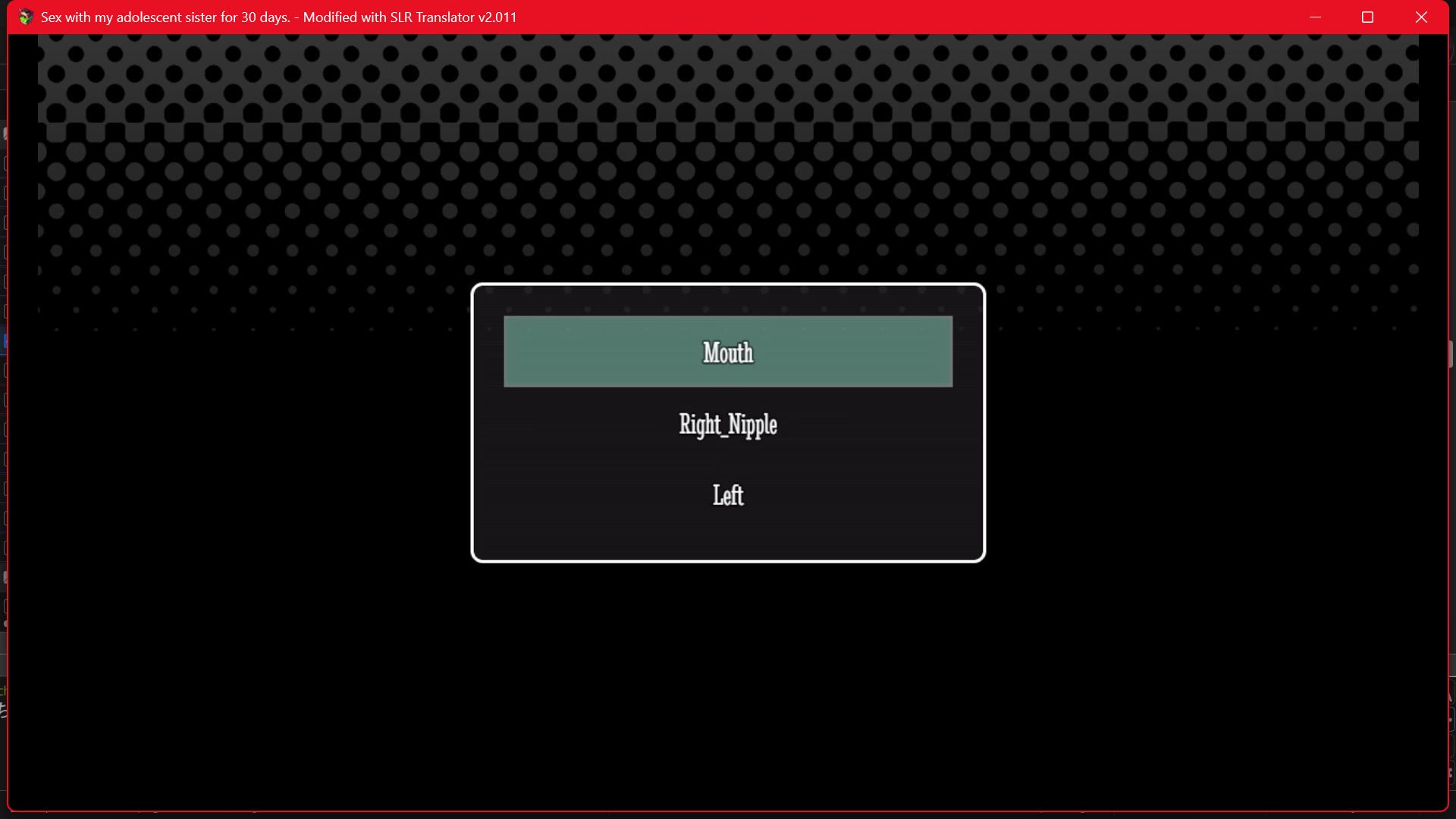
Use IDSP.View attachment 5559196 Can i ask something, how to make space in this sentence, when i give space like in "left nipple" it make the rest choise disappear View attachment 5559208
A non breaking figure space.
You must be registered to see the links
- Dec 29, 2017
- 3,552
- 6,268
- 727
I've released v2.045.
Significant changes to DSLR. If you use that, you should definitely update.
Changelog since last changelog post:
2.045
Introduced new "bad translation" purple tags for wrong line count and missing numbers.
Changed Batch size calculation to just be characters again.
DSLR Changes:
Changed Full Batch divider logic.
Changed wrapper so IDSP will no longer cause a sentence to split.
Added option (on by default) to remove all inner IDSP before sending the request to the LLM
Changed Full Batch calculation to never allow more than twice the maximum size even when it produces less than 40 entries.
Changed Full Batch calculation to be a lot less lenient in counting.
During Single requests wrong linecount is now only a reason for a rejection if it's also either significantly more characters or significantly less.
Changed how context is sent to the LLM, it will now also include the original text and not just successful translations.
It will now always send all error context even on the first try.
Changed log messages to be more accurate.
Changed some wrong descriptions.
2.044
Improved D_Text handling for DSLR, added some isolation patterns for DSLR.
2.043
For DSLR changed console log messages to actually show the entire request body including parameters and prompts instead of just the requested text.
Implemented new check for FullBatch that will now reject a batch if it failed to preserve more than 50% of text commands and placeholders. It wil also reject a batch if the LLM added 50% more than the original amount.
Implemented new detection for "response refusal" messages, but only a few variations so far. It will treat them as Server Errors.
Adjusted a bunch of descriptions.
Fixed some typos.
Significant changes to DSLR. If you use that, you should definitely update.
Changelog since last changelog post:
2.045
Introduced new "bad translation" purple tags for wrong line count and missing numbers.
Changed Batch size calculation to just be characters again.
DSLR Changes:
Changed Full Batch divider logic.
Changed wrapper so IDSP will no longer cause a sentence to split.
Added option (on by default) to remove all inner IDSP before sending the request to the LLM
Changed Full Batch calculation to never allow more than twice the maximum size even when it produces less than 40 entries.
Changed Full Batch calculation to be a lot less lenient in counting.
During Single requests wrong linecount is now only a reason for a rejection if it's also either significantly more characters or significantly less.
Changed how context is sent to the LLM, it will now also include the original text and not just successful translations.
It will now always send all error context even on the first try.
Changed log messages to be more accurate.
Changed some wrong descriptions.
2.044
Improved D_Text handling for DSLR, added some isolation patterns for DSLR.
2.043
For DSLR changed console log messages to actually show the entire request body including parameters and prompts instead of just the requested text.
Implemented new check for FullBatch that will now reject a batch if it failed to preserve more than 50% of text commands and placeholders. It wil also reject a batch if the LLM added 50% more than the original amount.
Implemented new detection for "response refusal" messages, but only a few variations so far. It will treat them as Server Errors.
Adjusted a bunch of descriptions.
Fixed some typos.
I've got a bug here: essentially, I decided to translate a game into Russian using the RPG Maker VX Ace engine, and everything was fine until I started doing "Fix Cells and Check for Errors." It's doing something in the Task Manager, but it never goes past 20%. However, when I switch to English, it works in a second.
- Dec 29, 2017
- 3,552
- 6,268
- 727
SLR Translator expects the output to be English. It's not really designed to work with something else.I've got a bug here: essentially, I decided to translate a game into Russian using the RPG Maker VX Ace engine, and everything was fine until I started doing "Fix Cells and Check for Errors." It's doing something in the Task Manager, but it never goes past 20%. However, when I switch to English, it works in a second.
I think because it expects Latin characters and some of your cells most likely only had Cyrillic in them it viewed them as empty and got stuck.
Your only option at the moment is to not press the button and check the cells manually.
If there is serious demand I could try to add support for other languages, but that's actually a lot of work and the issue is that if I don't actually speak the language I can't really fix much. I would essentially just reduce it to very basic "did it screw up script commands?" checking. And I would change the wrapper entries to no longer escape anything, that it later expects to be replaced by English during the process of that button.
Edit: I'll run some tests, I guess it not doing or escaping much would still be better than it just outright crashing and implementing that wouldn't be an insane amount of work.
Edit2: It would be an insane amount of work. Just changing the button entries isn't enough. I would also need to change the engine wrapper, parser, engine, word wrapper, and options menu... most of it super tedious and I can't effectively ask AI for help either because my files are too long. It would need to have more than a million tokens of context.
Edit3: I still wont rule it out though, since most of SLR Translator is basically done now, it's not like I have anything else big planned...
Last edited:
Thanks for the answer, it would be really cool if it could translate from other languages.SLR Translator expects the output to be English. It's not really designed to work with something else.
I think because it expects Latin characters and some of your cells most likely only had Cyrillic in them it viewed them as empty and got stuck.
Your only option at the moment is to not press the button and check the cells manually.
If there is serious demand I could try to add support for other languages, but that's actually a lot of work and the issue is that if I don't actually speak the language I can't really fix much. I would essentially just reduce it to very basic "did it screw up script commands?" checking. And I would change the wrapper entries to no longer escape anything, that it later expects to be replaced by English during the process of that button.
Edit: I'll run some tests, I guess it not doing or escaping much would still be better than it just outright crashing and implementing that wouldn't be an insane amount of work.
- Dec 29, 2017
- 3,552
- 6,268
- 727
I'm probably going to try to cobble something together regardless, but this is going to take quite a while and I want to gauge how "user friendly" and "complete" I would have to build it. (Just as a one-of drop-in thing Qrtew could use, or a real implementation.)
Is SLR Translator support for other Source or Target languages something people are actually interested in?
Especially considering how many other options for RPG Maker translations there are these days.
Basically just post "I want support for 'LanguageX' as 'Source' and 'LanguageY' as 'Target'. So I have an idea what would be worth implementing.
Currently I would only have a request for JP>RU so I wouldn't bother implementing an options menu for that, I'd probably just give him some edited files as drop in.
Edit: I realize asking on Christmas is probably not the best idea to get an answer, but this is probably going to take weeks anyway...
Is SLR Translator support for other Source or Target languages something people are actually interested in?
Especially considering how many other options for RPG Maker translations there are these days.
Basically just post "I want support for 'LanguageX' as 'Source' and 'LanguageY' as 'Target'. So I have an idea what would be worth implementing.
Currently I would only have a request for JP>RU so I wouldn't bother implementing an options menu for that, I'd probably just give him some edited files as drop in.
Edit: I realize asking on Christmas is probably not the best idea to get an answer, but this is probably going to take weeks anyway...
Last edited:
- Dec 29, 2017
- 3,552
- 6,268
- 727
I cobbled something together in v2.046.Thanks for the answer, it would be really cool if it could translate from other languages.
That only took 10 hours.
But what else would I do during christmas, spend time with my not existing family? Hah, funny.

In that version you should now have a toggle in the General options to turn off "English Target Language". You need to restart SLR Translator for it to take effect.
Afterwards the Fix Cells and Check for Errors button should no longer crash.
It should now skip all English specific code of SLR Translator, that cannot be changed in the options menu. (All customizable stuff still needs to be adjusted by the user. (Prompts and wrapper patterns.))
I also added a Japanese Source Language toggle that does the same for Japanese.
But I obviously did not have time to test any of it, yet.
Last edited:

- Dec 29, 2017
- 3,552
- 6,268
- 727
I'm not entirely sure I understand.Hi!, just wanna ask after I translate all text from the game that I selected how do I run it and see if its working?
Sorry I'm new to this stuff since I wanna translate a that I like but no ones wants to translate it.
Do you mean how to actually apply it to the game?
If so, you press the "export" button at the top, you choose export as zip or export as folder (zip generally works better).
Then you overwrite the game files with the newly created ones. in case of MV you need to put it in the www folder, otherwise you can just drag it into the main folder of the game. (If it doesn't overwrite anything, it will also not do anything.)
I strongly recommend to keep a backup of the game before you do that in case something goes wrong.

Zaychikz
Member
- Apr 3, 2020
- 275
- 488
- 214
Yeah this the one. Thank you well ask again if I had any problem.I'm not entirely sure I understand.
Do you mean how to actually apply it to the game?
If so, you press the "export" button at the top, you choose export as zip or export as folder (zip generally works better).
Then you overwrite the game files with the newly created ones. in case of MV you need to put it in the www folder, otherwise you can just drag it into the main folder of the game. (If it doesn't overwrite anything, it will also not do anything.)
I strongly recommend to keep a backup of the game before you do that in case something goes wrong.
Zaychikz
Member
- Apr 3, 2020
- 275
- 488
- 214
Can I ask for help? How do I uncensor mosaic using mods?I've released v2.047.
Added support for v4 endpoints.
Tested it with a coding api running GLM-4.7. It worked really well.
- Dec 29, 2017
- 3,552
- 6,268
- 727
Err... this thread is about translation.Can I ask for help? How do I uncensor mosaic using mods?
There is no proper mosaic removal mod I know of.
There was a project for that before called DeepCreamPy, but it's long been abandoned.
If you have a high end rig you could use stable diffusion inpainting to uncensor CG, but that's certainly not some 1 click operation.
You would have to mask the censored area and experiment with different models and prompts.
If it's just a slight mosaic, you could open it in photoshop or something similar and downsize it by 4 while disabling the option to keep sharp edges. Then you can use an upscaling model to make it the original size again and the mosaic should be gone, but that can make the image loose details, so it would be a good idea to then cut out the now uncensored bit and insert it into the original.
Long story short if you are looking for something you can just feed the files and then you get uncensored output, that does not exist (as far as I know).
Edit: I guess I should mention that I was actually working on something like that, but I had to abandon the project due to hardware constraints. I tried to crowdfund a suitable GPU, but people didn't care enough, and now the market looks even worse. There's also still a lot of negativity around AI generated images.
Last edited:
- Dec 29, 2017
- 3,552
- 6,268
- 727
I've released v2.050 v2.051.
Biggest update in a while.
Loads of improvements and new options.
Happy New Year!

Changelog since last changelog post:
2.051
Fixed issues with some v1 endpoints.
Updated manual.
2.048-2050
Fixed placeholder recovery system.
Added v4 api support to SEP, including option to disable thinking.
SEP's api setting will now also automatically add v1/chat/completions/ if there is nothing similar.
Fixed tons of typos.
DSLR:
Added new options to specify how commands and placeholders are sent to the LLM.
Added automations to adjust placeholder mentions in prompts and error handling based on the currently chosen replacements.
Added option to replace all linebreaks with <br> before sending them to the LLM.
Added special automation for using html5 paragraph tags instead of dividers. (In theory, not tested)
The fallback model will now have its own batch calculation and options.
Added new Max Sent Placeholders option to limit batch size based on how many placeholders or commands are already in it.
Changed all prompts.
Adjusted descriptions.
Changed Options menu order.
Fixed \\i[] commands not making it to DSLR.
Fixed some typos.
2.047
Added DSLR support for v4 endpoints including its thinking parameter.
Cleaned up the old SLR code.
2.046
Added Experimental support for translations other than JP>EN.
Added new General Options called Japanese Language Source, and English Target Source.
They will attempt to skip all code parts that either expect the source to be Japanese or the Target to be English, that cannot be changed in the options menu.
Removed the obsolete character counting option.
To actually use DSLR for other translations the user still needs to adjust prompts and wrapper patterns. There is no automation for that.
Changed the sizes of the DSLR option menu entry fields.
Updated the manual and several descriptions to reflect the changes.
Biggest update in a while.
Loads of improvements and new options.
Happy New Year!

Changelog since last changelog post:
2.051
Fixed issues with some v1 endpoints.
Updated manual.
2.048-2050
Fixed placeholder recovery system.
Added v4 api support to SEP, including option to disable thinking.
SEP's api setting will now also automatically add v1/chat/completions/ if there is nothing similar.
Fixed tons of typos.
DSLR:
Added new options to specify how commands and placeholders are sent to the LLM.
Added automations to adjust placeholder mentions in prompts and error handling based on the currently chosen replacements.
Added option to replace all linebreaks with <br> before sending them to the LLM.
Added special automation for using html5 paragraph tags instead of dividers. (In theory, not tested)
The fallback model will now have its own batch calculation and options.
Added new Max Sent Placeholders option to limit batch size based on how many placeholders or commands are already in it.
Changed all prompts.
Adjusted descriptions.
Changed Options menu order.
Fixed \\i[] commands not making it to DSLR.
Fixed some typos.
2.047
Added DSLR support for v4 endpoints including its thinking parameter.
Cleaned up the old SLR code.
2.046
Added Experimental support for translations other than JP>EN.
Added new General Options called Japanese Language Source, and English Target Source.
They will attempt to skip all code parts that either expect the source to be Japanese or the Target to be English, that cannot be changed in the options menu.
Removed the obsolete character counting option.
To actually use DSLR for other translations the user still needs to adjust prompts and wrapper patterns. There is no automation for that.
Changed the sizes of the DSLR option menu entry fields.
Updated the manual and several descriptions to reflect the changes.
Last edited:
- Dec 29, 2017
- 3,552
- 6,268
- 727
I need some opinions.
The Attached txt files are the contents of a Map001 file in original and 6 translation attempts.
Please rank them for me based on translation quality.
I purposely did not make them a single table, because this is not about nitpicking a single translation, but to compare the readability of the entire block.
If you view multiple as of identical quality just rank them the same.
If you view all of them the same, please still post about it.
This is actually really important going forward.
The Attached txt files are the contents of a Map001 file in original and 6 translation attempts.
Please rank them for me based on translation quality.
I purposely did not make them a single table, because this is not about nitpicking a single translation, but to compare the readability of the entire block.
If you view multiple as of identical quality just rank them the same.
If you view all of them the same, please still post about it.
This is actually really important going forward.
In general from best to worst I would rate 4 > 6 > 3 > 2 > 1 > 5, but most of the time it's a case by case basis, as all examples have parts that in one are best than others.
For instance, 5 that I say is worst is there just because it translate literally too much, resulting in robotic or strange phrases. Is it worse than others? Most of the time, yes, but there're some examples that it excels.
Maybe some of these limitations could be avoided if there were a tool to identify repeating terms, so the user can give them a decisive translation, such as names, places, sound effects... The glossary that is fed to the LLM but a way to identify the terms. That should provide better consistency if the LLM follow what they are asked.
For instance, 5 that I say is worst is there just because it translate literally too much, resulting in robotic or strange phrases. Is it worse than others? Most of the time, yes, but there're some examples that it excels.
You don't have permission to view the spoiler content.
Log in or register now.
- Dec 29, 2017
- 3,552
- 6,268
- 727
Thanks for the detailed response.In general from best to worst I would rate 4 > 6 > 3 > 2 > 1 > 5, but most of the time it's a case by case basis, as all examples have parts that in one are best than others.
For instance, 5 that I say is worst is there just because it translate literally too much, resulting in robotic or strange phrases. Is it worse than others? Most of the time, yes, but there're some examples that it excels.
Maybe some of these limitations could be avoided if there were a tool to identify repeating terms, so the user can give them a decisive translation, such as names, places, sound effects... The glossary that is fed to the LLM but a way to identify the terms. That should provide better consistency if the LLM follow what they are asked.You don't have permission to view the spoiler content. Log in or register now.
As for the inconsistent name problem (so other people know, I hope I get more responses):
The LLMs were not given a context prompt.
(I felt like adding detailed context would make it too hard to compare these results.)
Last edited:

- Nov 3, 2021
- 506
- 1,277
- 318
From most to least readable, I'd rank them 2 > 4 > 6 > ... > 5 > 1 > 3. Notably, I'd be more-or-less satisfied with 2/4/6, but not the others.
I didn't put any weight on character, item, or npc names since those are always best handled by using the glossary feature (pre-translation) or a bit of Find & Replace (post-translation) anyway.
I'd like to have them as a single table though, if possible. The text files are long and have different numbers of lines, so I need to do some searching if I want to compare a particular block of text (such as deciding whether or not to sleep at that guy's place) across multiple translations.
I didn't put any weight on character, item, or npc names since those are always best handled by using the glossary feature (pre-translation) or a bit of Find & Replace (post-translation) anyway.
I'd like to have them as a single table though, if possible. The text files are long and have different numbers of lines, so I need to do some searching if I want to compare a particular block of text (such as deciding whether or not to sleep at that guy's place) across multiple translations.
I supposed right there were no context, as the example shows, and it's the right decision when comparing LLMs in my opinion.The LLMs were not given a context prompt.
(I felt like adding detailed context would make it too hard to compare these results.)
However, that doesn't change that it's difficult to find out what terms LLMs may have difficulty translating, thus requiring manual revision that takes a lot of time if they were not put in a glossary and fed as context. That's what I am reffering to with "a way to identify the (repeating) terms" in a project pre-translation, so it facilitates the building of a glossary to be fed as context.
I did the comparison on this modified samples, it just didn't occur to me to share it. Note that the "Test_chars_only" folder is not parsed correctly, but still can be used for comparing the translation of character names from speaker dialog. The "Test_text_only" is what you asked for comparing 1:1 number lines between samples. Hopefully I did not mess up.I'd like to have them as a single table though, if possible. The text files are long and have different numbers of lines, so I need to do some searching if I want to compare a particular block of text (such as deciding whether or not to sleep at that guy's place) across multiple translations.
In case you're interested on how I did it, the answer is regex as always \r\n^(?!「)(.*)