Create and Fuck your AI Cum Slut –70% OFF
x

Tool RPGM SLR - Offline JP to EN Translation for RPG Maker VX, VX Ace, MV, MZ, and Pictures

RTS23

Newbie
Apr 10, 2018
76
95
141
Being completely new to this, I tried this tool so here's my feedback/experience.
You don't have permission to view the spoiler content. Log in or register now.

In summary, I appreciate even more now the translators, even those using AI because man, sometimes they can be really orthopedic for no reason. The translation is a bit off, specially because the local LLMs seems to be unable to understand who is talking on every line, mixing personas that may be talking about themselves in some sentence.

Whatever the case may be, it has been around 3 days (11 effective translation hours) of an experience that I consider to be good enough. So thanks for the tool.
 
  • Like
Reactions: Entai2965

Shisaye

Engaged Member
Modder
Dec 29, 2017
3,510
6,215
676
if I were to add something to it would be a "dictionary" of sorts, something like the context prompt used by DSLR so some specific terms are literally translated, even if this may be prone to error in some cases.
The differentiating factor of SLR compared to just using Sugoi is actually a dictionary with several thousand entries of pre-defined translations. It's just not particularly convenient to expand. You would add the thing you don't want sent to Sugoi to the TranslationEngineWrapper.js in the www>addons>SLRtrans>lib>TranslationEngine folder.
As a regex after the line that says "'//Specific pre defined translations',".
For example:
JavaScript:
/^購入する$/gi.toString() + ',',
If it is something that should only be replaced if it's alone in a cell.

Or:
JavaScript:
/[  ]*(?<=[^一-龠ぁ-ゔァ-ヴー々〆〤ヶレディファイッ]|^)購入する(?=[^一-龠ぁ-ゔァ-ヴー々〆〤ヶレディファイッ]|$)[  ❤♥♡…!?。、・♪]*/g.toString() + ',',
If it's an isolated text inside a cell with other stuff.

Then you would add another regex with the actual translation to the transredbatch.js in the www>addons>SLRbatch folder.
After the "//Predefined Translations" line.
Example:
JavaScript:
shistuff = shistuff.replaceAll(/(?<=[^一-龠ぁ-ゔァ-ヴー々〆〤ヶレディファイッ]|^)(?<!\\G\[|\\fs\[|\\RB\[|\\rb\[|\\p\[|\\l\[|\\r\[|\\F\[|\\FF\[|\\FFF\[|\\FFFF\[|\\FFFFF\[|\\FFFFFF\[|\\FFFFFFF\[|\\FFFFFFFF\[|\\FFFFFFFFF\[|\\FFFFFFFFFF\[|\\A\[|\\AA\[|\\AAA\[|\\AAAA\[|\\AAAAA\[|\\AAAAAA\[|\\AAAAAAA\[|\\AAAAAAAA\[|\\AAAAAAAAA\[|\\AAAAAAAAAA\[|\\p\[|\\FH\[|\\SVVN\[|\\se\[|\\SE\[|\\_SE\[|\\M\[|\\i\[|\\v\[|\\oc\[|\\VS\[|\\NA\[|\\vs\[|\\na\[|\\PICN\[|\\PICE\[|\\picn\[|\\pice\[)購入する(?=[^一-龠ぁ-ゔァ-ヴー々〆〤ヶレディファイッ]|$)/g, "Buy");
You can just copy that and replace the "購入する" with the original text and "Buy" with the replacement. The rest of that is just failsafe stuff to make sure it doesn't replace the wrong thing.

I thought about remaking the system to be more convenient to expand, but with sugoiV4 being very outdated at this point I kinda gave up on expanding it. If LLM progress continues at this pace, my dictionary is likely fully obsolete soon.
Does the options I set at SLRTranslator overwrite those in LM Studio server?
Changing the options in DSLR means it will send those specific parameters on each request, overriding defaults set by LM Studio. You do not need to touch the LM studio settings, unless it's about a setting not present in the DSLR options menu.
4- The save translation progressper batch should, in my opinion, be enabled by default, because for instance I lost like 4 hours without knowing aborting would delete all progress and not keep it for resuming later.
That makes it quite a bit slower though, so someone with high end hardware might be annoyed by it.
And when using not properly tested LLM the user might not always want to keep the translations.

If you are worried about loosing progress a better way would be to keep persistent cache enabled. (Which is on by default on SLR)
Even when it crashes you can just start the batch translation again and it will continue where it left off after filling in the translations from cache.
5- The search feature is a bit barebones in my experience. I would like to search at specific columns so the original text is unnaffected by any replace change or discarded from the search (useful when trying to reduce line breaks from the translation column).
I would use regex or custom scripts for that, and you can turn on regexp in the search/replace menu. I'm honestly not sure how I could make that more user friendly. GUI stuff is not exactly my strong suit.
6- Maybe it's not something solvable because it may be UI things, but after searching something that is found at a cell near the end of a file, then clicking any other cell to see the area found would move the UI downwards past the last row of the file. I don't really know why it happens, but it's a bit annoying.
Yeah I noticed that, too. The problem is I didn't make the UI and I have no idea what could be causing that. it's either a node.js issue in general or some dreamsavior fuckup.
7- Copying a cell and pasting it elsewhere does not copy the cell, but splits each line within the copied cell to multiple cells where it is pasted. If this is a feature, it is prone to error in my opinion.
It does copy the cell if you click into the field at the bottom first. It only tries to distribute stuff if you just have a cell selected in the grid.
8- The text wrapper feature doesn't get explained with enough detail or I'm stupid (most probably). I would guess that if I set it to 60/56, it means that the text will wrap anytime the text goes over the 60 character in non-avatar windows and 56 in avatar ones. However, this doesn't seem to be the case for me, because after testing many values 32/30 seem to be the adequate for what I was searching. I tested the options mentioned by the window and none seemed to work well in my case.
It's not "characters" it's "monospace characters". The issue with just using characters is that for example a "i" is a lot shorter than a "O".
As a result just counting characters means 10 can be
iiiiiiiiii
and
OOOOOOOOOO
Even though the latter takes much more space.
Because of that I'm instead counting in fixed width characters.
This special space for example " " is exactly 1 monospace wide.
They will always be that width regardless which font you use.

As for the shortcuts, they are specifically for using Stint ultra condensed font, or a font size of 16, because those are my preferred options for trying to make things fit in option menus. Since English takes so much more space than Japanese trying to fit English in standard font only very rarely works. (In an automated fashion)
9- Also with the text wrapper feature, for some reason it usually cuts early even if the limit wouldn't be reached whenever there's a comma in the sentence. For instance, "As a newcomer, I'm confused about how to act..." would be cut as "As a newcomer,\nI'm confused about how to act...".
I made it an elaborate script trying to find "natural" break points so it doesn't look stupid in-game. If you just want "dumb" wrapping you can actually do that, too, by right-clicking an object and choosing wrap there. That one also uses the "normal" character count, since it's the original wrapping system of dreamsavior.

 
Last edited:
  • Like
Reactions: RTS23

RTS23

Newbie
Apr 10, 2018
76
95
141
Thanks forthe answers.

The differentiating factor of SLR compared to just using Sugoi is actually a dictionary with several thousand entries of pre-defined translations. It's just not particularly convenient to expand. You would add the thing you don't want sent to Sugoi to the TranslationEngineWrapper.js in the www>addons>SLRtrans>lib>TranslationEngine folder.
As a regex after the line that says "'//Specific pre defined translations',".
For example:
JavaScript:
/^購入する$/gi.toString() + ',',
If it is something that should only be replaced if it's alone in a cell.

Or:
JavaScript:
/[  ]*(?<=[^一-龠ぁ-ゔァ-ヴー々〆〤ヶレディファイッ]|^)購入する(?=[^一-龠ぁ-ゔァ-ヴー々〆〤ヶレディファイッ]|$)[  ❤♥♡…!?。、・♪]*/g.toString() + ',',
If it's an isolated text inside a cell with other stuff.
Great to know. I thought of something like that, but seeing that it would be too much work (I have +250 terms, too many because of splitting name and surname) I just tried out an LLM to check it out.

Changing the options in DSLR means it will send those specific parameters on each request, overriding defaults set by LM Studio. You do not need to touch the LM studio settings, unless it's about a setting not present in the DSLR options menu.
That explains why the context prompt did only work if it was passed through SLRTranslator.
I would annotate that on the help manual. I would say is the kind of thing that seems obvious but it's not for a fool like me (probably did not help trying to figure out multiple software at the same time, mixing instructions to different things).

That makes it quite a bit slower though, so someone with high end hardware might be annoyed by it.
And when using not properly tested LLM the user might not always want to keep the translations.

If you are worried about loosing progress a better way would be to keep persistent cache enabled. (Which is on by default on SLR)
Even when it crashes you can just start the batch translation again and it will continue where it left off after filling in the translations from cache.
Oh, I did disable the cache as stated in the help manual for DSLR, though I did use a local LLM instead of comercial one, so I guess I should have moved away from that configuration example.

I would use regex or custom scripts for that, and you can turn on regexp in the search/replace menu. I'm honestly not sure how I could make that more user friendly. GUI stuff is not exactly my strong suit.
Yeah, I used regex but that only allows to differentiate between text, not columns. I guess I didn't realize there's a difference between japanese and english typesets that maybe can be differentiated using regex, but a GUI selector with column and cell color tag would make easier changes without 3rd party tools or specific scripts.
I exported to .ods spreadsheets, but it's way too conversome to check every different file. Scripts would help but did not read anything on the help manual, so I just left it as last resort once I figured out what I really want to do.

It does copy the cell if you click into the field at the bottom first. It only tries to distribute stuff if you just have a cell selected in the grid.
No idea what did I do before, that now it's working as expected.

It's not "characters" it's "monospace characters". The issue with just using characters is that for example a "i" is a lot shorter than a "O".
As a result just counting characters means 10 can be
iiiiiiiiii
and
OOOOOOOOOO
Even though the latter takes much more space.
Because of that I'm instead counting in fixed width characters.
This special space for example " " is exactly 1 monospace wide.
They will always be that width regardless which font you use.
Oh, right. I didn't remember about that since the game I'm trying it out uses a monospaced font, so both strings are equally long. That's why I wasn't understanding the feature.

You don't have permission to view the spoiler content. Log in or register now.


I made it an elaborate script trying to find "natural" break points so it doesn't look stupid in-game. If you just want "dumb" wrapping you can actually do that, too, by right-clicking an object and choosing wrap there. That one also uses the "normal" character count, since it's the original wrapping system of dreamsavior.
I did get the feeling of that. The problem is that the "right-click object/wrap" overwrites from one column to another, even if the cell of origin is empty. If I first get column 1 to 3 using wrap, then column 2 empty cells will overwrite 3 when I wrap that.
The only solution in this case is 3rd party or script, at least if I did not miss anything.
 

Shisaye

Engaged Member
Modder
Dec 29, 2017
3,510
6,215
676
Oh, I did disable the cache as stated in the help manual for DSLR, though I did use a local LLM instead of comercial one, so I guess I should have moved away from that configuration example.
The issue with the cache is that you only have a single one for DSLR, that means if you change LLM it will still pull cache data from the old LLM. So you need to actually delete the cache manually when switching models.

Another issue is that if something is pulled from cache it's not being sent to the LLM, which means the LLM could loose out on context for the missing translations. (Less relevant for small LLMs without custom context prompts though)
But of course not using the cache can make the whole deal take ages, or in case of a premium service be pretty expensive.

It's a balancing act I guess.

If you know you are going to use the translations because they're not actually overwriting cells right now, then the saving after each batch option probably makes more sense. :unsure:

That stuff was a non issue when this was only using Sugoi, which can't even use context...
There's actually almost a million individual cached translations for Sugoi included in SLR Translator, because there's basically never a reason to not save the cache with that one.

The translation engine cache files are located in the www>addons>SLRtrans folder.
 

RTS23

Newbie
Apr 10, 2018
76
95
141
Oh, then disabling the cache was the good option for a "full free" translation like mine.

I tried to make a Automation script, but I just realized that the right-click option will not show the scripts. Am I doing something wrong like not importing the script first or what? I did write the script using the "Create Automation" option.

If that doesn't work, then any suggestion on how to script column modifications (copying, moving cells conditionally)? Libreoffice Calc is just too slow because there're too many files, and the record feature it has doesn't record paste skipping empty cells (another option would be to do a BASIC script, which I hate). Thought about using the "comma separated values" (CSV) export, but I feel it's not safe since who knows if the text has ", somewhere.
I even tried to modify the program so the top wrapper button does the right-click wrapper function, but there're too many packages within packages and is out of my capabilities.

EDIT: I forgot about something. The program does append " - Modified with SLR Translator v2.0" at the title of the window on System.json. The problem is that it doesn't seem to check if the append was already done by a previous run (I believe it appends it during translation), so I ended up with "<game_title> - Modified with SLR Translator v2.0 - Modified with SLR Translator v2.0 - Modified with SLR Translator v2.0 - Modified with SLR Translator v2.0". Maybe the program should check if the title has already the text before appending it.
 

Shisaye

Engaged Member
Modder
Dec 29, 2017
3,510
6,215
676
I tried to make a Automation script, but I just realized that the right-click option will not show the scripts. Am I doing something wrong like not importing the script first or what? I did write the script using the "Create Automation" option.
Did you actually add it to favorites? There should be a checkbox for that.
 
  • Like
Reactions: RTS23

Shisaye

Engaged Member
Modder
Dec 29, 2017
3,510
6,215
676
EDIT: I forgot about something. The program does append " - Modified with SLR Translator v2.0" at the title of the window on System.json. The problem is that it doesn't seem to check if the append was already done by a previous run (I believe it appends it during translation), so I ended up with "<game_title> - Modified with SLR Translator v2.0 - Modified with SLR Translator v2.0 - Modified with SLR Translator v2.0 - Modified with SLR Translator v2.0". Maybe the program should check if the title has already the text before appending it.
Ah shit, that's probably happening because the version number got a lot shorter from 1.144 to 2.0 and the cleanup step is looking for more digits.
I'll fix that next update.

If you want to just get rid of the step adding it, it is at the very end of the transredbatch.js, the "ReplacerGameTitle" function.
Just change that function to be empty.

Edit: Not sure when I'll actually release another update though, I don't really have any set plans.
I was expecting a bit more feedback from people regarding the new SEP addition, but I guess there's not much to say.
cool.jpeg
 
Last edited:

RTS23

Newbie
Apr 10, 2018
76
95
141
On the wrapper function, maybe I'm wrong, but I would say what it lacks is a check that if it surpasses 4 lines (makes another window) force squishing text, skipping the part of the script to make text beautiful. Of course, if the text contains a character name, it should take into account the maximum length that it can be to avoid overflowing the screen, something I suppose it already does.

Also, I don't know if your wrapper scripts skip color commands (eg \C[1]), but the right-click option clearly doesn't. Maybe adding a non-monospace function to your wrapper mode would help to specific cases like mine, though I manage with Automation scripts + right-click wrapper (the only thing I'm missing is that I cannot differentiate between avatar and non-avatar windows, but it's fine for an amateur translation like mine).

About DSLR mode, does the LLM actually understand who is talking? Could be there a way to tell from the RPG Maker code so the AI is able to comprehend a bit better conversations. Maybe is something that is already being done, but since the LLM I'm using is a bit wonky and I don't really know what I'm doing most of the time, I cannot know for sure.

Don't worry about updating the tool too much. Give it time for the changes to be meaningful enough for an update. Otherwise, people start not worrying about updating all togheter because of too many updates, which bring many other problems.
 

LinkR34

Member
Dec 9, 2017
317
288
177
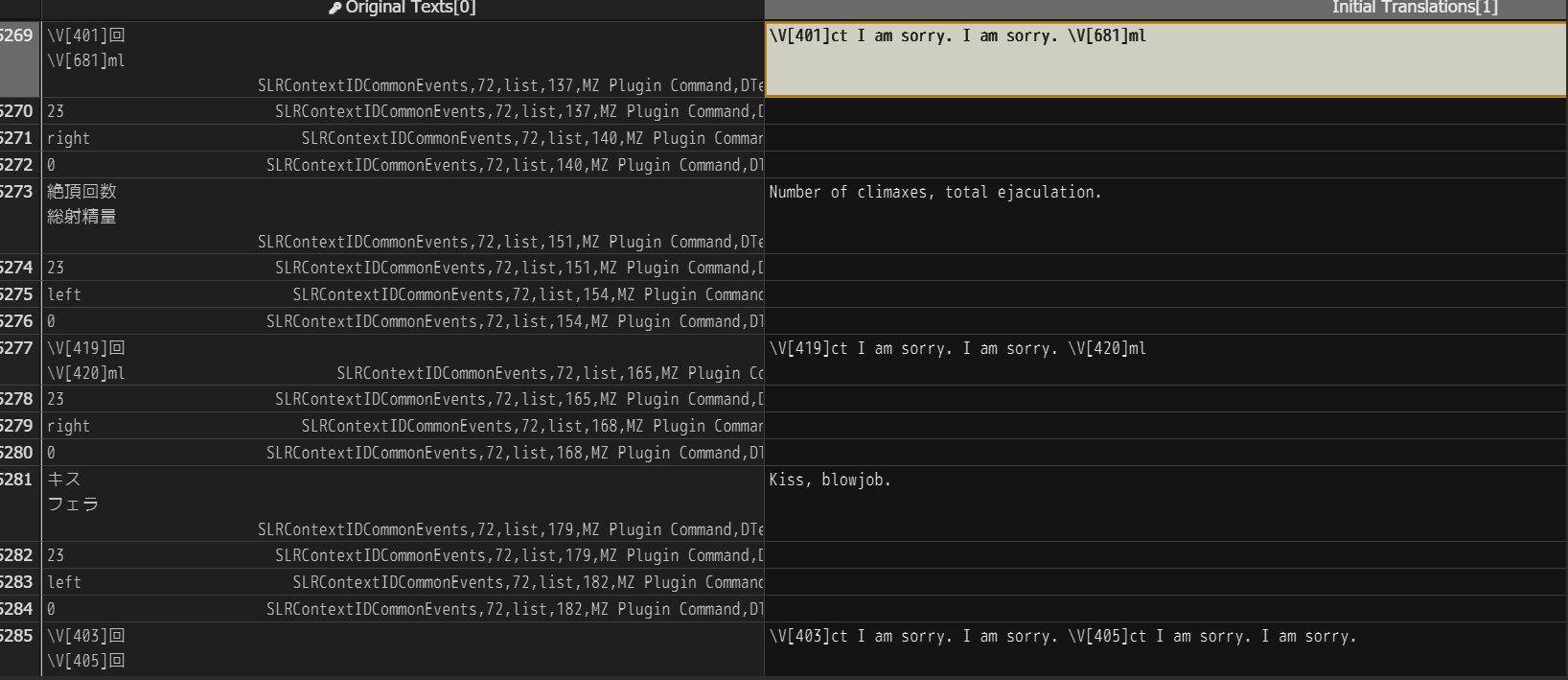
For some reason this happened:

1756657459898.png

Instead of only translating

\V[401]回
\V[681]ml

It added "I am sorry. I am sorry." to all lines with those characters, and when I ran the automatic word wrapping it tagged them "indigo".

And the translation ended like this:
\V[401]ct I am sorry. I am sorry. \V[681]ml

I'm trying to translate this game: https://f95zone.to/threads/translat...-netorimurano-rj01256651.226551/post-15625983

(i'm using SLR v2.0)
 
Last edited:

Samjaza

Newbie
Jun 10, 2017
36
16
260
For some reason this happened:

View attachment 5205162

Instead of only translating

\V[401]回
\V[681]ml

It added "I am sorry. I am sorry." to all lines with those characters, and when I ran the automatic word wrapping it tagged them "indigo".

And the translation ended like this:
\V[401]ct I am sorry. I am sorry. \V[681]ml

I'm trying to translate this game: https://f95zone.to/threads/translat...-netorimurano-rj01256651.226551/post-15625983

(i'm using SLR v2.0)
Ive had issues in the past with SugoiV4 doing that
 

Shisaye

Engaged Member
Modder
Dec 29, 2017
3,510
6,215
676
For some reason this happened:

View attachment 5205162

Instead of only translating

\V[401]回
\V[681]

It added "I am sorry. I am sorry." to all lines with those characters, and when I ran the automatic word wrapping it tagged them "indigo".

And the translation ended like this:
\V[401]ct I am sorry. I am sorry. \V[681]ml

I'm trying to translate this game: https://f95zone.to/threads/translat...-netorimurano-rj01256651.226551/post-15625983

(i'm using SLR v2.0)
That means Sugoi received a task it is unable to understand and basically completely crashed out.
But there's no reason why it should crash out here, since all it should have been sent was 回, everything else should have been filtered.
So I assume that it was somehow sent special whitespace, or something like that. You should see what it was actually sent in the console, but I'll run some tests myself with that game.

Edit: Yep it's being sent whitespace because the dev for some reason added non breaking spaces at the end between linebreaks.
I'll fix that next update by making my filter system more aggressive.
 
Last edited:
  • Heart
Reactions: LinkR34

Shisaye

Engaged Member
Modder
Dec 29, 2017
3,510
6,215
676
I've released SLR v2.001.

Instead of only translating

\V[401]回
\V[681]ml

It added "I am sorry. I am sorry." to all lines with those characters, and when I ran the automatic word wrapping it tagged them "indigo".
Fixed it by more aggressively removing whitespace at the start and end of cells if there are linebreaks.
I even tried to modify the program so the top wrapper button does the right-click wrapper function, but there're too many packages within packages and is out of my capabilities.
I actually have a pre-made custom button for that, but I guess you didn't find it in the mess that is transredbatch.
I've added a new bit to the help menu to explain how to enable/use it.
EDIT: I forgot about something. The program does append " - Modified with SLR Translator v2.0" at the title of the window on System.json. The problem is that it doesn't seem to check if the append was already done by a previous run (I believe it appends it during translation), so I ended up with "<game_title> - Modified with SLR Translator v2.0 - Modified with SLR Translator v2.0 - Modified with SLR Translator v2.0 - Modified with SLR Translator v2.0". Maybe the program should check if the title has already the text before appending it.
Should be fixed now.
 
  • Like
Reactions: RTS23

RTS23

Newbie
Apr 10, 2018
76
95
141
I found out that LM Studio would loop error with "Channel broken" (or something like that, I don't remember exactly) and SLRTranslator would just keep trying to request translation. After testing many things (I was just trying a larger LLM), I realized that it was the Context Prompt being too large to handle (around 200 lines).
First, I did all the manual job of finding how many occurrances each term had, so I could exclude the less used ones and prioritize the ones with most. However, it was not until I finished, that occured to me... "What if the LLM still struggles with +100 terms?" What I'm doing will not help, specially since I'll have to manually translate the ones with less occurrances.

Thus, I tried to modify DSLREngine.js to add a check between the quoted "term" (or 'term') on every line of the Context Prompt, and compare it with the text batch to translate. If there is no match, dismiss the line of the term since it's not needed for that batch. Oh, and if there is no quoted text on the line, the line is always parsed, just in case the user wants to force some context.

The code is of course spaghettiTM, so feel free to rewrite however you see fit/to your standard. I wasn't able to put the new option "optionSystemPromptAdditionTrim" below "optionSystemPromptAddition" where it would make sense, so that's something you'll have to solve. Other than that, I tried it with texts of null, empty spaces, \n and everything worked as I expect.

I expect this to help the LLM, since it will have less input tokens. Correct the option description if it doesn't reduce costs and might improve accuracy. In any case, if you see this wrong or not required, please tell me and dismiss the work done.

PD: I just remembered that I did not try a large Context Prompt. Who knows? Maybe this doesn't solve the original problem, but hopefully helps/improves normal operation.

EDIT: Almost forgot. Found out that when doing a batch translation selecting objects, they would be translated from last to first, by object it line, for some reason. Maybe I did select them in the reverse order and that's why? Anyways, it's something to check for and solve if necessary, I guess.
 
Last edited:
  • Like
Reactions: Entai2965

Shisaye

Engaged Member
Modder
Dec 29, 2017
3,510
6,215
676
I found out that LM Studio would loop error with "Channel broken" (or something like that, I don't remember exactly) and SLRTranslator would just keep trying to request translation. After testing many things (I was just trying a larger LLM), I realized that it was the Context Prompt being too large to handle (around 200 lines).
First, I did all the manual job of finding how many occurrances each term had, so I could exclude the less used ones and prioritize the ones with most. However, it was not until I finished, that occured to me... "What if the LLM still struggles with +100 terms?" What I'm doing will not help, specially since I'll have to manually translate the ones with less occurrances.

Thus, I tried to modify DSLREngine.js to add a check between the quoted "term" (or 'term') on every line of the Context Prompt, and compare it with the text batch to translate. If there is no match, dismiss the line of the term since it's not needed for that batch. Oh, and if there is no quoted text on the line, the line is always parsed, just in case the user wants to force some context.

The code is of course spaghettiTM, so feel free to rewrite however you see fit/to your standard. I wasn't able to put the new option "optionSystemPromptAdditionTrim" below "optionSystemPromptAddition" where it would make sense, so that's something you'll have to solve. Other than that, I tried it with texts of null, empty spaces, \n and everything worked as I expect.

I expect this to help the LLM, since it will have less input tokens. Correct the option description if it doesn't reduce costs and might improve accuracy. In any case, if you see this wrong or not required, please tell me and dismiss the work done.

PD: I just remembered that I did not try a large Context Prompt. Who knows? Maybe this doesn't solve the original problem, but hopefully helps/improves normal operation.

EDIT: Almost forgot. Found out that when doing a batch translation selecting objects, they would be translated from last to first, by object it line, for some reason. Maybe I did select them in the reverse order and that's why? Anyways, it's something to check for and solve if necessary, I guess.
Limiting the context prompt to a very specific format and not allowing general guidance like setting, doesn't seem like it would work for everyone, but since it can be turned off and isn't enabled by default I wouldn't really see a problem with adding it.
But you are currently only modifying the full batch prompt, you left the individual translation requests untouched.
And to make it work for the individual translations you would have to take the optionEnableContext setting into account. (Whether or not it looks at the last successful translations or not.)

Also the option priority stuff doesn't work half the time so I'm not using the system. You can change the order of the options menu items in the DSLRTranslationEngineWrapper.js at around line 1400. There's a comment saying "// Define explicit ordering for options within each category".

Edit: It would also be nice to know which models you actually tried. I didn't really have that context limitation problem, yet.
 
Last edited:

RTS23

Newbie
Apr 10, 2018
76
95
141
Limiting the context prompt to a very specific format and not allowing general guidance like setting, doesn't seem like it would work for everyone, but since it can be turned off and isn't enabled by default I wouldn't really see a problem with adding it.
That's why I left the option to always parse lines that do not have anything between quotes (I just realized it would still get quoted "things" along the line, solved it with ^ at the start of the regex [I'll never get to fully undestand regex syntax]), but yeah, leave it as disabled by default because it's enforcing a Context Prompt format.
But you are currently only modifying the full batch prompt, you left the individual translation requests untouched.
That explains why LM Studio is still looping "Error: Channel error" and the debug prompt printing the Context Prompt is not appearing at the translation window. I made a function and applied it on two places so it's easierTM to follow now.
And to make it work for the individual translations you would have to take the optionEnableContext setting into account. (Whether or not it looks at the last successful translations or not.)
I fail to see how optionEnableContext would affect getting the optionSystemPromptaddition trimmed. I see that optionSystemPromptaddition > SystemPromptAdditionValue > systemContent, then it goes to a optionEnableContext check where systemContent += ... + this.optionContextPrompt.getValue() + sanitizedTranslations.join("\n---\n") + ...;. I shouldn't have any problem if I'm overwriting SystemPromptAdditionValue.
Maybe I'm understand your warning wrong... That this term trimming would be not work for individual lines since it's getting the whole batch matches. If that's the case, yeah, it would be best for the single line translation to also have trimmed terms to that line being translated, but it would mess with the systemContent you mentioned.
To avoid that, that check and building systemContent should be moved to the actual loop line translation, which it could mess other things, and I don't see it too bad that line translations gets the whole batch terms. It could affect the translation, but it's too much trouble for what's worth in my opinion.
Also the option priority stuff doesn't work half the time so I'm not using the system. You can change the order of the options menu items in the DSLRTranslationEngineWrapper.js at around line 1400. There's a comment saying "// Define explicit ordering for options within each category".
For some reason, I wasn't searching on DSLRTranslationEngineWrapper.js but TranslationEngineWrapper.js and TranslationEngineWrapper2.js. Did I already say that I can be very blind?
Edit: It would also be nice to know which models you actually tried. I didn't really have that context limitation problem, yet.
The same suggested qwen3-30b-a3b-abliterated-erotic-i1, but with higher quantification. Pre-2.001 I was using GGUF Q4_K_S, then moved to GGUF Q6_K (the largest trying to get best results) when updating 2.001, there I was getting the error, so I rolled to GGUF IQ3_XXS (the same as suggested in the manual). For some lines it was okey, but then it failed again. After checking on many things and trying other quantification levels, found out that I also did increase the context prompt, so by reducing it I got it to work again without much trouble (the same eventual retry, mismatch number of lines, etc), but would still go. Find in the .rar a context prompt of near 300 lines. That would get LM Studio in the error loop, my guess is because I did not configure correctly some token limit option.

And something to report, I though that maybe it would be solved by increasing quantification, but for some reason "「" symbols are getting dupped when at the start of the untranslated sentence on the translated version. It's not a big deal because of regex, but something to note.
 

Shisaye

Engaged Member
Modder
Dec 29, 2017
3,510
6,215
676
Maybe I'm understand your warning wrong...
Maybe I understand your system wrong.
But If you remove context entries based on what's send to the LLM during the request, shouldn't your system also consider what is being sent as part of the past successful translation addition?

I mean let's say the thing sent for translation during a single translation request is:
"Person continued to do stuff."

And the context prompt is:
'ユマ' means 'Yuma'. Yuma is female.

Then it should get rid of the context because Yuma isn't mentioned by name and the context doesn't do anything.


But what if there was a a cell directly beforehand that made clear:
"Yuma started to do stuff."

and it was sent as context because of the enableContext option.
Shouldn't it take that into account and keep the "'ユマ' means 'Yuma'. Yuma is female." context so the LLM can make the connection that it is still Yuma doing stuff and therefore should use female pronouns?


Or are you not even planning to consider the individual request here, and still just work with the context prompt trimmed by the entire batch, even if it isn't necessarily relevant?
 
Last edited:

RTS23

Newbie
Apr 10, 2018
76
95
141
Maybe I understand your system wrong.
But If you remove context entries based on what's send to the LLM during the request, shouldn't your system also consider what is being sent as part of the past successful translation addition?

I mean let's say the thing sent for translation during a single translation request is:
"Person continued to do stuff."

And the context prompt is:
'ユマ' means 'Yuma'. Yuma is female.

Then it would get rid of the context because Yuma isn't mentioned by name.


But what if there was a a cell directly beforehand that made clear:
"Yuma started to do stuff."

and it was sent as context because of the enableContext option.
Shouldn't it take that into account and keep the "'ユマ' means 'Yuma'. Yuma is female." context so the LLM can make the connection that it is still Yuma doing stuff and therefore should use female pronouns?

Or are you not even planning to consider the individual request here, and still just work with the context prompt trimmed by the entire batch, even if it isn't necessarily relevant?
Well, as far I understand, the previous translations context input by enableContext is translated text, no? If that's the case, then the LLM shouldn't need the "'ユマ' means 'Yuma'. Yuma is female." line because on the line being translated, there is no "ユマ".

Oh, you are talking about details of the term being lost, such as "Yuma is female." In that case, maybe it's the second quotted term that, in addition, should be checked on the text got by enableContext, which I guess that's sanitizedTranslations. But then there could be duplicated lines on the trimmed version ofthe Context Prompt...

Give me time to try to do something about it.
 

Shisaye

Engaged Member
Modder
Dec 29, 2017
3,510
6,215
676
Well, as far I understand, the previous translations context input by enableContext is translated text, no? If that's the case, then the LLM shouldn't need the "'ユマ' means 'Yuma'. Yuma is female." line because on the line being translated, there is no "ユマ".

Oh, you are talking about details of the term being lost, such as "Yuma is female." In that case, maybe it's the second quotted term that, in addition, should be checked on the text got by enableContext, which I guess that's sanitizedTranslations. But then there could be duplicated lines on the trimmed version ofthe Context Prompt...

Give me time to try to do something about it.
I still really wonder what actually makes this system necessary.
I appreciate the effort and something that reduces token usage without downside is always welcome.
But how on earth are you actually hitting the context limits of the models?

According to the official numbers the qwen3 30b model should support a context length of 32,768 natively and 131,072 tokens with YaRN.
How on earth is it running out? Especially on single requests?

There's something fucky here.

Edit: What's the context limit you have in LM studio for the model? I don't think that is actually influenced by max_tokens and needs to be set in LM Studio.

Edit2: I looked it up specifically again and you cannot influence the context length limit option of the requested model through the LM Studio api, you need to do it in LM Studio itself. I should really add that to the help menu...

Please try increasing that option in case you haven't already. (Will eat more ram though.)
 
Last edited:
  • Like
Reactions: RTS23

RTS23

Newbie
Apr 10, 2018
76
95
141
Even though I can increase the context length at LM Studio (thanks for pointing it out), I prefer to keep it as it is if it can work like that.

Anyhow, I spent more than I would've liked on trying to escape "\N[1]" or any control symbol for that matter in the matching process, because I realized my system was only matching "N", which was not good at all. After that, I put the system to also manage previous translations, so it can get details from the Context Prompt if there're any name or control sysmbols (for instance, "\N[1]" is passed because it's expected that line to only have a single quoted element) on previous translations.

However, after running the tests (of that part), I realized that previous translations only are called if the actual translation failed.
Is this expected normal operation? Wouldn't the LLM benefit always from having access to previous (at least the inmediate previous) translations? I've read from options that too much past context can break the LLM, but always having a single previous batch maybe it's good? I guess not if it's not done that way (I did understand later that this is the single-line translation mode for when the whole batch doesn't work).

Anyways, here's my progress tested. Somehow previous translations are calling lines from the Context Prompt that they weren't and maybe they should have. Like calling "'ユ' means 'Yu'" because it found "Yuma" on the previous translations, but the actual translation also includes "'ユマ' means 'Yuma'" because it found "ユマ", so I don't know what's going on. I guess it's because of differences between regex Japanese and English, but I'm not sure (I really, really hate regex).
I haven't been able to fully test it because my LLM decided to work flawlessly and is getting late. I hope something is usable. Feel free to mark it as "Experimental" or dismiss it all together if you don't feel confident.

EDIT: 5 minutes later LLM failed and got into the single-line translation. For what I've seen, it works as intended (add additional context from previous translations). The "somehow previous translations are calling lines from the Context Prompt that they weren't and maybe they should have" was a red herring, the actual japanese term wasn't exactly a subset, but in english is, thus the appearing on translated but not on untranslated text. I reuploaded the .rar because I missed a '\n' when merging the trimmed prompt at that stage of the code.
 
Last edited: