RPGM None [Translation Request] On the Island Where Sex Training Is Held [RJ01481895] [Karafureshima]

Sep 29, 2017
18
9
191
View attachment 5527205
View attachment 5527240


I’ve already tried continuing all of the save files from you, and all of them have heroine characters. I’ve attached the SHA256 value of the game. You can load that SHA256 value using your SHA256 checksum verification application, or with RapidCRC from me (specifically for Windows x64).

Strangely, when continuing your save, the protagonist character moves too quickly. So my temporary conclusion is that this is not due to a translation error. My suggestion is to try starting a new game. It’s not uncommon for bugs to carry over when continuing save files from an older version of the game.

I’ve also added translations to several texts that were still untranslated. Please re-download the patch from original post.

After replacing your game files with newest patch, place the file RJ01481895 v1.03 eng.sha256 in the same folder as Game.exe. Run RapidCRC, choose “Open files”, navigate to the location of RJ01481895 v1.03 eng.sha256, then select Open.
After finishing the check of thousands of files, click on the “Info” column header at the top right to sort and see which files do not match.
You don't have permission to view the spoiler content. Log in or register now.
ran the programm and got this error. data\Map196.json and js\plugins.js are corrupted
also i did a fresh install of version 1.02 with a new save and the problem persist with the portraits when i use your patch. the movement speed is a item that you get in the game so i dont think its related to the missing portraits
 
Last edited:

ripno

Member
Jan 27, 2023
143
345
131
ran the programm and got this error. data\Map196.json and js\plugins.js are corrupted
also i did a fresh install of version 1.02 with a new save and the problem persist with the portraits when i use your patch. the movement speed is a item that you get in the game so i dont think its related to the missing portraits
I appreciate your answer. I suspect that the error is caused by the zip compression type. I will resend it using 7z compression. Hopefully, there will be no more issues.
Please re-download the patch from original post.
 

Johnny 1207

Member
Jan 16, 2021
191
58
152
I appreciate your answer. I suspect that the error is caused by the zip compression type. I will resend it using 7z compression. Hopefully, there will be no more issues.
Please re-download the patch from original post.
Thanks for the fix crafting works now experimented on text size 0.90 ideal for main/heroine and 1.1 ideal for npc bubble. Character glossary not yet until unlock second page
 
  • Like
Reactions: ripno

eric_alvin

Newbie
May 26, 2020
63
101
219
I appreciate your answer. I suspect that the error is caused by the zip compression type. I will resend it using 7z compression. Hopefully, there will be no more issues.
Please re-download the patch from original post.
Everything is working smoothly for me now as well after downloading your updated patch. Character portraits are present and the image that failed to load during the first sex scene with MC and Miyamoto now loads. You've done an incredible job and its much appreciated, was nearly ready to give up on this game, but now all is good
 
  • Like
Reactions: ripno

Johnny 1207

Member
Jan 16, 2021
191
58
152
I appreciate your answer. I suspect that the error is caused by the zip compression type. I will resend it using 7z compression. Hopefully, there will be no more issues.
Please re-download the patch from original post.
First scene with Riyo after talk 2x right near the locker
Screenshot_2025-12-15-01-08-25-84_b256d658d995ac698dafdc780f3e0c52.jpg
 

ripno

Member
Jan 27, 2023
143
345
131
First scene with Riyo after talk 2x right near the locker
View attachment 5528327
Thank you for your feedback. I kindly ask for your understanding. Since I cannot code, I asked for help from Gemini 3 Pro. Gemini 3 Pro checked and found the weakness due to an error in the translator++ parsing code. So I copied the fix provided by Gemini 3 Pro. Hopefully, there will be no more errors. Please download again from the original post.
 
  • Like
Reactions: Johnny 1207

Johnny 1207

Member
Jan 16, 2021
191
58
152
Thank you for your feedback. I kindly ask for your understanding. Since I cannot code, I asked for help from Gemini 3 Pro. Gemini 3 Pro checked and found the weakness due to an error in the translator++ parsing code. So I copied the fix provided by Gemini 3 Pro. Hopefully, there will be no more errors. Please download again from the original post.
Sorry the same didn't work
 

Mistervd

Well-Known Member
Nov 25, 2017
1,593
1,962
351
wait is the portraid not showing a bug or did the dev remove them?
I'm using the 1.03 version with the eng patch and the portraits shows ar normal, the only thing I can think of if that the website that uploaded your version deleted those.

Edit: oh you fixed the problem haha
 

Mistervd

Well-Known Member
Nov 25, 2017
1,593
1,962
351
First scene with Riyo after talk 2x right near the locker
View attachment 5528327
Those types of errors, most of the time, happen because you used the wrong setting when unziping the files. Make sure your windows is in japanese locale and your unziping software is also using japanese coding.

Most of the time if you don't have those settings on, your computer will change the files names/won't be able to read japanese characters hence the error.
 
  • Like
Reactions: Johnny 1207

Johnny 1207

Member
Jan 16, 2021
191
58
152
Those types of errors, most of the time, happen because you used the wrong setting when unziping the files. Make sure your windows is in japanese locale and your unziping software is also using japanese coding.

Most of the time if you don't have those settings on, your computer will change the files names/won't be able to read japanese characters hence the error.
Yeah still in Japanese encoding no changes
 

ripno

Member
Jan 27, 2023
143
345
131
Yeah still in Japanese encoding no changes
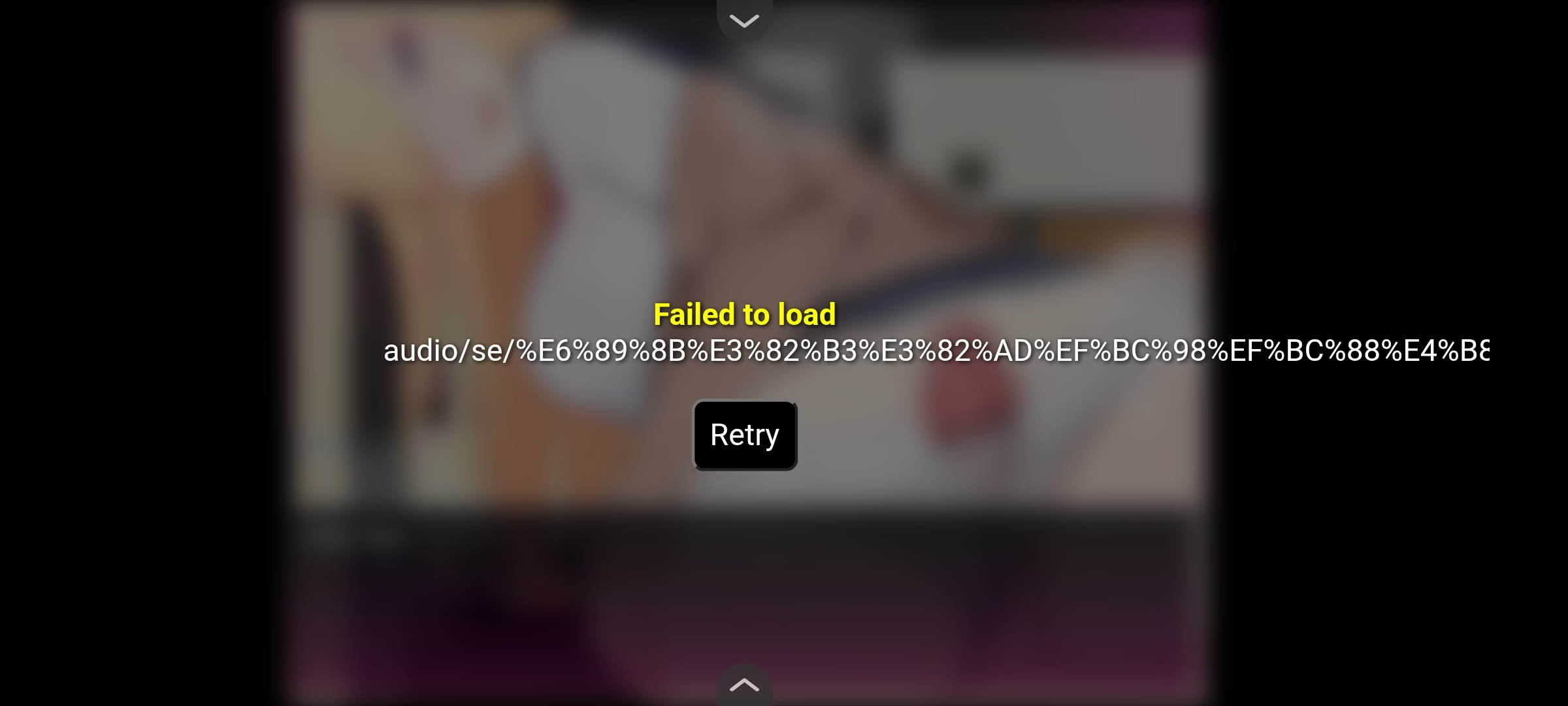
The error message Failed to load audio/se/%E6%89%8B%E3%82%B3%E3%82%AD%EF%BC%98... indicates that the game is trying to load a Japanese‑named sound effect file.

For reference, the URL‑encoded string %E6%89%8B %E3%82%B3 %E3%82%AD %EF%BC%98... corresponds to the characters in the filename:
  • 「手」 → %E6%89%8B
  • 「コ」 → %E3%82%B3
  • 「キ」 → %E3%82%AD
  • 「8」 (fullwidth digit 8, not ASCII "8") → %EF%BC%98
In RPG Maker MZ, event code 250 is the command for Play SE (Sound Effect). The "parameters" field specifies which sound effect file to play, along with its volume, pitch, and pan settings. In this case, the game is instructed to play the file named 手コキ8(中速~高速).ogg_.
I checked the CommonEvent.json and the entry for event code 250 is correct, and it is the same as in the raw file:
JSON:
{"code":250,"indent":0,"parameters":[{"name":"手コキ8(中速~高速)","volume":100,"pitch":100,"pan":0}]}
Translator++ did not touch this part, so the translation process should not be the cause. RPGM MZ save files (.rmmzsave) also do not store audio file names in URL‑encoded form. Since the game runs on NW.js with its own Chromium build, the browser version of the player does not matter.

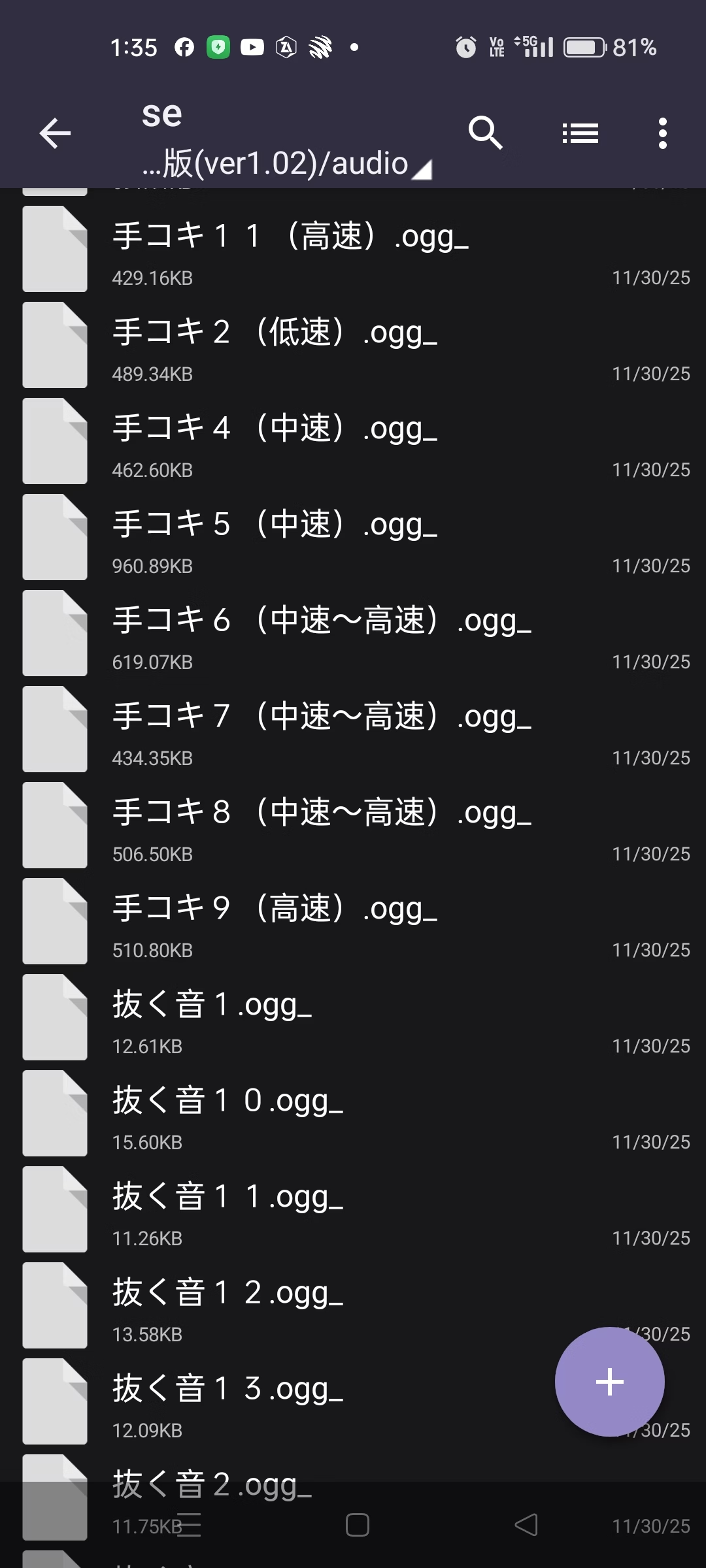
Please check whether the file 手コキ8(中速~高速).ogg_ actually exists in the folder audio/se. If the file is missing or renamed, the game will throw this error. If you do find that 手コキ8(中速~高速).ogg_ is present in the folder, then honestly I don’t know how else to fix it, because I cannot code. All of the explanations I’ve shared here come from asking ChatGPT and Gemini.
 
Last edited:
  • Like
Reactions: Johnny 1207

Johnny 1207

Member
Jan 16, 2021
191
58
152
The error message Failed to load audio/se/%E6%89%8B%E3%82%B3%E3%82%AD%EF%BC%98... indicates that the game is trying to load a Japanese‑named sound effect file.

For reference, the URL‑encoded string %E6%89%8B %E3%82%B3 %E3%82%AD %EF%BC%98... corresponds to the characters in the filename:
  • 「手」 → %E6%89%8B
  • 「コ」 → %E3%82%B3
  • 「キ」 → %E3%82%AD
  • 「8」 (fullwidth digit 8, not ASCII "8") → %EF%BC%98
In RPG Maker MZ, event code 250 is the command for Play SE (Sound Effect). The "parameters" field specifies which sound effect file to play, along with its volume, pitch, and pan settings. In this case, the game is instructed to play the file named 手コキ8(中速~高速).ogg_.
I checked the CommonEvent.json and the entry for event code 250 is correct, and it is the same as in the raw file:
JSON:
{"code":250,"indent":0,"parameters":[{"name":"手コキ8(中速~高速)","volume":100,"pitch":100,"pan":0}]}
Translator++ did not touch this part, so the translation process should not be the cause. RPGM MZ save files (.rmmzsave) also do not store audio file names in URL‑encoded form. Since the game runs on NW.js with its own Chromium build, the browser version of the player does not matter.

Please check whether the file 手コキ8(中速~高速).ogg_ actually exists in the folder audio/se. If the file is missing or renamed, the game will throw this error. If you do find that 手コキ8(中速~高速).ogg_ is present in the folder, then honestly I don’t know how else to fix it, because I cannot code. All of the explanations I’ve shared here come from asking ChatGPT and Gemini.
Ok will try
 

Johnny 1207

Member
Jan 16, 2021
191
58
152
The error message Failed to load audio/se/%E6%89%8B%E3%82%B3%E3%82%AD%EF%BC%98... indicates that the game is trying to load a Japanese‑named sound effect file.

For reference, the URL‑encoded string %E6%89%8B %E3%82%B3 %E3%82%AD %EF%BC%98... corresponds to the characters in the filename:
  • 「手」 → %E6%89%8B
  • 「コ」 → %E3%82%B3
  • 「キ」 → %E3%82%AD
  • 「8」 (fullwidth digit 8, not ASCII "8") → %EF%BC%98
In RPG Maker MZ, event code 250 is the command for Play SE (Sound Effect). The "parameters" field specifies which sound effect file to play, along with its volume, pitch, and pan settings. In this case, the game is instructed to play the file named 手コキ8(中速~高速).ogg_.
I checked the CommonEvent.json and the entry for event code 250 is correct, and it is the same as in the raw file:
JSON:
{"code":250,"indent":0,"parameters":[{"name":"手コキ8(中速~高速)","volume":100,"pitch":100,"pan":0}]}
Translator++ did not touch this part, so the translation process should not be the cause. RPGM MZ save files (.rmmzsave) also do not store audio file names in URL‑encoded form. Since the game runs on NW.js with its own Chromium build, the browser version of the player does not matter.

Please check whether the file 手コキ8(中速~高速).ogg_ actually exists in the folder audio/se. If the file is missing or renamed, the game will throw this error. If you do find that 手コキ8(中速~高速).ogg_ is present in the folder, then honestly I don’t know how else to fix it, because I cannot code. All of the explanations I’ve shared here come from asking ChatGPT and Gemini.
is this it?
Screenshot_2025-12-15-13-35-25-99_db51e592e420a9871f4a37915a68789b.jpg
 

ripno

Member
Jan 27, 2023
143
345
131
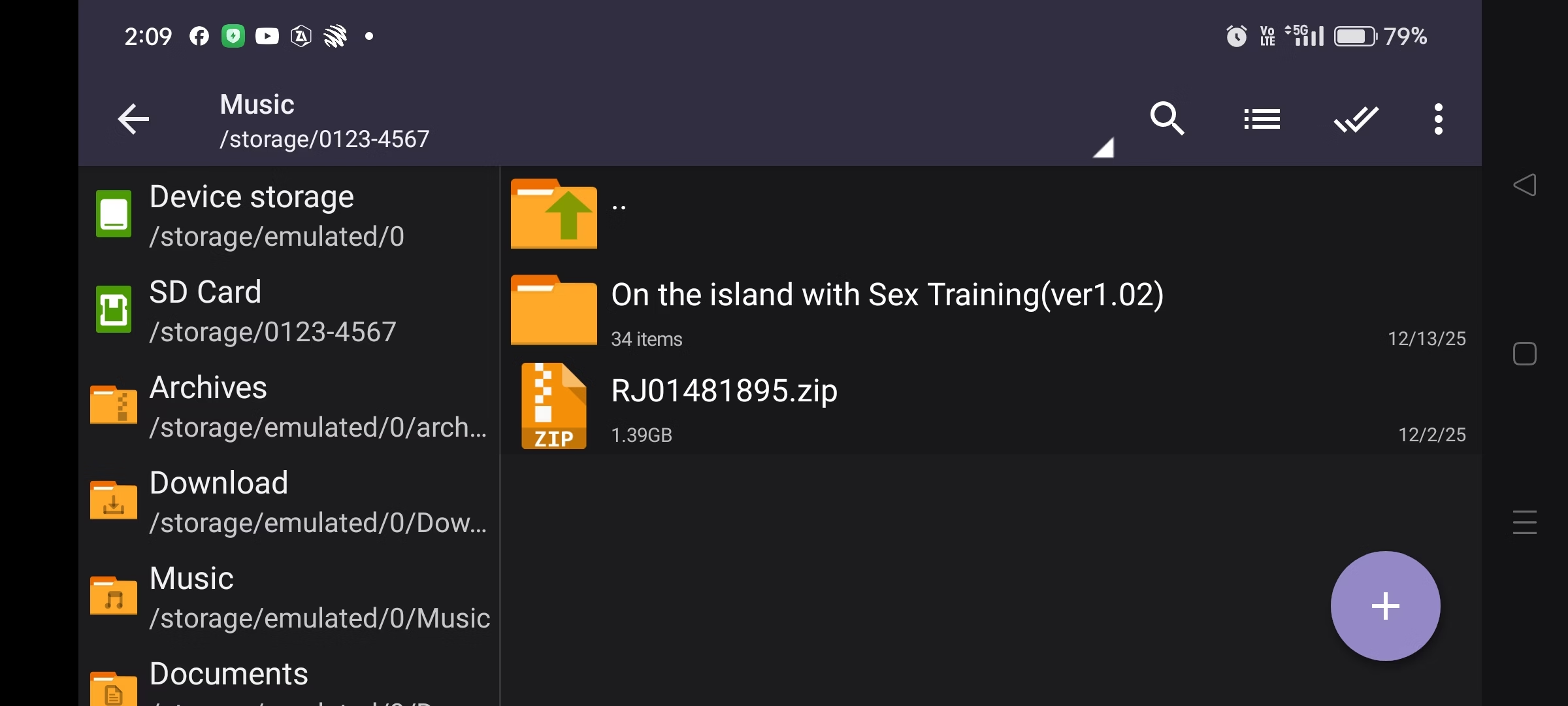
A folder name with Japanese characters on your Android device could be one of the causes of the issue. Android sometimes has trouble recognizing or processing non-Latin characters (like Japanese letters or special symbols) in directory paths or filenames, which can prevent the game from finding or loading files, such as audio.
Try renaming the main folder where the game is located to a name that only uses Latin letters (standard characters like a-z, numbers, and basic symbols), removing any Japanese characters. Hopefully, this can help.
 
Last edited:

Johnny 1207

Member
Jan 16, 2021
191
58
152
A folder name with Japanese characters on your Android device could be one of the causes of the issue. Android sometimes has trouble recognizing or processing non-Latin characters (like Japanese letters or special symbols) in directory paths or filenames, which can prevent the game from finding or loading files, such as audio.
Try renaming the main folder where the game is located to a name that only uses Latin letters (standard characters like a-z, numbers, and basic symbols), removing any Japanese characters. Hopefully, this can help.
try it same problem sorry
Screenshot_2025-12-15-14-09-21-66_db51e592e420a9871f4a37915a68789b.jpg