


denadm
Member
- Apr 7, 2023
- 181
- 224
- 227
This is only possible with manual translation or using AI. I was able to do this, but the free limit didn't allow me to finish the translation.Is there anyway to fix pronouns in translation?

kukuru97
Member
- May 31, 2019
- 135
- 187
- 192
How do I fix this?Here's my build, using renpy for translation. All unnecessary junk for translating other engines has been removed. Everything unnecessary has been removed, and everything that might be needed has been archived.
Use it, 2 bucks is not a lot of money, even for Ukraine.
Works without a Patreon link or accounts.
If you don't want to be detected, useYou must be registered to see the linksor any other blocking tool.
If anyone is interested, I can try to explain how to set up the OpenAI addon on a local AI, but it's better to ask copilot or gemini
DownloadYou must be registered to see the links
Password inside archive
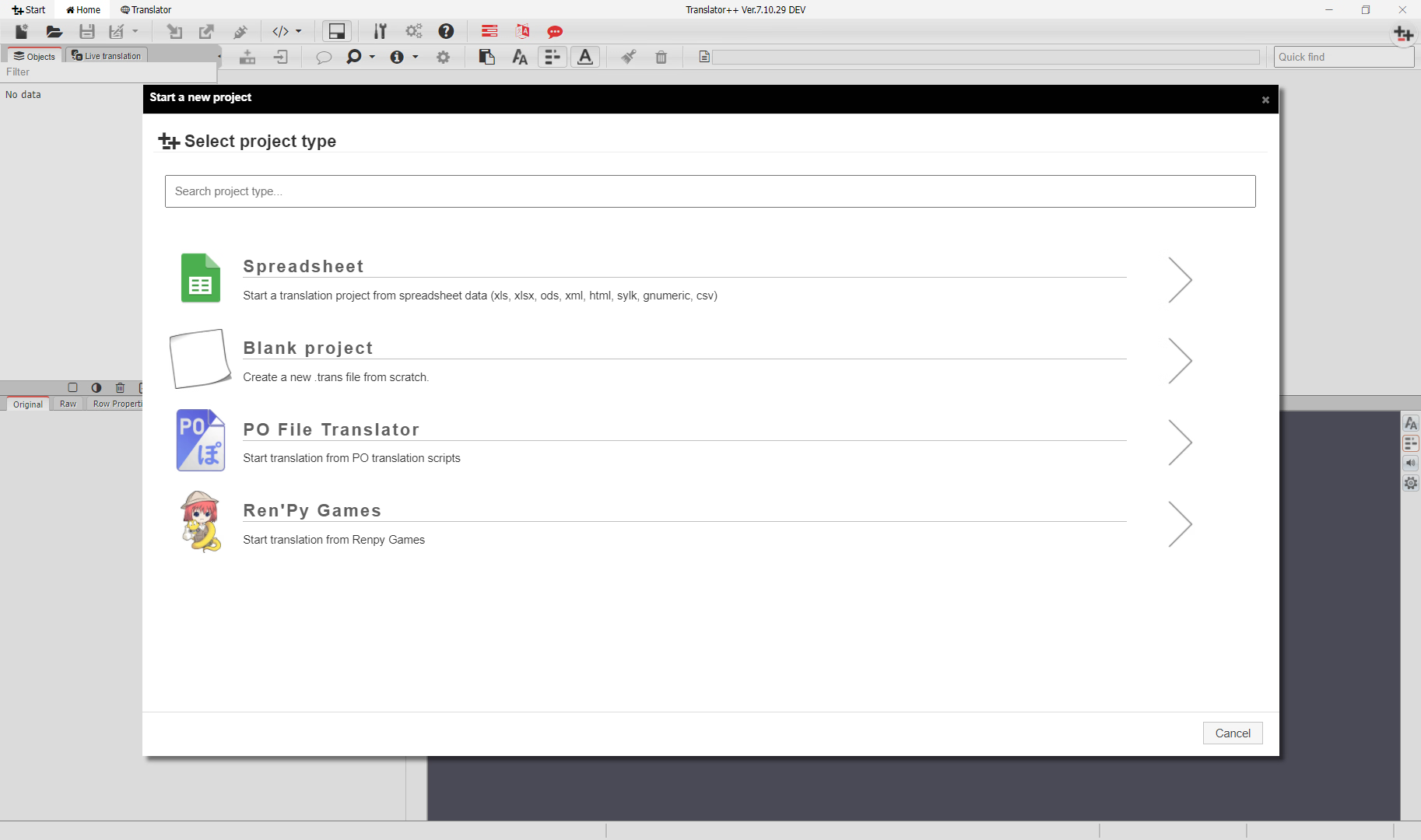
I only get a few options when creating a new project.
C:\Users\XXXXX\AppData\Local\translator++If anyone knows how I can make sure my Patreon account is completely removed when I share it, I'd be glad to.
It looks like the crash issue in Translator++ (versions 7.5.2 and above) is often caused by corrupted local cache, staging files, or missing dependencies. A few things you can try:Hello guys I am having problem with Translator++ 7.5.2 and up.
Every time I start Translator++ above 7.5.2 it closes it self after around 20 seconds.
Translator++ doesn't give and any error report. Any idea how to fix this problem?
- Delete the cache folder at:
C:\Users\%USERNAME%\AppData\Local\translator++
This forces Translator++ to rebuild its settings from scratch.
- Delete any old Translator++\data\staging folders. Sometimes leftover staging data is not compatible with newer builds and causes the program to close itself. Translator++\data\staging
- Make sure you have the required Microsoft Visual C++ Redistributables installed (both x86 and x64).
For Microsoft Visual C++ 2010, it can be downloaded
You must be registered to see the links
.For Microsoft Visual C++ 2015-2022, it can be downloaded
You must be registered to see the links
.- Run Translator++ as Administrator to avoid permission issues.
- If the problem persists, check that your .NET Framework is up to date (4.7.2 or newer is recommended). .NET Framework 4.8.1 Offline Installer can be downloaded
You must be registered to see the links
.This should help stabilize Translator++ and prevent it from closing itself after 20 seconds.
Last edited:

I try what you suggest and it didn't work.It looks like the crash issue in Translator++ (versions 7.5.2 and above) is often caused by corrupted local cache, staging files, or missing dependencies. A few things you can try:
- Delete the cache folder at:
C:\Users\%USERNAME%\AppData\Local\translator++
This forces Translator++ to rebuild its settings from scratch.
- Delete any old Translator++\data\staging folders. Sometimes leftover staging data is not compatible with newer builds and causes the program to close itself. Translator++\data\staging
- Make sure you have the required Microsoft Visual C++ Redistributables installed (both x86 and x64).
For Microsoft Visual C++ 2010, it can be downloadedYou must be registered to see the links.
For Microsoft Visual C++ 2015-2022, it can be downloadedYou must be registered to see the links.
- Run Translator++ as Administrator to avoid permission issues.
- If the problem persists, check that your .NET Framework is up to date (4.7.2 or newer is recommended). .NET Framework 4.8.1 Offline Installer can be downloadedYou must be registered to see the links.
This should help stabilize Translator++ and prevent it from closing itself after 20 seconds.
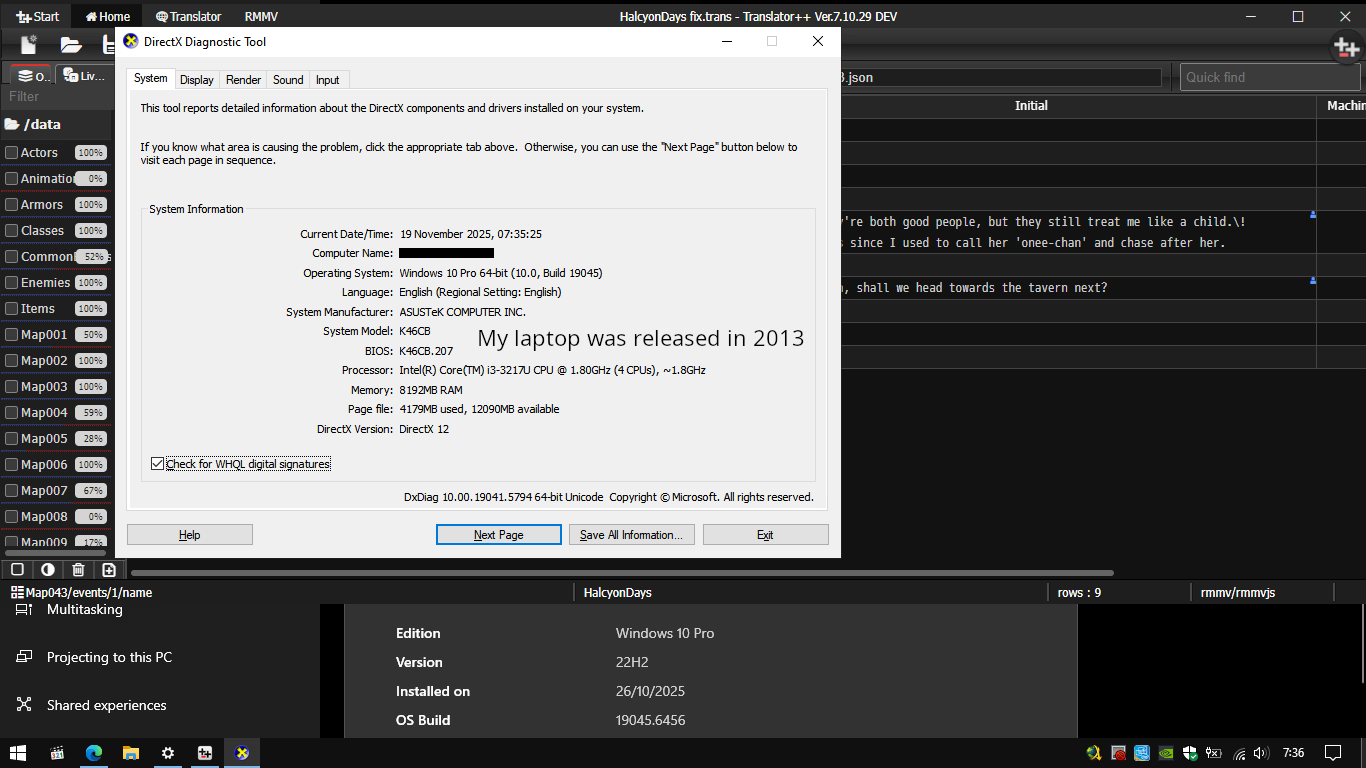
Does this has to do with version of windows?
I might not be able to help much if the problem comes from the Windows version, sorry about that.I try what you suggest and it didn't work.
Does this has to do with version of windows?
My 2013 ASUS laptop still runs smoothly, even though I installed Windows from a preactivated custom ISO.
Last edited:

TheExorcist-
Member
- Dec 8, 2019
- 193
- 202
- 282
Can you try using Revo Uninstaller with a deep uninstall? (It completely cleans registry keys and other leftover files.)I try what you suggest and it didn't work.
Does this has to do with version of windows?

HanTranslate
Member
- Sep 28, 2022
- 167
- 247
- 170
I have a Python code that translates by scraping Deepl. I wrote it and it works great. I will try to add it to the translator++ it's so slow tho
HanTranslate
Member
- Sep 28, 2022
- 167
- 247
- 170
A game that takes less than a minute with Google Translate can take around 40 minutes with this method. Deepl still produces very good translations, but I know Google Translate will catch up to it. In fact, I know it will even surpass it because of Gemini. Therefore, this solution may not satisfy many of you.I have a Python code that translates by scraping Deepl. I wrote it and it works great. I will try to add it to the translator++ it's so slow tho
TheExorcist-
Member
- Dec 8, 2019
- 193
- 202
- 282
I’d appreciate it if you could share it, so I can take a look as well.I have a Python code that translates by scraping Deepl. I wrote it and it works great. I will try to add it to the translator++ it's so slow tho
I try Revo Uninstaller it didn't work.Can you try using Revo Uninstaller with a deep uninstall? (It completely cleans registry keys and other leftover files.)
I try to start Translator++ try web browser, it is located in 'www' folder file named 'trans.html' but I am getting forever load problem.
Any idea how to fix it?
RPG Maker MV Add‑on (rmmv.js) Update
Hello everyone, while hoping that someone would share an update for RPG Maker MV & MZ, I took the initiative to improve the rmmv add‑on for RPG Maker MV with the help of Gemini 3 Pro. I’m not a coding expert, but I tried to merge the strengths of
Improvements in this Version
⚠ Disclaimer
This modification is shared as-is. Use at your own risk. Please make sure to back up your project and rmmv add-on before applying these changes.
Simply replace rmmv.js in Translator++\www\addons\rmmv
Hello everyone, while hoping that someone would share an update for RPG Maker MV & MZ, I took the initiative to improve the rmmv add‑on for RPG Maker MV with the help of Gemini 3 Pro. I’m not a coding expert, but I tried to merge the strengths of
You must be registered to see the links
and SLR Translator into a single hybrid version, aiming for more complete text extraction and greater stability.Improvements in this Version
- System.json → Native Translator++ skipped the currencyUnit, but this version adds it back. Result: Currency unit is now included.
- Event Code 122 (Control Variables) → Uses superior SLR logic. This detects JSON strings or text inside variables (common in RPG Maker MZ), which are often missed by standard parsers.
- Event Code 357 (MZ Plugin Command) → Uses SLR’s stronger recursive JSON parsing algorithm to handle complex plugin parameters.
- Event Code 655 (Script) → Modified to be able to extract Key-Value formats or non-standard JavaScript code in json files.
- Now the format of each JSON will be like the original ("Compact Array" or "Multiline Array"), not the minified version, except for System.json which will still use the minified version.
⚠ Disclaimer
This modification is shared as-is. Use at your own risk. Please make sure to back up your project and rmmv add-on before applying these changes.
Simply replace rmmv.js in Translator++\www\addons\rmmv
You don't have permission to view the spoiler content.
Log in or register now.
Last edited:
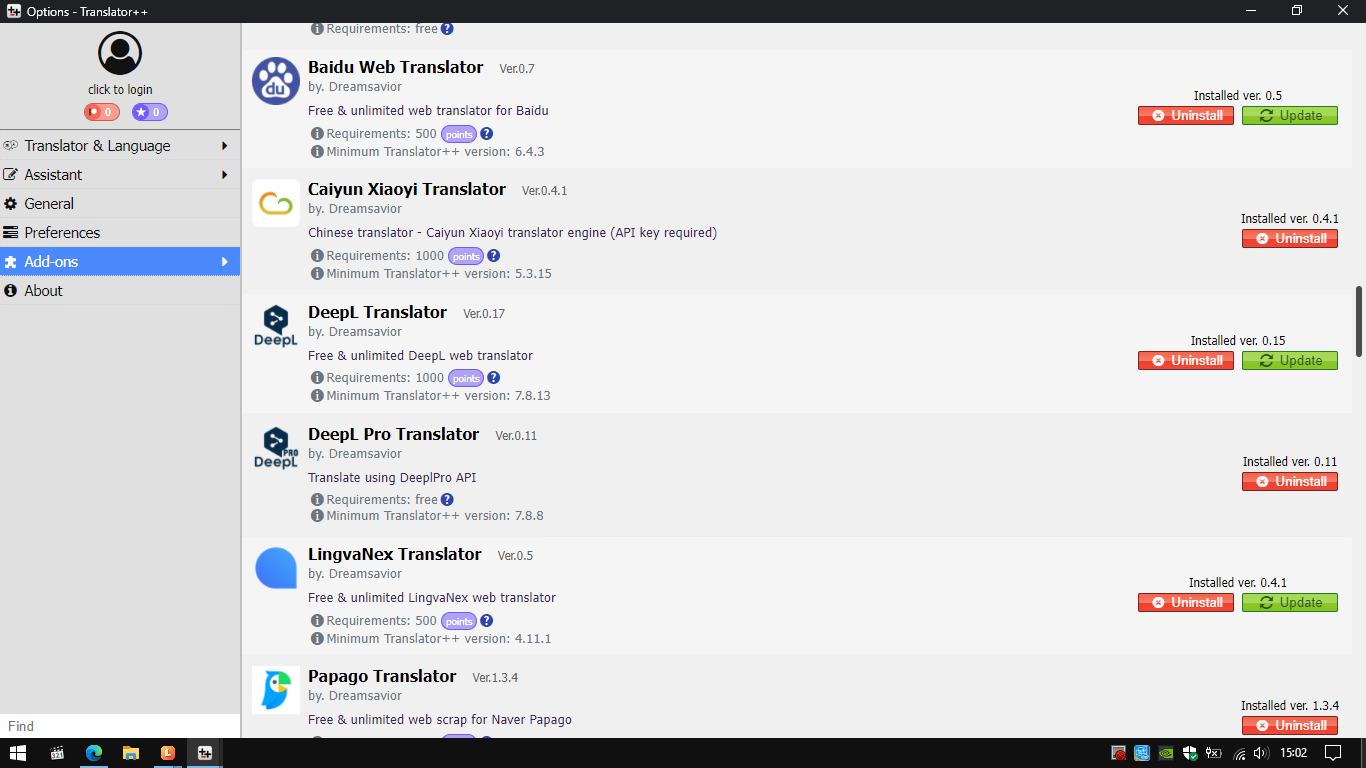
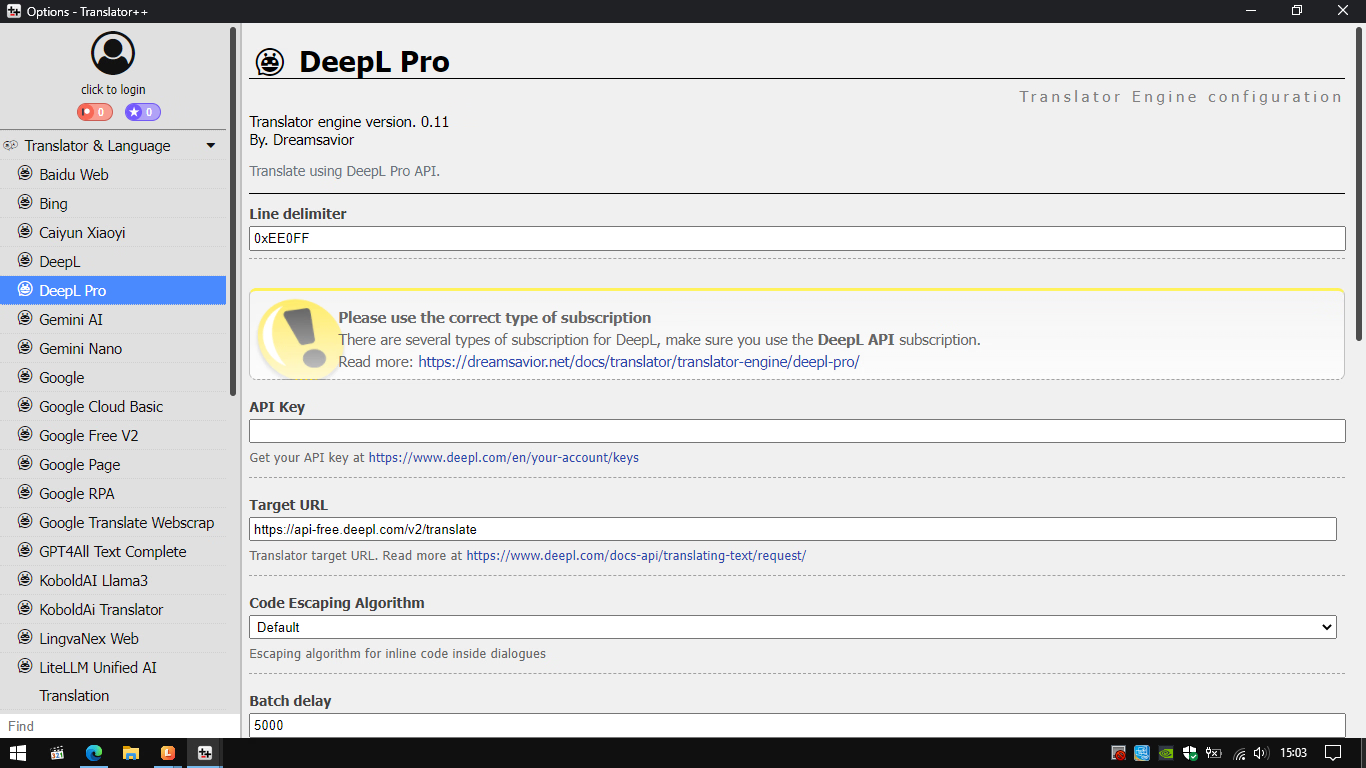
Thank you for sharing. Could you please check DeepLTrans again? After I installed it into Translator++, I couldn't find any place to enter the URL or API key. When I tried to translate, it gave me a "connection error" message.Hello everyone, I’d like to share some Translator++ add-ons here. Please note that some of them are still older versions, but hopefully they can still be useful for your projects. Feel free to check them out!
If anyone has any new add-ons, I hope you can share them here.
You must be registered to see the links
password for xmlTrans v0.10.zip is 123
I believe the fields for target URL and API key are available in DeepL Pro, not in the free version. You can re-download if you encounter errors, since the DeepL Pro add-on is indeed free.Thank you for sharing. Could you please check DeepLTrans again? After I installed it into Translator++, I couldn't find any place to enter the URL or API key. When I tried to translate, it gave me a "connection error" message.
iwannatalkshit
Newbie
- Feb 23, 2025
- 30
- 51
- 63
Does anyone know the best way to apply a translation patch to games made on tyranobuilder? When I try to put the patch in the game folder it just crashes.
TyranoBuilder patches are a bit quirky. The .tpatch format is basically just an archive that the engine reads at startup. It can only replace files that already exist inside app.asar, not add new ones. That’s why translation patches sometimes crash — if they reference files that aren’t in the original build, the engine chokes.Does anyone know the best way to apply a translation patch to games made on tyranobuilder? When I try to put the patch in the game folder it just crashes.
Normal way to apply:
- Drop the .tpatch file in the root folder of the game, right next to the .exe.
- Don’t put it in resources/ or anywhere else.
- Tyrano will auto‑load it when you run the game.
- app.asar is just an Electron archive. You can unpack it with tools like:
-
You must be registered to see the links(popular for VN assets).
-
You must be registered to see the links+You must be registered to see the linksplugin (lets 7‑Zip open .asar files directly).
- Or the official Node.js asar tool (asar extract app.asar ./folder).
-
- Once extracted, you’ll see the full Tyrano project structure (data/scenario, data/image, etc.).
- Extract the .tpatch too — it’s basically a zip. Just rename it to .zip and open it.
- Copy the patch contents over the extracted app.asar files (overwrite them).
- You can repack into a new app.asar with asar pack ./folder app.asar… but here’s the trick:
- Tyrano games will still run even if you don’t repack. As long as you have an app folder with the extracted contents, the engine will load from that folder instead of app.asar.
- Put the original app.asar somewhere safe in case you need it later.
- So you can just keep the unpacked folder and overwrite files there — no need to rebuild the archive unless you want a cleaner package.
- Important: don’t leave both app.asar and the extracted app folder together inside /resources. The engine can get confused if both are present. Keep only one of them in there.
- It’s not the “official” patch method, just a workaround.
- If you mess up the structure, the game won’t boot.
- For commercial releases (Steam, DLsite, etc.), repacking can break updates or cause issues, so make a copy before you mod them.
Last edited:
Hello everyone,
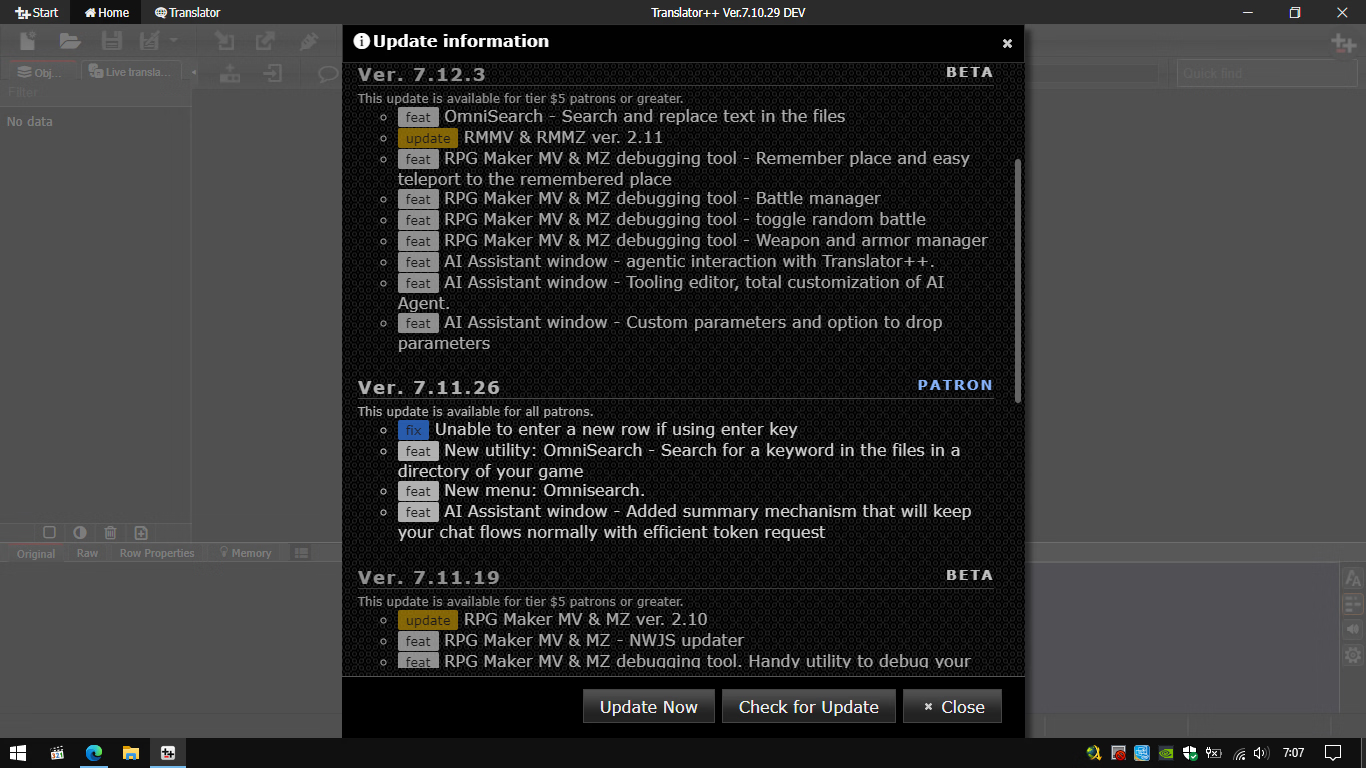
I’d like to kindly ask if KyoukoSakura, denadm, or anyone else would be kind enough to share the latest
I’d be truly grateful for your help.
I’d like to kindly ask if KyoukoSakura, denadm, or anyone else would be kind enough to share the latest
You must be registered to see the links
(at least version 7.11.26) along with all available add‑ons for translating other engines such as KiriKiri, Ren’Py, RPG Maker (XP–MZ), Unity, Wolf RPG Editor, NScripter/ONScripter, YU-RIS, Majiro, SiglusEngine, CatSystem2, Ethornell (E-mote), LiveMaker, etc.I’d be truly grateful for your help.
Last edited: