


That’s because denadm deliberately deleted it before sharing it. You can read the post by denadm at this link.
Everyone here was also surprised when many important built-in add-ons were removed. Whether this happened due to carelessness or because the add-ons were considered unimportant is unclear.
You can download many add-ons from the previous version here.
You must be registered to see the links
Hopefully KyoukoSakura, denadm, or anyone else would be kind enough to share the latest
You must be registered to see the links
(at least version 7.11.26) along with all available built-in add‑ons.
Last edited:
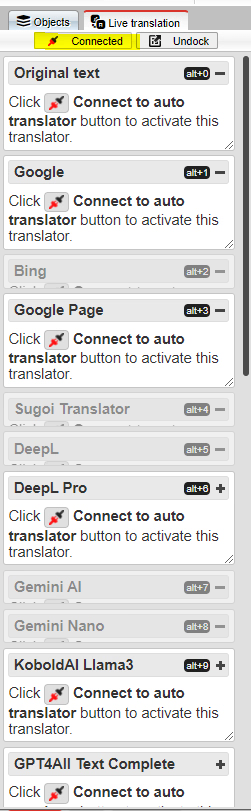
Probably a dumb question but I haven't opened this in a long while and managing to fail at googling/searching this thread something fierce. To get the live translation option running, what more did you need to do beyond hitting the connect button? I'm assuming there's some web connection I currently don't have configured correctly but wherever it's located is eluding me.
When I do translations for some games it gives me errors when trying to load images saying it can't find them.
I assume the images are being called from the maps files and the translator is translating it and mismatching the names.
Has anybody encountered this issue and fixed it? I have tried looking through the files but I can't find out what's actually breaking it.
I assume the images are being called from the maps files and the translator is translating it and mismatching the names.
Has anybody encountered this issue and fixed it? I have tried looking through the files but I can't find out what's actually breaking it.

joelurmel
Engaged Member
- Nov 3, 2022
- 2,801
- 5,009
- 698
This is probably due to the translator also translating the names of your images.When I do translations for some games it gives me errors when trying to load images saying it can't find them.
I assume the images are being called from the maps files and the translator is translating it and mismatching the names.
Has anybody encountered this issue and fixed it? I have tried looking through the files but I can't find out what's actually breaking it.
This happens if the image name is included in the line of text to be translated.
Anyway to fix it? How do you fix it for your translations?This is probably due to the translator also translating the names of your images.
This happens if the image name is included in the line of text to be translated.
joelurmel
Engaged Member
- Nov 3, 2022
- 2,801
- 5,009
- 698
In your translation directory if you are on Windows, use the commandAnyway to fix it? How do you fix it for your translations?
findstr /ILSC:"jpg" . *.rpy
and repeat with all extensions (like webm, png) name you can find in the images directory.
You just have to rename to the original files, or recreate the directory tree with the image translated if needed and renamed with the translated name, but this can provide a very big translation files.
The core issue behind the “image not found” error is not that the asset itself is missing, but that the filename reference has been altered during translation injection. RPG Maker (RPGM) relies on exact matches between the filenames stored in its JSON files (like `MapXXX.json`) and the actual files in the `img` folders. If Translator++ changes those strings, the game can no longer locate the correct asset.When I do translations for some games it gives me errors when trying to load images saying it can't find them.
I assume the images are being called from the maps files and the translator is translating it and mismatching the names.
Has anybody encountered this issue and fixed it? I have tried looking through the files but I can't find out what's actually breaking it.
Recommended approach:
- Play through the game step by step. Each time an error appears, note the filename that RPGM reports as missing.
- Check your translation table. Locate the entry for that filename and delete or clear the translated value so it reverts to the original source string.
- Re‑inject the translation. This ensures the game uses the correct filename again.
- Repeat as needed. Continue testing until all altered filenames have been restored.
Why this is necessary:
- Translator++ extracts all strings from JSON files, including asset identifiers. Because these identifiers don’t include extensions, they look like normal text and are hard to filter automatically.
- Asset names (images, audio, system graphics) must remain identical to the source. Any change — even capitalization — will break the link between the JSON reference and the actual file.
The root cause is filename translation, not missing files. The safest workflow is to manually restore asset names whenever errors occur, ensuring that only dialogue and narrative text are translated while filenames remain untouched.
Last edited:
I set out to use your solution and found what the problem was. It was as you said but the automatic translation worked this time.The core issue behind the “image not found” error is not that the asset itself is missing, but that the filename reference has been altered during translation injection. RPG Maker (RPGM) relies on exact matches between the filenames stored in its JSON files (like `MapXXX.json`) and the actual files in the `img` folders. If Translator++ changes those strings, the game can no longer locate the correct asset.
Recommended approach:
- Play through the game step by step. Each time an error appears, note the filename that RPGM reports as missing.
- Check your translation table. Locate the entry for that filename and delete or clear the translated value so it reverts to the original source string.
- Re‑inject the translation. This ensures the game uses the correct filename again.
- Repeat as needed. Continue testing until all altered filenames have been restored.
Why this is necessary:
- Translator++ extracts all strings from JSON files, including asset identifiers. Because these identifiers don’t include extensions, they look like normal text and are hard to filter automatically.
- Asset names (images, audio, system graphics) must remain identical to the source. Any change — even capitalization — will break the link between the JSON reference and the actual file.
The root cause is filename translation, not missing files. The safest workflow is to manually restore asset names whenever errors occur, ensuring that only dialogue and narrative text are translated while filenames remain untouched.
Every time I translate I wrap the text so it fits in the text box. This time I didn't do it since I was going to skip through the text to get to the error and it worked. I can only assume the wrap function split the image file name.
Thank you for your help. I'll be more cautious with the wrap function.

-Ben-
Newbie
- Feb 11, 2020
- 57
- 23
- 156
I have no idea if anyone else has encountered this problem, but I've been searching for a solution for several hours now and can't find one. I'm using T++ to translate a Unity game and make it as polished as possible, but I keep running into a problem.
I have the following text in the auto-generated translation file:-----------------------------------------\n..............\n20XX年 12月 23日\n退勤は道の時
Translated, it would look something like this:-----------------------------------------\n...........\nDecember 23, 20XX\nIt's time to leave work on the road.
So far good, but the next line of text is like this:-----------------------------------------\n..............\nDecember 23, 20XX It's time to leave work\n............\nちょっと疲れた感じ..
As you can see, for some reason I don't know, the autotranslator is constantly rewriting the previous line and then adding it to the next text on the screen, turning a simple dialogue into a string of characters that keeps growing longer and longer.
I tried to subdivide it into smaller parts within the txt file as follows:
20XX年 12月 23日\n=December 23, 20XX\n
And so on with all the text I found, but it doesn't work because the translator takes the entire line of text and doesn't look for matching strings within that line.
Is there a solution for this? Am I doing something wrong?
One thing I think is worth mentioning is that I often have to rewrite line breaks because they get deleted when I translate. I understand that this has something to do with Google Translate, but line breaks aren't always deleted. Why is that?
I have the following text in the auto-generated translation file:-----------------------------------------\n..............\n20XX年 12月 23日\n退勤は道の時
Translated, it would look something like this:-----------------------------------------\n...........\nDecember 23, 20XX\nIt's time to leave work on the road.
So far good, but the next line of text is like this:-----------------------------------------\n..............\nDecember 23, 20XX It's time to leave work\n............\nちょっと疲れた感じ..
As you can see, for some reason I don't know, the autotranslator is constantly rewriting the previous line and then adding it to the next text on the screen, turning a simple dialogue into a string of characters that keeps growing longer and longer.
I tried to subdivide it into smaller parts within the txt file as follows:
20XX年 12月 23日\n=December 23, 20XX\n
And so on with all the text I found, but it doesn't work because the translator takes the entire line of text and doesn't look for matching strings within that line.
Is there a solution for this? Am I doing something wrong?
One thing I think is worth mentioning is that I often have to rewrite line breaks because they get deleted when I translate. I understand that this has something to do with Google Translate, but line breaks aren't always deleted. Why is that?
Hero_Protagonist
New Member
- Apr 6, 2024
- 12
- 3
- 58
I don't have any experience in translating Unity games, personally translated a lot of kirikiri games and few artemis engine's. But i think process is not so different. T++ parses game dialogs to xlsx or json. Then you can translate it. I think it is probably some T++ translation bug especially if you use some old modified version. You can debug it, most code executes at runtime, file is here: www/js/trans.js. Just find the string that is translation result and fix it, probably instead of reassigning it accomulates translation strings like this: string += newstring.I have no idea if anyone else has encountered this problem, but I've been searching for a solution for several hours now and can't find one. I'm using T++ to translate a Unity game and make it as polished as possible, but I keep running into a problem.
I have the following text in the auto-generated translation file:-----------------------------------------\n..............\n20XX年 12月 23日\n退勤は道の時
Translated, it would look something like this:-----------------------------------------\n...........\nDecember 23, 20XX\nIt's time to leave work on the road.
So far good, but the next line of text is like this:-----------------------------------------\n..............\nDecember 23, 20XX It's time to leave work\n............\nちょっと疲れた感じ..
As you can see, for some reason I don't know, the autotranslator is constantly rewriting the previous line and then adding it to the next text on the screen, turning a simple dialogue into a string of characters that keeps growing longer and longer.
I tried to subdivide it into smaller parts within the txt file as follows:
20XX年 12月 23日\n=December 23, 20XX\n
And so on with all the text I found, but it doesn't work because the translator takes the entire line of text and doesn't look for matching strings within that line.
Is there a solution for this? Am I doing something wrong?
One thing I think is worth mentioning is that I often have to rewrite line breaks because they get deleted when I translate. I understand that this has something to do with Google Translate, but line breaks aren't always deleted. Why is that?
Or instead of debugging you can write translation script yourself. Python with some LLM, bing, DeepL, google translate. Use T++ to parse lines of dialogs of your game then translate them through your script and then insert translation by T++
Last edited: