Cool, also, what about the forum QOL that f95checker has that i spoke about above?
//////////////////////////////////////////////////////////////////
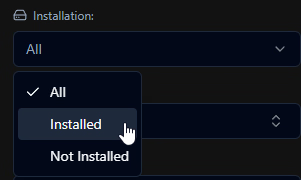
Another thing, i'm "installing" my games using XLibrary to try it out, dlsite is missing as a source.
//////////////////////////////////////////////////////////////////
When i click on "developer" filter, it's a bit laggy, and "partnership" developers do not work, i wanted to look for all "kagura games" but it only works as a joint name, so i actually can't ever look for kagura games except for a specific one because kagura only does partnerships/localization. The lag makes me not wanna click on the "dev" options(i do have 3k games lul), can a have a syntax, i would expect to be able to simply type "dev: kagura games" in the text box and it would filter it out for me like a lot of modern collection/booru websites have. I feel like that would save me way more time, but another thing that could make the "developer" filter better, is the fact when you search for "kagura..." instead of grouping all options together so i can view them, there's a "blank black" void between each option, now, one can arrow key down and up between each, but would be better if it simply grouped them together instead of making space in between. Also, the filters only work "forward" as in if i type something wrong and try to fix it, it does not update the filter, it only updates to narrow the search. Unless you erase the whole text field, then it updates.
//////////////////////////////////////////////////////////////////
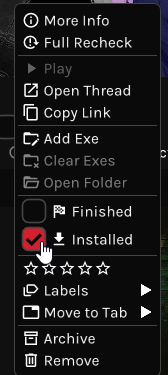
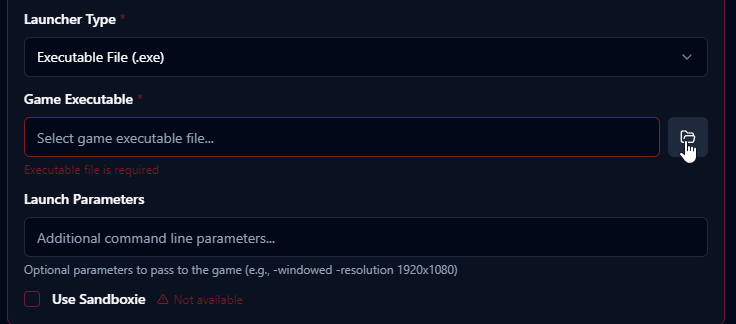
Another thing i found a bit annoying when installing games is having to inside a game to actually be able to interact with launch options, i expected to be simply right click and have it be one of the options so i don't have to constantly leave the search window, load screenshots and then do this back and forth multiple times.
//////////////////////////////////////////////////////////////////
Since i'm still using F95Checker, i had some new games added, i tried to import the database again, it said i had 16 new games to import, but there was no option to simply import those new games, so decided to import the whole database to see what would happen, now thankfully the launch options did not get affected.
//////////////////////////////////////////////////////////////////
I did read your explanation of how update works, but i found it very confusing, what is the difference between "Enable automatic checking", "Manual check period(check now option)" and "Automatic Game Synchronization"
I assume the first option is for normal daily updates(is this the last 90 day one?) which is to be expected.
Manual i'm not entirely sure, is it meant to be able to check every single game? You did say "... such as 3, 6, or 12 months, or even longer" however the max is 12 months on mine, are you planning on increasing it? Is this meant for maybe someone has an old database on a pc they haven't touched in a while, and they can manually update everything to check? Is that why this option exists?
Now the third and last option, i have no idea what it actually does, what's the difference between "automatic checking" and "automatic synchronization"? What happens if i have both enabled? What's the difference/use case for having both?
//////////////////////////////////////////////////////////////////
That's all i can think of right now. Thanks for the app though, good shit
Edit: just realized, none of the "suggestions" on Manual entry for new games actually get pasted into the text box after being clicked on.
Edit2: just realized the manual url source is "hidden" inside "game sources", i would expect it to show up in the same window with the rest of the details i have to insert when first making a manual new game. I thought there simply wasn't the option.
Edit3: the "tags" suggestion actually work on manual entry, but the rest of the stuff don't.
Edit4: games that only have a steam source don't have a "Engine" nor "Developmento Completion status" despite being the only main "tags" that show up on the non-list games view, and there doesn't seem to be an option to add those manually if steam is the main source. Do we need to change the main source to manual to be able to edit that? How exactly do multiple sources interact with each other? I know there's a "main" one, but how does it actually work?
Edit5(just woke up again): manual source's URL does not display but the "officially implemented" ones do, i have to click on the "edit pencil" to actually see the url
Edit6: This game was imported as a "custom game" from F95Checker(which is equal to a manual entry in XLibrary)
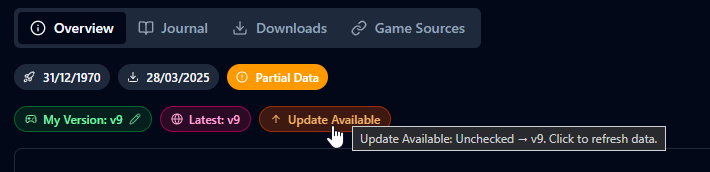
As you can see the release date is 1970(copied from f95checker), however it seems to import f95checker custom games as F95Zone games(as primary source), although some of these games were on f95zone and then removed from this websites, a lot of these are not and don't even have a f95zone link.
Another thing, "release date" only exists on games that have a "official source"(steam, f95zone) as this game was imported as a f95zone game(despite the link being to itch.io) i do have access to the release date, however as i swapped the primary source to manual, i realized we do not have access to the release date! Please add manual access to that as well.

I believe this "Update Available" to be a mistake, the option should not exist because when i clicked on setting version i clicked on "Set to Latest". I've tried closing and opening up XLibrary but this does not change/update.
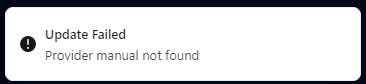
This is what shows on the top right when i click "Update Available"

Another thing, i already added the screenshots through the manual entry, why is this "Partial Data" still showing? If i click it i get the same error as above.

I believe these bugs are from "converting" a officialy sourced game(steam, f95zone) and swapping it to a primary manual entry?
Edit7: Any plans to add "changelog" as one of the "tabs"(Overview, Journal...)
Edit8: When a game's f95zone source is something like this
https://f95zone.to/forums/request.119/ (like a translated game on a forum post)
The screenshots do not get added, but the game cover does.
Edit9: Covers don't seem to work as gifs? But "screenshots" do.