WibuTampan

Newbie
Apr 20, 2020
61
36
112
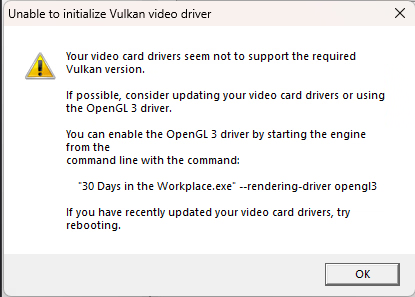
cant seem to open the game it just gives me this error View attachment 5503862
have you tried what error say? if not try it first
make a shortcut of the exe, right click on the shortcut, click properties, add --rendering-driver opengl3 to the target, and apply
here is my example: "D:\Games\Completed\30 Days in Workplace\30 Days in the Workplace.exe" --rendering-driver opengl3
after that, run the game from the shortcut to see if it's worked or not, if not well idk coz I haven't encountered it yet
 

smugspite

New Member
Jul 10, 2023
10
1
161
have you tried what error say? if not try it first
make a shortcut of the exe, right click on the shortcut, click properties, add --rendering-driver opengl3 to the target, and apply
here is my example: "D:\Games\Completed\30 Days in Workplace\30 Days in the Workplace.exe" --rendering-driver opengl3
after that, run the game from the shortcut to see if it's worked or not, if not well idk coz I haven't encountered it yet
thx for that, I didnt know to how to add --rendering-driver opengl3 to it, didnt realise I had to create a short cut it works now
 
3.50 star(s) 13 Votes