


Yes, but you do not lose your work if it crashes. Then you can just pick up where it left off.Rendering to image series takes the same amount of time. Complete waste of time.
Yes, but you do not lose your work if it crashes. Then you can just pick up where it left off.Rendering to image series takes the same amount of time. Complete waste of time.

Expound, please. What do you mean by I can just pick up where I left off? Because this is my issue, nothing is rendered.Yes, but you do not lose your work if it crashes. Then you can just pick up where it left off.
I said, that if you render as an image series, rather than a movie, than say if your daz crashes on frame 40 of a 50 frame animation, you can reboot it up, and just render the last 10 frames, rather than the whole thing. The first 40 will still be saved.Expound, please. What do you mean by I can just pick up where I left off? Because this is my issue, nothing is rendered.
View attachment 5355484
Nevermind, I'll get back to this movie rendering stuff in half a year or so. Not worth the time.I said, that if you render as an image series, rather than a movie, than say if your daz crashes on frame 40 of a 50 frame animation, you can reboot it up, and just render the last 10 frames, rather than the whole thing. The first 40 will still be saved.
Well, Daz was not made for animations, it really sucks for it, but if it makes you feel better, it takes me more than an hour or two per frame most of the time, took me almost 4 days to get 58 frames, so getting 17 frames an hour is something you should be happy about.Nevermind, I'll get back to this movie rendering stuff in half a year or so. Not worth the time.
VaM is a game, like Honey Select. And like them, I assume the same issues will arise over copyright using their images in a game, if you want to go one Steam (etc.), because of this it would likely be easier to use, as it was for players, not developers.I have some confusion between these tools- I've been looking at VAM and Daz3D. Optimally I would like to make animations quickly and easily. I don't exactly understand what the difference is between VAM and Daz. I just see weird dance videos for VAM and mostly still pics from Daz.
Can someone give a summary or pros/cons of VAM and Daz?
I understand Blender a bit. I'm very comfortable in modeling with 3DSMAX but novice with animation. If the other tools aren't sufficient I'll just spend my energy learning Blender.
If you render as an image series, you would have immediately seen it wasnt rendering the first frame. Or if indeed it did make progress, then say errored out on frame #214, you could keep all 213 prior to that and resume to finish it.Rendering to image series takes the same amount of time. Complete waste of time.
 ) Meaning you'll need to do converions at the end regardless.
Daz is utter garbage for animation, and moreover if you're familiar with 3DS as I am, you'll pull your hair out going from a sensible environment to a janky animation UI.I have some confusion between these tools- I've been looking at VAM and Daz3D. Optimally I would like to make animations quickly and easily. I don't exactly understand what the difference is between VAM and Daz. I just see weird dance videos for VAM and mostly still pics from Daz.
Can someone give a summary or pros/cons of VAM and Daz?
I understand Blender a bit. I'm very comfortable in modeling with 3DSMAX but novice with animation. If the other tools aren't sufficient I'll just spend my energy learning Blender.
Actually, that is not a given. It is mentioned/referred to sometime as a game, but also (primarily) as VR application - if anybody wants to have a clear "final" answer about whether images taken with VAM can be used for a game, they should check the licensing for VAM or ask VAM directly.VaM is a game, like Honey Select. And like them, I assume the same issues will arise over copyright using their images in a game, if you want to go one Steam (etc.), because of this it would likely be easier to use, as it was for players, not developers.
I am one of those that criticise heavily the animations in DAZ in this forum, however, saying that you have to do everything manually is wrong.Daz is a render tool, it can do animations, but unless you download premade animations, you have to do everything manually, including motion physics (boob, hair, clothing moving, etc.). Rendering is time consuming, and animations are pretty much a nightmare (as you can see by the conversation above).
Matter of taste, I guess, I have used a bit VAM to get some assets, and honestly I found its interface and way to access to different elements much worst than DAZ and BlenderVaM is far easier to use, and has a lot of built in tools to use, but the legality of it is iffy at best.
, but that is a diffent matter. Not at all, if what you want is to be able to mix and match assets or modify them yourself for renders.Daz is much harder to use, [...]
Better at some things, yes, because it can e.g. do full sculpting.Blender is another story, while it is far better/easier at some things than Daz,
Actually, there is more than one way and plugin to export character from DAZ to Blender, and I remember vaguely at least one plugin/tool that allows even to export the character with the rigging - though I admit I cannot say how good it is at that, because for me was more interesting to do the opposite.You could make characters in Daz, and import them into Blender, rerig them, and use them there, I know that is done by a few teams around here.
I am considering that one myself at some point, but converting all my sets and characters would take me months.
I am generally very critical of DAZ, but you indication about "worst" seems wrong, if nothing else, because already from some time, if with "main render engine" of DAZ Studio you mean the one most people seem to use, it is IRAY, that is not from Daz, is from NVIDIA ;-).Another thing to keep in mind is what video card you have, they are all very demanding, Daz might be the worst there, badly optimized in a lot of ways, but Daz requires that you have a high end Nvidia card, if you want to use their main render engine.
Anything else, and you will default to rendering with your CPU (something that will also happen if your scene exceeds your card's ram), and that can take up to 10 times longer.
Yes, obviously there is interpolation, but it will not make your tits move correctly with the body, it will not make the clothes correctly, or the hair, and so on. You have to set up all of those key frames manually.Actually, that is not a given. It is mentioned/referred to sometime as a game, but also (primarily) as VR application - if anybody wants to have a clear "final" answer about whether images taken with VAM can be used for a game, they should check the licensing for VAM or ask VAM directly.
I am one of those that criticise heavily the animations in DAZ in this forum, however, saying that you have to do everything manually is wrong.
It does have an interpolation between positions, which mean in theory one can just set the start position and the end position and the software will do everything on its own, even (if using dForce) the clothes and hairs.
Boobs and asses are a different matter, but because the base character has boobs and glutes that are static, adding up dynamic dForce elements is possible through add-ons.
Effectively, VAM is the same principle, the functionalities for boobs physics and the like are apparently in the application in reality using plugins that come with the software.
I do agree that the interpolation from daz in animatinos is often not up to what I personally would like, but DAZ it is not primarily made for animations, and it also has to do with the intermediate, i.e. if you set A and C position and then try to add up a B position, it goes quirk - and I used quite nicely for having the clothes and hairs of a character draping nicely and more realistically when going from one position to another, than when they are static.
Matter of taste, I guess, I have used a bit VAM to get some assets, and honestly I found its interface and way to access to different elements much worst than DAZ and Blender
If if it is only about opening a pre-made scene and running it, yes, I agree with you.
But again, is because it primary target is the users that want to interact with the character, VAM is definitively not an animation tool (and if you want to object that DAZ is also not an animation tool, I agree, DAZ has the timeline as an added functionality which ends up working well for dforce simulation, but I don't think is an animation tool).
So much that you can see that in VAM you need to use DAZ and Blender or other tools if you want to create characters/morphs, clothes etc. for VAM - DAZ is not a "sculping" software, but both natively (through e.g. geometry editor, surface editor) and with add-ons (e.g. morph grabber), you can modify charaters, put together elements from different objects creating new ones.
The legality of VAM itself is apparently covered, they licensed from DAZ the use of their Genesis 2 characters.
The legality of the content created for VAM can indeed sometime be very dubious
This must also not be confused automatically with the fact they can import clothes in DAZ format - if being able to open a format that is not "native" of the application was illegal, then most software, including major commercial products and open source software like e.g. Microsoft Office, Adobe Premiere, LibreOffice, would all be illegal.
Not at all, if what you want is to be able to mix and match assets or modify them yourself for renders.
If you want to have a character that interacts in close to real time with you and eventually in VR, than yes, I also agree, but it is not surprising, VAM was made for that, DAZ was not (and the same is true for Blender).
Better at some things, yes, because it can e.g. do full sculpting.
Easier, freedom of opion, honestly most people I heard of (plus himself) indicate the learning curve for Blender is steeper than for DAZ Studio.
It also has started to have a defect that over the years has started plaguing many great open source "tools" ("tools", because I am also thinking about libraries and even programming languages), my wild guess is that in some cases that links to the success (success meaning more people willing to contribute, but then more people independently and without a basic coordination/quality process messing around in the software, an approach that has become quite common) - changes on basic menus, and even worst, compatibility even between versions that are minor update or close by in time.
E.g. I need to keep two versions of Blender, because one add-on that was expected to be forward compatible and is not because they changed something in the application, so I need to keep 3.6, and even in the 4.x line, I have to precisely install 4.2, because an add-on explicitly made to work with 4.x but done at the time of 4.2, was broken by 4.3.
Actually, there is more than one way and plugin to export character from DAZ to Blender, and I remember vaguely at least one plugin/tool that allows even to export the character with the rigging - though I admit I cannot say how good it is at that, because for me was more interesting to do the opposite.
I am generally very critical of DAZ, but you indication about "worst" seems wrong, if nothing else, because already from some time, if with "main render engine" of DAZ Studio you mean the one most people seem to use, it is IRAY, that is not from Daz, is from NVIDIA ;-).
If you really mean the main render engine of DAZ as company, then it is Filament, because that is indicated as being their "house made" render engine, and that one is quite fast and is not NVIDIA-exclusive.
One of the two renders available out of the box in Blender is definitively faster than IRAY and does not need a discrete GPU - but Blender people themselves admit it is because it is lower quality and not photorealistic - the other, can use NVIDIA acceleration (but also just CPUs, and AMD GPUs) and depending on the scene and parameters, is not really that different in speed on NVIDIA Hardware (did some rendering in the past).
One thing I agree with, people should be careful when talking about animation not to have their expectations based on videos, in terms of workload for the computer.
If I do an editing on a "real" video (taken with a video camera, mobile phone, whatever), even if e.g. I add a small basic special effect, when I am generating the output, it is not creating the image pixels, it is reading existing ones and eventually changing the encoding (or recoding as they were, but in general is still a decode-recode), eventually doing a sum of the two images (actually, that is part of the reason why it is possible to buy premade special effects with transparency, so putting them in becomes almost a summing up of the images).
There can be still cases when something has to be generated on the fly if the software allows it (e.g. shadows), but it is less than generating the whole image calculating e.g. the movement and the full of emisision, reflections, refractions, absorption according to the different materials and light spectrum (Iray can do, hence its potential for realism) for the elements in the image for each frame for the whole duration.
Even applying a LUT is subtantially a value transposition - computational work, but not full path of light ray calculation with all the elements.
Notice professional video software can eventually add up even 3d effects generated in the software to the scene, there the thing can become closer to the "generate and calculate paths" scenario, even with added up image analysis, and the computational cost go up (a lot, many things do not have a linear progression).
If I generate an animation from zero and I want maximuim realism, I need to generate 24, 25, 29.x etc. (depending on the target standard and medium) frames per each second of my video, and for each of those frames I need to calculate movement of objects and parts thereof, collisions, light rays from all the sources and their interaction, etc.
For that, can come useful techniques derived from when animations was made on film and even special effects were addedd up to the fotograms, adapted to the digital world, so you don't really generate all the frame for all the lenght, but that, is a different subject.
Actually, there is another choice for animation, that as far as I know (though I admit is not much) about it, is powerful and relatively easy to use - iClone (and no, despite the name, nothing to do with Apple :-D).Thanks for the helpful info! I imagine the top tier animators are using Blender. I see that VaM keeps being mentioned as a "game" but also a "player" for interacting with a character. Those animations must be made in another tool or VaM itself. Daz3d reminds me of "Poser" which I am also familiar with. So I think I understand that tool a bit. And Blender is by far the most manual but most powerful.
I was thinking VaM or Daz may offer something a bit easier for animation since the tools are fairly purpose-built. And if there was a clear go-to tool for some of the amateur animators here. I don't mind fumbling my way through learning Blender if that makes the most sense. I've made some animations in 3DSMAX and done a lot of modeling in the past, objects mostly not characters. I was hoping to eventually learn a tool that I could make longer animations of reasonable amateur quality.
These are free to try, so I guess I can mess about with all of them and see what works.

You need to set the body (and anything else it might touch), as a collision item. I am no expert, but maybe this will help.Hello, I am having difficulty mastering physics in Blender. More specifically, I am having trouble with "cloth" physics on body models. I want to create a collision between bodies, but I don't know how to configure the “cloth” parameter. From what I understand, I need to select the mesh of a specific part of the body, for example, the buttocks, create a copy of it, and then apply “cloth” physics to the copy? And this is where I run into problems: no matter how hard I try, everything either “explodes,” “slides,” or doesn't react at all. Can anyone tell me how to set up body collision physics, or maybe there is an add-on that simplifies the creation of physics? I'm using a model from nyl2, and it seems to me that such a high-quality model should already have everything configured, since this model is specifically designed for animation (although even a simple image requires collision). Maybe this physics is enabled by some function? Please help.
Thank you for the video, but my issue is slightly different. I am unable to determine which modifier to use ("soft body" or "cloth") and how to configure it correctly for the human body. Grok suggests using "soft body" for buttock collisions, while ChatGPT recommends "cloth". I've already tried making a "jelly cube", and it worked. But the human body is made up of different parts (soft and hard), and they need to be configured separately. If I apply the modifier to the entire body mesh, it will all become "soft", which, of course, will look unrealistic. I tried asking on Reddit, but my posts were simply deleted for NSFW content (even though I tried my best to veil this topic).You need to set the body (and anything else it might touch), as a collision item. I am no expert, but maybe this will help.
You must be registered to see the links
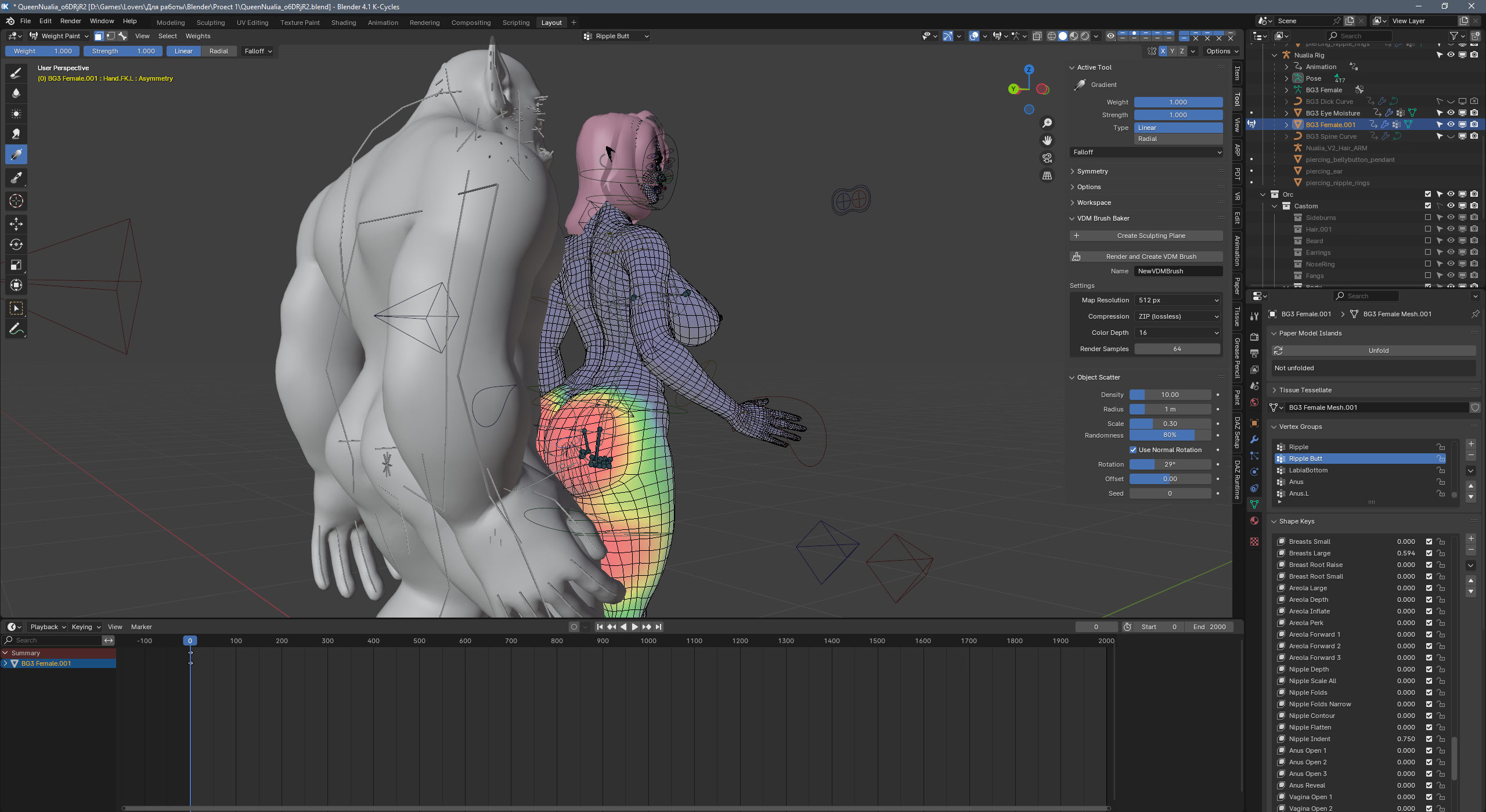

Not an expert at all. Just played around after reading your questions.I found ready-made "vortex groups" in the model, obviously prepared specifically for working with collisions, but I don't understand how to "activate" them.

Do you think a 3090 is good to start learning DAZ?VaM is a game, like Honey Select. And like them, I assume the same issues will arise over copyright using their images in a game, if you want to go one Steam (etc.), because of this it would likely be easier to use, as it was for players, not developers.
Daz is a render tool, it can do animations, but unless you download premade animations, you have to do everything manually, including motion physics (boob, hair, clothing moving, etc.). Rendering is time consuming, and animations are pretty much a nightmare (as you can see by the conversation above).
VaM is far easier to use, and has a lot of built in tools to use, but the legality of it is iffy at best.
Daz is much harder to use, and sucks at animations, but you can use most of the renders for a game, without fear of a copyright strike.
Blender is another story, while it is far better/easier at some things than Daz, it doesn't have the ease of making characters, whereas Daz has sliders so you can create a character much like making one in a video game character creator, with Blender, you have to sculpt them from scratch, like using clay. Blender can basically do anything they can do at Pixar, but you need real skills to use it, unlike the others. Though, if you do learn it, you could make characters in Daz, and import them into Blender, rerig them, and use them there, I know that is done by a few teams around here.
I am considering that one myself at some point, but converting all my sets and characters would take me months.
Another thing to keep in mind is what video card you have, they are all very demanding, Daz might be the worst there, badly optimized in a lot of ways, but Daz requires that you have a high end Nvidia card, if you want to use their main render engine. Anything else, and you will default to rendering with your CPU (something that will also happen if your scene exceeds your card's ram), and that can take up to 10 times longer.
Yeah, it's a good card, I am using it on my good pc right now.Do you think a 3090 is good to start learning DAZ?
completely agreeYeah, it's a good card, I am using it on my good pc right now.
The 40xx are a bit better, but not really worth the price if you already have a 3090.
The 50xx are not compatible with Daz yet.