

Standard keys for rpgmaker vxace games are arrow keys for movement, z for confirm/interact, and x for cancel/open menu. Sometimes they have more or alternate keys if the developer implements them. You should check for a readme to see if it lists any other keys. This one doesn't though.
- Thread starter 7767
- Start date
4.50 star(s)
103 Votes


Youtiy
Member
- Feb 20, 2019
- 204
- 258
- 187
The last message pretty much summed it up, there is another way to access the menu though at least for me. Numpad 0/Ins opens it. As it's closer to the arrow key's for me I find it faster, as for the mouse. I don't think that's possible, I'm pretty sure there's no way to use it.Oh so it's a universal problem. Do you know where I can find all of the keyboard controls in this game? I just hit randomly on my keyboard, and the only keys I can use are: Arrow keys (to move); Shift + Arrow keys (to move fast); Esc: To open the Overall information UI so I can see all my stats and items, save and quit the game; Enter to attack or pick up the items. And that's it.
I can't even use my mouse
danangjr123
New Member
- Mar 5, 2023
- 12
- 1
- 38

Sum G
Member
- Jul 5, 2023
- 117
- 135
- 129
Install RPG VX Ace RTPWhats wrong with my joiplay? Did i need to install something?
Sum G
Member
- Jul 5, 2023
- 117
- 135
- 129
Whats wrong with my joiplay? Did i need to install something?
For anyone that can't find the requirements for the game to be played, this is what you will need!
VL Gothic Font - Extract, open the folder, open the font file that doesn't have the P in the name, and click install
RPGVXAce RTP - Search "RPG Maker RTP", then go into the official RPG Maker RTP Download. Go to the RPG Maker VX Ace version and download the Run Time Package (RTP). After the RTP has been downloaded, extract, open the folder, and open the Setup Application. Finally, just set it up with the Setup Wizard and install. (Note: I wasn't able to put the download here sense the Compressed File was too big).
Enjoy The Game!
danangjr123
New Member
- Mar 5, 2023
- 12
- 1
- 38
danangjr123
New Member
- Mar 5, 2023
- 12
- 1
- 38
Sum G
Member
- Jul 5, 2023
- 117
- 135
- 129
I don't use Joiplay, just try playing it again it should work.I done dowloading the RTP now what should i do?
danangjr123
New Member
- Mar 5, 2023
- 12
- 1
- 38
[KUTIPAN="Sum G, posting: 16631321, anggota: 6265822"]
[/MENGUTIP]
[/MENGUTIP]
Nah it can't work, how to open the RTP when in android i don't knowI don't use Joiplay, just try playing it again it should work.
Sum G
Member
- Jul 5, 2023
- 117
- 135
- 129
You're supposed to go into the RTP and install it on the android if that's the issue, you have to find it and set it up with the wizard. After that it should play, but if you still can't then I can't help you with it. (Don't forget to install the Gothic Font for the game too, if you already did that)[KUTIPAN="Sum G, posting: 16631321, anggota: 6265822"]
[/MENGUTIP]
Nah it can't work, how to open the RTP when in android i don't know

Kisama33
Well-Known Member
- May 13, 2018
- 1,154
- 1,469
- 306
Usually you get a message asking for RTX VX Ace that allows you to select the file to install, that's not your case so it's probably an issue with your installed plugins, so uninstall them all and reinstall only the later versions.[KUTIPAN="Sum G, posting: 16631321, anggota: 6265822"]
[/MENGUTIP]
Nah it can't work, how to open the RTP when in android i don't know


Edgyusername1
New Member
- Mar 8, 2023
- 3
- 1
- 85
Hi, I played BS2 and wanted to play the first but was unable to. I promise I'm not computer illiterate but I've had problems opening the application. I checked the thread and saw the most likely problems but I don't think they apply to my situation. Specifically,
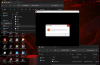
as you can see, the file it says cannot be found is in the system folder.
Please help a brother out, thanks.
does not apply to me. I've downloaded and unzipped both and they seem to work fine. The problem is this;For anyone that can't find the requirements for the game to be played, this is what you will need!
VL Gothic Font - Extract, open the folder, open the font file that doesn't have the P in the name, and click install
RPGVXAce RTP - Search "RPG Maker RTP", then go into the official RPG Maker RTP Download. Go to the RPG Maker VX Ace version and download the Run Time Package (RTP). After the RTP has been downloaded, extract, open the folder, and open the Setup Application. Finally, just set it up with the Setup Wizard and install. (Note: I wasn't able to put the download here sense the Compressed File was too big).
Enjoy The Game!
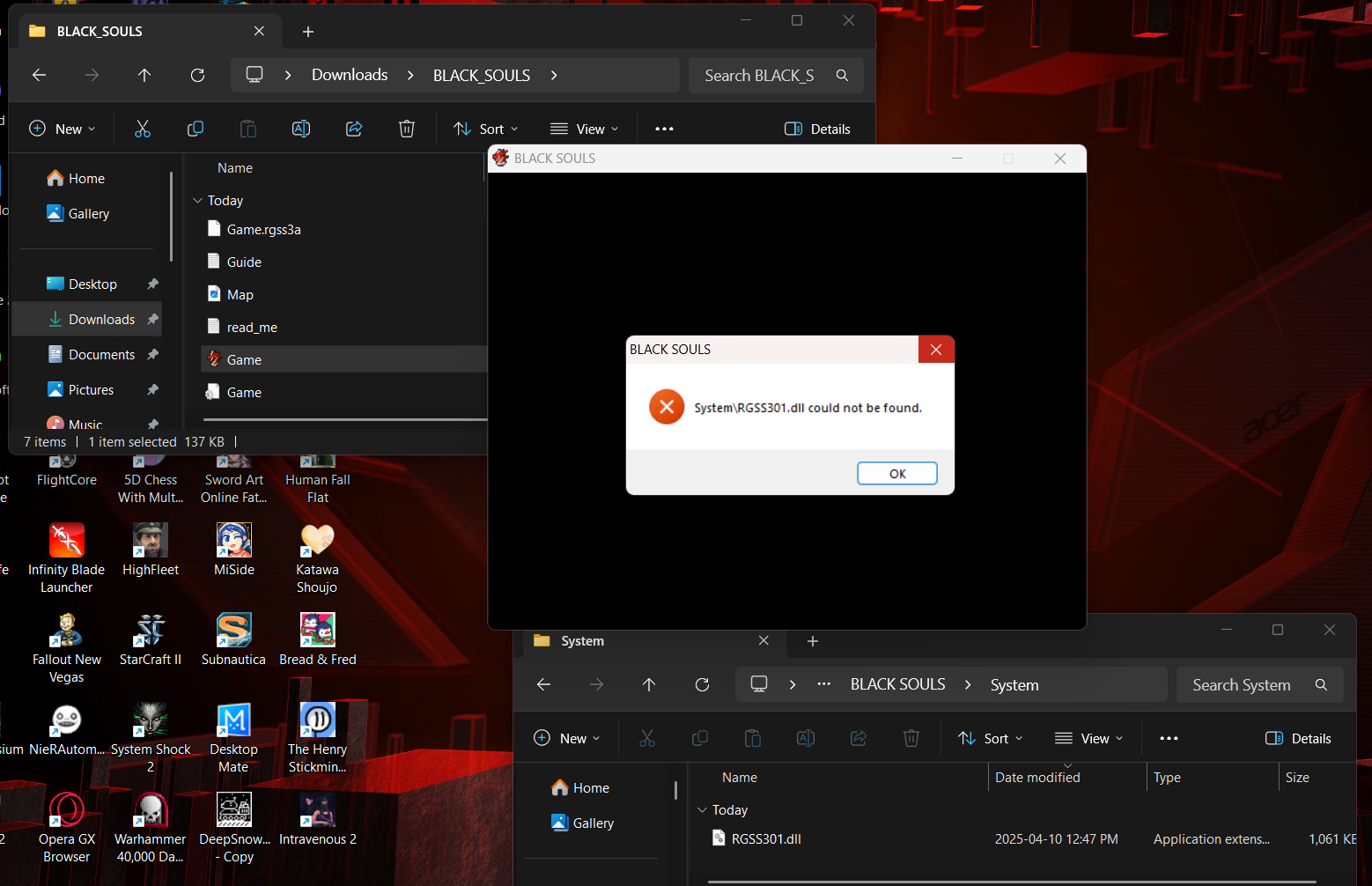
as you can see, the file it says cannot be found is in the system folder.
Please help a brother out, thanks.
Sum G
Member
- Jul 5, 2023
- 117
- 135
- 129
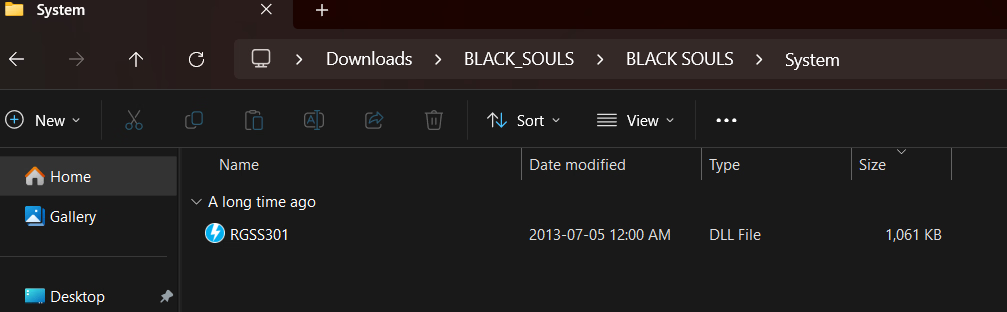
The only thing that I see that might be the problem is the file type, I have the file as a DLL file and yours has an Application Extension file. The date is also different as mine is back in 2013 while yours is recent, there could be something in your system that changes those files.Hi, I played BS2 and wanted to play the first but was unable to. I promise I'm not computer illiterate but I've had problems opening the application. I checked the thread and saw the most likely problems but I don't think they apply to my situation. Specifically,
does not apply to me. I've downloaded and unzipped both and they seem to work fine. The problem is this;
View attachment 4732626
as you can see, the file it says cannot be found is in the system folder.
Please help a brother out, thanks.
Here is mine:

Here is yours:

There is a difference, but how I change that AE file to a DLL file is unknown to me but I will put a link here that has the DLL file that is the same as mines. Hopefully it works.
You must be registered to see the links
Edgyusername1
New Member
- Mar 8, 2023
- 3
- 1
- 85
Thank you for the help, I appreciate it. Unfortunately your link is still being changed into an AE file, so it's probably something with my system. I'll try to look for a way to convert the file, if I find one I'll post the solution.The only thing that I see that might be the problem is the file type, I have the file as a DLL file and yours has an Application Extension file. The date is also different as mine is back in 2013 while yours is recent, there could be something in your system that changes those files.
Here is mine:
View attachment 4733589
Here is yours:
View attachment 4733588
There is a difference, but how I change that AE file to a DLL file is unknown to me but I will put a link here that has the DLL file that is the same as mines. Hopefully it works. Mega Link
EDIT: So... I don't know exactly what I did but it works now. I basically changed the file to be opened with DAEMON Tools Lite and then reinstalled it to the same folder, replacing the previous files and now it's a DLL file. Thanks Sum G you helped me work it out.
Last edited:
Sum G
Member
- Jul 5, 2023
- 117
- 135
- 129
No problemThank you for the help, I appreciate it. Unfortunately your link is still being changed into an AE file, so it's probably something with my system. I'll try to look for a way to convert the file, if I find one I'll post the solution.
EDIT: So... I don't know exactly what I did but it works now. I basically changed the file to be opened with DAEMON Tools Lite and then reinstalled it to the same folder, replacing the previous files and now it's a DLL file. Thanks Sum G you helped me work it out.
View attachment 4733807

SavageCat32
New Member
- Jul 24, 2020
- 4
- 0
- 11
I ran into a weird problem with this game, downloaded and extracted it but when i try to run the exe a black window pops up and closes instantly. the game does not launch. any fixes?
Sum G
Member
- Jul 5, 2023
- 117
- 135
- 129
Have you set it up with the RTP and Gothic Font? I have a guide for running this game with the requirements.I ran into a weird problem with this game, downloaded and extracted it but when i try to run the exe a black window pops up and closes instantly. the game does not launch. any fixes?
For anyone that can't find the requirements for the game to be played, this is what you will need!
VL Gothic Font - Extract, open the folder, open the font file that doesn't have the P in the name, and click install
RPGVXAce RTP - Search "RPG Maker RTP", then go into the official RPG Maker RTP Download. Go to the RPG Maker VX Ace version and download the Run Time Package (RTP). After the RTP has been downloaded, extract, open the folder, and open the Setup Application. Finally, just set it up with the Setup Wizard and install. (Note: I wasn't able to put the download here sense the Compressed File was too big).
Enjoy The Game!

blitxo
Newbie
- Mar 14, 2019
- 77
- 69
- 52
Punch Leaf. Fuck Leaf. In either order. Or at the same time.im gnna fck the fary