WhiteVanDaycare
Member
- Mar 23, 2021
- 367
- 435
- 207
This is most likely a corrupted Windows Icon Cache. Try the following:Hi WillyJL - I don't know if it is mentioned here before (tried search but couldn't find anything), so sorry if it was already... but I just today updated my Windows 10 to 11 and now when I start your F95Checker I got "no" Taskbar Symbol anymore, just some strange "Standard"? Symbol - I upload an Image and marked your Tool in a red Square. View attachment 4877299 Is this a known Win11 Problem or is there any fix for this?
TIA and greetings.
Edit:
I did add your Tool to the list of "Games"and after refreshing it, the "original" Task-Symbol was there - "but" - after closing it and start F95Checker again, the Symbol is gone again like shown above, even if I refresh/search for updates.
Really strange that it's not there all the Time after starting F95Checker.
I hope you can understand my explanation and know a solution for it.
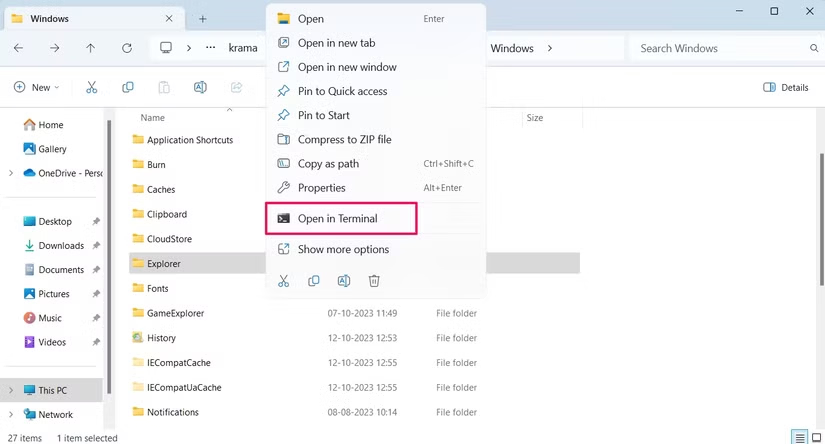
1. Navigate in File Explorer to C:\Users\%userprofile%\AppData\Local\Microsoft\Windows , then right click on Explorer window and select Open in Terminal
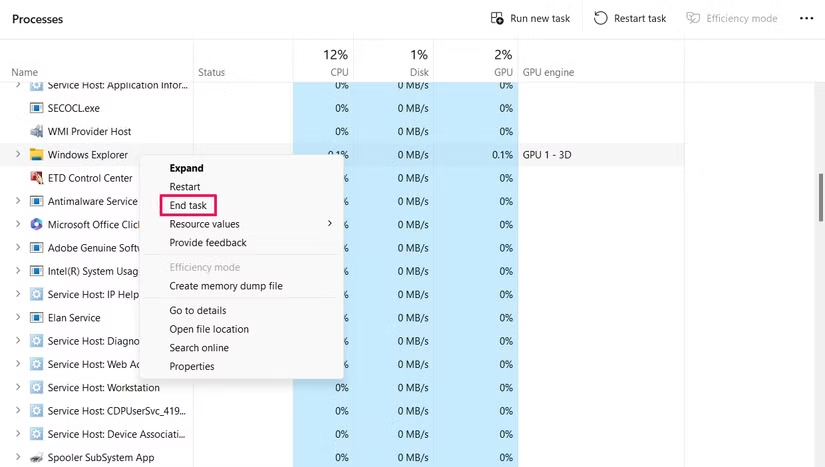
2. Kill the Windows Explorer process (this will make the Desktop disappear and you will have to reboot to get it back)
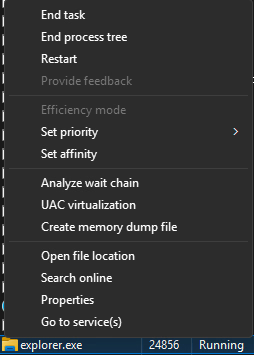
NOTE: You many need to right click on Windows Explorer and then select 'Go to details' then right click on the explorer.exe to kill this process (don't just restart).
3. In the terminal type del iconcache* then when done type shutdown /r (computer will reboot).
Last edited: