Tool Others F95Checker [WillyJL]

5.00 star(s) 31 Votes
Mar 23, 2021
367
433
207
If one of you having the issue wants to try a fix:
1. Exit F95Checker
2. Start -> type 'Internet Options'
3. Select Content tab
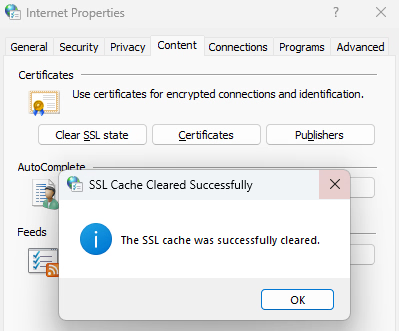
4. Click Clear SSL state button (confirmation pops up)
5. Open browser tab to and refresh page
6. If no errors, reopen F95Checker.
1767906718110.png
Let us know if this works (it isn't going to hurt anything, just browser will download new certs when visiting sites).

EDIT: If that doesn't fix the problem, in your browser open to is there a lock to the left? Does it say valid when you click on it?
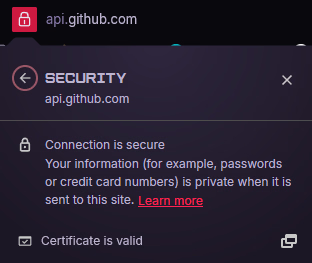
1767906869655.png
 
  • Like
Reactions: Fauno36

abc123xyz

Member
Jul 7, 2019
169
266
278
If one of you having the issue wants to try a fix:
1. Exit F95Checker
2. Start -> type 'Internet Options'
3. Select Content tab
4. Click Clear SSL state button (confirmation pops up)
5. Open browser tab to and refresh page
6. If no errors, reopen F95Checker.
Let us know if this works (it isn't going to hurt anything, just browser will download new certs when visiting sites).

EDIT: If that doesn't fix the problem, in your browser open to is there a lock to the left? Does it say valid when you click on it?
After doing this and restarting the Checker, there was no error. I don't know if it does a version check on startup nor do I know how to force an update check so I don't actually know if it worked yet. Just that I had no error when restarting. v11.0.3 like the others.

Side note, do you know if there are a change log for the v11.1 beta?
 

Taz423

Newbie
Mar 27, 2021
53
40
81
If one of you having the issue wants to try a fix:
1. Exit F95Checker
2. Start -> type 'Internet Options'
3. Select Content tab
4. Click Clear SSL state button (confirmation pops up)
5. Open browser tab to and refresh page
6. If no errors, reopen F95Checker.
View attachment 5609114
Let us know if this works (it isn't going to hurt anything, just browser will download new certs when visiting sites).

EDIT: If that doesn't fix the problem, in your browser open to is there a lock to the left? Does it say valid when you click on it?
View attachment 5609119
Tried this, did not help. There is a lock next to it, but Idk if the cert is valid.
 
  • Like
Reactions: A Common Crab
5.00 star(s) 31 Votes