

kunamatata99
Member
- Sep 26, 2025
- 139
- 286
- 114
Hi, sorry for this noob question, but how do I use it? I'd like to rip a 3D character model from a BAKIN game.
1. Check the "unpack and exit" checkboxHi, sorry for this noob question, but how do I use it? I'd like to rip a 3D character model from a BAKIN game.
OMG it worked, thank you so much! One question, do you know why it exports the model so small, it's almost invisible xD The only way to fix it is by removing the rig. If that's the only way to make it look normal, I'm not complaining, I'll do it myself later, just to save myself some time xD1. Check the "unpack and exit" checkbox
2. drag'n'drop the game's folder on the GR window
Step 1 is needed because GR does not list 3D models on its UI. However "unpack and exit" feature decrypts and unpacks all files. What 3D model format BAKIN uses is a different question, but you'll get them.
You're welcome!OMG it worked, thank you so much!
Like I've said, GR does not decode and export the models, it just extracts vanilla files in whatever format they might be.One question, do you know why it exports the model so small, it's almost invisible xD
I don't know the actual format used, but all 3D model formats are vector formats, meaning you can surely scale them.The only way to fix it is by removing the rig. If that's the only way to make it look normal, I'm not complaining, I'll do it myself later, just to save myself some time xD

Thanks for taking the time to reply. I couldn't fix the rig, but I'll try to make one and see how it goes. xD Thanks a lot for sharing this tool, it was very helpfulYou're welcome!

Checking the "Unpack and exit" checkbox is probably easier. That mode does not keep all decoded assets in memory, just one file at a time, so it's RAM usage is much lower.The workaround I found for the extremely high RAM usage was to create a very big SWAP file and use cgroups2 to force gameripper to only be allowed to use swap lmfao, not pretty but works
I have been using this program for weeks or months now and I hadn't noticed that checkbox until now due to the slightly different checkbox coloring...Checking the "Unpack and exit" checkbox is probably easier. That mode does not keep all decoded assets in memory, just one file at a time, so it's RAM usage is much lower.


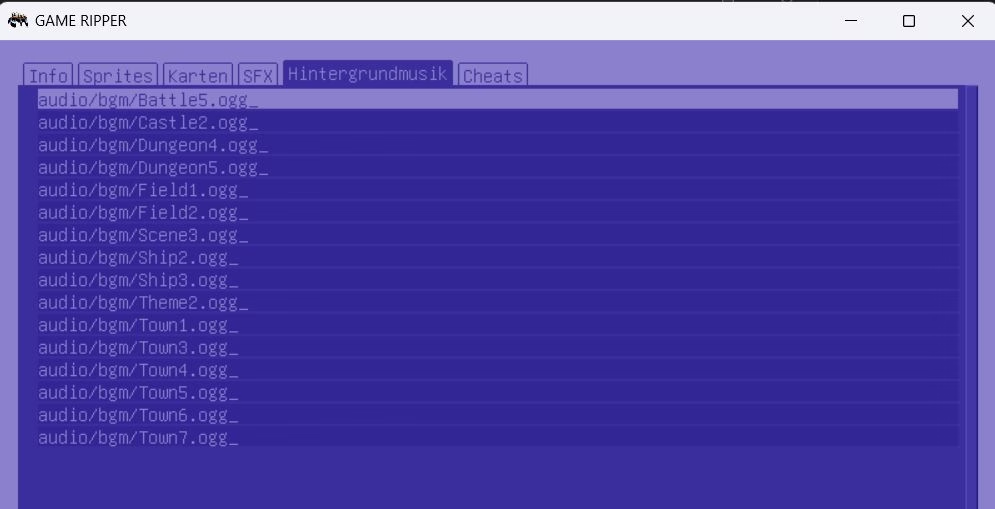
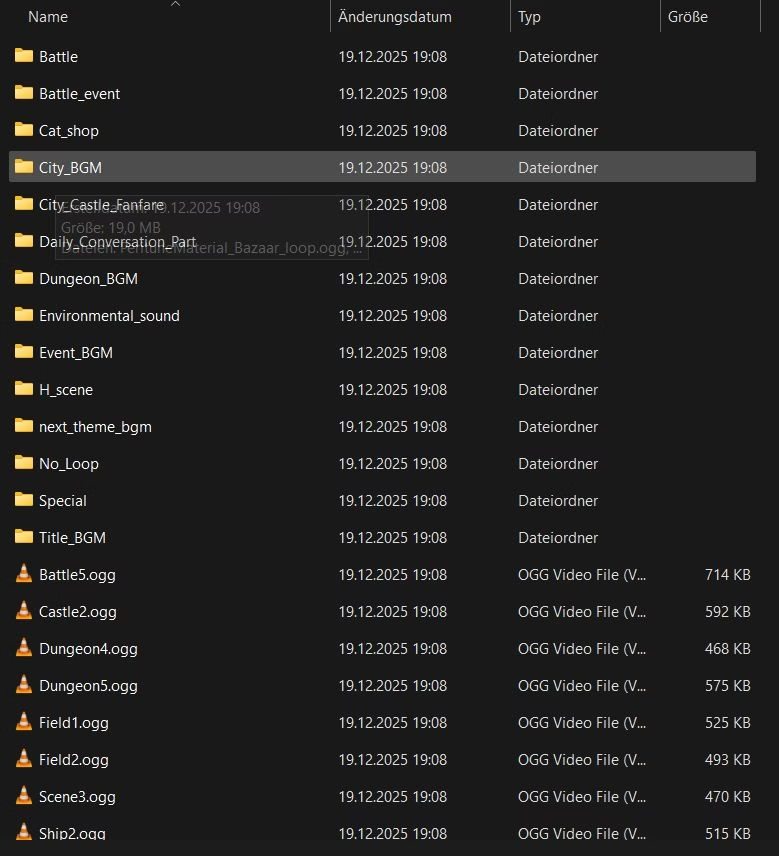
You're welcome!Thank you for the tool, I do not need to understand much and can just run it to then access files. nice.
To avoid dependencies (such as installed fonts), GR embeds GNU-unifont, which is a non-scalable bitmap font that comes in one size only: 16px. Sorry.Though I side with the poor legibility complaint, and I am old enough which is actually the point: eyesight is not getting better.
There isn't, and shouldn't be such button.There is a tiny visual inconvenience, when loading game into the gui: for music it does not display files from sub-sub folders and I do not see a button or so to display sub-sub folders.
Strange, both is called to descend into 10 levels of subfolders:With "Extract all" the files are unpacked alright, just not shown in the gui
Can you please provide a link to that game so that I can take a look? Gofile, meganz, workupload, pixeldrain, etc.?screenshots from a rpgmz game, Laura of Reigetsu - 2nd screenshot is the perfectly unpacked bgm folder
Oh it is not such a big deal.To avoid dependencies (such as installed fonts), GR embeds GNU-unifont, which is a non-scalable bitmap font that comes in one size only: 16px. Sorry.
If you know another bitmap font that's legally free to use, larger, more readable and has at least the same level of UNICODE coverage I'll replace the font.
ah, for me it was just 8 levels from C: , like:Strange, both is called to descend into 10 levels of subfolders:
Not like that, the 10 levels are counted starting from the game folder you supply to GR. So here it's 3, only "audio\bgm\Title_BGM\" counts.ah, for me it was just 8 levels from C: , like:
Thanks! I can confirm that bgm subdirectories are missing on the GUI, I'll look into that.The game (2.5 GB) is here

Sadly this game isn't working. It is uses the Godot engine, GR locates the data correctly, it extracts the directory properly, but the assets are marked non-encrypted while they are obviously encrypted (resource files, like .ctex files do not start with the required "RSRC" magic bytes).Hi, excuse me, do you know how I could open this game?
Or is it not possible with the program?
https://f95zone.to/threads/nekontr-v0-0-12-nekoaddict.245099/
 ...
Godot executable 'NekoNTR-0.0.12.exe'
section  0:      400  49b9800 .text
section  1:  49b9c00    e4200 .data
section  2:  4a9de00   e03600 .rdata
section  3:  5d03400 262d7380 pck
section  4:  58a1600   1d0a00 .pdata
section  5:  5a72000   20e000 .xdata
section  7:  5c80000      200 .edata
section  8:  5c80200     5c00 .idata
section  9:  5c85e00      200 .CRT
section 10:  5c86000      200 .tls
section 11:  5c86200    26000 .rsrc
Godot Pack offs 5d03400 size 640512896, version 2, engine 4.4.1, list offs 64, data offs 78800, numfiles 5089, len 640512896
file in archive '_godot/exported/133200997/export-006276c08dd6324cb1849a4d02d13f4e-char_edit_p_section_main.scn' (3660 bytes, @8c3a0, encrypted 0)
file in archive '_godot/exported/133200997/export-022fc2ef4ae1ba69f213292e791e3f69-button_pressed.res' (1010 bytes, @216774c0, encrypted 0)
file in archive '_godot/exported/133200997/export-0254c2ea0e7d1f0d66ed49b1b5271693-field_array.scn' (2304 bytes, @ad920, encrypted 0)
file in archive '_godot/exported/133200997/export-045a60f973b8bd25b0d34a0c439a5e7f-search_char_template.scn' (2656 bytes, @216889d0, encrypted 0)
file in archive '_godot/exported/133200997/export-08710a358045f9466df83caf96aefa32-full_advance_input_layer.scn' (1128 bytes, @3245c0, encrypted 0)
file in archive '_godot/exported/133200997/export-0afa2e04d0404f51a24d4bd87a3dc0bc-player_message.res' (1025 bytes, @21669730, encrypted 0)
file in archive '_godot/exported/133200997/export-0bcf1da2044c80819bd05c63a33ebdb5-history_layer.scn' (3025 bytes, @322870, encrypted 0)
file in archive '_godot/exported/133200997/export-0d115bad48f26a5c202a14e5b5c36b57-array_part.scn' (2646 bytes, @abac0, encrypted 0)
file in archive '_godot/exported/133200997/export-0df756cbdf637713e408b83e3ea351a2-home_screen.scn' (4410 bytes, @2167fd80, encrypted 0)
file in archive '_godot/exported/133200997/export-0e63420d5d5befbdd32018830ef76a8e-field_color.scn' (912 bytes, @af8c0, encrypted 0)
file in archive '_godot/exported/133200997/export-108a1f4736d18c2491f8cf809597b229-preview_character.res' (1247 bytes, @3057d0, encrypted 0)
file in archive '_godot/exported/133200997/export-1392783fded7c65e71c073259c23a6ca-button.res' (957 bytes, @21665b10, encrypted 0)
file in archive '_godot/exported/133200997/export-13dc216148396112aa39828b55e5eaac-ppv.scn' (4032 bytes, @21687710, encrypted 0)
file in archive '_godot/exported/133200997/export-13f7eff754c8167f64a01b92e52780ed-dm_received.scn' (2093 bytes, @2167c180, encrypted 0)
file in archive '_godot/exported/133200997/export-140e1be54aca91a0ac7bc7efbe1e1b34-sounds.scn' (701 bytes, @2604c6b0, encrypted 0)
file in archive '_godot/exported/133200997/export-17427fc10ee2c192173c4dedf8375a29-BranchEnd.scn' (2720 bytes, @c24f0, encrypted 0)
file in archive '_godot/exported/133200997/export-191b78ef2eb50fdaf59bc1469915f365-timeline_editor.scn' (6361 bytes, @111700, encrypted 0)
file in archive '_godot/exported/133200997/export-1c0fb9a6bca9a001eb3a1ce9babd5216-reference_manager.scn' (11108 bytes, @993b0, encrypted 0)
file in archive '_godot/exported/133200997/export-1c7ffd644cd03f0975a5f06a683b59aa-message.res' (1018 bytes, @21666d50, encrypted 0)
file in archive '_godot/exported/133200997/export-1d3397f989702b99da31fd1f68fe6070-version_end_008.scn' (2111 bytes, @2166b060, encrypted 0)
file in archive '_godot/exported/133200997/export-1ecb7a557a5b440d89658245acef59ef-onlyfyans_theme.res' (1217 bytes, @216825f0, encrypted 0)
file in archive '_godot/exported/133200997/export-1f5933353aded39238e5f5301945fe80-search_control.scn' (1136 bytes, @21689770, encrypted 0)
 ...
Tested it, can confirm gdre_tools work. Unpacks images and videos from that one game.You might try GDREtools (You must be registered to see the links), as that's being a Godot app itself it might be able to run that plugin to deobfuscate the assets. Just a guess, worth a try.
thanks :"vSadly this game isn't working. It is uses the Godot engine, GR locates the data correctly, it extracts the directory properly, but the assets are marked non-encrypted while they are obviously encrypted (resource files, like .ctex files do not start with the required "RSRC" magic bytes).
(Note "encrypted 0") The most likely scenario is, the game is using some custom made obfuscation plugin. GR can't run Godot plugins so it only supports the official Godot AES encryption.Code:... Godot executable 'NekoNTR-0.0.12.exe' section 0: 400 49b9800 .text section 1: 49b9c00 e4200 .data section 2: 4a9de00 e03600 .rdata section 3: 5d03400 262d7380 pck section 4: 58a1600 1d0a00 .pdata section 5: 5a72000 20e000 .xdata section 7: 5c80000 200 .edata section 8: 5c80200 5c00 .idata section 9: 5c85e00 200 .CRT section 10: 5c86000 200 .tls section 11: 5c86200 26000 .rsrc Godot Pack offs 5d03400 size 640512896, version 2, engine 4.4.1, list offs 64, data offs 78800, numfiles 5089, len 640512896 file in archive '_godot/exported/133200997/export-006276c08dd6324cb1849a4d02d13f4e-char_edit_p_section_main.scn' (3660 bytes, @8c3a0, encrypted 0) file in archive '_godot/exported/133200997/export-022fc2ef4ae1ba69f213292e791e3f69-button_pressed.res' (1010 bytes, @216774c0, encrypted 0) file in archive '_godot/exported/133200997/export-0254c2ea0e7d1f0d66ed49b1b5271693-field_array.scn' (2304 bytes, @ad920, encrypted 0) file in archive '_godot/exported/133200997/export-045a60f973b8bd25b0d34a0c439a5e7f-search_char_template.scn' (2656 bytes, @216889d0, encrypted 0) file in archive '_godot/exported/133200997/export-08710a358045f9466df83caf96aefa32-full_advance_input_layer.scn' (1128 bytes, @3245c0, encrypted 0) file in archive '_godot/exported/133200997/export-0afa2e04d0404f51a24d4bd87a3dc0bc-player_message.res' (1025 bytes, @21669730, encrypted 0) file in archive '_godot/exported/133200997/export-0bcf1da2044c80819bd05c63a33ebdb5-history_layer.scn' (3025 bytes, @322870, encrypted 0) file in archive '_godot/exported/133200997/export-0d115bad48f26a5c202a14e5b5c36b57-array_part.scn' (2646 bytes, @abac0, encrypted 0) file in archive '_godot/exported/133200997/export-0df756cbdf637713e408b83e3ea351a2-home_screen.scn' (4410 bytes, @2167fd80, encrypted 0) file in archive '_godot/exported/133200997/export-0e63420d5d5befbdd32018830ef76a8e-field_color.scn' (912 bytes, @af8c0, encrypted 0) file in archive '_godot/exported/133200997/export-108a1f4736d18c2491f8cf809597b229-preview_character.res' (1247 bytes, @3057d0, encrypted 0) file in archive '_godot/exported/133200997/export-1392783fded7c65e71c073259c23a6ca-button.res' (957 bytes, @21665b10, encrypted 0) file in archive '_godot/exported/133200997/export-13dc216148396112aa39828b55e5eaac-ppv.scn' (4032 bytes, @21687710, encrypted 0) file in archive '_godot/exported/133200997/export-13f7eff754c8167f64a01b92e52780ed-dm_received.scn' (2093 bytes, @2167c180, encrypted 0) file in archive '_godot/exported/133200997/export-140e1be54aca91a0ac7bc7efbe1e1b34-sounds.scn' (701 bytes, @2604c6b0, encrypted 0) file in archive '_godot/exported/133200997/export-17427fc10ee2c192173c4dedf8375a29-BranchEnd.scn' (2720 bytes, @c24f0, encrypted 0) file in archive '_godot/exported/133200997/export-191b78ef2eb50fdaf59bc1469915f365-timeline_editor.scn' (6361 bytes, @111700, encrypted 0) file in archive '_godot/exported/133200997/export-1c0fb9a6bca9a001eb3a1ce9babd5216-reference_manager.scn' (11108 bytes, @993b0, encrypted 0) file in archive '_godot/exported/133200997/export-1c7ffd644cd03f0975a5f06a683b59aa-message.res' (1018 bytes, @21666d50, encrypted 0) file in archive '_godot/exported/133200997/export-1d3397f989702b99da31fd1f68fe6070-version_end_008.scn' (2111 bytes, @2166b060, encrypted 0) file in archive '_godot/exported/133200997/export-1ecb7a557a5b440d89658245acef59ef-onlyfyans_theme.res' (1217 bytes, @216825f0, encrypted 0) file in archive '_godot/exported/133200997/export-1f5933353aded39238e5f5301945fe80-search_control.scn' (1136 bytes, @21689770, encrypted 0) ...
You might try GDREtools (You must be registered to see the links), as that's being a Godot app itself it might be able to run that plugin to deobfuscate the assets. Just a guess, worth a try.
Thanks, good to know! It's a custom Godot plugin then.Tested it, can confirm gdre_tools work. Unpacks images and videos from that one game.
Yes, "unpack all" should unpack all files, even the ones that are not recognized.unpacking with 'decrypt/unpack all' does create a bunch of files (should it do so in this case?)
Correction: there are image files (under "_godot\imported\*.ctex"), only they are left un-decrypted and un-decoded because those .ctex files do not start with the Godot magic. I've checked some, and they all seem to use different keys (probably derived from the file name), so it's hard to deduct the obfuscation algorithm from the data alone.but video files can't be opened and there are no images.