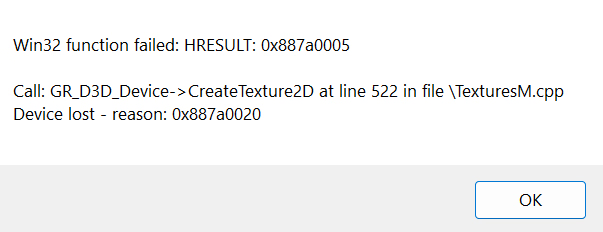
Why is this popping up whenever I tried to open the game and how do I fix this
View attachment 5447543
Usually a problem like that is caused when your graphics card is too old or graphics drivers are out of date.
Go here ->
You must be registered to see the links
or here ->
You must be registered to see the links
depending on your card and make sure you have your latest drivers.
You can also download their apps for auto-updates.
Maybe update your OS too, and if your OS isn't at least Windows 10, upgrade it entirely, since unfortunately Windows 7 and 8 (mainly 7 is unfortunate) aren't really properly supported anymore.
If that doesn't work, you can try re-downloading the game.
Finally, if all of that fails, you can make a shortcut for the game exe (ask google or chatgpt how to do this if you don't know how), and set the launch arg
-dx11, which will make your game try to use a legacy version of DirectX and Direct3D, which is what is erroring in that screenshot you sent.