4.00 star(s) 2 Votes

deafrocket

Newbie
Game Developer
Feb 25, 2022
60
81
103
could you add a button into the right bar that brings us back to the world map in case we end up in some sort of deadend again? Maybe not now for the hotfix to not delay making it playable asap but for the next planned real update?
Hmm... I was able to do it with the buggy one, but I'll add an emergency exit in case of error happening in the next update
 
  • Heart
Reactions: kaneeden

deafrocket

Newbie
Game Developer
Feb 25, 2022
60
81
103
Hello again! Here's the hotfix for the previous version 0.2.1 which introduces huge grey boxes because the system can't find the NPCs! Please try and don't be shy to report more bugs if you found one!

You don't have permission to view the spoiler content. Log in or register now.

I also added the link in the main post with the warning! Please make sure you download only in PIXELDRAIN for the latest version unless a kind uploader mirrors it!
 
  • Like
Reactions: kaneeden

Tacitus Kilgore

New Member
Mar 22, 2019
7
1
215
Hello, it seems I can’t play the game on Windows 11. It always crashes helloworld.exe, and I already have the latest version of Visual C++. Is there something else that might be causing the problem?
Congratulations on this new version of your game, i hope everything continues to go well.
 

deafrocket

Newbie
Game Developer
Feb 25, 2022
60
81
103
Hello, it seems I can’t play the game on Windows 11. It always crashes helloworld.exe, and I already have the latest version of Visual C++. Is there something else that might be causing the problem?
Congratulations on this new version of your game, i hope everything continues to go well.
Thank you! In the game's folder in your Documents, can you see if it has crash.txt or log.txt that may contain some info? Also, does it work previously for you?
 

Tacitus Kilgore

New Member
Mar 22, 2019
7
1
215
Thank you! In the game's folder in your Documents, can you see if it has crash.txt or log.txt that may contain some info? Also, does it work previously for you?
I couldn’t find any game folders in my Documents. The game crashes, which I confirmed by checking the crash dump logs in AppData. I haven’t been able to open the game even once. Thank you for your reply.
 

v_142857

New Member
Mar 17, 2024
8
3
38
For the soft lock one, there's a warning in the map tab to see if your lot's count can accommodate the population, which should warn you to prevent a soft lock like this.
There were residentials available, but the apartments were completely filled and the game doesnt let you buy residentials
 

deafrocket

Newbie
Game Developer
Feb 25, 2022
60
81
103
I couldn’t find any game folders in my Documents. The game crashes, which I confirmed by checking the crash dump logs in AppData. I haven’t been able to open the game even once. Thank you for your reply.
Since I already added support for non-ASCII characters in the folder... you could try turning off the antivirus for a while or just the Windows 11 Controlled Folder Access (you can also just try adding it to the allowed list). or try running as admin.

Lastly, checking the event viewer during the crash or attaching the dump file for me may help me solve these crashes in the game!
 

Tacitus Kilgore

New Member
Mar 22, 2019
7
1
215
Since I already added support for non-ASCII characters in the folder... you could try turning off the antivirus for a while or just the Windows 11 Controlled Folder Access (you can also just try adding it to the allowed list). or try running as admin.

Lastly, checking the event viewer during the crash or attaching the dump file for me may help me solve these crashes in the game!
Here is what shows up when I open the crash dump with WinDbg

........
Loading unloaded module list
....
This dump file has an exception of interest stored in it.
The stored exception information can be accessed via .ecxr
(7288.620): Security check failure or stack buffer overrun - code c0000409 (first/second chance not available)
Subcode: 0x5 FAST_FAIL_INVALID_ARG
For analysis of this file, run !analyze -v
*** WARNING: Unable to verify checksum for flutter_windows.dll
flutter_windows!InternalFlutterGpu_Texture_AsImage+0x5cef54:
00007ffe`55602f38 cd29 int 29h
0:000> .ecxr
rax=0000000000000001 rbx=000001f608fbc9d6 rcx=0000000000000005
rdx=0000000000000000 rsi=00000021788febb8 rdi=00000021788fece0
rip=00007ffe55602f38 rsp=00000021788feaf0 rbp=000001f60918ce00
r8=0000000000000000 r9=0000000000000000 r10=000001f608fbc998
r11=00000021788fec20 r12=00000021788fed40 r13=00000021788fec30
r14=000001f608fbc980 r15=00000021788fec50
iopl=0 nv up ei pl nz na pe nc
cs=0033 ss=002b ds=002b es=002b fs=0053 gs=002b efl=00000202
flutter_windows!InternalFlutterGpu_Texture_AsImage+0x5cef54:
00007ffe`55602f38 cd29 int 29h

 

deafrocket

Newbie
Game Developer
Feb 25, 2022
60
81
103
Here is what shows up when I open the crash dump with WinDbg

........
Loading unloaded module list
....
This dump file has an exception of interest stored in it.
The stored exception information can be accessed via .ecxr
(7288.620): Security check failure or stack buffer overrun - code c0000409 (first/second chance not available)
Subcode: 0x5 FAST_FAIL_INVALID_ARG
For analysis of this file, run !analyze -v
*** WARNING: Unable to verify checksum for flutter_windows.dll
flutter_windows!InternalFlutterGpu_Texture_AsImage+0x5cef54:
00007ffe`55602f38 cd29 int 29h
0:000> .ecxr
rax=0000000000000001 rbx=000001f608fbc9d6 rcx=0000000000000005
rdx=0000000000000000 rsi=00000021788febb8 rdi=00000021788fece0
rip=00007ffe55602f38 rsp=00000021788feaf0 rbp=000001f60918ce00
r8=0000000000000000 r9=0000000000000000 r10=000001f608fbc998
r11=00000021788fec20 r12=00000021788fed40 r13=00000021788fec30
r14=000001f608fbc980 r15=00000021788fec50
iopl=0 nv up ei pl nz na pe nc
cs=0033 ss=002b ds=002b es=002b fs=0053 gs=002b efl=00000202
flutter_windows!InternalFlutterGpu_Texture_AsImage+0x5cef54:
00007ffe`55602f38 cd29 int 29h
Thanks! That was very helpful! It seems like something in your GPU causing the crash... Let's try running it in software renderer instead:

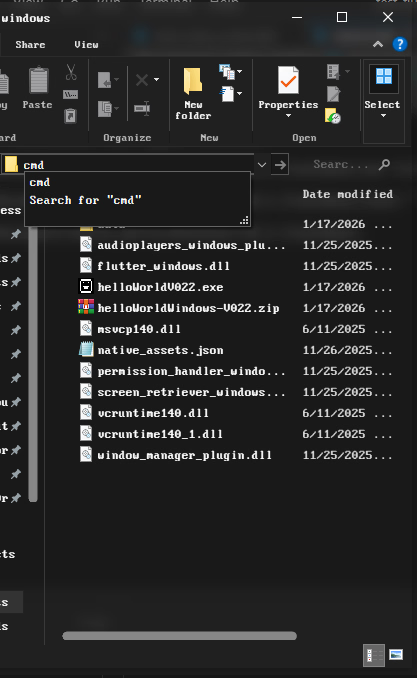
First, go to your folder (where the .exe is) and just run cmd in the address as shown:
1768693873735.png

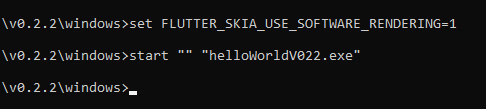
Then, type this at the cmd line:
1768693925255.png

Or this if it fails:
```
set FLUTTER_SOFTWARE_RENDERING=true
start "" "helloWorldV022.exe"

```

this should let you run it and if it works, that may confirm something in your GPU causing it to crash as it may be outdated or it doesn't support integrated ones (which shouldn't since I have this one too)
 
Last edited:

JonasTh

New Member
Aug 30, 2022
3
1
70
1768694391285.png
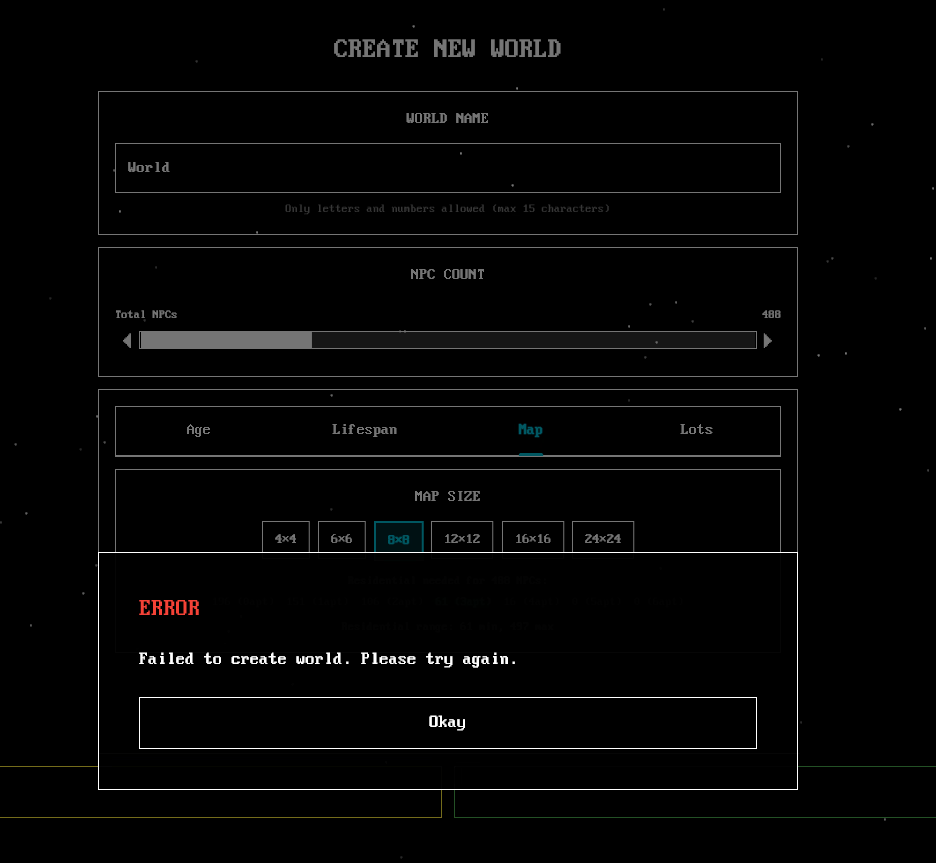
I can't seem to create a world, it did work in the earlier updates, but not anymore. I updated all my vc_redist and nothing works.
 

JonasTh

New Member
Aug 30, 2022
3
1
70
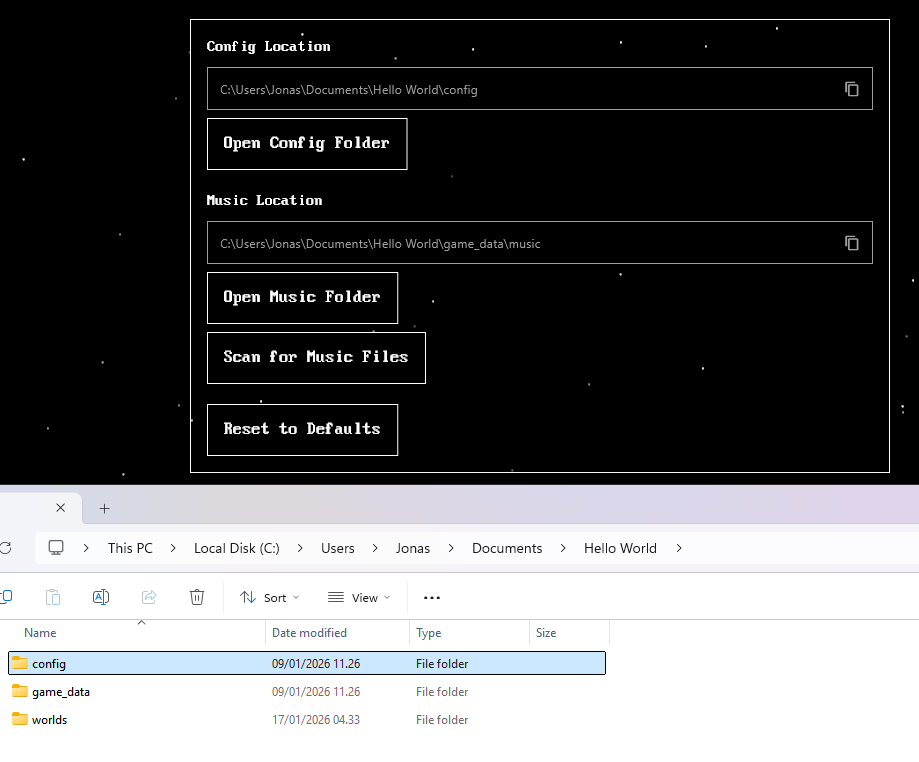
Okay I found the problem, bc I didn't delete the config location from the older version, the new version didn't seems to have premission to storage. Normally you would get the storage not allowed pop-up, but it seems to remember the old location from earlier updates.

The fix is just to delete the old "Hello World" folder from your documents and then try open the game again, now you get the pop-up storage not allowed. I went to windows and allowed it and everything works.

Hope other people find this helpful too :)
 
  • Heart
Reactions: deafrocket

deafrocket

Newbie
Game Developer
Feb 25, 2022
60
81
103
Okay I found the problem, bc I didn't delete the config location from the older version, the new version didn't seems to have premission to storage. Normally you would get the storage not allowed pop-up, but it seems to remember the old location from earlier updates.

The fix is just to delete the old "Hello World" folder from your documents and then try open the game again, now you get the pop-up storage not allowed. I went to windows and allowed it and everything works.

Hope other people find this helpful too :)
Thank you! I'll be quoting this if anyone might run into the same issues
 
  • Heart
Reactions: JonasTh
4.00 star(s) 2 Votes