AI Porn is here, Create and Fap TRY FREE
x

6ft3btw

Member
Jul 27, 2021
120
90
119
Is there an easy way to see what the mods in the Sideloader pack actually do? I installed the one for KK and spent quite a while removing a lot of it as it was things I didn't want - items that didn't match the vanilla aesthetic, things specifically made for R34 content, that sort of thing. I don't really want to download 300 GB of content if I'm going to remove a lot of it, but the Sideloader website just lets you see the folder structure and file names of the pack.

Failing that, are there any recommendations for character maker and studio mods or creators that add more vanilla-style variety in clothes, hair, maps, etc.? For example, has a lot of different maps for KK with a unified style that is close to the base game.
 
  • Like
Reactions: mrphamvn
Feb 28, 2018
219
538
224
Looks like your error is Sideloader Modpack - Studio\AmusingCalico\[AmusingCalico] [AC]Frozen Landscape Bundle v1.0.zipmod. Try deleting/removing that one and seeing if it resolves your issues.
Thanks for your help. That didn't fix the issue unfortunately.
Here's the logs with [AmusingCalico] [AC]Frozen Landscape Bundle v1.0.zipmod deleted.

You don't have permission to view the spoiler content. Log in or register now.

The last error message in the logs unfortunately doesn't mention the mod's name.
 

Azure Sun

Active Member
Apr 15, 2021
631
1,465
267
Thanks for your help. That didn't fix the issue unfortunately.
Here's the logs with [AmusingCalico] [AC]Frozen Landscape Bundle v1.0.zipmod deleted.

You don't have permission to view the spoiler content. Log in or register now.

The last error message in the logs unfortunately doesn't mention the mod's name.
It looks like it's one of the your .dll files (Sirenix) which makes things really tricky. You might look into backing up personal files (mods/cards/scenes/etc) and trying to update everything from the initsettings.exe. There's a chance that that will refresh/restore the core files and libraries. I've personally never seen this specific problem, so take my advice as you will.
 

Hater Supreme

Member
Apr 16, 2020
334
908
238
I know, links by Mega can be shut down by Mega and not kemono, what I'm asking is that all Mega links to cloth mods are still available while the head mods' are dead.
I sometimes think that it's the patreon page authors themselves that update their kemono prior to changing all the links.
It is especially puzzling how many kemono pages are updated with no actual content - all the mods/videos/etc. are on the discord server (or DMs, or need a PW from a DM, etc) and if it was an actual heroe he'd know that and update that too rather than just give free marketing to a patreon page.
 
Last edited:
  • Thinking Face
Reactions: Maggaylvp
Feb 28, 2018
219
538
224
It looks like it's one of the your .dll files (Sirenix) which makes things really tricky. You might look into backing up personal files (mods/cards/scenes/etc) and trying to update everything from the initsettings.exe. There's a chance that that will refresh/restore the core files and libraries. I've personally never seen this specific problem, so take my advice as you will.
The Sirenix error message seems to be unrelated. I went through the updated mods and found the culprit.
Within \mods\Sideloader Modpack - Studio\SVB128\ there are two identical mods:

- [SVB128] Half Life Alyx Consumables Misc v1.0.zipmod
- [SVB128] Half Life-Alyx Consumables Misc v1.0.zipmod

I removed the file with the dash instead of the space and now Studio Neo is starting up again.
Thanks again for your help. (y)
 

malok1224

New Member
Aug 24, 2021
10
2
79
Studio hangs on startup after KK mod updates any way to fix this. Updated HF patch to the latest, this is the console output:

[Warning:Material Editor] Unable to load shader: VolumetricCloud3
[Debug :Modding API] SceneManager.sceneUnloaded - Init
[Debug :Modding API] SceneManager.activeSceneChanged - from to StudioStart
[Debug :Modding API] SceneManager.sceneLoaded - StudioStart in Single mode
[Error : Unity Log] ArgumentException: An item with the same key has already been added. Key: [3311, ItemCategory_3311_12345678]
Stack trace:
System.Collections.Generic.TreeSet`1[T].AddIfNotPresent (T item) (at <d2957de1c3fd4781a43d89572183136c>:0)
System.Collections.Generic.SortedSet`1[T].Add (T item) (at <d2957de1c3fd4781a43d89572183136c>:0)
System.Collections.Generic.SortedDictionary`2[TKey,TValue].Add (TKey key, TValue value) (at <d2957de1c3fd4781a43d89572183136c>:0)
Studio.Info.LoadItemCategoryInfo (System.String _bundlePath, System.String _regex) (at <f42641e4193742afa1c79de0438b6fed>:0)
(wrapper dynamic-method) Studio.Info+<LoadExcelDataCoroutine>d__58.DMD<Studio.Info+<LoadExcelDataCoroutine>d__58::MoveNext>(Studio.Info/<LoadExcelDataCoroutine>d__58)
IllusionFixes.StudioOptimizations.RunCoroutineImmediately (System.Collections.IEnumerator enumerator) (at <1bf075c9092a4640abcba1b578621c19>:0)
IllusionFixes.StudioOptimizations+<FastLoadCoroutine>d__21.MoveNext () (at <1bf075c9092a4640abcba1b578621c19>:0)
UnityEngine.SetupCoroutine.InvokeMoveNext (System.Collections.IEnumerator enumerator, System.IntPtr returnValueAddress) (at <a43c47796b1b4dc78509dc74aec2356b>:0)

[Debug :IllusionFixes] Skipping cleanup because of low memory load (47% RAM, 20% Page file, 81273MB available in PF)

 
Feb 28, 2018
219
538
224
Studio hangs on startup after KK mod updates any way to fix this. Updated HF patch to the latest, this is the console output:

[Warning:Material Editor] Unable to load shader: VolumetricCloud3
[Debug :Modding API] SceneManager.sceneUnloaded - Init
[Debug :Modding API] SceneManager.activeSceneChanged - from to StudioStart
[Debug :Modding API] SceneManager.sceneLoaded - StudioStart in Single mode
[Error : Unity Log] ArgumentException: An item with the same key has already been added. Key: [3311, ItemCategory_3311_12345678]
Stack trace:
System.Collections.Generic.TreeSet`1[T].AddIfNotPresent (T item) (at <d2957de1c3fd4781a43d89572183136c>:0)
System.Collections.Generic.SortedSet`1[T].Add (T item) (at <d2957de1c3fd4781a43d89572183136c>:0)
System.Collections.Generic.SortedDictionary`2[TKey,TValue].Add (TKey key, TValue value) (at <d2957de1c3fd4781a43d89572183136c>:0)
Studio.Info.LoadItemCategoryInfo (System.String _bundlePath, System.String _regex) (at <f42641e4193742afa1c79de0438b6fed>:0)
(wrapper dynamic-method) Studio.Info+<LoadExcelDataCoroutine>d__58.DMD<Studio.Info+<LoadExcelDataCoroutine>d__58::MoveNext>(Studio.Info/<LoadExcelDataCoroutine>d__58)
IllusionFixes.StudioOptimizations.RunCoroutineImmediately (System.Collections.IEnumerator enumerator) (at <1bf075c9092a4640abcba1b578621c19>:0)
IllusionFixes.StudioOptimizations+<FastLoadCoroutine>d__21.MoveNext () (at <1bf075c9092a4640abcba1b578621c19>:0)
UnityEngine.SetupCoroutine.InvokeMoveNext (System.Collections.IEnumerator enumerator, System.IntPtr returnValueAddress) (at <a43c47796b1b4dc78509dc74aec2356b>:0)

[Debug :IllusionFixes] Skipping cleanup because of low memory load (47% RAM, 20% Page file, 81273MB available in PF)

See my fix two posts above yours.

The Sirenix error message seems to be unrelated. I went through the updated mods and found the culprit.
Within \mods\Sideloader Modpack - Studio\SVB128\ there are two identical mods:

- [SVB128] Half Life Alyx Consumables Misc v1.0.zipmod
- [SVB128] Half Life-Alyx Consumables Misc v1.0.zipmod

I removed the file with the dash instead of the space and now Studio Neo is starting up again.
Thanks again for your help. (y)
 
  • Heart
Reactions: malok1224

PornCid58

Newbie
Dec 22, 2022
19
4
127
The Sirenix error message seems to be unrelated. I went through the updated mods and found the culprit.
Within \mods\Sideloader Modpack - Studio\SVB128\ there are two identical mods:

- [SVB128] Half Life Alyx Consumables Misc v1.0.zipmod
- [SVB128] Half Life-Alyx Consumables Misc v1.0.zipmod

I removed the file with the dash instead of the space and now Studio Neo is starting up again.
Thanks again for your help. (y)
Dude... You're my saviour !
 

CrookedEGG69

New Member
Jul 7, 2020
7
19
71
Does the Base Game WITHOUT the sidloader modpack contain The Studio Neov2, or do I need the modpack for it? Any help will be appreciated.
 

Kaseijin

Active Member
Jul 9, 2022
719
1,187
267
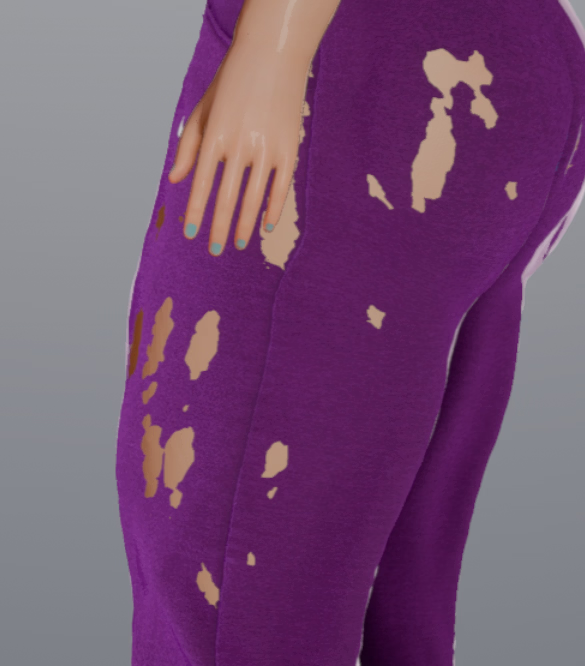
View attachment 5196919 is there anything i can do when there are clothes that clip into the skin like this? is there like an offset somewhere i can apply?
Hi!
Try changing the "uncensor" to a basic one. I mean, when using High-Polygon (Hi poli) uncensors, it tend to modify some clothes because it borrows polygons from other part of the body.
Moreover, some Uncensors are meant for a specific use, so I reccomend using BP4, BP5 Uncensors when the model is dresed
 

Zhang rui zz

Newbie
Jan 31, 2025
51
34
18
Hi!
Try changing the "uncensor" to a basic one. I mean, when using High-Polygon (Hi poli) uncensors, it tend to modify some clothes because it borrows polygons from other part of the body.
Moreover, some Uncensors are meant for a specific use, so I reccomend using BP4, BP5 Uncensors when the model is dresed
关注了老哥
 

PornCid58

Newbie
Dec 22, 2022
19
4
127
Is there a way to add a resolution to the launcher ? I have to choose between 1600x900 and take a part of my screen or 1920x1080 and have the game / studio cut in the height...
And betwenne those 2 resolution, there's some marge...
 
3.90 star(s) 59 Votes