

Don't know the answer to your question but have you tried messing around with the renderer editor (ctrl +r) or the material editor (in menu)?I have a question on a lighting effect. There are some maps that have built-in lighting with a variable intensity, in that it fluctuates back and forth repeatedly. This is often used in fireplaces. How can I put this variable intensity in my own lights that I add? I cannot figure this out.
I can mention that these built-in map lights with variable intensities cannot be adjusted in F5, which makes me think this setting is elsewhere.
I am really stumped here.
Tutorial [ILLUSION] HS2 Studio Neo|Chara Maker - (Help & guides Thread)
- Thread starter hun hunter
- Start date
5.00 star(s)
2 Votes

I'm asking here as I didn't get any response in the game thread, has anyone tried using maker or studio in linux? I've tried and studio came right up. Way faster than in windows, however, it didn't access any of the plugins or bepinex at all. Couldn't figure out how to get it to. It was the betterrepack version and it seemed to just boot to the base version. Unfortunately everything's in japanese so couldn't say exactly.
I used wine.
Anyone try and if so, how did you get it to work? thx.
I used wine.
Anyone try and if so, how did you get it to work? thx.

FaF18IR
New Member
- Aug 25, 2025
- 2
- 0
- 1
Thanks a lot for the explanation ! I’ve seen the haircut parameters you mentioned, but yeah… I can’t really tweak the style the way I hoped. Looks like I’ll have to play around with the hair accessories to reshape things a bit. Should be fun to experiment with anyway !Some, but only some, of the hair assets allow some adjustment of the hair. It's in the menu next to type when you select it. But it's nto all.
Some of the hair can also be adjusted a bit in studio using nodes but it's limited. For full adjustments the only way I've seen is using the hair accessories. Some of the hair assetsare there but there's also bits and bobs you can put together into full hair or as accents on the hair assets.
I've actually done this with a couple of my animations and thought of this, but was hoping there was a better way. Guess I'll do it this time too.You can put keyframes in the timeline with variable strength/deepness for each when you select a light. I don't think it's the best way to do it but it can definitly do it.
I already tried the Material Editor, but it doesn't appear when selecting lights. Thanks for showing me the Renderer Editor, although it doesn't show anything when selecting lights.Don't know the answer to your question but have you tried messing around with the renderer editor (ctrl +r) or the material editor (in menu)?

PurpleDeep
Member
- Aug 24, 2019
- 161
- 276
- 124
I saw the tutorial on joan's projectors and rerender plugin. Does this also work on Koikatsu Sunshine?
I'm not sure if this is the right place to ask. I created multiple animations, but want to add sounds to them after generating the mp4 files. I was able to find free sounds for download, but am having trouble with voices. I'd like a voice converter so I can convert my own voice to other characters. I tried VoiceMod, but the thing won't even install. What do you all use for this purpose? I need something free (I will only be using it lightly). Can someone give me a recommendation?

Kaseijin
Active Member
- Jul 9, 2022
- 721
- 1,189
- 318
I was thinking in the same topic: How to add real voices, no just the ones like reading a script but something more vivid and human like.I'm not sure if this is the right place to ask. I created multiple animations, but want to add sounds to them after generating the mp4 files. I was able to find free sounds for download, but am having trouble with voices. I'd like a voice converter so I can convert my own voice to other characters. I tried VoiceMod, but the thing won't even install. What do you all use for this purpose? I need something free (I will only be using it lightly). Can someone give me a recommendation?
I have seen and listen to some Japanese creators using AI to add voices.
Glad to see I'm not the only one looking for this. In your case, you can try VoiceMod, which claims to be able to convert your recorded voice (using a microphone) to any other AI-generated voice. I was unable to install it, but maybe you'll have better luck. It cI was thinking in the same topic: How to add real voices, no just the ones like reading a script but something more vivid and human like.
I have seen and listen to some Japanese creators using AI to add voices.
slut_summer
New Member
- Dec 26, 2024
- 13
- 9
- 132
Ive just downloaded and installed the all-in-one dx R16 repack. What is included in the optional sideloader modpack? I'm using my gaming laptop for this which only has two 500 gb ssds. One is used for windows and my work stuff, the other I'm using for HS2. Is there a way I can download only the mods that I need from the 273 GB optional modpack? Otherwise I wont be able to fit it all in the space that I have. Where else can I download individual mods from? I can consider getting an external 1-2TB SSD but I'm worried the performance will be worse compared to an internal SSD.

Patrikjain
New Member
- Aug 16, 2019
- 6
- 4
- 178

conkave4
Newbie
- Oct 17, 2023
- 29
- 43
- 171
You can go toIve just downloaded and installed the all-in-one dx R16 repack. What is included in the optional sideloader modpack? I'm using my gaming laptop for this which only has two 500 gb ssds. One is used for windows and my work stuff, the other I'm using for HS2. Is there a way I can download only the mods that I need from the 273 GB optional modpack? Otherwise I wont be able to fit it all in the space that I have. Where else can I download individual mods from? I can consider getting an external 1-2TB SSD but I'm worried the performance will be worse compared to an internal SSD.
You must be registered to see the links
to download individual mods. There is also a mods channel in the Illusion discord.IIRC, the mods that take up the most space by far are the studio items and maps. If you want to make your own HS2 VN, you might find it easier to download the entire Sideloader modpack rather than spend hours searching for specific things you need. Also, i don't think your performance will suffer with an external ssd but i could be wrong.

Pheontrain
New Member
- Aug 2, 2022
- 6
- 5
- 55
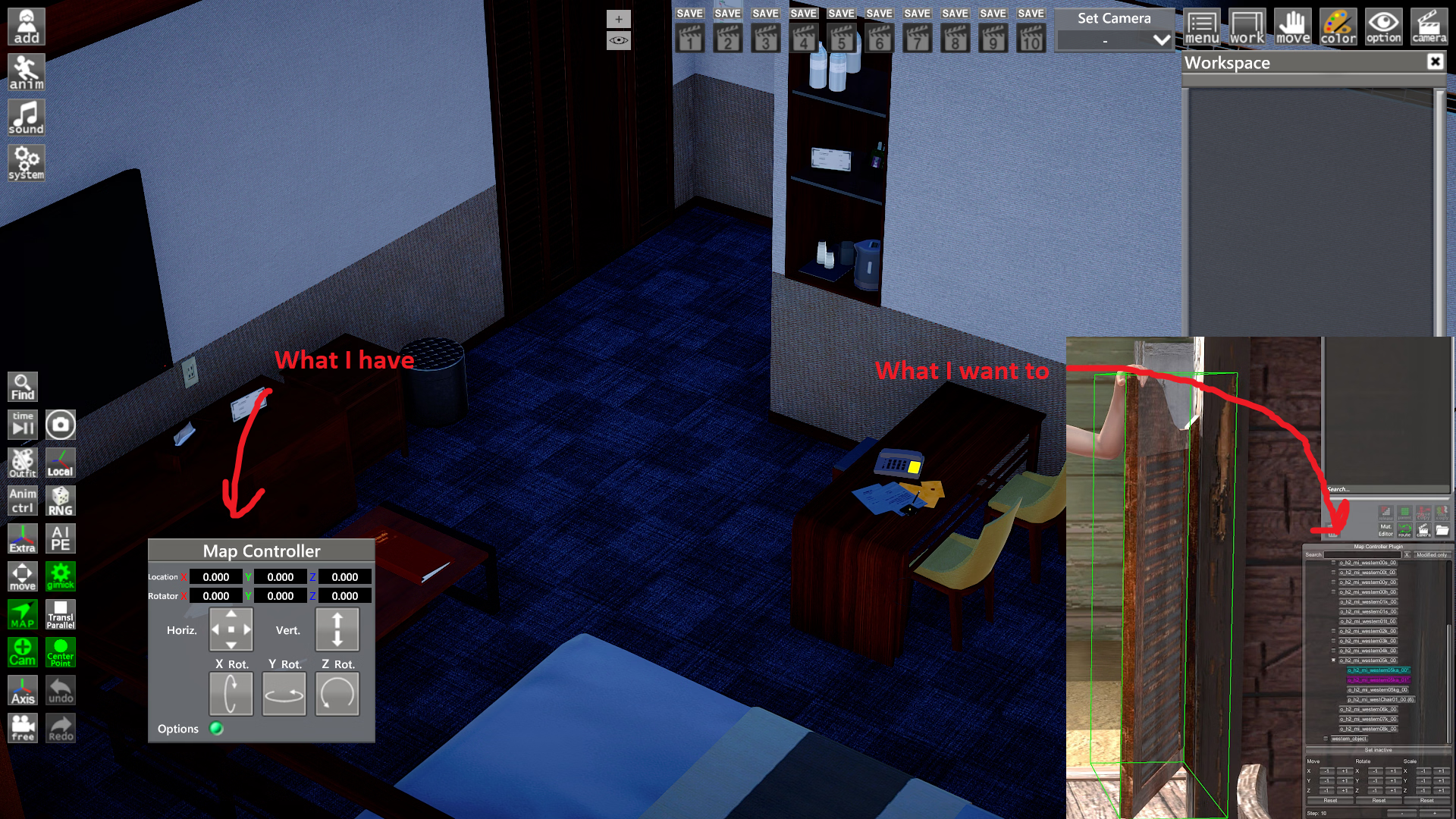
Hello everyone, my question about Ai Shoujo repack
How can I open Map Controller menu with map element list? I do not see any green outline like said in the plugin description and "Map" button opens only menu with location and rotation options. I have tried different maps.
How can I open Map Controller menu with map element list? I do not see any green outline like said in the plugin description and "Map" button opens only menu with location and rotation options. I have tried different maps.

genericNeet
Member
- Jul 6, 2022
- 118
- 148
- 87

pepplez
Well-Known Member
- Jun 7, 2020
- 1,154
- 1,628
- 358
It's usually in the better repack but you can find it atHello everyone, my question about Ai Shoujo repack
How can I open Map Controller menu with map element list? I do not see any green outline like said in the plugin description and "Map" button opens only menu with location and rotation options. I have tried different maps.
View attachment 5566685
You must be registered to see the links
Blog.
Pheontrain
New Member
- Aug 2, 2022
- 6
- 5
- 55
Thank you. For some reason I thought that this mod was already installed.It's usually in the better repack but you can find it atYou must be registered to see the linksBlog.

AmaNo04
Active Member
- Jul 6, 2020
- 870
- 742
- 278
Ekan hasnt updated his gumroad and fantia page since he announced that he's quitting.Found Ekan Studio Items 2.8 onYou must be registered to see the links. It's not the 3.0 version, but it does include the mover item (Not included in better repack). I couldn't find the free version anywhere else.
Also version 2.9.1 is already published for free on early October at discords server.
Personally you better search for version 3 since it has "channel" feature. So you can have multiple mover for example at the same coordinate but different channel.
genericNeet
Member
- Jul 6, 2022
- 118
- 148
- 87
If somebody could share it over here it would be great. I can't be the only one actively avoiding having to create a Discord account for this hobby lolEkan hasnt updated his gumroad and fantia page since he announced that he's quitting.
Also version 2.9.1 is already published for free on early October at discords server.
Personally you better search for version 3 since it has "channel" feature. So you can have multiple mover for example at the same coordinate but different channel.
That could be two issues or both at the same time. Check if the girl has BP uncensor as well, any type of vagina will do.View attachment 5516448
How can I solve this problem? I am using one of the BP penises and have selected the vagina as the target. It was working fine normally, but today I encountered this problem.
The second one could be chars misaligned. Sometimes when one of the actors is too tall, you have to adjust the scene manually, so the little winnie gets in the hole properly. And from what I can see in the screen, your problem is height of the male char.
That scene looks from the Koikatsu series which I'm not too familiar with, but the mechanics are quite the same as HS.