

And that you have zero customization. But I think this has to do with the workload.That's a lot of words just to say "she became a sex crazed slut".
- Thread starter Stone Eyes
- Start date
-
- Tags
- 2d game 2dcg anal sex big ass big tits bukkake combat corruption creampie fantasy female protagonist footjob groping group sex handjob interracial japanese game masturbation multiple endings multiple penetration oral sex rpg sex toys spanking teasing titfuck turn based combat vaginal sex virgin voiced
4.60 star(s)
497 Votes


Hunterop6969
Active Member
- Apr 14, 2020
- 759
- 454
- 248
we could have a mod that transform rimjob into "the man eating her ass out" not the contrary

DemonLord98
Well-Known Member
- Oct 11, 2019
- 1,012
- 1,235
- 319
I wish we had a flaunt for every body part. Not just a general one.

900bs
Well-Known Member
- Jul 2, 2023
- 1,168
- 1,259
- 292
Full version v1.3.0.94 +All DLCFull version v1.3.0.90 +All DLC
Pixeldrain
You must be registered to see the links
I've got an update to my DepotDownloader_KP scripts that I shared a while back if anyone is interested.
Quite a few changes since then, with the most notable one being a config for generating the MacOS build using the "sync" script. (resulting build not tested though)
EDIT: Automated _AppVersion setting.
Needed for a couple of configsets when using the
Quite a few changes since then, with the most notable one being a config for generating the MacOS build using the "sync" script. (resulting build not tested though)
You don't have permission to view the spoiler content.
Log in or register now.
You must be registered to see the links
EDIT: Automated _AppVersion setting.
update.cmd now grabs the game version from "path\to\depot\folder\www\js\plugins\RemtairyTextManager.js" after all downloads (whether download succeeds or not) and stores it in "Config\version.cfg" if the expected match is found.Needed for a couple of configsets when using the
sync.cmd script.
Last edited:
can you share your latest mod data too? XDFull version v1.3.0.94 +All DLC
Pixeldrain
900bs
Well-Known Member
- Jul 2, 2023
- 1,168
- 1,259
- 292
Yeah, I'll share my mods a bit later.can you share your latest mod data too? XD
P.S. First, download the 'mods' folder — it's enough to copy it with replacement over your own.
Then the 'img' folder — delete yours and insert mine. (Why? You could copy with replacement, but it would take a long time; it's much easier and faster to just delete your folder and paste mine.)
All mods are the latest versions and fully working. Adding other mods, etc., is not guaranteed to work.
A total of 19 mods are installed.
mods-
You must be registered to see the links
*The links have also been updated here.img-
You must be registered to see the links
Solution for problems with missing PNG files - https://f95zone.to/threads/karryns-prison-v1-3-0-90-full-dlcs-remtairy.33777/post-16898293
https://f95zone.to/threads/karryns-prison-v1-3-0-90-full-dlcs-remtairy.33777/post-16902817
Last edited:
Raptureman66
New Member
- Apr 30, 2025
- 1
- 0
- 10
Thank you for this! Using yours now would it affect my current mods? Or would it just resume where I left off?Yeah, I'll share my mods a bit later.
P.S. First, download the 'mods' folder — it's enough to copy it with replacement over your own.
Then the 'img' folder — delete yours and insert mine. (Why? You could copy with replacement, but it would take a long time; it's much easier and faster to just delete your folder and paste mine.)
All mods are the latest versions and fully working. Adding other mods, etc., is not guaranteed to work.
A total of 19 mods are installed.
mods- Pixeldrain
img- Pixeldrain
900bs
Well-Known Member
- Jul 2, 2023
- 1,168
- 1,259
- 292
There are 19 of the most popular mods included, so yours are probably among them — it shouldn't cause any issues.Thank you for this! Using yours now would it affect my current mods? Or would it just resume where I left off?
But SluttyBabe might cause problems if you had a very old version of that mod installed.
Also, my settings for the mods might be applied by default — you can change them in the mod menu in the game.
Question, where should I put the mod folder? Very new to this game.There are 19 of the most popular mods included, so yours are probably among them — it shouldn't cause any issues.
But SluttyBabe might cause problems if you had a very old version of that mod installed.
Also, my settings for the mods might be applied by default — you can change them in the mod menu in the game.
find the www folder in the game there extract here in side the www folder plus delete img folder in the www folder and do the extract here again with img rar from the second link.Question, where should I put the mod folder? Very new to this game.
Yeah, I'll share my mods a bit later.
P.S. First, download the 'mods' folder — it's enough to copy it with replacement over your own.
Then the 'img' folder — delete yours and insert mine. (Why? You could copy with replacement, but it would take a long time; it's much easier and faster to just delete your folder and paste mine.)
All mods are the latest versions and fully working. Adding other mods, etc., is not guaranteed to work.
A total of 19 mods are installed.
mods- Pixeldrain
img- Pixeldrain
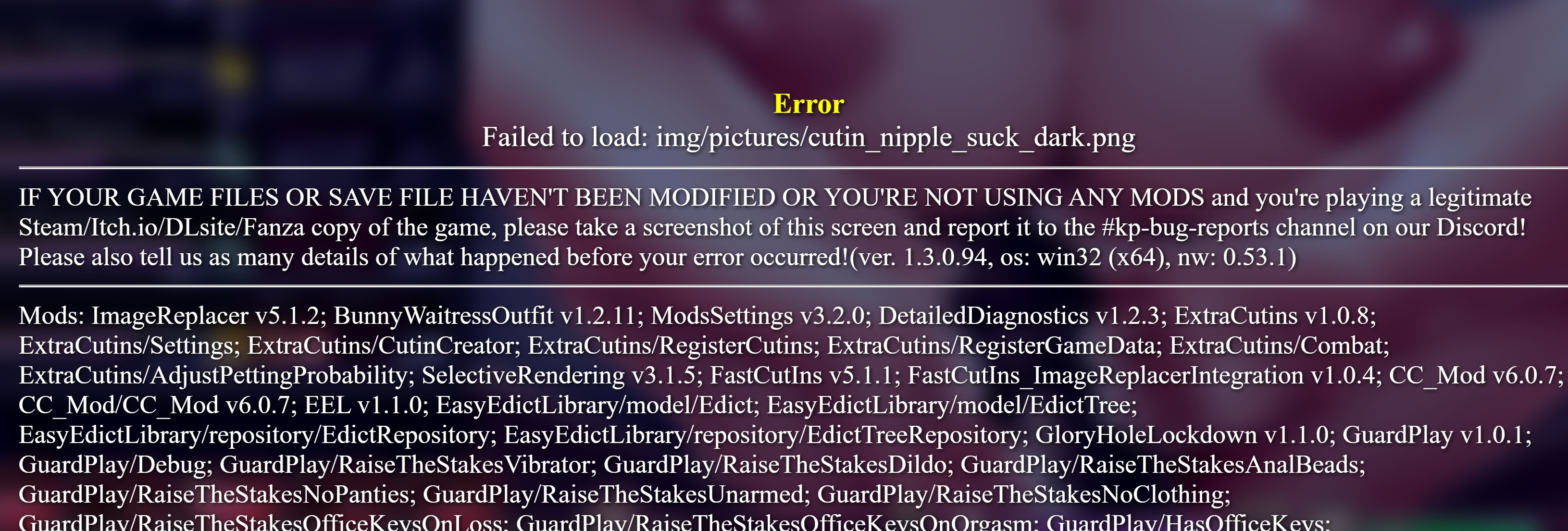
Downloaded your mods+imgs and getting a ton of failed to load errors in level 2
How to open cheat menuYeah, I'll share my mods a bit later.
P.S. First, download the 'mods' folder — it's enough to copy it with replacement over your own.
Then the 'img' folder — delete yours and insert mine. (Why? You could copy with replacement, but it would take a long time; it's much easier and faster to just delete your folder and paste mine.)
All mods are the latest versions and fully working. Adding other mods, etc., is not guaranteed to work.
A total of 19 mods are installed.
mods- Pixeldrain
img- Pixeldrain
If it's the cheat menu I'm thinking of it should be shift+rHow to open cheat menu
captainboo
Member
- Oct 17, 2017
- 183
- 128
- 188
Is there a way to change her stat? I want to play the sidejob while she's still pure without having to do a fresh run to see the different reactions
Did you put the img folder in the right place? (It merges withDownloaded your mods+imgs and getting a ton of failed to load errors in level 2
View attachment 4801603
www/img)
Cream cake
Newbie
- Aug 4, 2023
- 39
- 52
- 47

MrFleshstick
Member
- Oct 5, 2020
- 183
- 61
- 58
Sorry for bothering you! But I have similar errors as previous posts, where it's saying that I have missing images. Example: Failed to load: img/pictures/cutin_cock_kiss_goblin.png (this is just an example)Yeah, I'll share my mods a bit later.
P.S. First, download the 'mods' folder — it's enough to copy it with replacement over your own.
Then the 'img' folder — delete yours and insert mine. (Why? You could copy with replacement, but it would take a long time; it's much easier and faster to just delete your folder and paste mine.)
All mods are the latest versions and fully working. Adding other mods, etc., is not guaranteed to work.
A total of 19 mods are installed.
mods- Pixeldrain
img- Pixeldrain
And whenever I get a similar error, it's always missing png files. Although the whole img folder doesn't contain any png files. Do you have these errors coming up as well?
I can also submit a screenshot, if necessary.
Pantsu san
New Member
- Nov 10, 2022
- 4
- 2
- 22
900bs
Well-Known Member
- Jul 2, 2023
- 1,168
- 1,259
- 292
Hi, everything’s fine — feedback about bugs is important.Sorry for bothering you! But I have similar errors as previous posts, where it's saying that I have missing images. Example: Failed to load: img/pictures/cutin_cock_kiss_goblin.png (this is just an example)
And whenever I get a similar error, it's always missing png files. Although the whole img folder doesn't contain any png files. Do you have these errors coming up as well?
I can also submit a screenshot, if necessary.
Last time, the issues disappeared after installing the 'img' folder, and no one reported any errors.
Send a screenshot of the error and also a screenshot of your 'img' folder.
And also the save folder too — I want to test it on my end.
I think I found the issue — the Extra Cut-Ins mod.Downloaded your mods+imgs and getting a ton of failed to load errors in level 2
View attachment 4801603
Compatibility:
When installing or uninstalling it mid-playthrough, the mod is slightly incompatible with mods that add new skills for Karryn or edicts. It depends on the mod load order and the stage at which those mods register new skills.
Mods that depend on Easy Edict Library and use it properly (as far as I know, only KP Deviancy doesn’t use it properly), as well as CC Mod and KP Mod, are exceptions — they use existing skills.
If you install it on a new game or New Game+, it should be compatible with all mods.
It should also be compatible with everything else.
So, you either need to start a new save or delete/move the "ExtraCutins" folder elsewhere.
Last edited: