

I don't get itI was leaning more towards, opening the directory up in a file manager and double click on the .sh file. Hence the screenshot and not a set of instructions.
Ren'Py Rogue-like: Evolution [v1.70c] [Oni]
- Thread starter 7767
- Start date
-
- Tags
- 2dcg anal sex animated big tits bukkake corruption creampie exhibitionism female protagonist footjob groping group sex handjob harem interracial lesbian male domination male protagonist masturbation milf oral sex parody pov romance sandbox spanking stripping superpowers titfuck vaginal sex virgin voyeurism
4.40 star(s)
168 Votes

sleepingkirby
Well-Known Member
- Aug 8, 2017
- 1,397
- 2,036
- 413
And that's what I was afraid of. Which is why I went as simplest as I know how. If you're lost as to the instructions we have given, I suggest you learn/look up how to run/start scripts and/or executable files within linux. Once you know how to do that, come back here.I don't get it

pepplez
Well-Known Member
- Jun 7, 2020
- 1,204
- 1,736
- 358
When he clicks on the .sh file in file-explorer, his text editor will probably open and display the script (as in most cases).And that's what I was afraid of. Which is why I went as simplest as I know how. If you're lost as to the instructions we have given, I suggest you learn/look up how to run/start scripts and/or executable files within linux. Once you know how to do that, come back here.
ebenammi's answer works - however, this requires that you know how to open a terminal in the folder or navigate there to execute the script, which must also have the appropriate permissions to be executed and so on and so forth.
Ok. Thats is weird. Can you provide a screen shot?
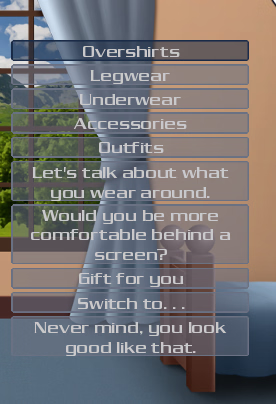
The same way (change her -> wardrobe) . I summoned emma in my room for this one
#!/bin/shWhen he clicks on the .sh file in file-explorer, his text editor will probably open and display the script (as in most cases).
ebenammi's answer works - however, this requires that you know how to open a terminal in the folder or navigate there to execute the script, which must also have the appropriate permissions to be executed and so on and so forth.
PYTHON="py3"
SCRIPT="$0"
# Resolve the chain of symlinks leading to this script.
while [ -L "$SCRIPT" ] ; do
LINK=$(readlink "$SCRIPT")
case "$LINK" in
/*)
SCRIPT="$LINK"
;;
*)
SCRIPT="$(dirname "$SCRIPT")/$LINK"
;;
esac
done
# The directory containing this shell script - an absolute path.
ROOT=$(dirname "$SCRIPT")
ROOT=$(cd "$ROOT"; pwd)
# The name of this shell script without the .sh on the end.
BASEFILE=$(basename "$SCRIPT" .sh)
if [ -z "$RENPY_PLATFORM" ] ; then
RENPY_PLATFORM="$(uname -s)-$(uname -m)"
case "$RENPY_PLATFORM" in
Darwin-*|mac-*)
RENPY_PLATFORM="mac-universal"
;;
*-x86_64|amd64)
RENPY_PLATFORM="linux-x86_64"
;;
*-i*86)
RENPY_PLATFORM="linux-i686"
;;
Linux-*)
RENPY_PLATFORM="linux-$(uname -m)"
;;
*)
;;
esac
fi
LIB="$ROOT/lib/$PYTHON-$RENPY_PLATFORM"
if ! test -d "$LIB"; then
echo "Ren'Py platform files not found in:"
echo
echo "$LIB"
echo
echo "Please compile the platform files using the instructions in README.md"
echo "or point them to an existing installation using ./after_checkout.sh <path>."
echo
echo "Alternatively, please set RENPY_PLATFORM to a different platform."
exit 1
fi
if [ -e "$LIB/$BASEFILE" ] ; then
exec $RENPY_GDB "$LIB/$BASEFILE" "$@"
fi
if [ -e "$LIB/renpy" ] ; then
exec $RENPY_GDB "$LIB/renpy" "$@"
fi
echo "$LIB/$BASEFILE not found."
echo "This game may not support the $RENPY_PLATFORM platform."
exit 1
pepplez
Well-Known Member
- Jun 7, 2020
- 1,204
- 1,736
- 358
Yes, and? Could you finally run it?
chmod +x ./Rogue-Like.sh <-- doesn't work as you already know.
just type:
./Rogue-Like.sh
and see what happens, if it won't run it may lack the rights which is were you use:
chmod +x Rogue-Like.sh
the dot and slash are commands to run a script (./) , so this is important to understand that's why sleepingkirby told you to learn/look up how to run/start scripts and/or executable files within linux.
pepplez
Well-Known Member
- Jun 7, 2020
- 1,204
- 1,736
- 358
That doesn't work. Please do yourself a favor and study how you open/execute scripts within linux. Ask google, visit the homepage of your distro and so on.I ran into this
Edit: You're not in the game dir, that's why it won't work.
Try:
Code:
cd /home/<your username>/downloads
chmod +x Rogue-Like.sh
./Rogue-Like.sh
Last edited:
sleepingkirby
Well-Known Member
- Aug 8, 2017
- 1,397
- 2,036
- 413
The last 3 fresh linux distro installs I did defaults .sh in the file manager to asking if the user wanted to execute or execute in a terminal. Those distros were Linux Mint, Garuda and Devuan (non-systemd debian). In order for him to have changed that behavior, he would have had to change the default behavior, which is more complex than either of the answers given to him. The occam's razor is that he doesn't know how to use his own computer as this action is no different than on a mac computer or a windows. Hence why my answer was "learn how to use your computer". I wasn't saying to be flippant (I don't remember the last time I said anything to be flippant.). I was sincerely and neutrally saying that. Again, this is also why I did a screenshot. Giving someone like this too much info will just confuse them as they'll just try random commands, not understanding why they're doing it, and hoping it works.When he clicks on the .sh file in file-explorer, his text editor will probably open and display the script (as in most cases).
ebenammi's answer works - however, this requires that you know how to open a terminal in the folder or navigate there to execute the script, which must also have the appropriate permissions to be executed and so on and so forth.
The guy doesn't understand how to use his own computer. He needs to learn the bare basics, like files and folders, paths, current working directory, before he tackles anything else. Hence my answer.
ETA: Reading the follow replies proves my point. You said that " his text editor will probably open", so what did he do? He opened it up in text editor and thought it was an error. When ebenammi said he needs to chmod +x the file, he did it without evening know what it means (also, the latest linux version of this game has the right permissions so that's not needed.). When you show someone a file and their response is "I don't understand", that means they don't understand what files are on a computer. They need to learn the very basics of how a computer works.
There is a level of ignorance, willful or not, that no amount of automation or appeasement can overcome. He either needs to learn to use his computer or know he won't get what he wants.
Last edited:
sleepingkirby
Well-Known Member
- Aug 8, 2017
- 1,397
- 2,036
- 413
This is not a linux thing. This works the same on linux, windows or mac.Sorry for being new to Linux, I'm used to windows
pepplez
Well-Known Member
- Jun 7, 2020
- 1,204
- 1,736
- 358
I haven't used Linux for quite some time, most recently a Backtrack version to check a network for vulnerabilities (it was based on Debian at the time), and there, the system text editor came up when you clicked on it in the file explorer. No offense, I didn't mean to attack or insult you, I just found your comment funny. Unfortunately, it's probably not funny for the guy mentioned above, who really should learn the basics first before trying to do anything with Linux. It's also amazing that he was able to unzip/untar the game.The guy doesn't understand how to use his own computer. He needs to learn the bare basics, like files and folders, paths, current working directory, before he tackles anything else. Hence my answer.
sleepingkirby
Well-Known Member
- Aug 8, 2017
- 1,397
- 2,036
- 413
No worries. I'm not offended. I was just explaining. I did more than a decade of tech support, in person and over the phone, before becoming a programmer. I have a pretty good idea of how most people, especially in the US, think about tech.I haven't used Linux for quite some time, most recently a Backtrack version to check a network for vulnerabilities (it was based on Debian at the time), and there, the system text editor came up when you clicked on it in the file explorer. No offense, I didn't mean to attack or insult you, I just found your comment funny. Unfortunately, it's probably not funny for the guy mentioned above, who really should learn the basics first before trying to do anything with Linux. It's also amazing that he was able to unzip/untar the game.
Yeah, that's one of my first worries, which is why I posted just the .sh and nothing else. If he was like "I don't see that", then I would have had some clue where he's starting from. But "I don't understand" literally means he doesn't understand. But yeah, I get it. To a lot of people, me posting just a screenshot of one file looks/sounds funny. But it's not the first time I've had to do that to get people to understand. Pretty sure I once had to make a screenshot of something to set as a desktop background for them remember what to click on to "start the internet".It's also amazing that he was able to unzip/untar the game.
Do you remember what desktop environment it was? Because I know Gnome, cinnamon, xfce, mate, lxde, lxqt and KDE doesn't (unless the last 4 changed something in the last 10 years).the system text editor came up when you clicked on it in the file explorer.
From the limited screenshot he posted, that looks like a mac os window system (maybe cinnamon?). But, like, really badly done. It's all messed up. It's almost like someone did a bad photoshop of what they think a modern window system should look like.
Last edited:
pepplez
Well-Known Member
- Jun 7, 2020
- 1,204
- 1,736
- 358
Its been a while but I'm 99% sure it came with Gnome.Do you remember what desktop environment it was?
sleepingkirby
Well-Known Member
- Aug 8, 2017
- 1,397
- 2,036
- 413
That would make sense. Debian defaults to gnome. But the last time I used it (about ten years ago), the file manager still asked you to run .sh files. Maybe they changed, who knows.Its been a while but I'm 99% sure it came with Gnome.
pepplez
Well-Known Member
- Jun 7, 2020
- 1,204
- 1,736
- 358
Come to think of it, I may have set the text editor as the default myself because I used to edit scripts back then, but that was almost two decades ago.That would make sense. Debian defaults to gnome. But the last time I used it (about ten years ago), the file manager still asked you to run .sh files. Maybe they changed, who knows.
M1ChG4AV3Z9994
Member
- Jun 17, 2018
- 304
- 234
- 170
Ok that is super weird. Maybe is the level of the blue bar is low.View attachment 5463510
The same way (change her -> wardrobe) . I summoned emma in my room for this one