RPG Maker text boxes are glitched
- Thread starter FunFun67
- Start date

HELIO CESAR
Well-Known Member
- May 30, 2018
- 1,466
- 3,303
- 378
Did you do any driver update recently? Or any drive that is pending to update? Like a graphics card update that is pending, or any system update that you did recently?
What are your system configs like OS and Hardware and which RPG Maker, MV or MZ?
What are your system configs like OS and Hardware and which RPG Maker, MV or MZ?
I honestly don't know how to check any of that :'). I am very computer illiterate.Did you do any driver update recently? Or any drive that is pending to update? Like a graphics card update that is pending, or any system update that you did recently?
What are your system configs like OS and Hardware and which RPG Maker, MV or MZ?

Easy way to check if it's a GPU issue is to remove the GPU as a factor. Force Canvas Mode and see if the issue persists.I honestly don't know how to check any of that :'). I am very computer illiterate.
I looked at those instructions and I honestly have no idea what I'm looking at. I apologize for my code illiteracy. All of this stuff makes my brain hurt... I just wanna play lewd games :')Easy way to check if it's a GPU issue is to remove the GPU as a factor. Force Canvas Mode and see if the issue persists.
Move the package.json file (to the desktop or something, it's for a backup) and extract this to both the root folder (where the game exe is) and, if the game has it, also extract it to the www folder.I looked at those instructions and I honestly have no idea what I'm looking at. I apologize for my code illiteracy. All of this stuff makes my brain hurt... I just wanna play lewd games :')
Ok, so I checked the RPGM games I have downloaded and it already has the package.json file in both (no www folder that I could find tho). I honestly think it might be my gpu because it does this with every RPGM game I try to play. I have no idea what changed though because it didn't used to do this. I even tried updating my system and that didn't help.Move the package.json file (to the desktop or something, it's for a backup) and extract this to both the root folder (where the game exe is) and, if the game has it, also extract it to the www folder.
No www folder means it's MZ, so there should only be one. Replace that package.json (Backup the original of course, just move it to the desktop or something) with the one I posted, I think it should work. If it doesn't, you'll need to open the original package.json with notepad and follow the instructions I linked to on my previous post. (I promise it's way easier than you think)Ok, so I checked the RPGM games I have downloaded and it already has the package.json file in both (no www folder that I could find tho). I honestly think it might be my gpu because it does this with every RPGM game I try to play. I have no idea what changed though because it didn't used to do this. I even tried updating my system and that didn't help.
That did nothing. Text boxes still have black covering most of it like in the original picture. And I definitely didn't mess it up (I included the comma)No www folder means it's MZ, so there should only be one. Replace that package.json (Backup the original of course, just move it to the desktop or something) with the one I posted, I think it should work. If it doesn't, you'll need to open the original package.json with notepad and follow the instructions I linked to on my previous post. (I promise it's way easier than you think)

Random thought, what happens when you press F3 while the game is running?That did nothing. Text boxes still have black covering most of it like in the original picture. And I definitely didn't mess it up (I included the comma)
It just zooms inRandom thought, what happens when you press F3 while the game is running?
I think it's a problem with my drivers, or at least that's what people are saying could be wrong online. I also tried to install the oculus desktop app to pair my headset to my computer, and it keeps failing at the install stage, which also is apparantly a driver issue according to what I could find online.Random thought, what happens when you press F3 while the game is running?

Goeffel
Active Member
- Sep 10, 2022
- 983
- 691
- 193
On the (small) odd chance that it is/was a one-off hiccup with driver(s), that now persists because kept alive by windows's "fastboot" feature ... (think of broken website display stuck in webbrowser's cache)
do a right-mouse-button click on the windows start button, choose terminal (Administrator)
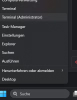
In the terminal type powercfg -h OFF
This disables powermanagement's suspend systems, including the "fastboot" feature. Now a left mouse button click on the windows startbutton, choose "reboot" (or sth similar in English, here it is in German)
I advise against using other reboot methods like a physical button or just closing and re-opening a notebook's lid, since those may have been set to not reboot at all but instead (try to) use sleep mode.

See if now things are good or still bad with rpgm games.
No matter it helped or not, call a terminal (Administrator) again and type powercfg -h ON and you are back at where you were before, just that your computer had a guaranteed proper re-boot.
do a right-mouse-button click on the windows start button, choose terminal (Administrator)
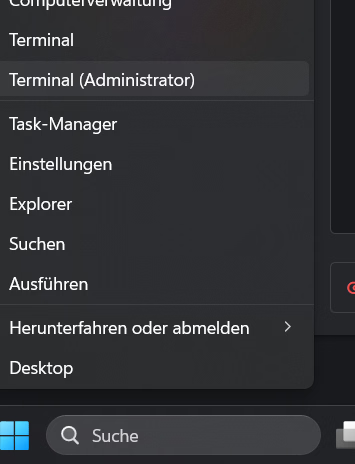
In the terminal type powercfg -h OFF
This disables powermanagement's suspend systems, including the "fastboot" feature. Now a left mouse button click on the windows startbutton, choose "reboot" (or sth similar in English, here it is in German)
I advise against using other reboot methods like a physical button or just closing and re-opening a notebook's lid, since those may have been set to not reboot at all but instead (try to) use sleep mode.
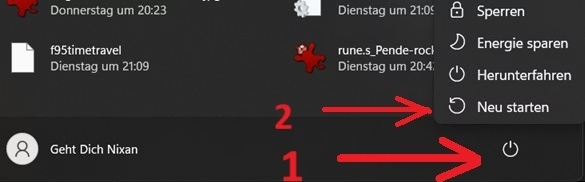
See if now things are good or still bad with rpgm games.
No matter it helped or not, call a terminal (Administrator) again and type powercfg -h ON and you are back at where you were before, just that your computer had a guaranteed proper re-boot.
It unfortunately didn't help. I'm honestly worried I might've deleted something I shouldn't have, and that's why all of this is happening. I have a shitty $300 laptop with almost no storage capacity so I went on a cleaning spree in my storage a little while back. I tried not to delete anything important, but I'm worried I messed up. Worst part is I wouldn't even know where to look to figure out what that important thing I even is.On the (small) odd chance that it is/was a one-off hiccup with driver(s), that now persists because kept alive by windows's "fastboot" feature ... (think of broken website display stuck in webbrowser's cache)
do a right-mouse-button click on the windows start button, choose terminal (Administrator)
View attachment 5384273
In the terminal type powercfg -h OFF
This disables powermanagement's suspend systems, including the "fastboot" feature. Now a left mouse button click on the windows startbutton, choose "reboot" (or sth similar in English, here it is in German)
I advise against using other reboot methods like a physical button or just closing and re-opening a notebook's lid, since those may have been set to not reboot at all but instead (try to) use sleep mode.
View attachment 5384308
See if now things are good or still bad with rpgm games.
No matter it helped or not, call a terminal (Administrator) again and type powercfg -h ON and you are back at where you were before, just that your computer had a guaranteed proper re-boot.
Goeffel
Active Member
- Sep 10, 2022
- 983
- 691
- 193
Then another possibility would be to use Windows's "System restore" feature. It never worked for me, but iirc. it helped just fine for some others.
This aims to set the system into a former state, your personal data is/ should not be not affected much.
But it is difficult for me to help with that, as here things are in German, and I am by no means expert in it. I soon migrated to other backup/restore means (but those relied on backups being made before the problem)
I can find the program only by searching my local computer for "Wiederherstellung" (German for restore).
What then shows up is this, the window to the right appears from chosing the 2nd option.
Once you see what system restore points are available, pick one and proceed. and good luck, maybe it helps.
This aims to set the system into a former state, your personal data is/ should not be not affected much.
But it is difficult for me to help with that, as here things are in German, and I am by no means expert in it. I soon migrated to other backup/restore means (but those relied on backups being made before the problem)
I can find the program only by searching my local computer for "Wiederherstellung" (German for restore).
What then shows up is this, the window to the right appears from chosing the 2nd option.
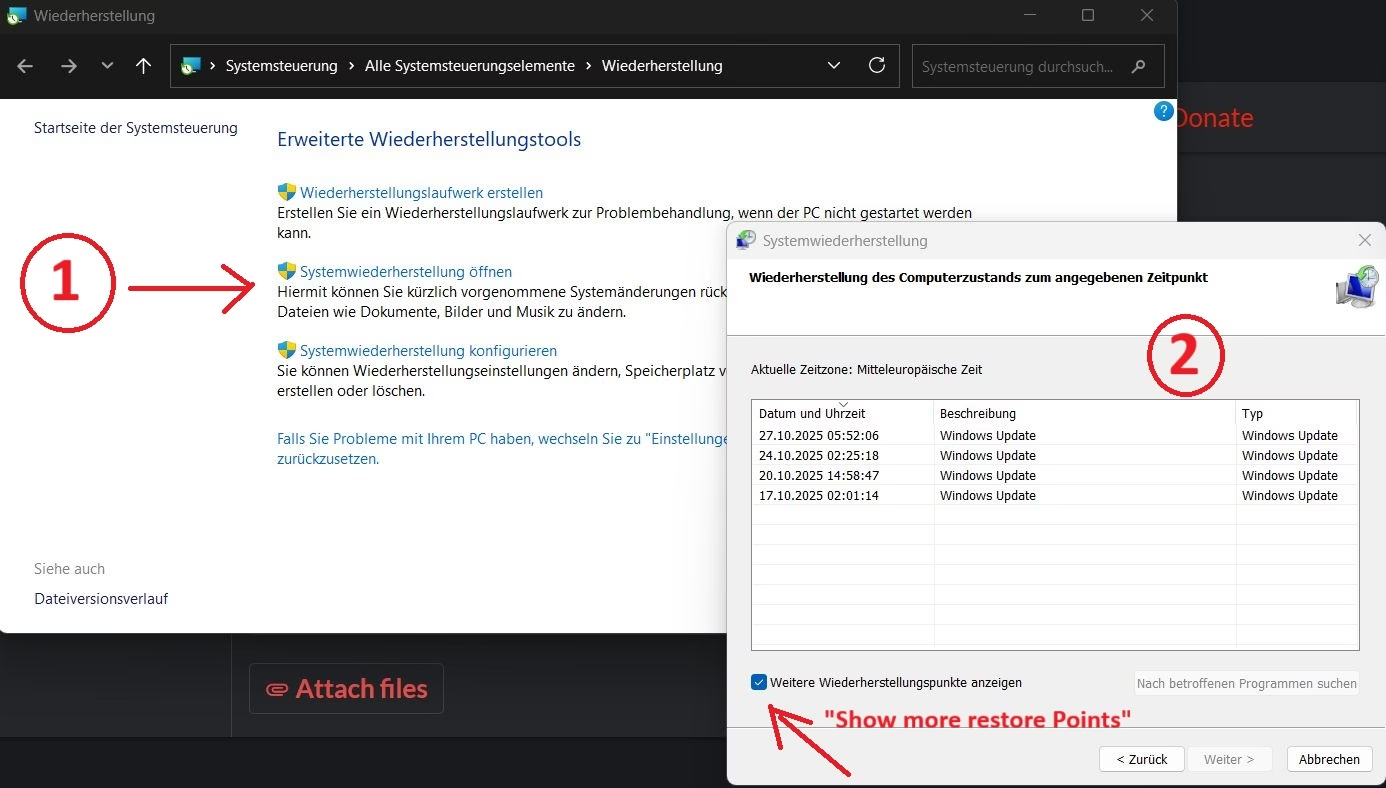
Once you see what system restore points are available, pick one and proceed. and good luck, maybe it helps.
HELIO CESAR
Well-Known Member
- May 30, 2018
- 1,466
- 3,303
- 378
You are using a win 11 system right?It unfortunately didn't help. I'm honestly worried I might've deleted something I shouldn't have, and that's why all of this is happening. I have a shitty $300 laptop with almost no storage capacity so I went on a cleaning spree in my storage a little while back. I tried not to delete anything important, but I'm worried I messed up. Worst part is I wouldn't even know where to look to figure out what that important thing I even is.
Assuming so, please right clink in the windows icon in the taskbar

And click system

it will show some of your system information that can help us.
mine as an example:
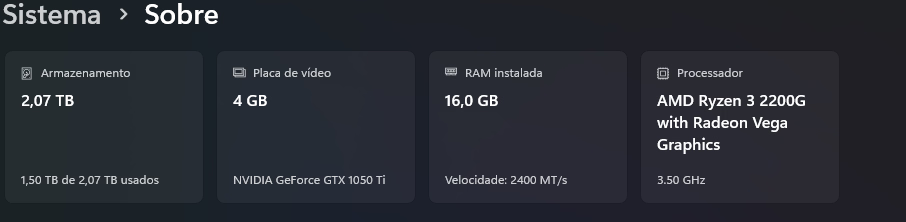
Storage, Graphics card, RAM and Processor.
Further down in the system info page there will be some data about your windows version, it could help if you inform us too.

HELIO CESAR
Well-Known Member
- May 30, 2018
- 1,466
- 3,303
- 378
Hmm, damn, i'm not familiar with samsung notebooks, it seems you do are with an up-to-date version of windows 11, so i will list some generic things that can help:Here, hope it helps
1. Installing optional updates, go again into system info and in search bar at the top search something like 'optional updates' to click at show optional updates (something like that i assume, my system is in portuguese), and if available install the optional windows and drivers updates.
2. Press win + r and search 'devmgmt.msc' to open driver management, in the video adaptor open it, right click your adreno driver, update driver and auto search for updates.
3. Contact samsung support, send them a ticket with your notebook model tag, usually at the bottom side of it, i believe yours are a NP340XLA-K0ABR, but if not so the code will be similar, in the ticket ask them for the latest drivers for windows 11 home. (especially for the qualcomm adreno 618), so you can re-install your drivers safely, there are some in the web but i'm not up to the safes sites to download drivers nowadays.
4. Follow those steps for verify corrupted files in your system:
I would go with 4, 1 and 2 first since they are the most easy to do, number 3 is a good one but consumer support is a pain in the ass...Step 1: Open an elevated Command Prompt
Click the Start button, type cmd.
Right-click "Command Prompt" and select "Run as administrator".
Click "Yes" if a User Account Control prompt appears.
Step 2: Run the System File Checker
In the new window, type sfc /scannow and press Enter.
This command will scan all protected system files and attempt to repair any that are corrupted.
A reboot may be necessary, and you might need to run the command again after restarting.
Step 3: Run the DISM command (if needed)
If sfc /scannow was unable to fix some files, run DISM /Online /Cleanup-Image /RestoreHealth in the same elevated command prompt.
This command repairs the Windows image, which SFC uses as a source for repairs.
After the DISM command completes, run sfc /scannow again to check and fix any remaining issues.
Good luck buddy.
So I followed #2 and looked and I don't see a video adaptor on there... is that maybe the thing I deleted?Hmm, damn, i'm not familiar with samsung notebooks, it seems you do are with an up-to-date version of windows 11, so i will list some generic things that can help:
1. Installing optional updates, go again into system info and in search bar at the top search something like 'optional updates' to click at show optional updates (something like that i assume, my system is in portuguese), and if available install the optional windows and drivers updates.
2. Press win + r and search 'devmgmt.msc' to open driver management, in the video adaptor open it, right click your adreno driver, update driver and auto search for updates.
3. Contact samsung support, send them a ticket with your notebook model tag, usually at the bottom side of it, i believe yours are a NP340XLA-K0ABR, but if not so the code will be similar, in the ticket ask them for the latest drivers for windows 11 home. (especially for the qualcomm adreno 618), so you can re-install your drivers safely, there are some in the web but i'm not up to the safes sites to download drivers nowadays.
4. Follow those steps for verify corrupted files in your system:
I would go with 4, 1 and 2 first since they are the most easy to do, number 3 is a good one but consumer support is a pain in the ass...
Good luck buddy.
HELIO CESAR
Well-Known Member
- May 30, 2018
- 1,466
- 3,303
- 378
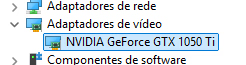
No haha, if you deleted your graphics card driver i assure you would have noticed it, like a full black screen (no video/image at all) till you reboot your notebook or something like that, you are in the wrong section, in portuguese it shows as video adaptors, yours probably is in the Monitors tab, a print of my system to help visualize:So I followed #2 and looked and I don't see a video adaptor on there... is that maybe the thing I deleted?